
Google Professional Cloud Developer Practice Exams
Last updated on Oct 24,2026- Exam Code: Professional Cloud Developer
- Exam Name: Professional Cloud Developer
- Certification Provider: Google
- Latest update: Oct 24,2026
Your application is deployed in a Google Kubernetes Engine (GKE) cluster. When a new version of your application is released, your CI/CD tool updates the spec.template.spec.containers[0].image value to reference the Docker image of your new application version. When the Deployment object applies the change, you want to deploy at least 1 replica of the new version and maintain the previous replicas until the new replica is healthy.
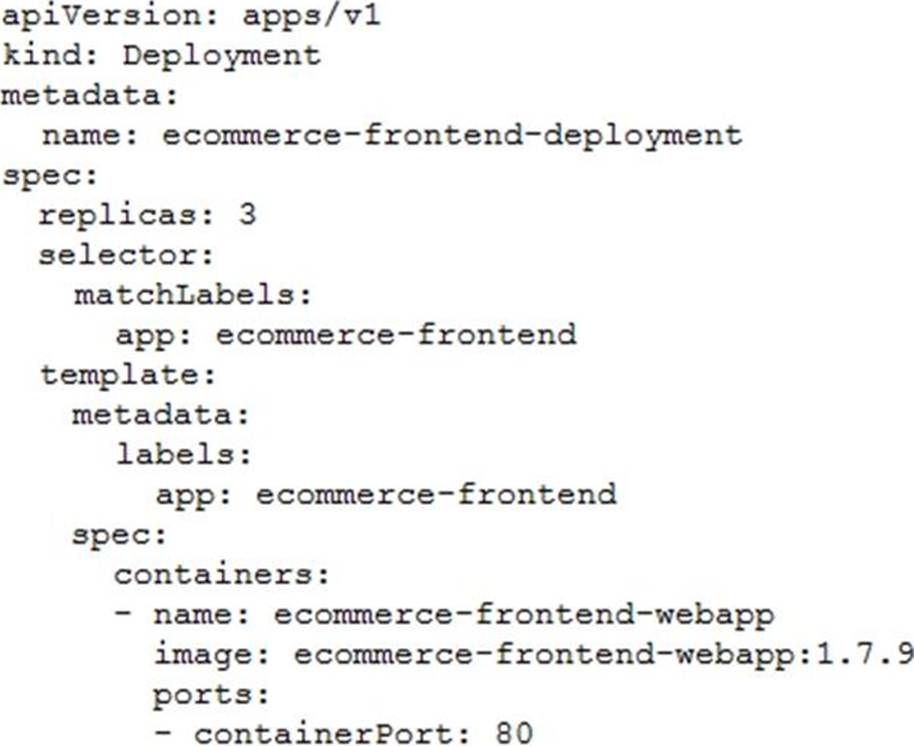
Which change should you make to the GKE Deployment object shown below?
- A . Set the Deployment strategy to RollingUpdate with maxSurge set to 0, maxUnavailable set to 1.
- B . Set the Deployment strategy to RollingUpdate with maxSurge set to 1, maxUnavailable set to 0.
- C . Set the Deployment strategy to Recreate with maxSurge set to 0, maxUnavailable set to 1.
- D . Set the Deployment strategy to Recreate with maxSurge set to 1, maxUnavailable set to 0.
Your team has created an application that is hosted on a Google Kubernetes Engine (GKE) cluster You need to connect the application to a legacy REST service that is deployed in two GKE clusters in two different regions. You want to connect your application to the legacy service in a way that is resilient and requires the fewest number of steps You also want to be able to run probe-based health checks on the legacy service on a separate port.
How should you set up the connection?
- A . Use Traffic Director with a sidecar proxy to connect the application to the service.
- B . Use a proxyless Traffic Director configuration to connect the application to the service.
- C . Configure the legacy service’s firewall to allow health checks originating from the proxy.
- D . Configure the legacy service’s firewall to allow health checks originating from the application.
- E . Configure the legacy service’s firewall to allow health checks originating from the Traffic Director control plane.
A, C
Explanation:
https://cloud.google.com/traffic-director/docs/advanced-setup#routing-rule-maps
https://cloud.google.com/traffic-director/docs/advanced-setup
A) Using Traffic Director with a sidecar proxy can provide resilience for your application by allowing for failover to the secondary region in the event of an outage. The sidecar proxy can route traffic to the legacy service in either of the two GKE clusters, ensuring high availability.
C. Configuring the legacy service’s firewall to allow health checks originating from the proxy allows the proxy to periodically check the health of the legacy service and ensure that it is functioning properly. This helps to ensure that traffic is only routed to healthy instances of the legacy service, further improving the resilience of the setup.
You are running an application on App Engine that you inherited. You want to find out whether the application is using insecure binaries or is vulnerable to XSS attacks.
Which service should you use?
- A . Cloud Amor
- B . Stackdriver Debugger
- C . Cloud Security Scanner
- D . Stackdriver Error Reporting
C
Explanation:
Reference: https://cloud.google.com/security-scanner
You are developing an online gaming platform as a microservices application on Google Kubernetes Engine (GKE). Users on social media are complaining about long loading times for certain URL requests to the application. You need to investigate performance bottlenecks in the application and identify. which HTTP requests have a significantly high latency span in user requests.
What should you do?
- A . Instrument your microservices by installing the OpenTelemetry tracing package Update your application code to send traces to Trace for inspection and analysis Create an analysis report on Trace to analyze user requests
- B . Configure GKE workload metrics using kubect1 Select all Pods to send their metrics to Cloud Monitoring. Create a custom dashboard of application metrics in Cloud Monitoring to determine performance bottlenecks of your GKE cluster
- C . Install tcpdump on your GKE nodes. Run tcpdump to capture network traffic over an extended period of time to collect data Analyze the data files using Wireshark to determine the cause of high latency
- D . Update your microservices to log HTTP request methods and URL paths to STDOUT Use the logs router to send container logs to Cloud Logging Create filters in Cloud Logging to evaluate the latency of user requests across different methods and URL paths.
You are developing an event-driven application. You have created a topic to receive messages sent to Pub/Sub. You want those messages to be processed in real time. You need the application to be independent from any other system and only incur compute costs when new messages arrive. You want to configure the simplest and most efficient architecture.
What should you do?
- A . Deploy your code on Cloud Functions. Use a Pub/Sub trigger to invoke the Cloud Function. Use the Pub/Sub API to create a pull subscription to the Pub/Sub topic and read messages from it.
- B . Deploy your code on Cloud Functions. Use a Pub/Sub trigger to handle new messages in the topic.
- C . Deploy the application on Google Kubernetes Engine. Use the Pub/Sub API to create a pull subscription to the Pub/Sub topic and read messages from it
- D . Deploy the application on Compute Engine. Use a Pub/Sub push subscription to process new messages in the topic.
B
Explanation:
https://cloud.google.com/functions/docs/calling/pubsub
You are porting an existing Apache/MySQL/PHP application stack from a single machine to Google Kubernetes Engine. You need to determine how to containerize the application. Your approach should follow Google-recommended best practices for availability.
What should you do?
- A . Package each component in a separate container. Implement readiness and liveness probes.
- B . Package the application in a single container. Use a process management tool to manage each component.
- C . Package each component in a separate container. Use a script to orchestrate the launch of the components.
- D . Package the application in a single container. Use a bash script as an entrypoint to the container, and then spawn each component as a background job.
A
Explanation:
https://cloud.google.com/blog/products/containers-kubernetes/7-best-practices-for-building-containers
https://cloud.google.com/architecture/best-practices-for-building-containers
"classic Apache/MySQL/PHP stack: you might be tempted to run all the components in a single container. However, the best practice is to use two or three different containers: one for Apache, one for MySQL, and potentially one for PHP if you are running PHP-FPM."
You are developing a Java Web Server that needs to interact with Google Cloud services via the Google Cloud API on the user’s behalf. Users should be able to authenticate to the Google Cloud API using their Google Cloud identities.
Which workflow should you implement in your web application?
- A . 1) When a user arrives at your application, prompt them for their Google username and password.
2) Store an SHA password hash in your application’s database along with the user’s username.
3) The application authenticates to the Google Cloud API using HTTPs requests with the user’s username and password hash in the Authorization request header. - B . 1) When a user arrives at your application, prompt them for their Google username and password.
2) Forward the user’s username and password in an HTTPS request to the Google Cloud authorization server, and request an access token.
3) The Google server validates the user’s credentials and returns an access token to the application.
4) The application uses the access token to call the Google Cloud API. - C . 1) When a user arrives at your application, route them to a Google Cloud consent screen with a list of requested permissions that prompts the user to sign in with SSO to their Google Account.
2) After the user signs in and provides consent, your application receives an authorization code from a Google server.
3) The Google server returns the authorization code to the user, which is stored in the browser’s cookies.
4) The user authenticates to the Google Cloud API using the authorization code in the cookie. - D . 1) When a user arrives at your application, route them to a Google Cloud consent screen with a list of requested permissions that prompts the user to sign in with SSO to their Google Account.
2) After the user signs in and provides consent, your application receives an authorization code from a Google server.
3) The application requests a Google Server to exchange the authorization code with an access token.
4) The Google server responds with the access token that is used by the application to call the Google Cloud API.
D
Explanation:
https://developers.google.com/identity/protocols/oauth2#webserver
The Google OAuth 2.0 endpoint supports web server applications that use languages and frameworks such as PHP, Java, Python, Ruby, and ASP.NET. The authorization sequence begins when your application redirects a browser to a Google URL; the URL includes query parameters that indicate the type of access being requested. Google handles the user authentication, session selection, and user consent. The result is an authorization code, which the application can exchange for an access token and a refresh token.
You are developing a Java Web Server that needs to interact with Google Cloud services via the Google Cloud API on the user’s behalf. Users should be able to authenticate to the Google Cloud API using their Google Cloud identities.
Which workflow should you implement in your web application?
- A . 1) When a user arrives at your application, prompt them for their Google username and password.
2) Store an SHA password hash in your application’s database along with the user’s username.
3) The application authenticates to the Google Cloud API using HTTPs requests with the user’s username and password hash in the Authorization request header. - B . 1) When a user arrives at your application, prompt them for their Google username and password.
2) Forward the user’s username and password in an HTTPS request to the Google Cloud authorization server, and request an access token.
3) The Google server validates the user’s credentials and returns an access token to the application.
4) The application uses the access token to call the Google Cloud API. - C . 1) When a user arrives at your application, route them to a Google Cloud consent screen with a list of requested permissions that prompts the user to sign in with SSO to their Google Account.
2) After the user signs in and provides consent, your application receives an authorization code from a Google server.
3) The Google server returns the authorization code to the user, which is stored in the browser’s cookies.
4) The user authenticates to the Google Cloud API using the authorization code in the cookie. - D . 1) When a user arrives at your application, route them to a Google Cloud consent screen with a list of requested permissions that prompts the user to sign in with SSO to their Google Account.
2) After the user signs in and provides consent, your application receives an authorization code from a Google server.
3) The application requests a Google Server to exchange the authorization code with an access token.
4) The Google server responds with the access token that is used by the application to call the Google Cloud API.
D
Explanation:
https://developers.google.com/identity/protocols/oauth2#webserver
The Google OAuth 2.0 endpoint supports web server applications that use languages and frameworks such as PHP, Java, Python, Ruby, and ASP.NET. The authorization sequence begins when your application redirects a browser to a Google URL; the URL includes query parameters that indicate the type of access being requested. Google handles the user authentication, session selection, and user consent. The result is an authorization code, which the application can exchange for an access token and a refresh token.
Your team is developing an ecommerce platform for your company. Users will log in to the website and add items to their shopping cart. Users will be automatically logged out after 30 minutes of inactivity. When users log back in, their shopping cart should be saved.
How should you store users’ session and shopping cart information while following Google-recommended best practices?
- A . Store the session information in Pub/Sub, and store the shopping cart information in Cloud SQL.
- B . Store the shopping cart information in a file on Cloud Storage where the filename is the SESSION ID.
- C . Store the session and shopping cart information in a MySQL database running on multiple Compute Engine instances.
- D . Store the session information in Memorystore for Redis or Memorystore for Memcached, and store the shopping cart information in Firestore.
Your team is developing an ecommerce platform for your company. Users will log in to the website and add items to their shopping cart. Users will be automatically logged out after 30 minutes of inactivity. When users log back in, their shopping cart should be saved.
How should you store users’ session and shopping cart information while following Google-recommended best practices?
- A . Store the session information in Pub/Sub, and store the shopping cart information in Cloud SQL.
- B . Store the shopping cart information in a file on Cloud Storage where the filename is the SESSION ID.
- C . Store the session and shopping cart information in a MySQL database running on multiple Compute Engine instances.
- D . Store the session information in Memorystore for Redis or Memorystore for Memcached, and store the shopping cart information in Firestore.