
Google Professional Cloud Developer Practice Exams
Last updated on Oct 22,2026- Exam Code: Professional Cloud Developer
- Exam Name: Professional Cloud Developer
- Certification Provider: Google
- Latest update: Oct 22,2026
You are developing an application that will handle requests from end users. You need to secure a Cloud Function called by the application to allow authorized end users to authenticate to the function via the application while restricting access to unauthorized users. You will integrate Google Sign-In as part of the solution and want to follow Google-recommended best practices.
What should you do?
- A . Deploy from a source code repository and grant users the roles/cloudfunctions.viewer role.
- B . Deploy from a source code repository and grant users the roles/cloudfunctions.invoker role
- C . Deploy from your local machine using gcloud and grant users the roles/cloudfunctions.admin role
- D . Deploy from your local machine using gcloud and grant users the roles/cloudfunctions.developer role
In order for HipLocal to store application state and meet their stated business requirements, which database service should they migrate to?
- A . Cloud Spanner
- B . Cloud Datastore
- C . Cloud Memorystore as a cache
- D . Separate Cloud SQL clusters for each region
Your team develops services that run on Google Cloud. You want to process messages sent to a Pub/Sub topic, and then store them. Each message must be processed exactly once to avoid duplication of data and any data conflicts. You need to use the cheapest and most simple solution.
What should you do?
- A . Process the messages with a Dataproc job, and write the output to storage.
- B . Process the messages with a Dataflow streaming pipeline using Apache Beam’s PubSubIO package, and write the output to storage.
- C . Process the messages with a Cloud Function, and write the results to a BigQuery location where you can run a job to deduplicate the data.
- D . Retrieve the messages with a Dataflow streaming pipeline, store them in Cloud Bigtable, and use another Dataflow streaming pipeline to deduplicate messages.
B
Explanation:
https://cloud.google.com/dataflow/docs/concepts/streaming-with-cloud-pubsub
You are designing a schema for a table that will be moved from MySQL to Cloud Bigtable.
The MySQL table is as follows:
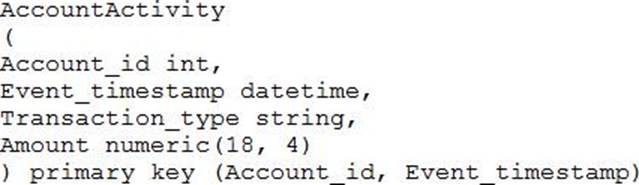
How should you design a row key for Cloud Bigtable for this table?
- A . Set Account_id as a key.
- B . Set Account_id_Event_timestamp as a key.
- C . Set Event_timestamp_Account_id as a key.
- D . Set Event_timestamp as a key.
You are designing a schema for a Cloud Spanner customer database. You want to store a phone number array field in a customer table. You also want to allow users to search customers by phone number.
How should you design this schema?
- A . Create a table named Customers. Add an Array field in a table that will hold phone numbers for the customer.
- B . Create a table named Customers. Create a table named Phones. Add a CustomerId field in the Phones table to find the CustomerId from a phone number.
- C . Create a table named Customers. Add an Array field in a table that will hold phone numbers for the customer. Create a secondary index on the Array field.
- D . Create a table named Customers as a parent table. Create a table named Phones, and interleave this table into the Customer table. Create an index on the phone number field in the Phones table.
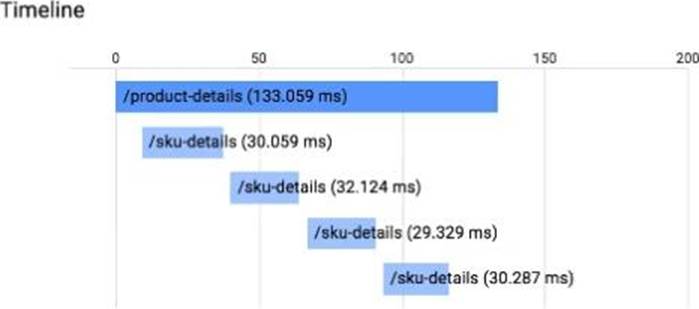
You have an application running in App Engine. Your application is instrumented with Stackdriver Trace. The /product-details request reports details about four known unique products at /sku-details as shown below. You want to reduce the time it takes for the request to complete.
What should you do?
- A . Increase the size of the instance class.
- B . Change the Persistent Disk type to SSD.
- C . Change /product-details to perform the requests in parallel.
- D . Store the /sku-details information in a database, and replace the webservice call with a database query.
You need to migrate an internal file upload API with an enforced 500-MB file size limit to App Engine.
What should you do?
- A . Use FTP to upload files.
- B . Use CPanel to upload files.
- C . Use signed URLs to upload files.
- D . Change the API to be a multipart file upload API.
C
Explanation:
Reference: https://wiki.christophchamp.com/index.php?title=Google_Cloud_Platform
Your operations team has asked you to create a script that lists the Cloud Bigtable, Memorystore, and Cloud SQL databases running within a project. The script should allow users to submit a filter expression to limit the results presented.
How should you retrieve the data?
- A . Use the HBase API, Redis API, and MySQL connection to retrieve database lists. Combine the results, and then apply the filter to display the results
- B . Use the HBase API, Redis API, and MySQL connection to retrieve database lists. Filter the results individually, and then combine them to display the results
- C . Run gcloud bigtable instances list, gcloud redis instances list, and gcloud sql databases list. Use a filter within the application, and then display the results
- D . Run gcloud bigtable instances list, gcloud redis instances list, and gcloud sql databases list. Use — filter flag with each command, and then display the results
D
Explanation:
https://cloud.google.com/sdk/gcloud/reference/topic/filters
Most gcloud commands return a list of resources on success. By default they are pretty-printed on the standard output. The –format=NAME[ATTRIBUTES](PROJECTION) and –filter=EXPRESSION flags along with projections can be used to format and change the default output to a more meaningful
result. Use the –format flag to change the default output format of a command. For details run $ gcloud topic formats.
You are a developer at a large organization. You have an application written in Go running in a production Google Kubernetes Engine (GKE) cluster. You need to add a new feature that requires access to BigQuery. You want to grant BigQuery access to your GKE cluster following Google-recommended best practices.
What should you do?
- A . Create a Google service account with BigQuery access. Add the JSON key to Secret Manager, and use the Go client library to access the JSON key.
- B . Create a Google service account with BigQuery access. Add the Google service account JSON key as a Kubernetes secret, and configure the application to use this secret.
- C . Create a Google service account with BigQuery access. Add the Google service account JSON key to Secret Manager, and use an init container to access the secret for the application to use.
- D . Create a Google service account and a Kubernetes service account. Configure Workload Identity on the GKE cluster, and reference the Kubernetes service account on the application Deployment.
D
Explanation:
https://cloud.google.com/kubernetes-engine/docs/concepts/workload-identity#what_is Applications running on GKE might need access to Google Cloud APIs such as Compute Engine API, BigQuery Storage API, or Machine Learning APIs.
Workload Identity allows a Kubernetes service account in your GKE cluster to act as an IAM service account. Pods that use the configured Kubernetes service account automatically authenticate as the IAM service account when accessing Google Cloud APIs. Using Workload Identity allows you to assign distinct, fine-grained identities and authorization for each application in your cluster.
You are a developer at a large organization. You have an application written in Go running in a production Google Kubernetes Engine (GKE) cluster. You need to add a new feature that requires access to BigQuery. You want to grant BigQuery access to your GKE cluster following Google-recommended best practices.
What should you do?
- A . Create a Google service account with BigQuery access. Add the JSON key to Secret Manager, and use the Go client library to access the JSON key.
- B . Create a Google service account with BigQuery access. Add the Google service account JSON key as a Kubernetes secret, and configure the application to use this secret.
- C . Create a Google service account with BigQuery access. Add the Google service account JSON key to Secret Manager, and use an init container to access the secret for the application to use.
- D . Create a Google service account and a Kubernetes service account. Configure Workload Identity on the GKE cluster, and reference the Kubernetes service account on the application Deployment.
D
Explanation:
https://cloud.google.com/kubernetes-engine/docs/concepts/workload-identity#what_is Applications running on GKE might need access to Google Cloud APIs such as Compute Engine API, BigQuery Storage API, or Machine Learning APIs.
Workload Identity allows a Kubernetes service account in your GKE cluster to act as an IAM service account. Pods that use the configured Kubernetes service account automatically authenticate as the IAM service account when accessing Google Cloud APIs. Using Workload Identity allows you to assign distinct, fine-grained identities and authorization for each application in your cluster.