
Google Associate Cloud Engineer Practice Exams
Last updated on Oct 21,2026- Exam Code: Associate Cloud Engineer
- Exam Name: Google Cloud Certified – Associate Cloud Engineer
- Certification Provider: Google
- Latest update: Oct 21,2026
You are using Data Studio to visualize a table from your data warehouse that is built on top of BigQuery. Data is appended to the data warehouse during the day. At night, the daily summary is recalculated by overwriting the table. You just noticed that the charts in Data Studio are broken, and you want to analyze the problem.
What should you do?
- A . Use the BigQuery interface to review the nightly Job and look for any errors
- B . Review the Error Reporting page in the Cloud Console to find any errors.
- C . In Cloud Logging create a filter for your Data Studio report
- D . Use the open source CLI tool. Snapshot Debugger, to find out why the data was not refreshed correctly.
D
Explanation:
Cloud Debugger helps inspect the state of an application, at any code location, without stopping or slowing down the running app // https://cloud.google.com/debugger/docs
You are designing an application that lets users upload and share photos. You expect your application to grow really fast and you are targeting a worldwide audience. You want to delete uploaded photos after 30 days. You want to minimize costs while ensuring your application is highly available.
Which GCP storage solution should you choose?
- A . Persistent SSD on VM instances.
- B . Cloud Filestore.
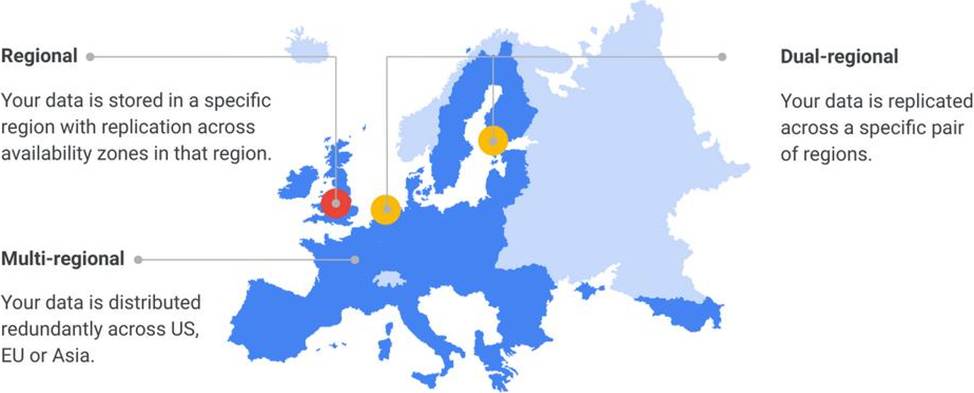
- C . Multiregional Cloud Storage bucket.
- D . Cloud Datastore database.
C
Explanation:
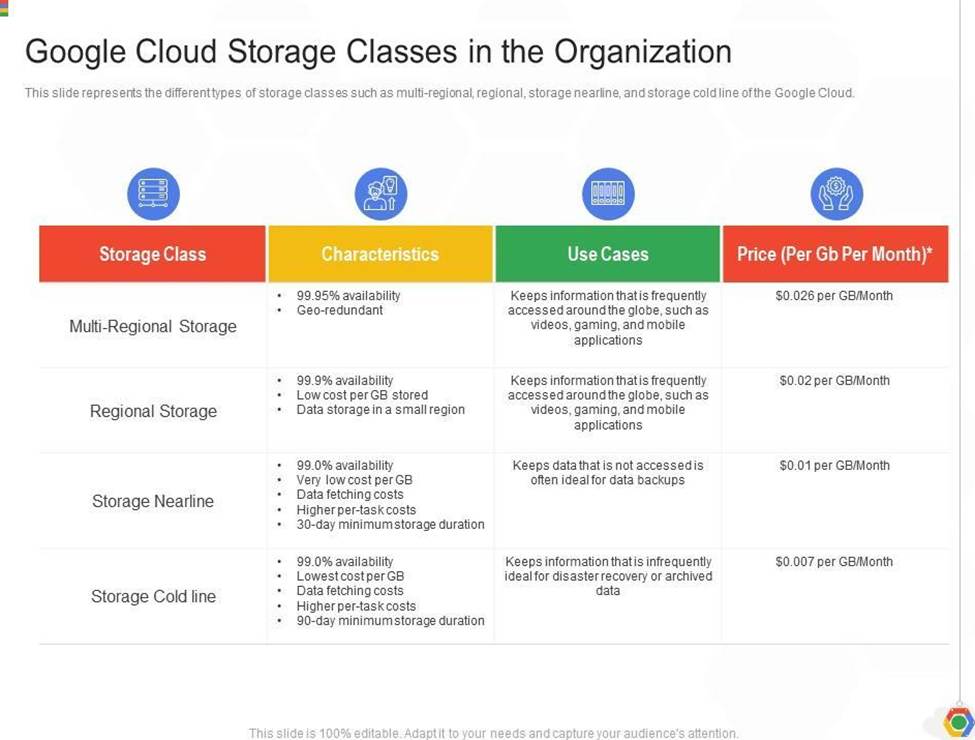
Cloud Storage allows world-wide storage and retrieval of any amount of data at any time. We dont need to set up auto-scaling ourselves. Cloud Storage autoscaling is managed by GCP. Cloud Storage is an object store so it is suitable for storing photos. Cloud Storage allows world-wide storage and retrieval so cater well to our worldwide audience. Cloud storage provides us lifecycle rules that can be configured to automatically delete objects older than 30 days. This also fits our requirements. Finally, Google Cloud Storage offers several storage classes such as Nearline Storage ($0.01 per GB per Month) Coldline Storage ($0.007 per GB per Month) and Archive Storage ($0.004 per GB per month) which are significantly cheaper than any of the options above.
Ref: https://cloud.google.com/storage/docs
Ref: https://cloud.google.com/storage/pricing
Your organization has strict requirements to control access to Google Cloud projects. You need to enable your Site Reliability Engineers (SREs) to approve requests from the Google Cloud support team when an SRE opens a support case. You want to follow Google-recommended practices.
What should you do?
- A . Add your SREs to roles/iam.roleAdmin role.
- B . Add your SREs to roles/accessapproval approver role.
- C . Add your SREs to a group and then add this group to roles/iam roleAdmin role.
- D . Add your SREs to a group and then add this group to roles/accessapproval approver role.
You want to run a single caching HTTP reverse proxy on GCP for a latency-sensitive website. This specific reverse proxy consumes almost no CPU. You want to have a 30-GB in-memory cache, and need an additional 2 GB of memory for the rest of the processes. You want to minimize cost.
How should you run this reverse proxy?
- A . Create a Cloud Memorystore for Redis instance with 32-GB capacity.
- B . Run it on Compute Engine, and choose a custom instance type with 6 vCPUs and 32 GB of memory.
- C . Package it in a container image, and run it on Kubernetes Engine, using n1-standard-32 instances as nodes.
- D . Run it on Compute Engine, choose the instance type n1-standard-1, and add an SSD persistent disk of 32 GB.
A
Explanation:
What is Google Cloud Memorystore?
Overview. Cloud Memorystore for Redis is a fully managed Redis service for Google Cloud Platform. Applications running on Google Cloud Platform can achieve extreme performance by leveraging the highly scalable, highly available, and secure Redis service without the burden of managing complex Redis deployments.
You are building an archival solution for your data warehouse and have selected Cloud Storage to archive your data. Your users need to be able to access this archived data once a quarter for some regulatory requirements. You want to select a cost-efficient option.
Which storage option should you use?
- A . Coldline Storage
- B . Nearline Storage
- C . Regional Storage
- D . Multi-Regional Storage
A
Explanation:
Coldline Storage is a very-low-cost, highly durable storage service for storing infrequently accessed data. Coldline Storage is ideal for data you plan to read or modify at most once a quarter. Since we have a requirement to access data once a quarter and want to go with the most cost-efficient option, we should select Coldline Storage.
Ref: https://cloud.google.com/storage/docs/storage-classes#coldline
Your team maintains the infrastructure for your organization. The current infrastructure requires changes. You need to share your proposed changes with the rest of the team. You want to follow Google’s recommended best practices.
What should you do?
- A . Use Deployment Manager templates to describe the proposed changes and store them in a Cloud Storage bucket.
- B . Use Deployment Manager templates to describe the proposed changes and store them in Cloud Source Repositories.
- C . Apply the change in a development environment, run gcloud compute instances list, and then save the output in a shared Storage bucket.
- D . Apply the change in a development environment, run gcloud compute instances list, and then save the output in Cloud Source Repositories.
B
Explanation:
Showing Deployment Manager templates to your team will allow you to define the changes you want to implement in your cloud infrastructure. You can use Cloud Source Repositories to store Deployment Manager templates and collaborate with your team. Cloud Source Repositories are fully-featured, scalable, and private Git repositories you can use to store, manage and track changes to your code.
https://cloud.google.com/source-repositories/docs/features
Your team maintains the infrastructure for your organization. The current infrastructure requires changes. You need to share your proposed changes with the rest of the team. You want to follow Google’s recommended best practices.
What should you do?
- A . Use Deployment Manager templates to describe the proposed changes and store them in a Cloud Storage bucket.
- B . Use Deployment Manager templates to describe the proposed changes and store them in Cloud Source Repositories.
- C . Apply the change in a development environment, run gcloud compute instances list, and then save the output in a shared Storage bucket.
- D . Apply the change in a development environment, run gcloud compute instances list, and then save the output in Cloud Source Repositories.
B
Explanation:
Showing Deployment Manager templates to your team will allow you to define the changes you want to implement in your cloud infrastructure. You can use Cloud Source Repositories to store Deployment Manager templates and collaborate with your team. Cloud Source Repositories are fully-featured, scalable, and private Git repositories you can use to store, manage and track changes to your code.
https://cloud.google.com/source-repositories/docs/features
Your team maintains the infrastructure for your organization. The current infrastructure requires changes. You need to share your proposed changes with the rest of the team. You want to follow Google’s recommended best practices.
What should you do?
- A . Use Deployment Manager templates to describe the proposed changes and store them in a Cloud Storage bucket.
- B . Use Deployment Manager templates to describe the proposed changes and store them in Cloud Source Repositories.
- C . Apply the change in a development environment, run gcloud compute instances list, and then save the output in a shared Storage bucket.
- D . Apply the change in a development environment, run gcloud compute instances list, and then save the output in Cloud Source Repositories.
B
Explanation:
Showing Deployment Manager templates to your team will allow you to define the changes you want to implement in your cloud infrastructure. You can use Cloud Source Repositories to store Deployment Manager templates and collaborate with your team. Cloud Source Repositories are fully-featured, scalable, and private Git repositories you can use to store, manage and track changes to your code.
https://cloud.google.com/source-repositories/docs/features
Your company is running a three-tier web application on virtual machines that use a MySQL database. You need to create an estimated total cost of cloud infrastructure to run this application on Google Cloud instances and Cloud SQL.
What should you do?
- A . Use the Google Cloud Pricing Calculator to determine the cost of every Google Cloud resource you expect to use. Use similar size instances for the web server, and use your current on-premises machines as a comparison for Cloud SQL.
- B . Implement a similar architecture on Google Cloud, and run a reasonable load test on a smaller scale. Check the billing information, and calculate the estimated costs based on the real load your system usually handles.
- C . Use the Google Cloud Pricing Calculator and select the Cloud Operations template to define your web application with as much detail as possible.
- D . Create a Google spreadsheet with multiple Google Cloud resource combinations. On a separate sheet, import the current Google Cloud prices and use these prices for the calculations within formulas.
Your company is running a three-tier web application on virtual machines that use a MySQL database. You need to create an estimated total cost of cloud infrastructure to run this application on Google Cloud instances and Cloud SQL.
What should you do?
- A . Use the Google Cloud Pricing Calculator to determine the cost of every Google Cloud resource you expect to use. Use similar size instances for the web server, and use your current on-premises machines as a comparison for Cloud SQL.
- B . Implement a similar architecture on Google Cloud, and run a reasonable load test on a smaller scale. Check the billing information, and calculate the estimated costs based on the real load your system usually handles.
- C . Use the Google Cloud Pricing Calculator and select the Cloud Operations template to define your web application with as much detail as possible.
- D . Create a Google spreadsheet with multiple Google Cloud resource combinations. On a separate sheet, import the current Google Cloud prices and use these prices for the calculations within formulas.