
Google Associate Cloud Engineer Practice Exams
Last updated on Oct 21,2026- Exam Code: Associate Cloud Engineer
- Exam Name: Google Cloud Certified – Associate Cloud Engineer
- Certification Provider: Google
- Latest update: Oct 21,2026
Your organization uses Active Directory (AD) to manage user identities. Each user uses this identity for federated access to various on-premises systems. Your security team has adopted a policy that requires users to log into Google Cloud with their AD identity instead of their own login. You want to follow the Google-recommended practices to implement this policy.
What should you do?
- A . Sync Identities with Cloud Directory Sync, and then enable SAML for single sign-on
- B . Sync Identities in the Google Admin console, and then enable Oauth for single sign-on
- C . Sync identities with 3rd party LDAP sync, and then copy passwords to allow simplified login with (he same credentials
- D . Sync identities with Cloud Directory Sync, and then copy passwords to allow simplified login with the same credentials.
Your organization has user identities in Active Directory. Your organization wants to use Active Directory as their source of truth for identities. Your organization wants to have full control over the Google accounts used by employees for all Google services, including your Google Cloud Platform (GCP) organization.
What should you do?
- A . Use Google Cloud Directory Sync (GCDS) to synchronize users into Cloud Identity.
- B . Use the cloud Identity APIs and write a script to synchronize users to Cloud Identity.
- C . Export users from Active Directory as a CSV and import them to Cloud Identity via the Admin Console.
- D . Ask each employee to create a Google account using self signup. Require that each employee use their company email address and password.
A
Explanation:
Reference: https://cloud.google.com/solutions/federating-gcp-with-active-directory-introduction
Directory Sync Google Cloud Directory Sync enables administrators to synchronize users, groups and other data from an Active Directory/LDAP service to their Google Cloud domain directory
https://tools.google.com/dlpage/dirsync/
You deployed a new application inside your Google Kubernetes Engine cluster using the YAML file specified below.
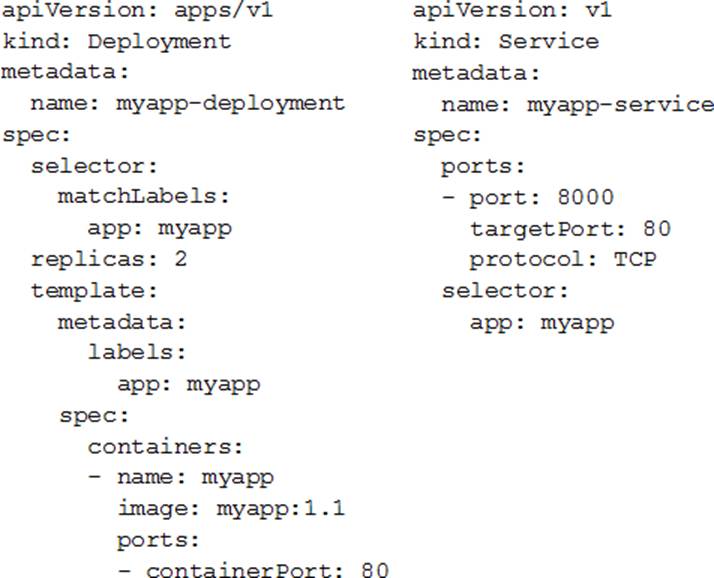
You check the status of the deployed pods and notice that one of them is still in PENDING status:

You want to find out why the pod is stuck in pending status.
What should you do?
- A . Review details of the myapp-service Service object and check for error messages.
- B . Review details of the myapp-deployment Deployment object and check for error messages.
- C . Review details of myapp-deployment-58ddbbb995-lp86m Pod and check for warning messages.
- D . View logs of the container in myapp-deployment-58ddbbb995-lp86m pod and check for warning messages.
C
Explanation:
https://kubernetes.io/docs/tasks/debug-application-cluster/debug-application/#debugging-pods
You need to create an autoscaling managed instance group for an HTTPS web application. You want to make sure that unhealthy VMs are recreated.
What should you do?
- A . Create a health check on port 443 and use that when creating the Managed Instance Group.
- B . Select Multi-Zone instead of Single-Zone when creating the Managed Instance Group.
- C . In the Instance Template, add the label ‘health-check’.
- D . In the Instance Template, add a startup script that sends a heartbeat to the metadata server.
A
Explanation:
https://cloud.google.com/compute/docs/instance-groups/autohealing-instances-in-migs#setting_up_an_autohealing_policy
You are working in a team that has developed a new application that needs to be deployed on Kubernetes. The production application is business critical and should be optimized for reliability. You need to provision a Kubernetes cluster and want to follow Google-recommended practices.
What should you do?
- A . Create a GKE Autopilot cluster. Enroll the cluster in the rapid release channel.
- B . Create a GKE Autopilot cluster. Enroll the cluster in the stable release channel.
- C . Create a zonal GKE standard cluster. Enroll the cluster in the stable release channel.
- D . Create a regional GKE standard cluster. Enroll the cluster in the rapid release channel.
B
Explanation:
Autopilot is more reliable and stable release gives more time to fix issues in new version of GKE
You are setting up a Windows VM on Compute Engine and want to make sure you can log in to the VM via RDP.
What should you do?
- A . After the VM has been created, use your Google Account credentials to log in into the VM.
- B . After the VM has been created, use gcloud compute reset-windows-password to retrieve the login credentials for the VM.
- C . When creating the VM, add metadata to the instance using ‘windows-password’ as the key and a password as the value.
- D . After the VM has been created, download the JSON private key for the default Compute Engine service account. Use the credentials in the JSON file to log in to the VM.
B
Explanation:
You can generate Windows passwords using either the Google Cloud Console or the gcloud command-line tool. This option uses the right syntax to reset the windows password. gcloud compute reset-windows-password windows-instance
Ref: https://cloud.google.com/compute/docs/instances/windows/creating-passwords-for-windows-instances#gcloud
You are deploying a production application on Compute Engine. You want to prevent anyone from accidentally destroying the instance by clicking the wrong button.
What should you do?
- A . Disable the flag “Delete boot disk when instance is deleted.”
- B . Enable delete protection on the instance.
- C . Disable Automatic restart on the instance.
- D . Enable Preemptibility on the instance.
D
Explanation:
Preventing Accidental VM Deletion This document describes how to protect specific VM instances from deletion by setting the deletionProtection property on an Instance resource. To learn more about VM instances, read the Instances documentation. As part of your workload, there might be certain VM instances that are critical to running your application or services, such as an instance running a SQL server, a server used as a license manager, and so on. These VM instances might need to stay running indefinitely so you need a way to protect these VMs from being deleted. By setting the deletionProtection flag, a VM instance can be protected from accidental deletion. If a user attempts to delete a VM instance for which you have set the deletionProtection flag, the request fails. Only a user that has been granted a role with compute.instances.create permission can reset the flag to allow the resource to be deleted.
https://cloud.google.com/compute/docs/instances/preventing-accidental-vm-deletion
You are planning to migrate your on-premises data to Google Cloud. The data includes:
• 200 TB of video files in SAN storage
• Data warehouse data stored on Amazon Redshift
• 20 GB of PNG files stored on an S3 bucket
You need to load the video files into a Cloud Storage bucket, transfer the data warehouse data into BigQuery, and load the PNG files into a second Cloud Storage bucket. You want to follow Google-recommended practices and avoid writing any code for the migration.
What should you do?
- A . Use gcloud storage for the video files. Dataflow for the data warehouse data, and Storage Transfer Service for the PNG files.
- B . Use Transfer Appliance for the videos. BigQuery Data Transfer Service for the data warehouse data, and Storage Transfer Service for the PNG files.
- C . Use Storage Transfer Service for the video files, BigQuery Data Transfer Service for the data warehouse data, and Storage Transfer Service for the PNG files.
- D . Use Cloud Data Fusion for the video files, Dataflow for the data warehouse data, and Storage Transfer Service for the PNG files.
You have a developer laptop with the Cloud SDK installed on Ubuntu. The Cloud SDK was installed from the Google Cloud Ubuntu package repository. You want to test your application locally on your laptop with Cloud Datastore.
What should you do?
- A . Export Cloud Datastore data using gcloud datastore export.
- B . Create a Cloud Datastore index using gcloud datastore indexes create.
- C . Install the google-cloud-sdk-datastore-emulator component using the apt get install command.
- D . Install the cloud-datastore-emulator component using the gcloud components install command.
D
Explanation:
The Datastore emulator provides local emulation of the production Datastore environment. You can use the emulator to develop and test your application locally
Ref: https://cloud.google.com/datastore/docs/tools/datastore-emulator
You have a managed instance group comprised of preemptible VM’s. All of the VM’s keepdeleting and recreating themselves every minute.
What is a possible cause of this behavior?
- A . Your zonal capacity is limited, causing all preemptible VM’s to be shutdown torecover capacity. Try deploying your group to another zone.
- B . You have hit your instance quota for the region.
- C . Your managed instance group’s VM’s are toggled to only last 1 minute inpreemptible settings.
- D . Your managed instance group’s health check is repeatedly failing, either to amisconfigured health check or misconfigured firewall rules not allowing the healthcheck to access the instance
D
Explanation:
as the instances (normal or preemptible) would be terminated and relaunched if the health check fails either due to application not configured properly or the instances firewall do not allow health check to happen.
GCP provides health check systems that connect to virtual machine (VM) instances on a configurable, periodic basis. Each connection attempt is called a probe. GCP records the success or failure of each probe.
Health checks and load balancers work together. Based on a configurable number of sequential successful or failed probes, GCP computes an overall health state for each VM in the load balancer. VMs that respond successfully for the configured number of times are considered healthy. VMs that fail to respond successfully for a separate number of times are unhealthy.
GCP uses the overall health state of each VM to determine its eligibility for receiving new requests. In addition to being able to configure probe frequency and health state thresholds, you can configure
the criteria that define a successful probe.