
Fortinet FCSS_SASE_AD-24 Practice Exams
Last updated on Oct 22,2026- Exam Code: FCSS_SASE_AD-24
- Exam Name: FCSS - FortiSASE 24 Administrator
- Certification Provider: Fortinet
- Latest update: Oct 22,2026
Refer to the exhibits.
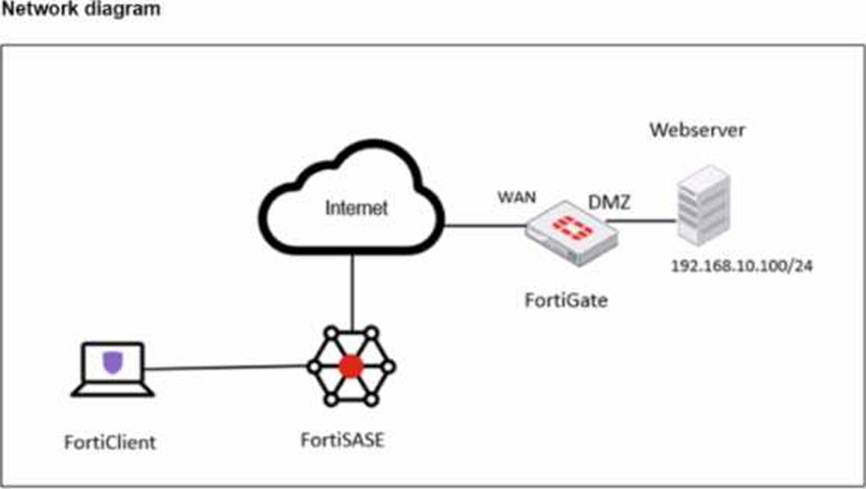
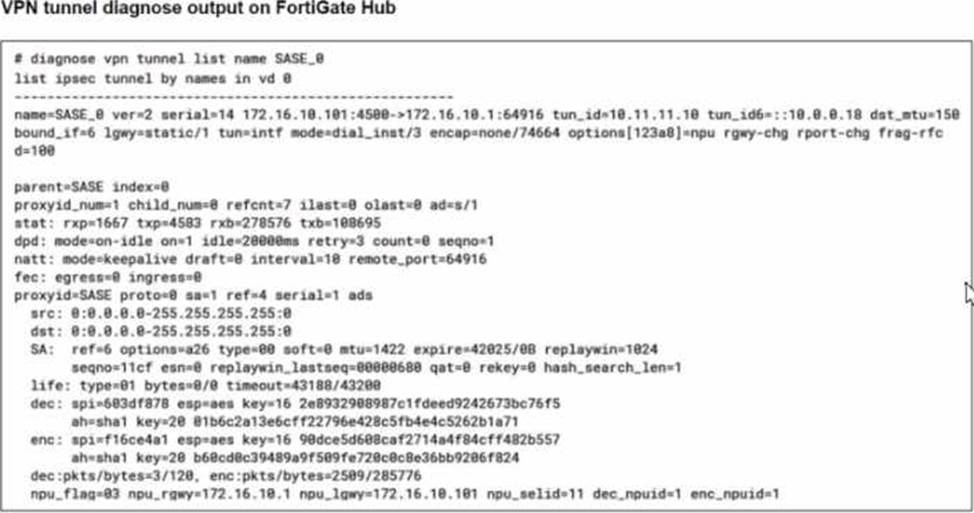
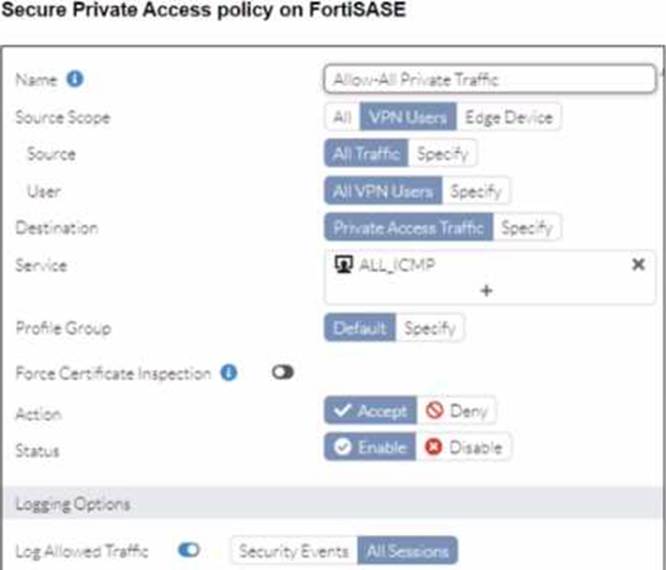
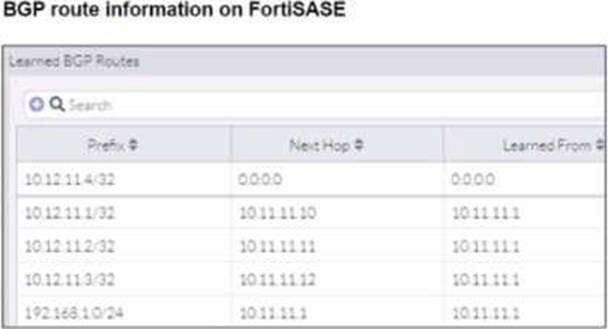
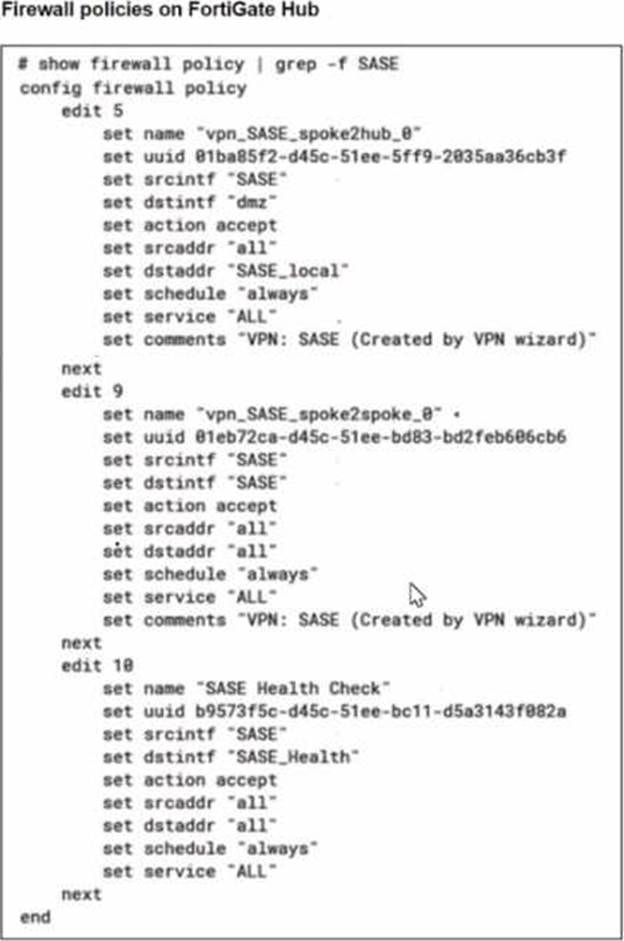
A FortiSASE administrator is trying to configure FortiSASE as a spoke to a FortiGate hub. The tunnel is up to the FortiGale hub. However, the administrator is not able to ping the webserver hosted behind the FortiGate hub.
Based on the output, what is the reason for the ping failures?
- A . The Secure Private Access (SPA) policy needs to allow PING service.
- B . Quick mode selectors are restricting the subnet.
- C . The BGP route is not received.
- D . Network address translation (NAT) is not enabled on the spoke-to-hub policy.
Which two deployment methods are used to connect a FortiExtender as a FortiSASE LAN extension? (Choose two.)
- A . Connect FortiExtender to FortiSASE using FortiZTP
- B . Enable Control and Provisioning Wireless Access Points (CAPWAP) access on the FortiSASE portal.
- C . Enter the FortiSASE domain name in the FortiExtender GUI as a static discovery server
- D . Configure an IPsec tunnel on FortiSASE to connect to FortiExtender.
AC
Explanation:
There are two deployment methods used to connect a FortiExtender as a FortiSASE LAN extension:
Connect FortiExtender to FortiSASE using FortiZTP:
FortiZero Touch Provisioning (FortiZTP) simplifies the deployment process by allowing FortiExtender to automatically connect and configure itself with FortiSASE.
This method requires minimal manual configuration, making it efficient for large-scale deployments.
Enter the FortiSASE domain name in the FortiExtender GUI as a static discovery server:
Manually configuring the FortiSASE domain name in the FortiExtender GUI allows the extender to discover and connect to the FortiSASE infrastructure.
This static discovery method ensures that FortiExtender can establish a connection with FortiSASE
using the provided domain name.
Reference: FortiOS 7.2 Administration Guide: Details on FortiExtender deployment methods and configurations. FortiSASE 23.2 Documentation: Explains how to connect and configure FortiExtender with FortiSASE using FortiZTP and static discovery.
In configuring SASE, what is an essential consideration for applying compliance rules related to data protection?
- A . Implementing uniform rules across all geographic regions
- B . Tailoring rules based on local legal requirements
- C . Using default settings for ease of deployment
- D . Avoiding encryption to ensure easier regulatory inspection
Why is it important to configure both real-time and historical logging within FortiSASE for a comprehensive security overview?
- A . To maintain an aesthetically pleasing dashboard
- B . To ensure all user actions are recorded for legal reasons
- C . To identify trends and patterns that could indicate evolving threats
- D . To use logs for marketing research
A FortiSASE administrator is configuring a Secure Private Access (SPA) solution to share endpoint information with a corporate FortiGate.
Which three configuration actions will achieve this solution? (Choose three.)
- A . Add the FortiGate IP address in the secure private access configuration on FortiSASE.
- B . Use the FortiClient EMS cloud connector on the corporate FortiGate to connect to FortiSASE
- C . Register FortiGate and FortiSASE under the same FortiCloud account.
- D . Authorize the corporate FortiGate on FortiSASE as a ZTNA access proxy.
- E . Apply the FortiSASE zero trust network access (ZTNA) license on the corporate FortiGate.
BCD
Explanation:
Reference: FortiOS 7.2 Administration Guide: Provides details on configuring Secure Private Access and integrating with FortiGate.
FortiSASE 23.2 Documentation: Explains how to set up and manage connections between FortiSASE and corporate FortiGate.
What challenges might arise when analyzing security reports in FortiSASE? (Select all that apply)
- A . Identifying false positives
- B . Delayed log updates
- C . High volume of data
- D . Limited access to historical data
An organization wants to block all video and audio application traffic but grant access to videos from CNN.
Which application override action must you configure in the Application Control with Inline-CASB?
- A . Allow
- B . Pass
- C . Permit
- D . Exempt
A
Explanation:
(https://docs.fortinet.com/document/fortisase/24.4.75/sia-agent-based-deployment-guide/568255/configuring-application-control-profile
Which statement applies to a single sign-on (SSO) deployment on FortiSASE?
- A . SSO overrides any other previously configured user authentication.
- B . SSO identity providers can be integrated using public and private access types.
- C . SSO is recommended only for agent-based deployments.
- D . SSO users can be imported into FortiSASE and added to user groups.
D
Explanation:
In a Single Sign-On (SSO) deployment on FortiSASE, SSO users can be imported into FortiSASE and added to user groups. This allows administrators to manage SSO users within FortiSASE, enabling them to apply policies, permissions, and group-based access controls. By integrating SSO with FortiSASE, organizations can streamline user authentication and simplify access management while maintaining security.
Here’s why the other options are incorrect:
Which FortiSASE component is crucial for managing security across multiple cloud environments?
- A . Secure SD-WAN
- B . Cloud Access Security Broker (CASB)
- C . Data Loss Prevention (DLP)
- D . Zero Trust Network Access (ZTNA)
Customizing FortiSASE dashboards allows security analysts to focus on the most critical data relevant to their role.
- A . False
- B . True