
DELL EMC D-VXB-DY-A-24 Practice Exams
Last updated on Oct 21,2026- Exam Code: D-VXB-DY-A-24
- Exam Name: Dell VxBlock Deploy Achievement
- Certification Provider: DELL EMC
- Latest update: Oct 21,2026
What type of topology does the ACI fabric use?
- A . Spine Leaf
- B . Tree
- C . Hierarchical
- D . Flat
A
Explanation:
Review ACI Fabric Topology: The ACI fabric topology is based on a spine-leaf architecture, which is a scalable, two-layer network topology composed of spine switches and leaf switches1.
Understand Spine-Leaf Benefits: This topology provides high-bandwidth connectivity between leaf switches and spine switches, allowing for efficient data flow across the network1.
Recognize ACI Fabric Design: In an ACI fabric, each leaf switch connects to every spine switch, creating a non-blocking, high-throughput network that supports east-west traffic patterns typical in modern data centers1.
Reference Official Documentation: The Official Dell VxBlock Deploy Achievement document would align with Cisco’s guidelines on ACI fabric, which specify the spine-leaf topology as the standard for ACI deployments1.
What is used to collect VxBlock component information during an RCM Assessment?
- A . VMware vRealize Operations
- B . VMware Configuration Automation Tool
- C . Dell EMC SCR
- D . Element Manager
D
Explanation:
During an RCM (Release Certification Matrix) Assessment for VxBlock, the Element Manager is used to collect component information. Element Managers are specialized tools designed to gather detailed data and status information from individual components within the VxBlock system. These tools provide granular insights into the configuration and health of the system, facilitating the RCM assessment process.
Reference: Dell EMC VxBlock System documentation.
Industry best practices for system assessments and management.
Which component is NOT part of the Cisco ACI solution?
- A . Cisco Nexus 7000 series switches
- B . Cisco Application Policy Infrastructure Controller
- C . Cisco Nexus 9000 series switches
- D . Cisco ACI End Point Group
A
Explanation:
Review Cisco ACI Components: Cisco ACI is a comprehensive networking solution for data centers that includes specific components designed to work within its architecture1.
Identify Non-ACI Component: The Cisco Nexus 7000 series switches are not part of the Cisco ACI solution. Cisco ACI is built on Cisco Nexus 9000 series spine and leaf switches1.
Understand ACI Architecture: The Cisco ACI architecture is designed around the Cisco Application Policy Infrastructure Controller (APIC) and the Nexus 9000 series switches, which work together to provide a policy-driven solution that automates network provisioning and control1.
Recognize ACI Specific Entities: The Cisco ACI End Point Group (EPG) is a fundamental entity within the ACI architecture that groups together similar endpoints with common policy requirements1.
Which configuration attribute should be enabled for dynamic routing on a distributed logical router?
- A . Gateway
- B . High Availability
- C . FIPS mode
- D . NSX edge interface
Which logical entity in ACI allows for logical separation and reuse of IP address space within an ACI fabric?
- A . EPG
- B . VLAN
- C . Context
- D . Tenant
D
Explanation:
In ACI (Application Centric Infrastructure), the logical entity that allows for logical separation and reuse of IP address space within an ACI fabric is the Tenant. A Tenant represents a unit of isolation from a policy perspective and allows for the segmentation of the network into multiple virtual environments, each with its own policies and IP address spaces.
Reference: Cisco ACI documentation.
Technical resources on ACI architecture and logical entities.
DRAG DROP
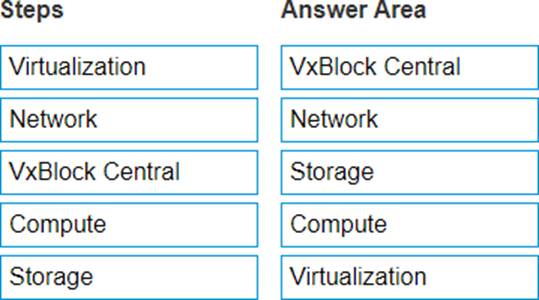
Based on the Dell EMC RCM Workbook upgrade plan, in what sequence should VxBlock components be upgraded?
Explanation:
VxBlock Central
Network
Storage
Compute
Virtualization
In the Dell EMC RCM (Release Certification Matrix) Workbook upgrade plan, the sequence of upgrading VxBlock components is designed to ensure system stability and minimize disruptions.
Here’s the detailed reasoning for the correct sequence: VxBlock Central:
VxBlock Central is the management and orchestration layer of the VxBlock system.
Upgrading this first ensures that the management tools are compatible with the new versions of the other components and can properly coordinate and monitor the upgrade process.
Reference: Dell EMC documentation emphasizes upgrading management and orchestration tools first to ensure compatibility and support for subsequent upgrades. Network:
The network forms the backbone of the VxBlock system, connecting all components. Upgrading the network components ensures that any changes or enhancements in connectivity, bandwidth, or protocols are in place before upgrading the other components that rely on network connectivity.
Reference: Best practices in infrastructure upgrades recommend updating network components early to ensure they can support new features and functionalities of other upgraded systems. Storage:
Upgrading storage components next ensures that the data layer is optimized and capable of handling new features and improvements. It also ensures data integrity and performance enhancements are in place before upgrading compute and virtualization layers.
Reference: Dell EMC guidelines for VxBlock upgrades often prioritize storage upgrades after network
to secure the data layer.
Compute:
Compute resources (servers and processing units) are upgraded next to ensure they are compatible with the updated storage and network components. This prepares the infrastructure for any new workloads or virtualization enhancements.
Reference: The compute upgrade follows storage to ensure that the processing power can efficiently
utilize the enhanced storage capabilities.
Virtualization:
Finally, the virtualization layer (such as VMware vSphere) is upgraded. This layer is highly dependent on the underlying hardware and network infrastructure. Ensuring all underlying components are upgraded and stable first guarantees that the virtualization environment can fully leverage the improvements and new features.
Reference: Virtualization upgrades are typically performed last to ensure full compatibility with all previously upgraded components and to minimize the risk of disruptions.
Following this sequence ensures a structured and stable upgrade process, aligning with Dell EMC’s recommended practices for maintaining system integrity and performance during upgrades.
An Implementation Specialist is connecting the Management switches within the VxBlock 1000 system to the customer network.
Which port is used when configuring the fiber uplink?
- A . Ethernet 1/48
- B . Ethernet 1/30
- C . Ethernet 1/32
- D . Ethernet 1/54
A
Explanation:
Review VxBlock 1000 Documentation: The VxBlock 1000 documentation provides specific details on the hardware installation and configuration, including the management switches1.
Identify the Fiber Uplink Port: The fiber uplink port is used to connect the Management switches to the customer’s network, providing a high-speed link for network traffic1.
Confirm Port Configuration: The Official Dell VxBlock Deploy Achievement document would specify the exact Ethernet port to be used for the fiber uplink, which is typically Ethernet 1/32 in the context of VxBlock 1000 systems1.
Validate with Technical Specifications: Ensure that the port configuration aligns with the technical specifications and requirements of the VxBlock 1000 system1.
You are expanding a PowerMax 8000.
What is the maximum allowed dispersion, in meters, between bricks?
- A . 30
- B . 25
- C . 20
- D . 35
C
Explanation:
Review PowerMax 8000 Specifications: The PowerMax 8000 is designed to support a dispersed configuration, allowing for flexibility in the physical placement of its components1.
Identify Maximum Dispersion: The maximum allowed dispersion between bricks in a PowerMax 8000 system is up to 25 meters1.
Understand Dispersion Considerations: This dispersion allows for the separation of individual or contiguous groups of system bays, providing options for physical layout within a data center1. Reference Official Documentation: The Official Dell VxBlock Deploy Achievement document would align with this specification, ensuring that the system meets both performance and physical space requirements1.
What is the purpose of the Knowledge Transfer process with the customer?
- A . Introduce the customer team to their new converged or hyperconverged system
- B . Provide generic information about VxBlock and its benefits
- C . Provide in-depth training of the solution
- D . Provide documents on critical items, such as naming conventions, IP address ranges, and component configurations
A
Explanation:
Introduction to the new system: The primary purpose of the Knowledge Transfer process is to introduce the customer team to their new converged or hyperconverged system1.
Familiarization with the environment: This process involves familiarizing the customer’s team with the environment and operational aspects of the VxBlock system1.
Ensuring smooth transition: Knowledge Transfer is crucial for ensuring that the customer’s team can effectively manage and maintain their new system1.
Empowering the customer: By transferring knowledge, the customer’s team is empowered to take full advantage of the system’s capabilities and benefits1.
What VMs are part of VxBlock Central?
- A . Multi-system Prepositioning (MSP), Element Manager, ESRS
- B . ESRS, Element Manager, Core
- C . Core, Multi-system Management (MSM), Multi-system Prepositioning (MSP)
- D . Element Manager, Multi-system Management (MSM), Multi-system Prepositioning (MSP)
C
Explanation:
Identify VxBlock Central Components: VxBlock Central is a unified interface and access point for converged infrastructure operations1.
Recognize VMs in VxBlock Central: The VMs that are part of VxBlock Central include the Core, Multi-system Management (MSM), and Multi-system Prepositioning (MSP)2. Understand VM Functions:
The Core VM provides the central point for management and operations within VxBlock Central. MSM (Multi-system Management) allows for the management of multiple systems within the VxBlock environment.
MSP (Multi-system Prepositioning) is used for staging updates and patches before they are deployed across the systems2.
Reference Official Documentation: The Official Dell VxBlock Deploy Achievement document details the VMs included in VxBlock Central and their respective roles within the infrastructure2.