
DELL EMC D-SNC-DY-00 Practice Exams
Last updated on Oct 21,2026- Exam Code: D-SNC-DY-00
- Exam Name: Dell SONiC Deploy Exam
- Certification Provider: DELL EMC
- Latest update: Oct 21,2026
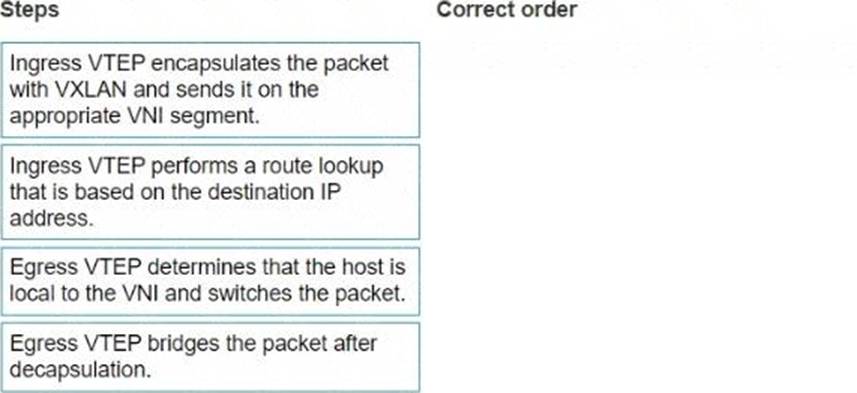
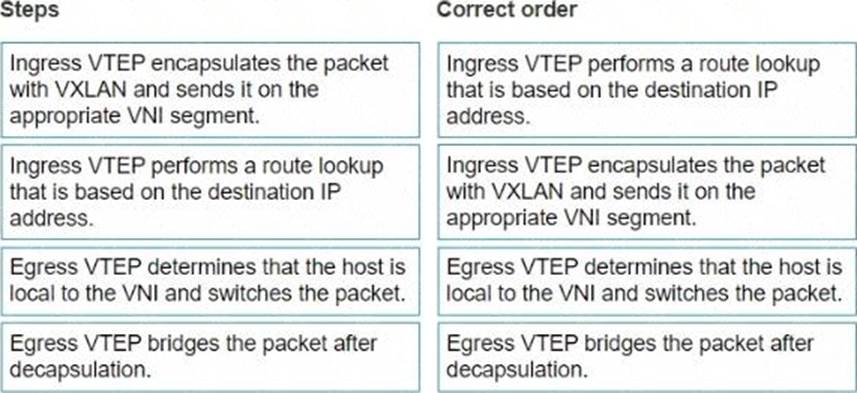
What is the correct order of steps for data flow in asymmetric IRB frame encapsulation?
Explanation:
Ingress VTEP performs a route lookup that is based on the destination IP address.
Ingress VTEP encapsulates the packet with VXLAN and sends it on the appropriate VNI segment.
Egress VTEP determines that the host is local to the VNI and switches the packet.
Egress VTEP bridges the packet after decapsulation.
Steps and Correct Order:
Ingress VTEP performs a route lookup that is based on the destination IP address.
The ingress VTEP (Virtual Tunnel Endpoint) first needs to determine the next hop for the packet.
This involves performing a route lookup using the destination IP address.
Ingress VTEP encapsulates the packet with VXLAN and sends it on the appropriate VNI segment.
Once the route lookup is complete, the ingress VTEP encapsulates the packet in a VXLAN header, which includes the appropriate VNI (VXLAN Network Identifier) segment, and forwards it.
Egress VTEP determines that the host is local to the VNI and switches the packet.
The egress VTEP receives the encapsulated VXLAN packet, decapsulates it, and then checks its local VNI to determine if the destination host is within the same VNI.
Egress VTEP bridges the packet after decapsulation.
After determining the destination host’s locality, the egress VTEP bridges the packet to the appropriate interface to deliver it to the final destination.
References:
Dell Technologies Networking – SONiC
Dell Enterprise SONiC Deployment Guide
These steps provide a comprehensive guide to understand the correct order of operations in asymmetric IRB (Integrated Routing and Bridging) frame encapsulation within a VXLAN environment.
Which two elements must be included in the show mclag interface x x command?
- A . Peer-link port channel number
- B . MC-LAG domain id
- C . MC-LAG port channel number
- D . MC-LAG VLAN id
A C
Explanation:
The show mclag interface command provides information about the multi-chassis link aggregation (MC-LAG) configuration. Essential elements that must be included are the peer-link port channel number and the MC-LAG port channel number. These parameters are critical for identifying the interface and its associated link aggregation settings.
References:
Dell SONiC Command Reference Guide
Dell Technologies InfoHub
Which two elements must be included in the show mclag interface x x command?
- A . Peer-link port channel number
- B . MC-LAG domain id
- C . MC-LAG port channel number
- D . MC-LAG VLAN id
A C
Explanation:
The show mclag interface command provides information about the multi-chassis link aggregation (MC-LAG) configuration. Essential elements that must be included are the peer-link port channel number and the MC-LAG port channel number. These parameters are critical for identifying the interface and its associated link aggregation settings.
References:
Dell SONiC Command Reference Guide
Dell Technologies InfoHub
Map a double-tagged VLAN packet with an outer CVLAN 100 and an inner dot1q 200 to SVLAN 300 translation on PE switch interface Eth1/2.
The necessary VLANs and VLAN stacking have already been configured.

see the explanation for all step by step solution with all explanation.
Map a Single-Tagged CVLAN 100 to SVLAN 200 on Interface Eth1/1:
sonic# configure terminal
sonic(config)# interface Ethernet1/1
sonic(config-if-Ethernet1/1)# switchport mode trunk
sonic(config-if-Ethernet1/1)# switchport vlan mapping 100 200
sonic(config-if-Ethernet1/1)# end
sonic# write memory
Map a Double-Tagged VLAN Packet with Outer CVLAN 100 and Inner dot1q 200 to SVLAN 300 on Interface Eth1/2:
sonic# configure terminal
sonic(config)# interface Ethernet1/2
sonic(config-if-Ethernet1/2)# switchport mode trunk
sonic(config-if-Ethernet1/2)# switchport vlan mapping 100 200 300
sonic(config-if-Ethernet1/2)# end
sonic# write memory
Comprehensive Detailed Step by Step Explanation: with References:
Enter Configuration Mode:
Access the global configuration mode using the configure terminal command.
Configure Interface Eth1/1:
Enter interface configuration mode for Ethernet1/1 using the command interface Ethernet1/1.
Set the switchport mode to trunk with the command switchport mode trunk.
Configure the VLAN translation using the switchport vlan mapping 100 200 command, which maps CVLAN 100 to SVLAN 200.
Exit the interface configuration mode by typing end.
Save the configuration with write memory.
Configure Interface Eth1/2:
Enter interface configuration mode for Ethernet1/2 using the command interface Ethernet1/2.
Set the switchport mode to trunk with the command switchport mode trunk.
Configure the double-tagged VLAN translation using the switchport vlan mapping 100 200 300 command, which maps packets with outer CVLAN 100 and inner dot1q 200 to SVLAN 300.
Exit the interface configuration mode by typing end.
Save the configuration with write memory.
References:
Dell Technologies Networking – SONiC
Dell Enterprise SONiC Deployment Guide
These steps provide a comprehensive guide to configure VLAN translations on a Dell SONiC switch, ensuring that the specific requirements for single-tagged and double-tagged VLAN mappings are met.
Refer to the exhibit.

What type of route is shown?
- A . Type 3 host route from external VTEP
- B . Type 2 host route from another VTEP
- C . Type 3 host route from another VTEP
- D . Type 5 host route from another VTEP
B
Explanation:
The exhibit shows a BGP EVPN route in a VXLAN environment. The route type can be determined based on the details provided. Type 2 routes in BGP EVPN are used to advertise MAC address reachability information between VTEPs (Virtual Tunnel End Points). The exhibit indicates a host route from another VTEP, which corresponds to a Type 2 route.
References:
Dell Technologies SONiC documentation
BGP EVPN Configuration Guide
How many ports are in each port-group on the S5200 series switches?
- A . 2
- B . 6
- C . 4
C
Explanation:
Each port-group on the S5200 series switches consists of 4 ports. This grouping allows for efficient management and configuration of the switch ports in sets.
References:
Dell S5200 Series Switches Documentation
Dell Technologies InfoHub
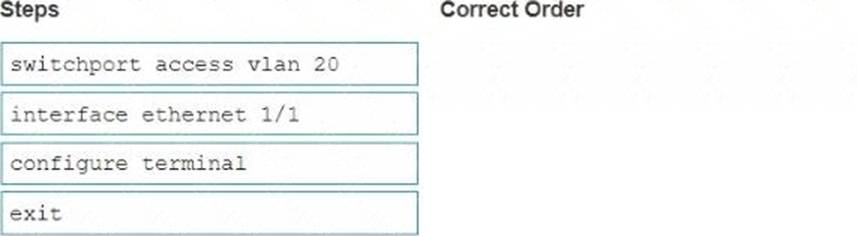
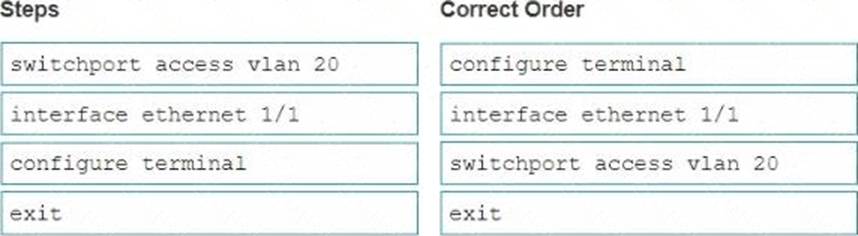
In what order should these commands be entered to configure an access port in SONiC CLI if the required VLAN is already configured?
Explanation:
To configure an access port on the SONiC CLI, the commands should be entered in the following order:
Enter global configuration mode with configure terminal.
Specify the interface to configure using interface ethernet 1/1.
Set the interface to access mode and assign it to VLAN 20 with switchport access vlan 20.
Exit the interface configuration mode with exit.
References:
Dell Technologies SONiC Command Reference Guide
Dell Networking Configuration Guide
Refer to the exhibit.
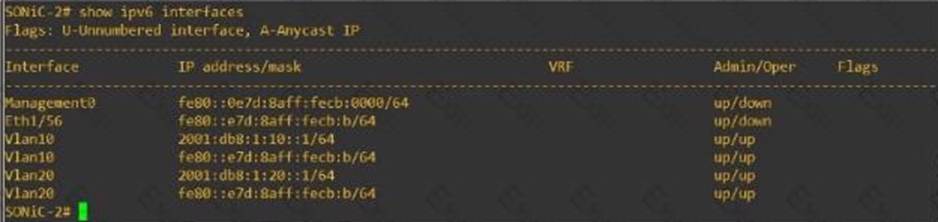
Eth 1/1 of SONiC-1 and Eth1/56 of SONiC-2 should be a routed link connecting the two Enterprise SONiC switches. No traffic is passing between them.
What is the cause of the failure?
- A . An incorrect IPv6 address type was used for interface Eth1/56 of SONiC-2.
- B . A spanning-tree is blocking the routed link.
- C . IPv6 is not enabled on interface Eth 1/1 of SONiC-1.
- D . There is a cable that is unplugged between SONiC-1 and SONiC-2.
A
Explanation:
From the exhibit, it is evident that Eth1/56 on SONiC-2 is assigned a link-local IPv6 address (fe80::e7d:8aff:fecb /64). Link-local addresses are not routable beyond the local network segment, which means they cannot be used to route traffic between SONiC-1 and SONiC-2. For routed links, global unicast addresses must be used.
References:
Dell Technologies SONiC documentation
IPv6 Addressing Guide
Refer to the exhibit.
Eth 1/1 of SONiC-1 and Eth1/56 of SONiC-2 should be a routed link connecting the two Enterprise SONiC switches. No traffic is passing between them.
What is the cause of the failure?
- A . An incorrect IPv6 address type was used for interface Eth1/56 of SONiC-2.
- B . A spanning-tree is blocking the routed link.
- C . IPv6 is not enabled on interface Eth 1/1 of SONiC-1.
- D . There is a cable that is unplugged between SONiC-1 and SONiC-2.
A
Explanation:
From the exhibit, it is evident that Eth1/56 on SONiC-2 is assigned a link-local IPv6 address (fe80::e7d:8aff:fecb /64). Link-local addresses are not routable beyond the local network segment, which means they cannot be used to route traffic between SONiC-1 and SONiC-2. For routed links, global unicast addresses must be used.
References:
Dell Technologies SONiC documentation
IPv6 Addressing Guide
What is a correct use-case scenario for ZTP in Enterprise SONiC?
- A . The user wants single pane of glass monitoring.
- B . The user wants to replace a failed unit and use an automatic script.
- C . The user wants multivendor switch deployment.
- D . The user wants to configure the switch manually using the CLI.
B
Explanation:
ZTP (Zero Touch Provisioning) is used to automate the configuration of switches, especially useful in scenarios where a failed unit needs to be replaced. By using ZTP, the switch can automatically download and apply the necessary configuration scripts upon boot-up, reducing the need for manual intervention and speeding up the deployment process.
References:
Dell Technologies SONiC documentation
Zero Touch Provisioning Guide