
DELL EMC D-PE-OE-23 Practice Exams
Last updated on Oct 23,2026- Exam Code: D-PE-OE-23
- Exam Name: Dell Technologies PowerEdge Operate 2023
- Certification Provider: DELL EMC
- Latest update: Oct 23,2026
SIMULATION
Due to recent security breaches and to avoid accidental changes made by the junior IT staff, an administrator would like to prevent unwanted configuration changes in the iDRAC UI.
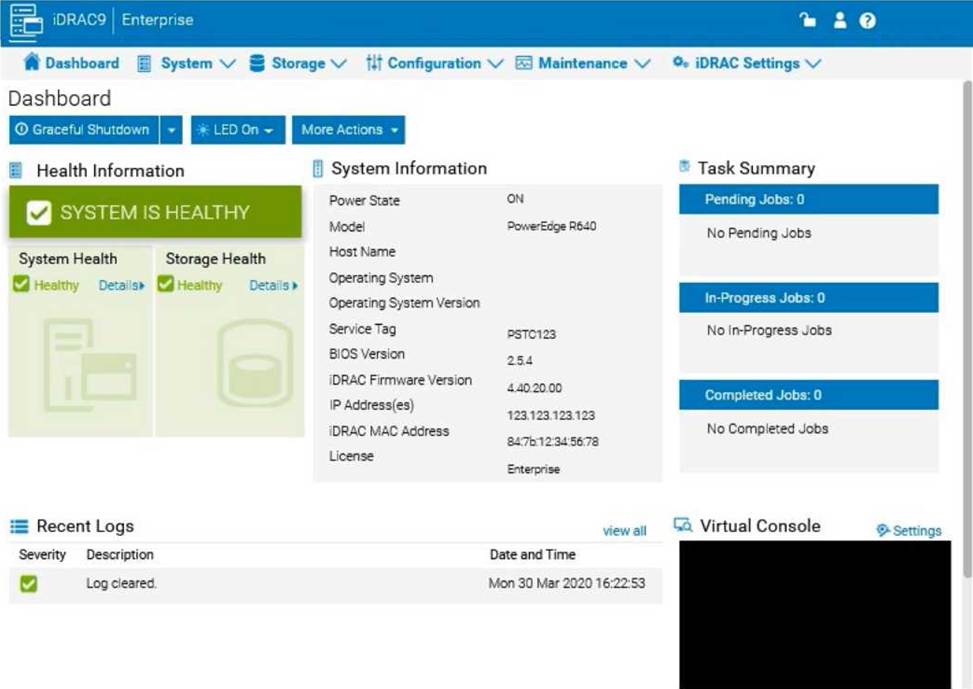
Here are the steps to secure the iDRAC configuration:
Step-by-Step Guide:
Access User Settings:
In the iDRAC interface, navigate to iDRAC Settings from the main menu. Choose User Authentication or Users to manage user accounts and permissions.
Adjust User Roles and Permissions:
Identify the accounts associated with junior IT staff.
For each user account, adjust the role to Read-Only if you want them to have view-only access without making configuration changes.
Alternatively, set their permissions to exclude configuration changes. This may involve assigning a custom role with limited access based on your needs.
Enable Configuration Lock (if available):
Some versions of iDRAC offer a Configuration Lock feature, which prevents any configuration changes until the lock is removed by an administrator.
Navigate to Configuration > System Security or User Authentication, depending on the version, and enable the Configuration Lock option.
Set Up Two-Factor Authentication (Optional):
For added security, enable Two-Factor Authentication under iDRAC Settings > Network or Security settings. This step ensures only authorized users can access and make changes to the iDRAC UI.
Save and Apply Security Changes:
After setting up the desired restrictions and permissions, save the settings to apply the changes. Verify that junior IT staff accounts now have restricted access and cannot make configuration changes.
Log Out and Test the Changes:
Log out of the administrator account and log in with a junior IT staff account to confirm that the permissions are set correctly.
Ensure that configuration changes are disabled and that the user can only view the iDRAC interface as per the restrictions.
By following these steps, you can restrict junior IT staff from making any configuration changes within the iDRAC interface, thus preventing accidental or unauthorized modifications.
What are the default settings used when applying firmware and a configuration to a replaced part using the Lifecycle Controller?
- A . Firmware Allow version upgrade only
Configuration: Disabled - B . Firmware: Upgrade to latest available version
Configuration Apply always - C . Firmware Disabled
Configuration Apply only if firmware match - D . Firmware: Match firmware of replaced part
Configuration Apply always
A technician configures a server then loads Windows 2016. The server then goes through testing. Before the servers go live the technician asks another technician who has limited experience with servers to quickly check the settings to ensure that everything is operational.
The next day the server is rebooted and the operating system fails to load. No errors are displayed and the boot sequence is correct. Errors are found in the log entries.
What should be done to resolve this issue in the least amount of time?
- A . Reload the operating system
- B . Delete the RAID virtual disk then create a new virtual disk
- C . Check if the iDRAC Boot Mode Setting is correct
- D . Check if the BIOS Boot Mode Setting is correct
Which component of the Dell EMC PowerEdge 13G server can be used as an indicator to locate a specific system within a rack?
- A . iDRAC8
- B . Back Panel
- C . LCD Front Panel
- D . System ID button
Case Study 4
A company is experiencing a noticeable decrease in performance when accessing data on their Dell EMC Isilon cluster. The cluster hosts Microsoft Windows home directories and general purpose file shares. In addition, a file pool policy moves data that has not been modified in six months to an achieve tier.
The administrator wants your assistance in understanding the reason for the slow data access. The number of users accessing the cluster has not changed. The administrator has shared the following baseline metrics. The outputs were captured from a performance- acceptable time frame.
Trace route shows:
– 3 hops between clients and the cluster
– Average latency is 3 ms
Iperf shows:
– 940 Mb/s average bandwidth
– 005 ms average jitter
Netstat on the local network shows:
– 05% average re-transmission rate
Hostcache list:
– 20 ms average roundtrip time across all clients
The administrator shows you the following iperf output:
– 890 Mb/s average bandwidth
– 98.8 ms average jitter
Based on the output, what information should be provided to the administrator?
- A . Amount of jitter is in an acceptable range
- B . Numbers remain within the recommended range
- C . Lower than average bandwidth needs to be investigated
- D . Amount of jitter is an indication of network congestion
Where is the data stored to allow Easy Restore to successfully complete a system board replacement?
- A . NAND Flash module on the disk drive mid plane
- B . IDSDM SD card
- C . vFlash SD card
- D . Serial Flash storage in the server’s front panel
A Dell EMC PowerEdge 14G server with an add-on bezel is in No POST No Video condition. iDRAC is currently inaccessible.
Which component will provide the system status and error messages?
- A . LCD panel on the bezel
- B . BIOS
- C . iDRAC Direct 2.0
- D . Lifecycle Controller
What operation should a technician perform to ensure configuration recovery if a server must be physically replaced?
- A . Create and export a Server Configuration Profile
- B . Back up the Server Profile to a network share or vFlash SD card
- C . Enable the export configuration option in System Setup
- D . View and export the current hardware inventory
A technician tries to power on a server but nothing happens when they press the power button. The status LEDs on both PSUs are green. The technician is able to connect to the iDRAC to review the System Event Logs and discovers that PSU2 has failed.
- A . Reboot the server
Reset the NVRAM - B . Reboot the server
Test one PSU at a time - C . Cycle the AC power
Test one PSU at a time - D . Cycle the AC power
Reset the NVRAM
Eight new servers have arrived at a datacenter. All use static IP addresses for iDRAC. The technician needs to enable these servers to contact the DHCP server on the network to obtain new IP addresses.
What method can the technician use to quickly switch to DHCP?
- A . Reboot each server to enable DHCP default settings
- B . Boot into CTRL+S and change iDRAC settings to DHCP
- C . Use the LCD panel to input a new IP address
- D . Log in to the iDRAC and enable DHCP