
DELL EMC D-PE-OE-23 Practice Exams
Last updated on Oct 23,2026- Exam Code: D-PE-OE-23
- Exam Name: Dell Technologies PowerEdge Operate 2023
- Certification Provider: DELL EMC
- Latest update: Oct 23,2026
A technician needs to use the iDRAC GUI to update the server using a custom repository hosted on an internal anonymous FTP. The technician receives an error message when trying to update. Catalog.xml not found.
What should the technician do to run updates?
- A . Verify that the FTP service is running on the iDRAC
- B . Enable FTP protocol in the Lifecycle Controller
- C . Update the catalog filename m the System Setup > iDRAC Settings
- D . Specify the catalog name in Catalog Filename
A technician needs to use the iDRAC GUI to roll back a diagnostics firmware revision on a server that was updated four weeks previously. However, the replaced version cannot be found in the Firmware Rollback section on the iDRAC GUI.
What could be the issue?
- A . Diagnostics firmware revision is part of the Lifecycle Controller firmware so the Lifecycle Controller must be updated first
- B . Rollback feature was not enabled in iDRAC Settings
- C . Firmware can only be rolled back within a week of being replaced.
- D . Diagnostics firmware is not supported in the Rollback feature.
SIMULATION
A customer wants to change the PSU configuration to a 2+0 with PSU2 as the primary. Use the simulator to complete this task in the iDRAC UI.
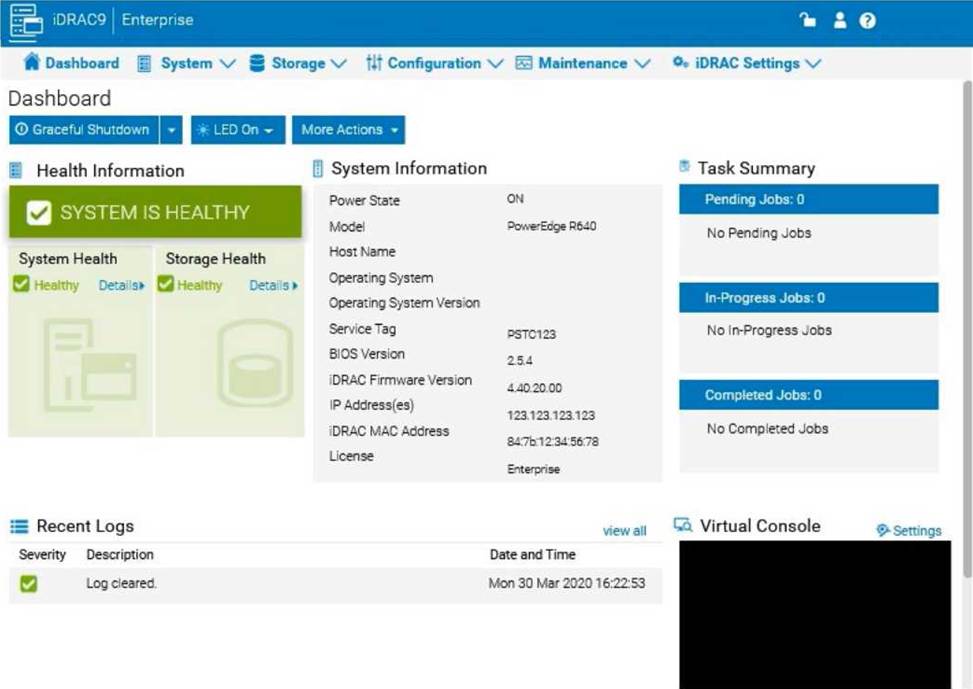
Step-by-Step Guide:
Navigate to Power Management Settings:
In the iDRAC interface, go to the Configuration tab at the top. Select Power Management from the dropdown options.
Locate the Power Configuration Section:
Within the Power Management settings, look for a section labeled Power Configuration or Power Supply Configuration.
Select the Redundancy Policy:
Change the Redundancy Policy to 2+0. In this configuration, there will be no redundancy, and both power supplies will be active but configured as independent power sources without failover. Set PSU2 as the Primary PSU:
Locate the option to designate the Primary PSU. Select PSU2 as the primary power source. This setting ensures that PSU2 will handle the primary power load under normal conditions.
Apply and Save Changes:
Once you have made these changes, click Apply or Save to confirm the new configuration.
The interface may prompt for confirmation, after which the settings will be saved, and PSU2 will become the primary power supply under a 2+0 configuration.
Verify Configuration:
Review the updated settings to confirm that PSU2 is now set as primary and that the redundancy policy is 2+0, meaning only PSU2 is actively providing power without a secondary backup.
By following these steps in the iDRAC simulator, you will set up PSU2 as the primary power source with no redundancy, ensuring a 2+0 configuration. This setup will leverage PSU2 exclusively without automatic failover to another power supply.
An existing server is transferred to a new location. When the iDRAC port is plugged into the network, it causes an IP conflict. The technician is directed to change iDRAC settings via the LCD Front Panel Display. There is NO option to make changes.
What is the most probable cause of this issue?
- A . The LCD Front Panel Display can only be used for initial iDRAC configuration.
- B . iDRAC settings can NOT be changed from LCD Front Panel once the OS has started.
- C . LCD Front Panel Display functionality has been limited to view only state in iDRAC
- D . iDRAC port settings can NOT be configured via LCD Front Panel Display.
What is a characteristic of out-of-band management?
- A . Less secure
- B . Agent based
- C . Dependent upon OS
- D . Dedicated device
SPECIAL INSTRUCTIONS
The remaining Part1 questions are associated with four case studies that describe various environments or settings. Each case study appears on its own display screen. Questions for each case study will appear on separate display screens. When displaying a question, you can easily review the related case study by clicking on the ‘Review Case Study icon shown below:
Case Study 5 – Refer to the Exhibit.
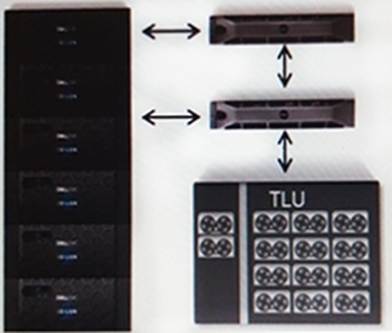
Backing up data from a Dell EMC Isilon cluster exceeds the company’s backup window. Because the company has a large amount of data with a continuous high growth rate, they want to change their backup strategy. The Gen 6 Isilon cluster consists of 24 nodes.
Their current backup strategy is an NDMP three-way backup performing weekly full backups to tape and incremental backups each night. The strategy uses Dell EMC Net Worker. The DMA uses Include paths to specify what data to backup. All data on the cluster must remain accessible.
The company’s IT team is now looking for a new data protection strategy.
The company wants to:
– Minimize the backup window
– Increase the speed of data recovery
– Reduce the network traffic
– Reduce the overall growth of the backup datasets
The IT Team indicates that their currently backup hardware will be used in any solution.
Which solution meets their requirements?
- A . Implement an incremental forever backup strategy
- B . Configure the DMA to use IPv6 for better performance
- C . Change the backup strategy to token-based backups
- D . Increase the backup tape block size to 512 KB
Which operation should a technician perform to ensure configuration recovery if a server must be physically replaced?
- A . View and export the current hardware inventory
- B . Create and export a Server Configuration Profile
- C . Back up and export the Server Profile to a network share
- D . Back up the Server Profile to vFlash
A technician must update the firmware on a savor, but has no network connectivity.
What can the technician use to update the BIOS and iDRAC/ lifecycle Controller firmware?
- A . OpenManage Server administrator DVD
- B . ftp dell.com
- C . NFS share
- D . USB key with Dell Update Package
Which application reduces the manual effort to update 500 Dell EMC PowerEdge R750 servers?
- A . iDRAC9
- B . Lifecycle Controller
- C . OpenManage Enterprise
- D . OpenManage Server Administrator
The Support Assist Setup Wizard is displayed only for users who are part of the Support Assist Admins group. Your administrator has added you to the group, but you are still having connection issues when you launch your browser.
What did you fail to configure?
- A . L2TP Server for connection to https://emc.dell.com
- B . Proxy Server for connection to https://api.dell.com
- C . L2TP Server for connection to https://api.dell.com
- D . Proxy Server for connection to https://dell.com/support