
DELL EMC D-PE-OE-23 Practice Exams
Last updated on Oct 22,2026- Exam Code: D-PE-OE-23
- Exam Name: Dell Technologies PowerEdge Operate 2023
- Certification Provider: DELL EMC
- Latest update: Oct 22,2026
A technician receives a new server with five drives.
They need to configure the drives based on the following requirements received from the administrator:
– Drive 0 as a single disk with no RAID
– Drives 1-3 as a RAID 5 with drive 4 as a hot spare just for this newly created RAID 5
The administrator plans to add more disks as separate RAID arrays at a later date but only wants drive 4 to be available for this first RAID 5 set.
How should the technician configure the drives?
- A . Set drive 0 to Ready; set drives 1-3 as RAID 5; set drive 4 as a Global Hot Spare
- B . Set drive 0 to Non-Raid; set drives 1-3 as RAID 5; set drive 4 as a Dedicated Hot Spare
- C . Set drive 0 to Non-Raid; set drives 1-3 as RAID 5; set drive 4 as a Global Hot Spare
- D . Set drive 0 to Ready; set drives 1-3 as RAID 5; set drive 4 as a Dedicated Hot Spare
The Dell PowerEdge server uses SEDs. The server is being repurposed for a new solution, and the data on the drives must be permanently deleted.
How can this be accomplished?
- A . Remove RAID configuration
- B . NVRAM Clear
- C . Format and Reinstall
- D . Secure Erase
D
Explanation:
Permanently Deleting Data on Self-Encrypting Drives (SEDs) in a Dell PowerEdge Server Server Components (26%)
Define storage options, Drives, PERC, IDSDM, and BOSS
Analyze server security features
Understanding Self-Encrypting Drives (SEDs)
SEDs are hard drives or SSDs that automatically encrypt all data written to them using a built-in encryption engine.
Benefits:
Enhanced data security.
Protection of data at rest.
Simplified disposal or repurposing processes through secure key management.
Methods to Permanently Delete Data on SEDs
Secure Erase:
Secure Erase is a process that performs a cryptographic erase by deleting the encryption keys stored within the drive.
Once the encryption key is erased, all data on the drive becomes unrecoverable, as it cannot be decrypted.
Advantages:
Fast and efficient method to render data inaccessible. Complies with data sanitization standards and regulations.
Implementation:
Can be initiated via the drive’s firmware commands.
Dell provides tools within the iDRAC or BIOS to perform Secure Erase operations on SEDs.
Explanation of Options
Option A: Remove RAID configuration
Deleting the RAID configuration removes the logical drive mappings but does not erase the actual data stored on the physical drives.
Data can potentially be recovered using data recovery tools.
Conclusion: Does not securely delete data.
Option B: NVRAM Clear
Clearing NVRAM resets BIOS settings to default.
Does not affect data stored on drives.
Conclusion: Ineffective for deleting drive data.
Option C: Format and Reinstall
Formatting the drives and reinstalling the operating system overwrites some data areas.
Does not guarantee that all data is overwritten.
Data recovery techniques can potentially retrieve residual data. Conclusion: Not a secure method for data deletion on SEDs.
Option D: Secure Erase
Performs a cryptographic erase by deleting the encryption keys.
Ensures that data cannot be recovered.
Conclusion: Correct Answer.
Dell Operate Reference
Server Components (26%)
Define storage options, Drives: Understanding the types of drives used and their management.
Analyze server security features: Knowledge of data protection and sanitization methods is crucial for maintaining data security.
Server Troubleshooting (32%)
Explain Configuration Validation, crash capture, and minimum to POST: While not directly related, understanding system configurations assists in performing operations like Secure Erase.
Conclusion
To permanently delete data on SEDs in a Dell PowerEdge server, Secure Erase should be performed. This method ensures that the encryption keys are destroyed, rendering all data on the drives inaccessible and irrecoverable.
A server has six memory modules attached to each CPU Memory Optimizer mode is configured. The user now wants to have maximum protection for the memory but cannot afford to lose any memory space.
What should the technician install/configure?
- A . No additional memory
Switch on Single Rank Spare Mode - B . No additional memory
Switch to memory Mirroring - C . Six additional memory modules matching the original
Switch on Single Rank Spare Mode - D . Six additional memory modules matching the original
Switch to Memory Mirroring
A server in an unattended remote site powers down unexpectedly. The technician assigned to the customer cannot arrive on-site until tomorrow. The customer needs the server back up and running today.
What should the technician do?
- A . Issue a Power Supply Unit reseat command using a remote CLI
- B . Use the RDP utility and power the server on remotely
- C . Access the iDRAC interface and power the server on remotely
- D . Log into the Lifecycle Controller and remotely power on the server
Refer to the exhibit.
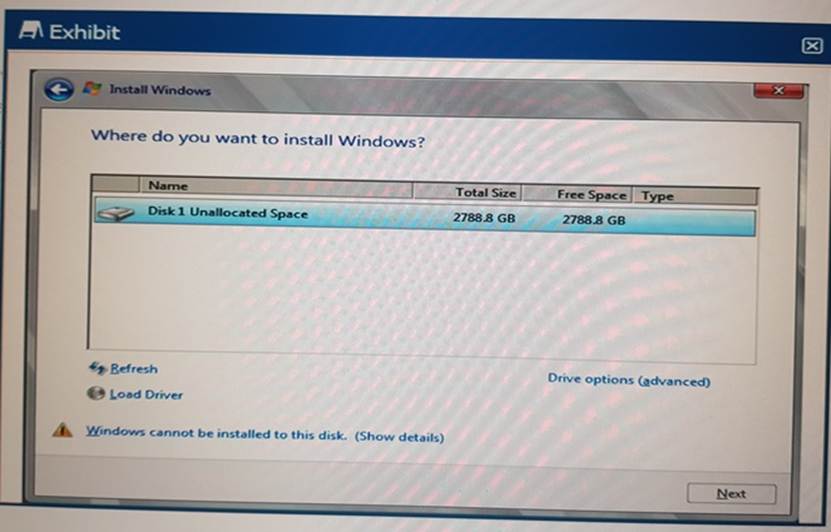
A technician it installing an OS to a server. The OS array is 2.8TBs. The OS install is unable to start.
What should the technician do to install the OS?
- A . Switch the boot settings to UEFI
- B . Use USB to load Storage Drivers
- C . Use LC to install the OS
- D . Switch the Hard Drive boot sequence so that C: is first
After a disk rebuild operation, a technician needs to configure the system so that the rebuild process happens faster in the future, even at the expense of stowing users down.
How should the technician perform this task?
- A . Change the System Profile to Performance in the System BIOS Setting
- B . Change the Rebuild Rate in the System BIOS Settings
- C . Change the System Profile 1o performance in the iDRAC GUI
- D . Change the Rebuild Rate from me iDRAC GUI
A system board has been replaced on a Dell PowerEdge 16G server.
What data can Easy Restore recover?
- A . Service Tag
- B . HBA configuration
- C . PERC configuration
- D . Lifecycle controller log
A
Explanation:
Understanding Easy Restore Functionality
Server Troubleshooting (32%)
Explain Easy Restore, diagnostic utilities, and hardware diagnostic options
What is Easy Restore?
Easy Restore is a feature in Dell PowerEdge servers that automatically restores system-specific information after a system board replacement.
Purpose: Minimizes downtime and simplifies recovery by retaining critical system identity information.
Data Restored by Easy Restore
Service Tag: The unique identifier (serial number) of the server.
System Configuration Settings: Includes BIOS settings and other non-volatile configurations.
Data NOT Restored by Easy Restore
Option B: HBA Configuration
Host Bus Adapter settings are not restored automatically.
Option C: PERC Configuration
RAID configurations need to be backed up and restored separately.
Option D: Lifecycle Controller Log
Logs are stored on the system board and do not transfer after replacement.
Evaluation of Options
Option A: Service Tag
Correct Answer. Easy Restore recovers the Service Tag, preserving the server’s identity.
Option B: HBA Configuration
Analysis: Requires manual configuration or restoration from a backup.
Option C: PERC Configuration
Analysis: RAID settings are critical but need separate backup and restoration procedures.
Option D: Lifecycle Controller Log
Analysis: Logs are not preserved after system board replacement.
Dell Operate Reference
Server Troubleshooting (32%)
Highlights the importance of understanding what Easy Restore can and cannot recover.
Conclusion
After replacing the system board on a Dell PowerEdge 16G server, Easy Restore will recover the Service Tag, ensuring the server maintains its unique identity within the network and management systems.
Which iDRAC feature allows users to view video recordings of the last three power cycles?
- A . Diagnostics
- B . Virtual Console
- C . System debug logs
- D . Boot and Crash Capture
A technician is deploying a new server in a datacenter and must install Microsoft Windows Server 2016. They have placed the OS media in the DVD attached to the server.
What does the technician need to do to install the OS using the Lifecycle Controller?
- A . Disable iDRAC virtual media
- B . Configure storage
- C . Configure Lifecycle Controller network settings
- D . Restore server profile
A server is equipped with 2 CPUs and 12x 8 GB DIMMs, for a total of 96 GB. The OS is not seeing all the memory.
Which memory mode should be configured so that all memory is seen by the OS?
- A . Mirroring
- B . Advanced ECC
- C . Optimizer
- D . Sparing