
Databricks Databricks Certified Data Analyst Associate Practice Exams
Last updated on Oct 21,2026- Exam Code: Databricks Certified Data Analyst Associate
- Exam Name: Databricks Certified Data Analyst Associate Exam
- Certification Provider: Databricks
- Latest update: Oct 21,2026
Which location can be used to determine the owner of a managed table?
- A . Review the Owner field in the table page using Catalog Explorer
- B . Review the Owner field in the database page using Data Explorer
- C . Review the Owner field in the schema page using Data Explorer
- D . Review the Owner field in the table page using the SQL Editor
A
Explanation:
In Databricks, to determine the owner of a managed table, you can utilize the Catalog Explorer
feature. The steps are as follows:
Access Catalog Explorer:
In your Databricks workspace, click on the Catalog icon in the sidebar to open Catalog Explorer.
Navigate to the Table:
Within Catalog Explorer, browse through the catalog and schema to locate the specific managed
table whose ownership you wish to verify.
View Table Details:
Click on the table name to open its details page.
Identify the Owner:
On the table’s details page, review the Owner field, which displays the principal (user, service principal, or group) that owns the table.
This method provides a straightforward way to ascertain the ownership of managed tables within the Databricks environment. Understanding table ownership is essential for managing permissions and ensuring proper access control.
Reference: Manage Unity Catalog object ownership
A data scientist has asked a data analyst to create histograms for every continuous variable in a data set. The data analyst needs to identify which columns are continuous in the data set.
What describes a continuous variable?
- A . A quantitative variable that never stops changing
- B . A quantitative variable Chat can take on a finite or countably infinite set of values
- C . A quantitative variable that can take on an uncountable set of values
- D . A categorical variable in which the number of categories continues to increase over time
C
Explanation:
A continuous variable is a type of quantitative variable that can assume an infinite number of values within a given range. This means that between any two possible values, there can be an infinite number of other values. For example, variables such as height, weight, and temperature are continuous because they can be measured to any level of precision, and there are no gaps between possible values. This is in contrast to discrete variables, which can only take on specific, distinct values (e.g., the number of children in a family). Understanding the nature of continuous variables is crucial for data analysts, especially when selecting appropriate statistical methods and visualizations, such as histograms, to accurately represent and analyze the data.
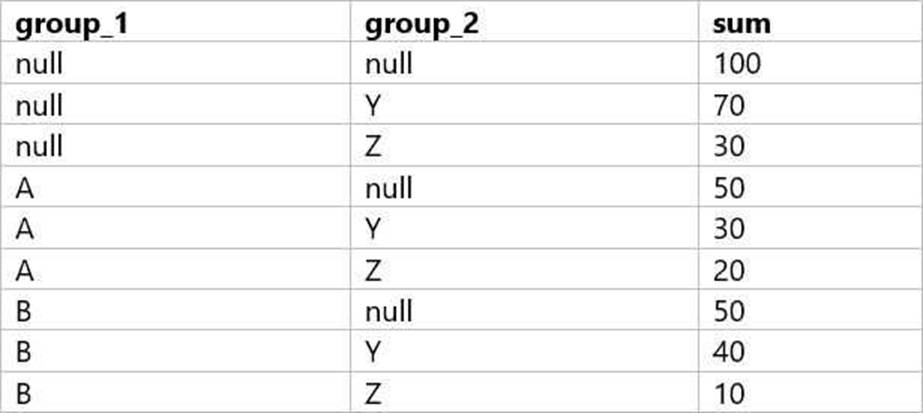
A data analyst is processing a complex aggregation on a table with zero null values and their query returns the following result:
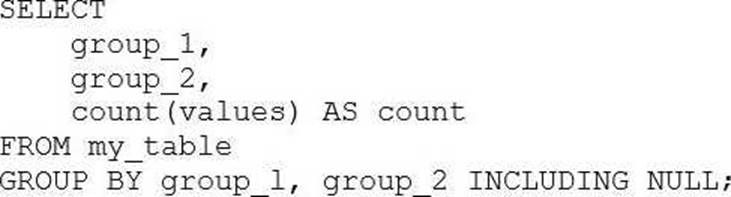
Which of the following queries did the analyst run to obtain the above result?
A)
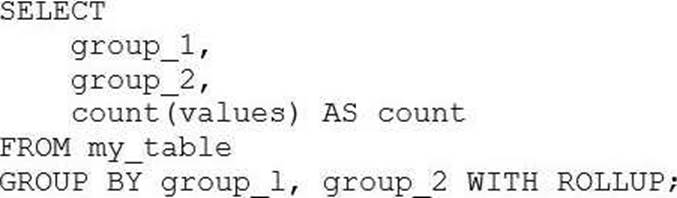
B)
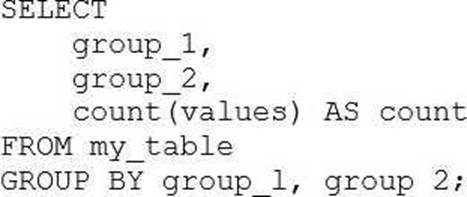
C)
D)
E)
- A . Option A
- B . Option B
- C . Option C
- D . Option D
- E . Option E
B
Explanation:
The result set provided shows a combination of grouping by two columns (group_1 and group_2) with subtotals for each level of grouping and a grand total. This pattern is typical of a GROUP BY … WITH ROLLUP operation in SQL, which provides subtotal rows and a grand total row in the result set.
Considering the query options:
A) Option A: GROUP BY group_1, group_2 INCLUDING NULL – This is not a standard SQL clause and would not result in subtotals and a grand total.
B) Option B: GROUP BY group_1, group_2 WITH ROLLUP – This would create subtotals for each unique group_1, each combination of group_1 and group_2, and a grand total, which matches the result set provided.
C) Option C: GROUP BY group_1, group 2 – This is a simple GROUP BY and would not include subtotals or a grand total.
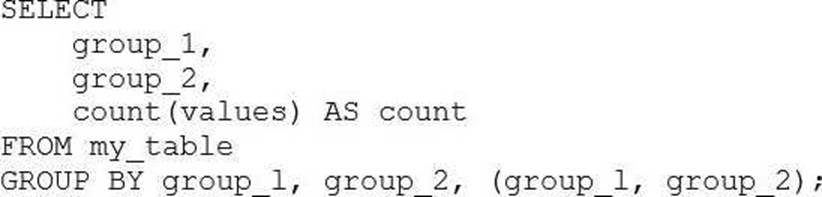
D) Option D: GROUP BY group_1, group_2, (group_1, group_2) – This syntax is not standard and would likely result in an error or be interpreted as a simple GROUP BY, not providing the subtotals and grand total.
E) Option E: GROUP BY group_1, group_2 WITH CUBE – The WITH CUBE operation produces subtotals for all combinations of the selected columns and a grand total, which is more than what is shown in
the result set.
The correct answer is Option B, which uses WITH ROLLUP to generate the subtotals for each level of grouping as well as a grand total. This matches the result set where we have subtotals for each group_1, each combination of group_1 and group_2, and the grand total where both group_1 and group_2 are NULL.
In which of the following situations will the mean value and median value of variable be meaningfully different?
- A . When the variable contains no outliers
- B . When the variable contains no missing values
- C . When the variable is of the boolean type
- D . When the variable is of the categorical type
- E . When the variable contains a lot of extreme outliers
E
Explanation:
The mean value of a variable is the average of all the values in a data set, calculated by dividing the sum of the values by the number of values. The median value of a variable is the middle value of the ordered data set, or the average of the middle two values if the data set has an even number of values. The mean value is sensitive to outliers, which are values that are very different from the rest of the data. Outliers can skew the mean value and make it less representative of the central tendency of the data. The median value is more robust to outliers, as it only depends on the middle values of the data. Therefore, when the variable contains a lot of extreme outliers, the mean value and the median value will be meaningfully different, as the mean value will be pulled towards the outliers, while the median value will remain close to the majority of the data1.
Reference: Difference Between Mean and Median in Statistics (With Example) – BYJU’S
A data analyst creates a Databricks SQL Query where the result set has the following schema:
region STRING
number_of_customer INT
When the analyst clicks on the "Add visualization" button on the SQL Editor page, which of the following types of visualizations will be selected by default?
- A . Violin Chart
- B . Line Chart
- C . IBar Chart
- D . Histogram
- E . There is no default. The user must choose a visualization type.
C
According to the Databricks SQL documentation, when a data analyst clicks on the “Add visualization” button on the SQL Editor page, the default visualization type is Bar Chart. This is because the result set has two columns: one of type STRING and one of type INT. The Bar Chart visualization automatically assigns the STRING column to the X-axis and the INT column to the Y-axis. The Bar Chart visualization is suitable for showing the distribution of a numeric variable across different categories.
Reference: Visualization in Databricks SQL, Visualization types
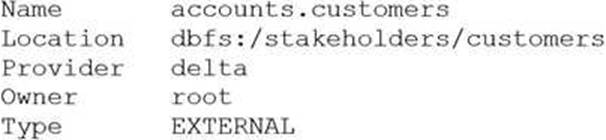
After running DESCRIBE EXTENDED accounts.customers;, the following was returned:
Now, a data analyst runs the following command:
DROP accounts.customers;
Which of the following describes the result of running this command?
- A . Running SELECT * FROM delta. `dbfs:/stakeholders/customers` results in an error.
- B . Running SELECT * FROM accounts.customers will return all rows in the table.
- C . All files with the .customers extension are deleted.
- D . The accounts.customers table is removed from the metastore, and the underlying data files are deleted.
- E . The accounts.customers table is removed from the metastore, but the underlying data files are untouched.
E
Explanation:
the accounts.customers table is an EXTERNAL table, which means that it is stored outside the default warehouse directory and is not managed by Databricks. Therefore, when you run the DROP command on this table, it only removes the metadata information from the metastore, but does not delete the actual data files from the file system. This means that you can still access the data using the location path (dbfs:/stakeholders/customers) or create another table pointing to the same location. However, if you try to query the table using its name (accounts.customers), you will get an error because the table no longer exists in the metastore.
Reference: DROP TABLE | Databricks on AWS, Best practices for dropping a managed Delta Lake table – Databricks
Which of the following describes how Databricks SQL should be used in relation to other business intelligence (BI) tools like Tableau, Power BI, and looker?
- A . As an exact substitute with the same level of functionality
- B . As a substitute with less functionality
- C . As a complete replacement with additional functionality
- D . As a complementary tool for professional-grade presentations
- E . As a complementary tool for quick in-platform Bl work
E
Databricks SQL is not meant to replace or substitute other BI tools, but rather to complement them by providing a fast and easy way to query, explore, and visualize data on the lakehouse using the built-in SQL editor, visualizations, and dashboards. Databricks SQL also integrates seamlessly with popular BI tools like Tableau, Power BI, and Looker, allowing analysts to use their preferred tools to access data through Databricks clusters and SQL warehouses. Databricks SQL offers low-code and no-code experiences, as well as optimized connectors and serverless compute, to enhance the productivity and performance of BI workloads on the lakehouse.
Reference: Databricks SQL, Connecting Applications and BI Tools to Databricks SQL, Databricks integrations
overview, Databricks SQL: Delivering a Production SQL Development Experience on the Lakehouse
Which of the following approaches can be used to connect Databricks to Fivetran for data ingestion?
- A . Use Workflows to establish a SQL warehouse (formerly known as a SQL endpoint) for Fivetran to interact with
- B . Use Delta Live Tables to establish a cluster for Fivetran to interact with
- C . Use Partner Connect’s automated workflow to establish a cluster for Fivetran to interact with
- D . Use Partner Connect’s automated workflow to establish a SQL warehouse (formerly known as a SQL endpoint) for Fivetran to interact with
- E . Use Workflows to establish a cluster for Fivetran to interact with
C
Explanation:
Partner Connect is a feature that allows you to easily connect your Databricks workspace to Fivetran and other ingestion partners using an automated workflow. You can select a SQL warehouse or a cluster as the destination for your data replication, and the connection details are sent to Fivetran. You can then choose from over 200 data sources that Fivetran supports and start ingesting data into Delta Lake.
Reference: Connect to Fivetran using Partner Connect, Use Databricks with Fivetran
Which of the following benefits of using Databricks SQL is provided by Data Explorer?
- A . It can be used to run UPDATE queries to update any tables in a database.
- B . It can be used to view metadata and data, as well as view/change permissions.
- C . It can be used to produce dashboards that allow data exploration.
- D . It can be used to make visualizations that can be shared with stakeholders.
- E . It can be used to connect to third party Bl cools.
B
Explanation:
Data Explorer is a user interface that allows you to discover and manage data, schemas, tables, models, and permissions in Databricks SQL. You can use Data Explorer to view schema details, preview sample data, and see table and model details and properties. Administrators can view and change owners, and admins and data object owners can grant and revoke
permissions1.
Reference: Discover and manage data using Data Explorer
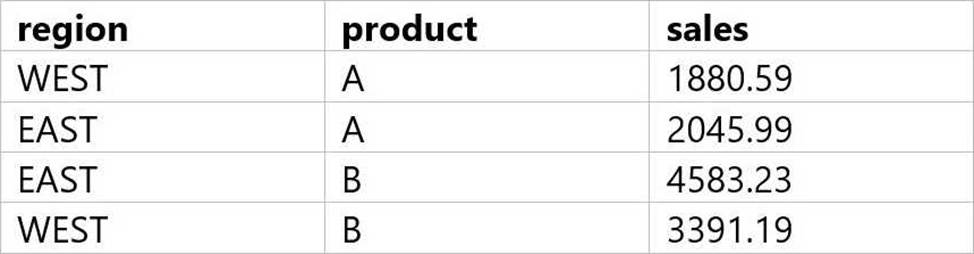
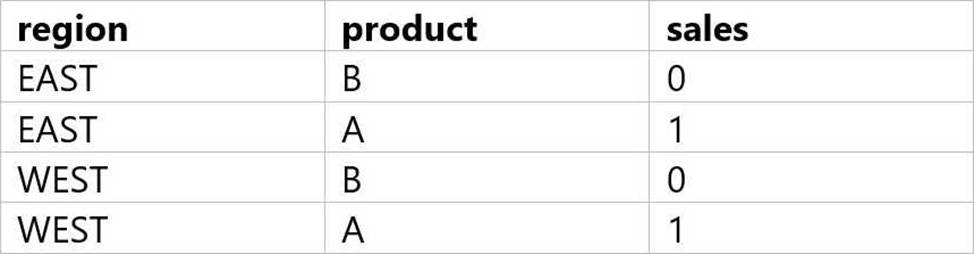
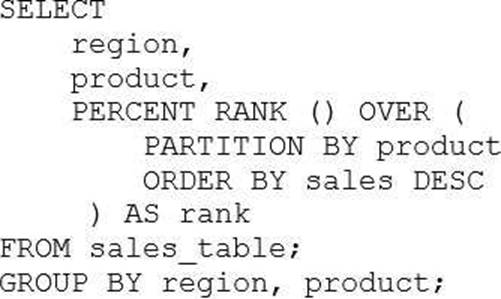
A data analyst has been asked to use the below table sales_table to get the percentage rank of products within region by the sales:
The result of the query should look like this:
Which of the following queries will accomplish this task?
A)
B)
C)
D)
- A . Option A
- B . Option B
- C . Option C
- D . Option D
B
Explanation:
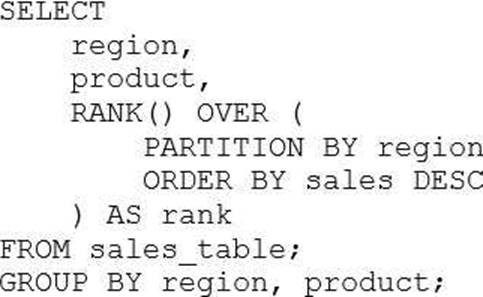
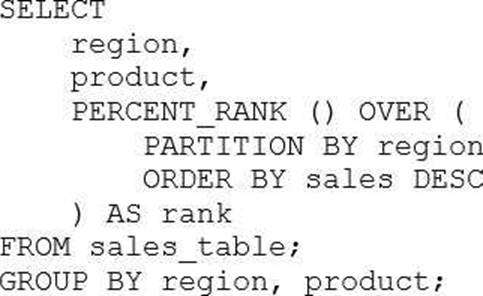
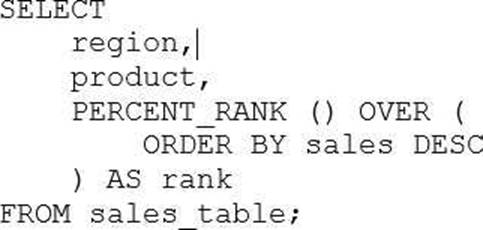
The correct query to get the percentage rank of products within region by the sales is option B. This query uses the PERCENT_RANK() window function to calculate the relative rank of each product within each region based on the sales amount. The window function is partitioned by region and ordered by sales in descending order. The result is aliased as rank and displayed along with the region and product columns.
The other options are incorrect because:
A) Option A uses the RANK() window function instead of the PERCENT_RANK() function. The RANK() function returns the rank of each row within the partition, but not the percentage rank. Also, the query does not have a GROUP BY clause, which is required for aggregate functions like SUM().
C) Option C uses the DENSE_RANK() window function instead of the PERCENT_RANK() function. The DENSE_RANK() function returns the rank of each row within the partition, but not the percentage rank. Also, the query does not have a GROUP BY clause, which is required for aggregate functions like SUM().
D) Option D uses the ROW_NUMBER() window function instead of the PERCENT_RANK() function. The ROW_NUMBER() function returns the sequential number of each row within the partition, but not the percentage rank. Also, the query does not have a GROUP BY clause, which is required for aggregate functions like SUM().
Reference:
1: PERCENT_RANK (Transact-SQL)
2: Window functions in Databricks SQL
3: Databricks Certified Data Analyst Associate Exam Guide