
Databricks Databricks Certified Data Analyst Associate Practice Exams
Last updated on Oct 21,2026- Exam Code: Databricks Certified Data Analyst Associate
- Exam Name: Databricks Certified Data Analyst Associate Exam
- Certification Provider: Databricks
- Latest update: Oct 21,2026
A data analyst is attempting to drop a table my_table. The analyst wants to delete all table metadata and data.
They run the following command:
DROP TABLE IF EXISTS my_table;
While the object no longer appears when they run SHOW TABLES, the data files still exist.
Which of the following describes why the data files still exist and the metadata files were deleted?
- A . The table’s data was larger than 10 GB
- B . The table did not have a location
- C . The table was external
- D . The table’s data was smaller than 10 GB
- E . The table was managed
C
Explanation:
An external table is a table that is defined in the metastore, but its data is stored outside of the Databricks environment, such as in S3, ADLS, or GCS. When an external table is dropped, only the metadata is deleted from the metastore, but the data files are not affected. This is different from a managed table, which is a table whose data is stored in the Databricks environment, and whose data files are deleted when the table is dropped. To delete the data files of an external table, the analyst needs to specify the PURGE option in the DROP TABLE command, or manually delete the files from the storage system.
Reference: DROP TABLE, Drop Delta table features, Best practices for dropping a managed Delta Lake table
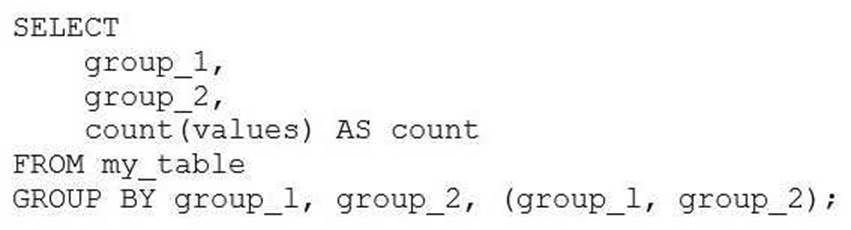
A data analyst is processing a complex aggregation on a table with zero null values and the query returns the following result:
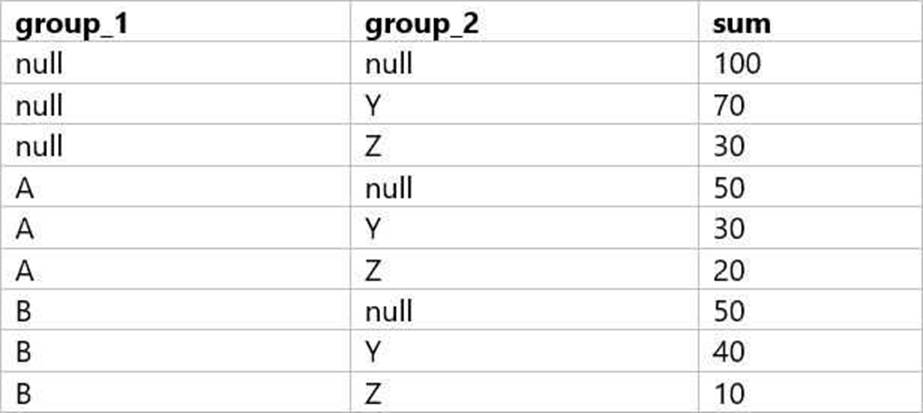
Which query did the analyst execute in order to get this result?
A)
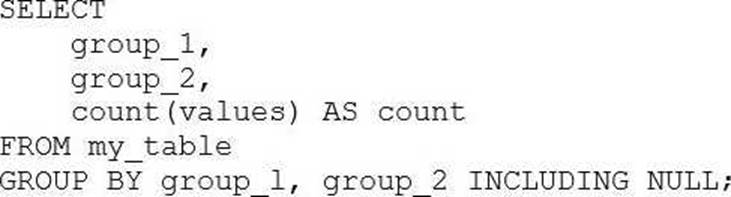
B)
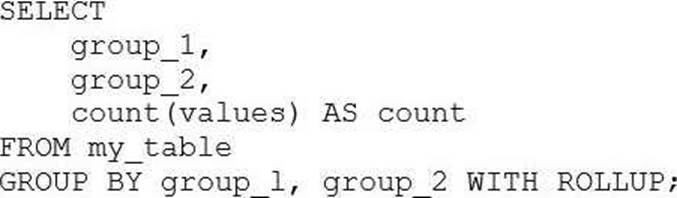
C)
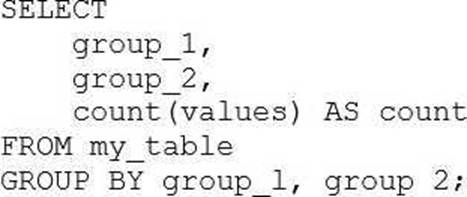
D)
- A . Option A
- B . Option B
- C . Option C
- D . Option D
A data analyst has been asked to configure an alert for a query that returns the income in the accounts_receivable table for a date range. The date range is configurable using a Date query parameter.
The Alert does not work.
Which of the following describes why the Alert does not work?
- A . Alerts don’t work with queries that access tables.
- B . Queries that return results based on dates cannot be used with Alerts.
- C . The wrong query parameter is being used. Alerts only work with Date and Time query parameters.
- D . Queries that use query parameters cannot be used with Alerts.
- E . The wrong query parameter is being used. Alerts only work with drogdown list query parameters, not dates.
D
Explanation:
The reason the alert is not functioning as expected is because Databricks SQL Alerts do not support query parameters. This limitation applies to all types of parameters, including date parameters.
Here’s why:
Alerts require static, deterministic query results so they can compare values consistently during scheduled executions.
When a query includes parameters (e.g., a date range parameter), its results may change based on user input or the default value set in the query editor.
However, Databricks SQL Alerts will always use the default value set for the parameter at the time the alert is created. This means the alert doesn’t dynamically adapt to new date ranges and will not reflect changes unless the query is manually updated.
As a result, if the business logic behind the alert depends on changing date ranges or any user input, the alert will not trigger correctly, or may never trigger at all.
Therefore, the correct explanation contradicts Option B, which is incorrect in saying that alerts
cannot work with date-based queries at all. In fact, they can―as long as the query is static (i.e.,
without parameters).
Reference: Databricks SQL Alerts Documentation
Databricks Knowledge: “You cannot use alerts with queries that contain parameters.”
Which of the following statements about adding visual appeal to visualizations in the Visualization Editor is incorrect?
- A . Visualization scale can be changed.
- B . Data Labels can be formatted.
- C . Colors can be changed.
- D . Borders can be added.
- E . Tooltips can be formatted.
D
The Visualization Editor in Databricks SQL allows users to create and customize various types of charts and visualizations from the query results. Users can change the visualization type, select the data fields, adjust the colors, format the data labels, and modify the tooltips. However, there is no option to add borders to the visualizations in the Visualization Editor. Borders are not a supported feature of the new chart visualizations in Databricks1. Therefore, the statement that borders can be added is incorrect.
Reference: New chart visualizations in Databricks | Databricks on AWS
A data analyst created and is the owner of the managed table my_ table. They now want to change ownership of the table to a single other user using Data Explorer.
Which of the following approaches can the analyst use to complete the task?
- A . Edit the Owner field in the table page by removing their own account
- B . Edit the Owner field in the table page by selecting All Users
- C . Edit the Owner field in the table page by selecting the new owner’s account
- D . Edit the Owner field in the table page by selecting the Admins group
- E . Edit the Owner field in the table page by removing all access
C
Explanation:
The Owner field in the table page shows the current owner of the table and allows the owner to change it to another user or group. To change the ownership of the table, the owner can click on the Owner field and select the new owner from the drop-down list. This will transfer the ownership of the table to the selected user or group and remove the previous owner from the list of table access control entries1.
The other options are incorrect because:
Which statement about subqueries is correct?
- A . Subqueries are not available in Databricks SQL
- B . Subqueries can be used like other user-defined functions to transform data into different data types.
- C . Subqueries can retrieve data without requiring the creation of a table or view.
- D . Subqueries can be used like other built-in functions to transform data into different data types.
C
Explanation:
In Databricks SQL, a subquery is a nested query within a larger SQL query that allows for the retrieval of data without the necessity of creating a table or view. This is particularly useful for simplifying complex queries by breaking them down into more manageable parts. Subqueries can be employed in various clauses such as SELECT, FROM, and WHERE to perform operations like filtering, transforming, and aggregating data on-the-fly. This flexibility enhances query efficiency and readability without the overhead of persisting intermediate results as separate tables or views.
Reference: Databricks SQL Query Syntax
A data analyst has recently joined a new team that uses Databricks SQL, but the analyst has never used Databricks before. The analyst wants to know where in Databricks SQL they can write and execute SQL queries.
On which of the following pages can the analyst write and execute SQL queries?
- A . Data page
- B . Dashboards page
- C . Queries page
- D . Alerts page
- E . SQL Editor page
E
Explanation:
The SQL Editor page is where the analyst can write and execute SQL queries in Databricks SQL. The SQL Editor page has a query pane where the analyst can type or paste SQL statements, and a results pane where the analyst can view the query results in a table or a chart. The analyst can also browse data objects, edit multiple queries, execute a single query or multiple queries, terminate a query, save a query, download a query result, and more from the SQL Editor page.
Reference: Create a query in SQL editor
In which of the following situations should a data analyst use higher-order functions?
- A . When custom logic needs to be applied to simple, unnested data
- B . When custom logic needs to be converted to Python-native code
- C . When custom logic needs to be applied at scale to array data objects
- D . When built-in functions are taking too long to perform tasks
- E . When built-in functions need to run through the Catalyst Optimizer
C
Explanation:
Higher-order functions are a simple extension to SQL to manipulate nested data such as arrays. A higher-order function takes an array, implements how the array is processed, and what the result of the computation will be. It delegates to a lambda function how to process each item in the array. This allows you to define functions that manipulate arrays in SQL, without having to unpack and repack them, use UDFs, or rely on limited built-in functions. Higher-order functions provide a performance benefit over user defined functions.
Reference: Higher-order functions | Databricks on AWS, Working with Nested Data Using Higher Order Functions in SQL on Databricks | Databricks Blog, Higher-order functions – Azure Databricks | Microsoft Learn, Optimization recommendations on Databricks | Databricks on AWS
What does Partner Connect do when connecting Power Bl and Tableau?
- A . Creates a Personal Access Token. downloads and installs an ODBC driver, and downloads a configuration file for connection by Power Bl or Tableau to a SQL Warehouse (formerly known as a SQL Endpoint).
- B . Creates a Personal Access Token for authentication into Databricks SQL and emails it to you.
- C . Downloads a configuration file for connection by Power Bl or Tableau to a SQL Warehouse (formerly known as a SQL Endpoint).
- D . Downloads and installs an ODBC driver.
A
Explanation:
When connecting Power BI and Tableau through Databricks Partner Connect, the system automates several steps to streamline the integration process:
Personal Access Token Creation: Partner Connect generates a Databricks personal access token, which is essential for authenticating and establishing a secure connection between Databricks and the BI tools.
ODBC Driver Installation: The appropriate ODBC driver is downloaded and installed. This driver facilitates communication between the BI tools and Databricks, ensuring compatibility and optimal performance.
Configuration File Download: A configuration file tailored for the selected BI tool (Power BI or Tableau) is provided. This file contains the necessary connection details, simplifying the setup process within the BI tool.
By automating these steps, Partner Connect ensures a seamless and efficient integration, reducing manual configuration efforts and potential errors.
Reference: Connect Tableau and Databricks
Which of the following approaches can be used to ingest data directly from cloud-based object storage?
- A . Create an external table while specifying the DBFS storage path to FROM
- B . Create an external table while specifying the DBFS storage path to PATH
- C . It is not possible to directly ingest data from cloud-based object storage
- D . Create an external table while specifying the object storage path to FROM
- E . Create an external table while specifying the object storage path to LOCATION
E
Explanation:
External tables are tables that are defined in the Databricks metastore using the information stored in a cloud object storage location. External tables do not manage the data, but provide a schema and a table name to query the data. To create an external table, you can use the CREATE EXTERNAL TABLE statement and specify the object storage path to the LOCATION clause. For example, to create an external table named ext_table on a Parquet file stored in S3, you can use the following statement: SQL
CREATE EXTERNAL TABLE ext_table (
col1 INT,
col2 STRING
)
STORED AS PARQUET
LOCATION ‘s3://bucket/path/file.parquet’
AI-generated code. Review and use carefully. More info on FAQ.
Reference: External tables