
CyberArk PAM-DEF-SEN Practice Exams
Last updated on Oct 22,2026- Exam Code: PAM-DEF-SEN
- Exam Name: CyberArk Defender – PAM & Sentry – PAM
- Certification Provider: CyberArk
- Latest update: Oct 22,2026
DRAG DROP
Match each automatic remediation to the correct PTA security event.
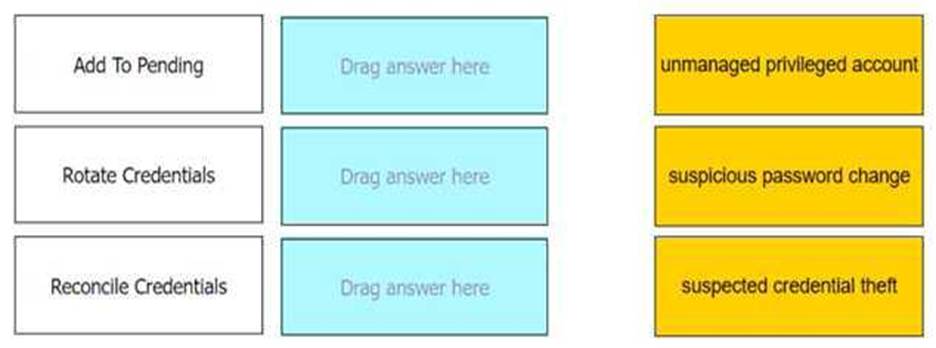
Add To Pending: Unmanaged privileged account
Rotate Credentials: Suspected credential theft
Reconcile Credentials: Suspicious password change
Comprehensive In CyberArk’s Privileged Threat Analytics (PTA), automatic remediations are actions that can be configured to respond to specific security events. For the event of an unmanaged privileged account, the remediation “Add To Pending” is used to add the account to the pending accounts queue. When there is a suspected credential theft, “Rotate Credentials” is the remediation that initiates a password change. Lastly, for a suspicious password change event, “Reconcile Credentials” is the remediation that ensures the credentials are correct and valid1.
Reference: CyberArk Docs: Configure security events
Which methods can you use to add a user directly to the Vault Admin Group? (Choose three.)
- A . REST API
- B . PrivateArk Client
- C . PACLI
- D . PVWA
- E . Active Directory
- F . Sailpoint
A, B, C
Explanation:
To add a user directly to the Vault Admin Group in CyberArk, you can use the following methods: REST API: The REST API allows for programmatic management of users and groups within the Vault, including adding users to the Vault Admin Group1.
PrivateArk Client: The PrivateArk Client provides a graphical interface for managing users and groups, and it can be used to add users directly to the Vault Admin Group2.
PACLI: The PACLI (Privileged Access Command Line Interface) is a command-line tool that enables administrators to manage the Vault, including adding users to groups2.
These methods provide different ways to manage users and their group memberships within the
CyberArk Vault, offering flexibility for administrators to choose the most suitable approach for their
needs.
Reference: CyberArk’s official documentation on using the REST API to manage users and groups1.
Information on managing users and groups through the PrivateArk Client and PACLI2.
A Vault administrator have associated a logon account to one of their Unix root accounts in the vault.
When attempting to verify the root account’s password the Central Policy Manager (CPM) will:
- A . ignore the logon account and attempt to log in as root
- B . prompt the end user with a dialog box asking for the login account to use
- C . log in first with the logon account, then run the SU command to log in as root using the password in the Vault
- D . none of these
C
Explanation:
According to the web search results, when a Vault administrator has associated a logon account to one of their Unix root accounts in the vault, the CPM will log in first with the logon account, then run the SU command to log in as root using the password in the Vault1. This is a common use case for using a logon account, as the best practice for Unix systems is to disallow the root user from logging in using SSH, which is what the CPM uses to sign in to a system to manage the password2. The logon account can be defined on the target account level or on the platform level, making it available to all accounts associated with the platform2. The CPM can also use the logon account to initiate PSM sessions to the target machine3.
When should vault keys be rotated?
- A . when it is copied to file systems outside the vault
- B . annually
- C . whenever a CyberArk user leaves the organization
- D . when migrating to a new data center
D
Explanation:
Vault keys should be rotated when there is a significant event that could potentially compromise the security of the keys, such as when migrating to a new data center. This is because the keys may be exposed to new environments and systems, and rotating them ensures that any potential exposure does not result in a security breach. Additionally, periodic rotation of encryption keys is recommended to maintain the integrity of the encryption and to adhere to best practices for security1.
Reference: CyberArk Docs: Credentials Rotation Policy2
HashiCorp Developer: Key Rotation
It is possible to restrict the time of day, or day of week that a [b]reconcile[/b] process can occur
- A . TRUE
- B . FALSE
A
Explanation:
It is possible to restrict the time of day, or day of week that a reconcile process can occur by using the Reconcile Safe option in the Platform Management section of the PrivateArk Client. This option allows the administrator to define the reconcile schedule for each platform, which specifies when the reconcile process can run and how often it should be performed. The reconcile schedule can be set to run daily, weekly, monthly, or on specific days and times. By restricting the reconcile process, the administrator can reduce the risk of unauthorized access to the accounts and improve the performance of the system.
Reference: [Defender PAM Course], Module 5: Reconcile and Rotate, Lesson 1: Reconcile and Rotate Overview,
Slide 9: Reconcile Safe
[Defender PAM Study Guide], Section 5.1: Reconcile and Rotate Overview, Page 24: Reconcile Safe [CyberArk Documentation], Privileged Access Security Implementation Guide, Chapter 5: Configure the Vault, Section 5.4: Configure Platforms, Subsection 5.4.2: Reconcile Safe
Where can you check that the LDAP binding is using TCP/636?
- A . in Active Directory under "Users OU" => "User Properties" => "External Bindings" => "Port"
- B . in PVWA, under "LDAP Integration" => "LDAP" => "Directories" => "" => "Hosts" => "Host"
- C . in PrivateArk Client, under "Tools" => "Administrative Tools" => "Directory Mapping" => ""
- D . From the PVWA, connect to the domain controller using Test-NetConnection on Port 636.
D
Explanation:
To check that the LDAP binding is using TCP/636, you can use the Test-NetConnection cmdlet from
the PVWA to connect to the domain controller on Port 636. This method allows you to verify that the
LDAP service is listening on the secure port and that the connection can be established using SSL/TLS,
which is typically associated with port 6361.
Reference: CyberArk Docs – LDAP Integration2
CyberArk Knowledge Article – How to test outgoing LDAP external directory connectivity to the vault
Your organization has a requirement to allow users to “check out passwords” and connect to targets
with the same account through the PSM.
What needs to be configured in the Master policy to ensure this will happen?
- A . Enforce check-in/check-out exclusive access = active; Require privileged session monitoring and isolation = active
- B . Enforce check-in/check-out exclusive access = inactive; Require privileged session monitoring and isolation = inactive
- C . Enforce check-in/check-out exclusive access = inactive; Record and save session activity = active
- D . Enforce check-in/check-out exclusive access = active; Record and save session activity = inactive
A
Explanation:
The Master Policy in CyberArk allows organizations to permit users to check out a ‘one-time’
password and lock it so that no other users can retrieve it at the same time. After the user has used
the password, they check the password back into the Vault, ensuring exclusive usage of the
privileged account. This is achieved by setting the ‘Enforce check-in/check-out exclusive access’ to
active. Additionally, to ensure that all sessions are monitored and isolated, the ‘Require privileged
session monitoring and isolation’ must also be set to active. This combination of settings guarantees
both the exclusive access to privileged accounts and the necessary session monitoring for security
and compliance purposes1.
Reference: CyberArk’s official documentation on Account check-out and check-in1.
The Master Policy overview provided by CyberArk2.
What is the purpose of the PrivateArk Server service?
- A . Executes password changes
- B . Maintains Vault metadata
- C . Makes Vault data accessible to components
- D . Sends email alerts from the Vault
C
Explanation:
The purpose of the PrivateArk Server service is to make Vault data accessible to components, such as the PVWA, the CPM, the PSM, and the PTA, and handle the requests from the clients and
components. The PrivateArk Server service is a Windows service that runs the Vault and communicates with the PrivateArk Database service, which maintains the Vault metadata. The PrivateArk Server service can start automatically or manually depending on the Server’s key configuration. The PrivateArk Server service can also be run in “console” mode for troubleshooting purposes1.
The other options are not the purpose of the PrivateArk Server service, although they may be related to other services or components of the Vault. The Central Policy Manager component is the component that executes password changes, verifications, and reconciliations for the accounts that are managed by the Vault. The Event Notification Engine service is the service that sends email alerts from the Vault, based on predefined events and recipients. The PrivateArk Client is a utility that allows the Vault administrator to access and manage the Vault data, users, groups, policies, and settings.
Reference: Server Components – CyberArk, section “The PrivateArk Server process (Dbmain)”
What is the purpose of the Immediate Interval setting in a CPM policy?
- A . To control how often the CPM looks for System Initiated CPM work.
- B . To control how often the CPM looks for User Initiated CPM work.
- C . To control how often the CPM rests between password changes.
- D . To Control the maximum amount of time the CPM will wait for a password change to complete.
B
Explanation:
The Immediate Interval setting in a CPM policy is used to control how often the CPM looks for User Initiated CPM work, such as manual password changes, retrievals, or requests. The Immediate Interval setting defines the frequency, in minutes, that the CPM will check the accounts that are associated with the policy and perform the actions that were initiated by the users. For example, if the Immediate Interval is set to 2, the CPM will check the accounts every 2 minutes and change, retrieve, or authorize the passwords according to the user requests. The Immediate Interval setting does not affect System Initiated CPM work, such as password changes, verifications, or reconciliations that are triggered by the policy settings, such as Expiration Period or One Time Password. These actions are controlled by the Interval setting in the CPM policy. The Immediate Interval setting also does not control how often the CPM rests between password changes or the maximum amount of time the CPM will wait for a password change to complete. These parameters are configured in the CPM.ini file, which is stored in the root folder of the <CPM username> Safe.
Reference: [Defender PAM eLearning Course], Module 5: Password Management, Lesson 5.1: CPM Policies, Slide
9: CPM Policy Settings
[Defender PAM Sample Items Study Guide], Question 6: CPM Policy Settings
[CyberArk Documentation Portal], CyberArk Privileged Access Security Implementation Guide, Chapter 5: Managing Passwords, Section: CPM Policy Settings, Subsection: Immediate Interval
DRAG DROP
Match each component to its respective Log File location.
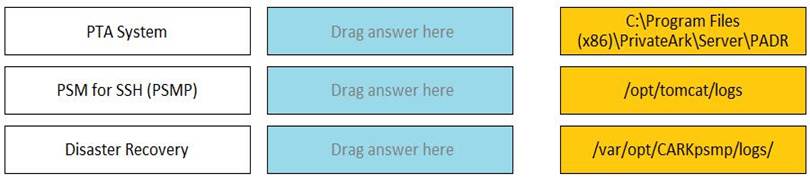
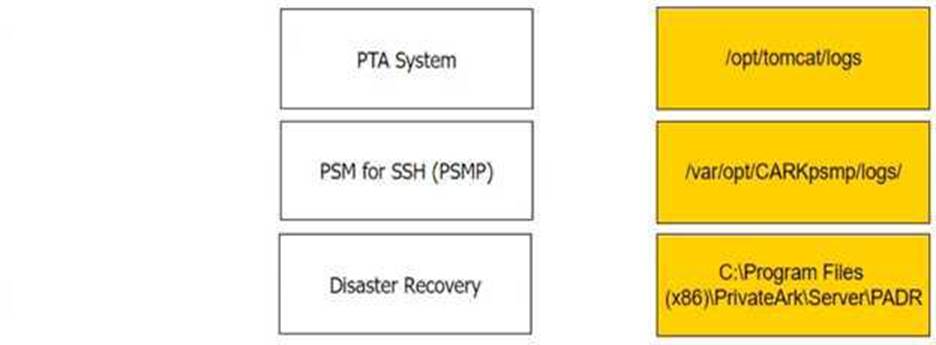
Comprehensive The log file locations for each component in CyberArk’s Privileged Access Management (PAM) are specific to the function and operation of that component. The PTA System logs are typically found in the PrivateArk Server directory, specifically in the PADR folder. The PSM for SSH, which is the Privileged Session Manager for SSH, stores its logs in the tomcat logs directory. Lastly, the logs for Disaster Recovery operations are located in the CARKsymop logs directory on a Linux-based system.
Reference: The information is based on the CyberArk documentation and best practices for managing and maintaining log files for different components within the PAM solution123. The log file locations are essential for troubleshooting and auditing purposes, ensuring that all activities and changes are properly recorded and can be reviewed when necessary.