
CyberArk PAM-DEF Practice Exams
Last updated on Oct 22,2026- Exam Code: PAM-DEF
- Exam Name: CyberArk Defender – PAM
- Certification Provider: CyberArk
- Latest update: Oct 22,2026
tsparm.ini is the main configuration file for the Vault.
- A . True
- B . False
B
Explanation:
tsparm.ini is not the main configuration file for the Vault. It is one of the several configuration files that control the initial settings and method of operation of the Server. The main configuration file for the Vault is DBParm.ini, which contains the general parameters of the database, such as the Vault name, the Vault IP address, the Vault port, the encryption algorithm, the log retention, and the debug mode.
Reference: Defender PAM Sample Items Study Guide, page 9, question 92
CyberArk Privileged Access Security Implementation Guide, page 75, section “DBParm.ini” CyberArk Vault Server Parameter Files, page 1, section “TSParm.ini”
Customers who have the ‘Access Safe without confirmation’ safe permission on a safe where accounts are configured for Dual control, still need to request approval to use the account.
- A . TRUE
- B . FALSE
B
Explanation:
Customers who have the ‘Access Safe without confirmation’ safe permission on a safe where accounts are configured for Dual control, do not need to request approval to use the account. The ‘Access Safe without confirmation’ safe permission allows users to access accounts without confirmation from authorized users, even if the Master Policy or an exception enforces Dual Control1. This means that users who have this permission can bypass the workflow process and access the account password or connect to the target system immediately. This permission can be granted to users or groups on a safe level by the safe owner or another user with the Manage Safe authorization2.
Reference: 1: Dual Control, Advanced Settings subsection
2: CyberArk Privileged Access Security Implementation Guide, Chapter 3: Managing Safes, Section:
Safe Authorizations, Table 2-1: Safe Authorizations
Refer to the exhibit.
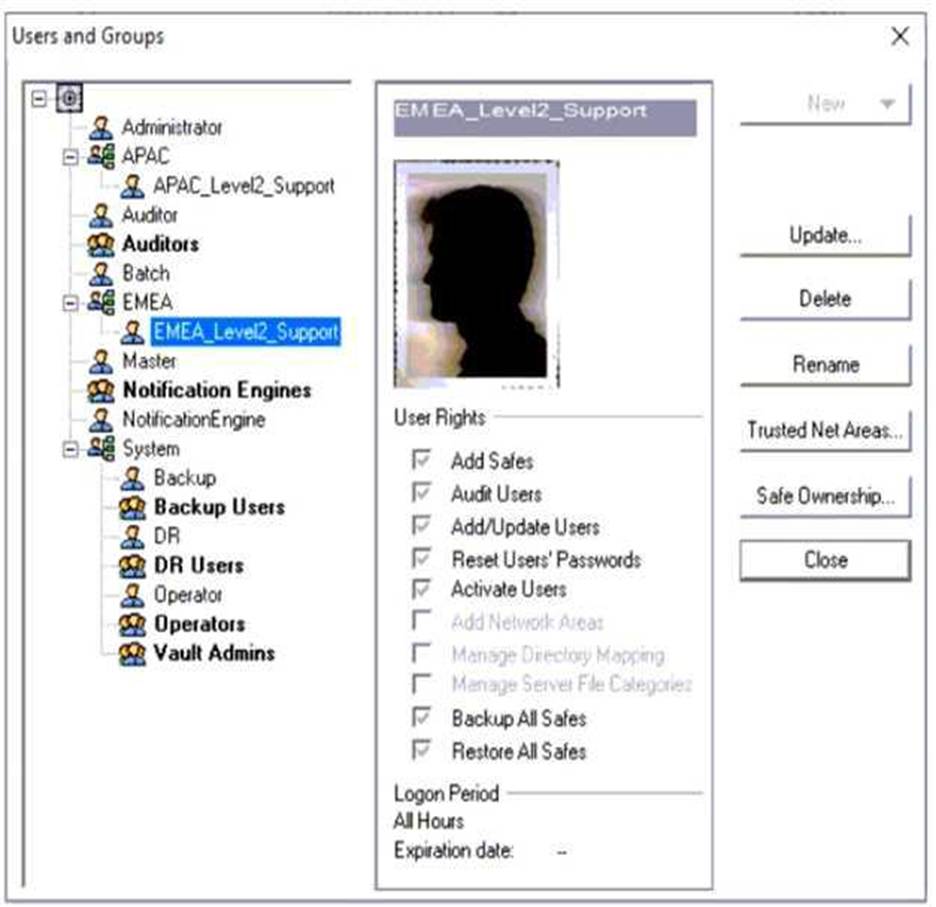
Why is user "EMEALevel2Support" unable to change the password for user "Operator"?
- A . EMEALevel2Support’s hierarchy level is not the same or higher than Operator.
- B . EMEALevel2Support does not have the "Manage Directory Mapping" role.
- C . Operator can only be reset by the Master user.
- D . EMEALevel2Support does not have rights to reset passwords for other users.
D
Explanation:
The image description indicates that “EMEALevel2Support” has the following rights: Add/Update Users, Manage Server File Categories, Manage Directory Mapping, Backup All Files, Restore All Files. Since there is no mention of the right to reset passwords for other users, this suggests that “EMEALevel2Support” lacks the necessary permission to change the password for “Operator”.
When a DR Vault Server becomes an active vault, it will automatically revert back to DR mode once the Primary Vault comes back online.
- A . True; this is the default behavior
- B . False, the Vault administrator must manually set the DR Vault to DR mode by setting “FailoverMode=no” in the padr.ini file
- C . True, if the AllowFailback setting is set to “yes” in the padr.ini file
- D . False, the Vault administrator must manually set the DR Vault to DR mode by setting “FailoverMode=no” in the dbparm.ini file
B
Explanation:
According to the web search results, when a DR Vault Server becomes an active vault, it will not automatically revert back to DR mode once the Primary Vault comes back online. The Vault administrator must manually set the DR Vault to DR mode by setting “FailoverMode=no” in the padr.ini file1. This file is located in the /opt/CARKaim/conf directory on the DR Vault machine2. The Vault administrator must also stop the replication process on the DR Vault and restart the PrivateArk Server service1. This procedure is known as a DR failback, which restores the original roles of the Primary Vault and the DR Vault after a failover1. The AllowFailback setting in the padr.ini file does not affect the DR failback process, as it only determines whether the DR Vault can be used as a backup for another DR Vault in a cascading DR scenario3. The dbparm.ini file is not relevant for the DR
failback process, as it contains the database parameters for the Vault server.
Reference: Initiate a DR failback to the Production Vault – CyberArk
Install the Disaster Recovery application – CyberArk
Cascading DR – CyberArk
[dbparm.ini file – CyberArk]
When Dual Control is enabled a user must first submit a request in the Password Vault Web Access (PVWA) and receive approval before being able to launch a secure connection via PSM for Windows (previously known as RDP Proxy).
- A . True
- B . False, a user can submit the request after the connection has already been initiated via the PSM for Windows
A
Explanation:
According to the CyberArk Defender PAM documentation1, when Dual Control is enabled, a user must first submit a request in the Password Vault Web Access (PVWA) and receive approval before being able to launch a secure connection via PSM for Windows (previously known as RDP Proxy). This is a security feature that ensures that passwords can only be retrieved after permission or ‘confirmation’ has been granted from an authorized Safe Owner(s). The user must specify the reason for accessing the account, whether they will access it once or multiple times, and the time period during which they will access it. The request is then sent to the authorized Safe Owners, who can either confirm or reject it. The number of confirmations required is defined in the Master Policy. Only after the user receives the required confirmations, they can activate the request and access the account through PSM for Windows. This way, Dual Control adds an additional measure of protection and accountability for accessing sensitive accounts.
A user is receiving the error message “ITATS006E Station is suspended for User jsmith” when
attempting to sign into the Password Vault Web Access (PVWA).
Which utility would a Vault administrator use to correct this problem?
- A . createcredfile.exe
- B . cavaultmanager.exe
- C . PrivateArk
- D . PVWA
C
Explanation:
The PrivateArk is a utility that allows the Vault administrator to access and manage the Vault data, users, groups, policies, and settings. The PrivateArk can be used to correct the problem of a user receiving the error message “ITATS006E Station is suspended for User jsmith” when attempting to sign into the PVWA. The error message means that the user has exceeded the number of invalid password attempts and has been locked out from the Vault. To unlock the user, the Vault administrator can use the PrivateArk to activate the suspended station for the user in the Trusted Net Areas1.
The other options are not utilities that can be used to correct this problem. The createcredfile.exe is a utility that creates a credential file for the CPM to connect to the target systems2. The cavaultmanager.exe is a utility that performs various Vault maintenance tasks, such as backup, restore, and encryption3. The PVWA is not a utility, but a web interface that allows the users to access and use the Vault features, such as managing accounts, requesting passwords, and initiating sessions.
Reference: Vault – ITATS006E Station is suspended for User Administrator – force.com, section “Resolution” Create a Credential File – CyberArk, section “Create a Credential File” Vault Maintenance – CyberArk, section “Vault Maintenance”
[Password Vault Web Access – CyberArk], section “Password Vault Web Access”
What is required to enable access over SSH to a Unix account through both PSM and PSMP?
- A . The platform must contain connection components for PSM-SSH and PSMP-SSH.
- B . PSM and PSMP must already have stored the SSH Fingerprint for the Unix host.
- C . The ‘Enable PSMP’ setting in the Unix platform must be set to Yes.
- D . A duplicate platform (Called) with the PSMP settings must be created.
A
Explanation:
To enable access over SSH to a Unix account through both Privileged Session Manager (PSM) and
Privileged Session Manager Proxy (PSMP), the platform must contain the necessary connection
components for both PSM-SSH and PSMP-SSH. This ensures that the system can handle SSH
connections through PSM for a native user experience and through PSMP for secure, transparent
connections to remote systems12.
Reference: CyberArk Docs: Connect through PSM for SSH1
CyberArk Docs: Connect to Unix machines (using PSM for SSH)2
Which service should NOT be running on the DR Vault when the primary Production Vault is up?
- A . PrivateArk Database
- B . PrivateArk Server
- C . CyberArk Vault Disaster Recovery (DR) service
- D . CyberArk Logical Container
C
Explanation:
The user that is automatically added to all Safes and cannot be removed is the Master user. The Master user is a predefined user that is created during the Vault installation and has full permissions on all Safes and accounts. The Master user is the only user that can perform certain tasks, such as creating other predefined users, managing the Vault configuration, and restoring the Vault from a backup. The Master user cannot be deleted or modified by any other user, and is always a member of every Safe12.
Reference: Predefined users and groups – CyberArk, section “Master”
Safes and Safe members – CyberArk, section “Safe members overview”
A Logon Account can be specified in the Master Policy.
- A . TRUE
- B . FALSE
B
Explanation:
A Logon Account cannot be specified in the Master Policy. The Master Policy is a set of rules that define the security and compliance policy of privileged accounts in the organization, such as access workflows, password management, session monitoring, and auditing1. The Master Policy does not include any technical settings that determine how the system manages accounts on various platforms1. A Logon Account is a technical setting that defines the account that the CPM uses to log on to a target system and perform password management tasks, such as changing, verifying, or reconciling passwords2. A Logon Account can be specified in the Platform Management settings, which are configured by the IT administrator for each platform2. The Platform Management settings are independent of the Master Policy and can be customized according to the organization’s
environment and security policies1.
Reference: The Master Policy
[Platform Management]
Which Cyber Are components or products can be used to discover Windows Services or Scheduled Tasks that use privileged accounts? Select all that apply.
- A . Discovery and Audit (DMA)
- B . Auto Detection (AD)
- C . Export Vault Data (EVD)
- D . On Demand Privileges Manager (OPM)
- E . Accounts Discovery
A, B, E
Explanation:
Discovery and Audit (DMA), Auto Detection (AD), and Accounts Discovery are CyberArk components or products that can be used to discover Windows Services or Scheduled Tasks that use privileged accounts.
Discovery and Audit (DMA) is a tool that scans Windows servers and workstations to identify privileged accounts that are used by Windows Services or Scheduled Tasks. DMA can also generate reports on the usage and risks of these accounts.
Auto Detection (AD) is a feature of the CyberArk Privileged Account Security Solution that automatically detects and onboards privileged accounts that are used by Windows Services or Scheduled Tasks. AD can also monitor and rotate the passwords of these accounts.
Accounts Discovery is a feature of the CyberArk Privileged Account Security Solution that scans the network to discover privileged accounts on various platforms, including Windows. Accounts Discovery can also identify accounts that are used by Windows Services or Scheduled Tasks.
Reference: : Discovery and Audit (DMA) User Guide
: Auto Detection Implementation Guide
: Accounts Discovery Implementation Guide