
CompTIA N10-009 Practice Exams
Last updated on Nov 16,2026- Exam Code: N10-009
- Exam Name: CompTIA Network+ Certification
- Certification Provider: CompTIA
- Latest update: Nov 16,2026
Which of the following most likely determines the size of a rack for installation? (Select two).
- A . KVM size
- B . Switch depth
- C . Hard drive size
- D . Cooling fan speed
- E . Outlet amperage
- F . Server height
B
Explanation:
Understanding Rack Size Determination:
The size of a rack for installation is determined by the dimensions of the equipment to be housed in it, primarily focusing on the depth and height of the devices. Switch Depth:
Depth of Equipment: The depth of network switches and other rack-mounted devices directly influences the depth of the rack. If the equipment is deeper, a deeper rack is required to accommodate it.
Industry Standards: Most racks come in standard depths, but it is essential to match the depth of the rack to the deepest piece of equipment to ensure proper fit and airflow. Server Height:
Height of Equipment: The height of servers and other devices is measured in rack units (U), where 1U equals 1.75 inches. The total height of all equipment determines the overall height requirement of the rack.
Rack Units: A rack’s height is typically described in terms of the number of rack units it can
accommodate, such as 42U, 48U, etc.
Why Other Options are Less Relevant:
KVM Size: While important for management, KVM (Keyboard, Video, Mouse) switches do not typically determine rack size.
Hard Drive Size: Individual hard drives are installed within servers or storage devices, not directly influencing rack dimensions.
Cooling Fan Speed: Fan speed affects cooling but not the physical size of the rack.
Outlet Amperage: Power requirements do not determine rack dimensions but rather the electrical
infrastructure supporting the rack.
Reference: CompTIA Network+ study materials on rack installation and equipment sizing.
Which of the following is the most likely benefit of installing server equipment in a rack?
- A . Simplified troubleshooting process
- B . Decreased power consumption
- C . Improved network performance
- D . Increased compute density
D
Explanation:
Installing server equipment in a rack increases compute density by allowing multiple servers to be organized efficiently in a vertical configuration, saving space while housing more devices in a smaller footprint. This is critical for data centers and businesses with high hardware demands.
Simplified troubleshooting process (A): While racks can aid in organizing equipment, this is a secondary benefit, not the primary purpose.
Decreased power consumption (B): Rack installation does not directly reduce power usage; equipment power consumption remains the same.
Improved network performance (C): Racking servers does not inherently improve network performance; that depends on network configurations.
Reference: CompTIA Network+ Official Study Guide, Domain 1.3 (Rack Installations).
Which of the following is used to stage copies of a website closer to geographically dispersed users?
- A . VPN
- B . CDN
- C . SAN
- D . SDN
B
Explanation:
Comprehensive and Detailed
A Content Delivery Network (CDN) caches website content across multiple geographically distributed servers to reduce latency and improve load times for users worldwide. Breakdown of Options:
A user’s home mesh wireless network is experiencing latency issues. A technician has:
• Performed a speed test.
• Rebooted the devices.
• Performed a site survey.
• Performed a wireless packet capture.
The technician reviews the following information:
The technician notices in the packet capture that frames were retransmitted.
Which of the following is the most likely cause of the user’s network issue?
- A . The SSIDs should not be the same.
- B . The network has too much overlap.
- C . The devices are incompatible with the mesh network.
- D . The nodes are underpowered.
B
Explanation:
• Too much overlap on the same channel (all devices on channel 11) causes interference, leading to retransmissions and high latency.
• Same SSIDs (A) are expected in mesh networks.
• Device compatibility (C) would show different symptoms.
• Node power (D) affects coverage, not congestion.
Reference: CompTIA Network+ N10-009 Official Documentation C Wireless Troubleshooting & Signal Interference.
SIMULATION
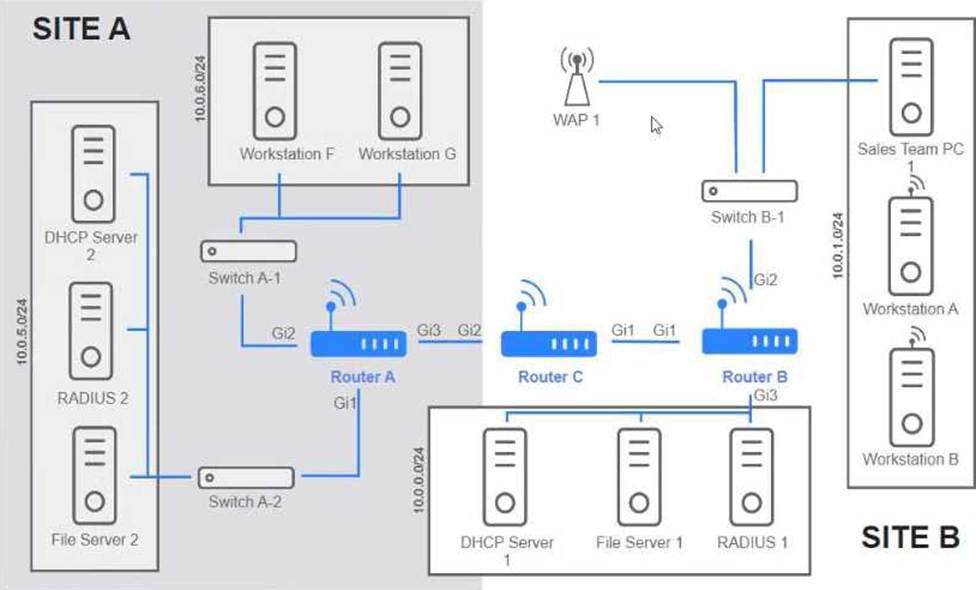
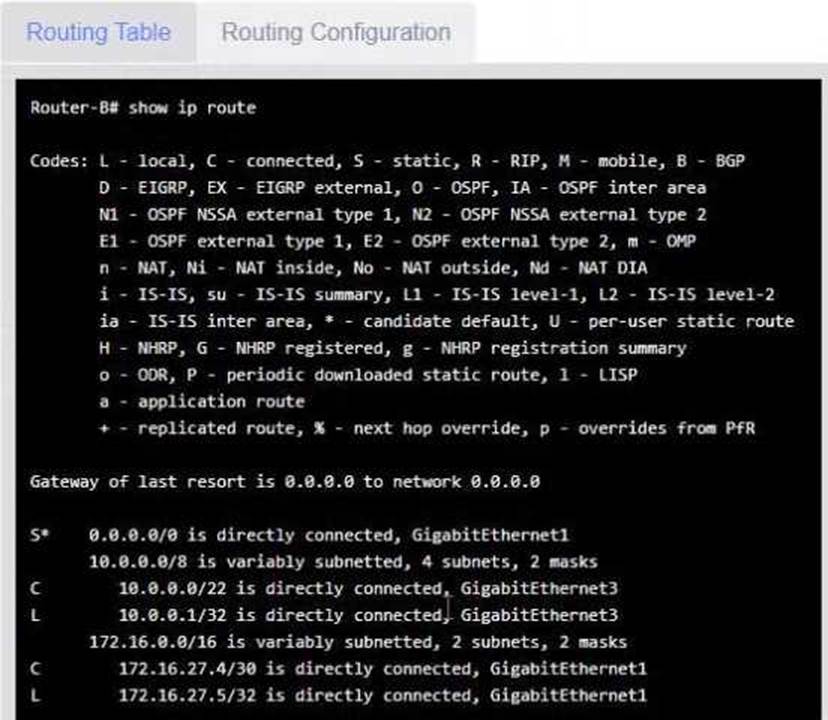
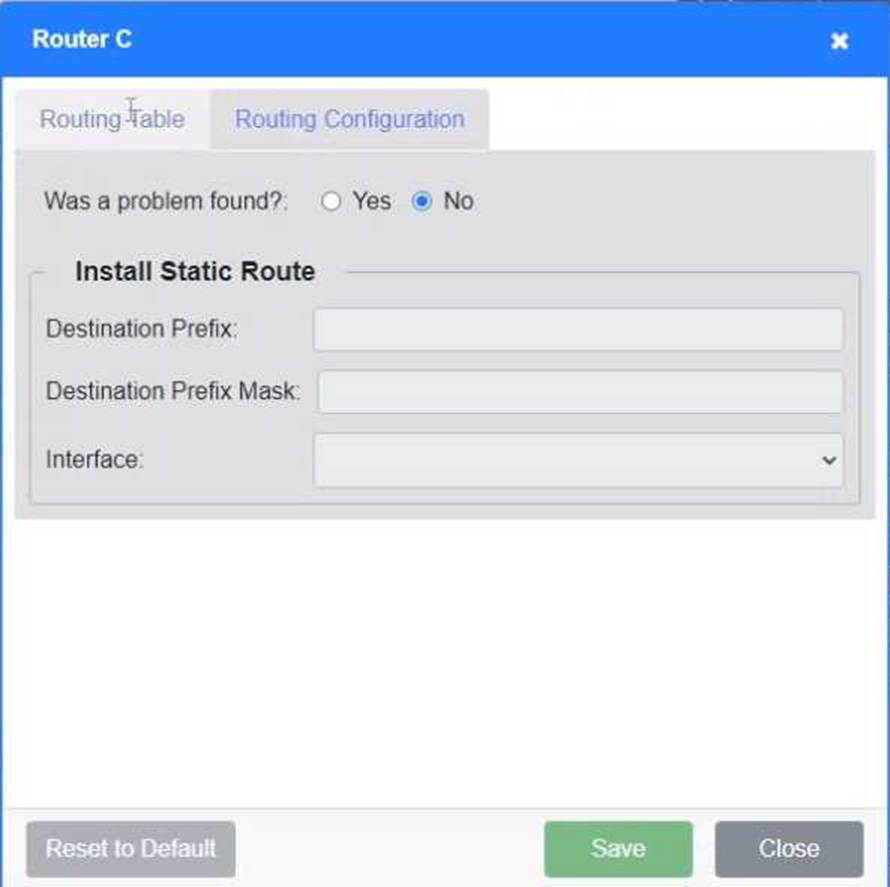
Users are unable to access files on their department share located on flle_server 2. The network administrator has been tasked with validating routing between networks hosting workstation A and file server 2.
INSTRUCTIONS
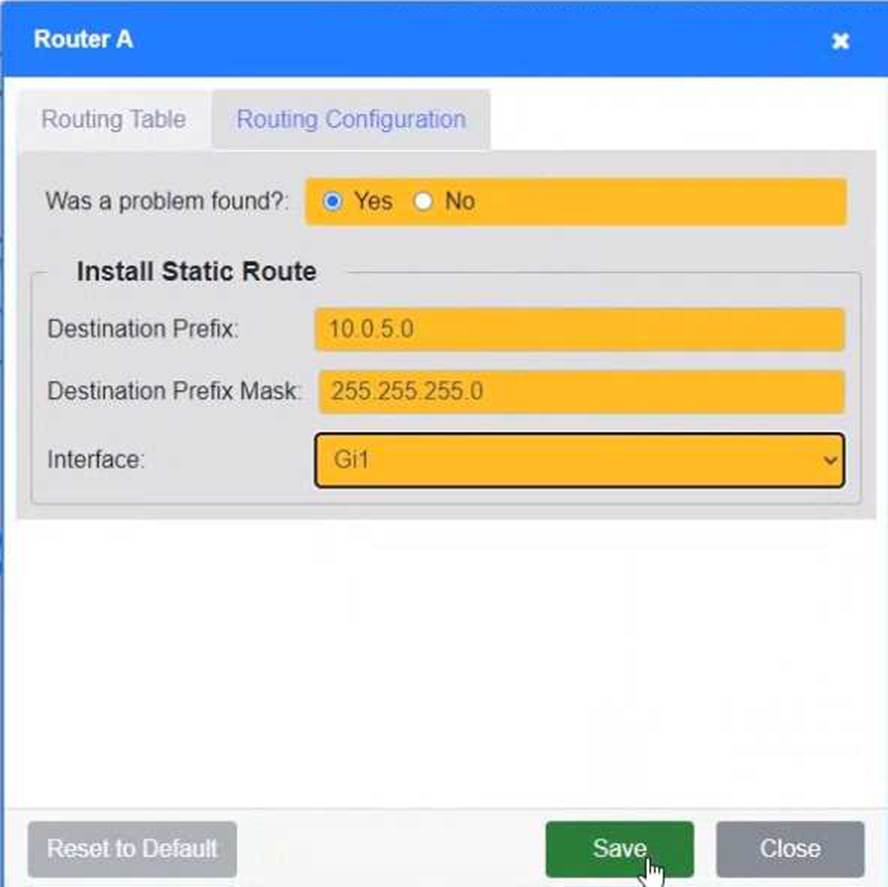
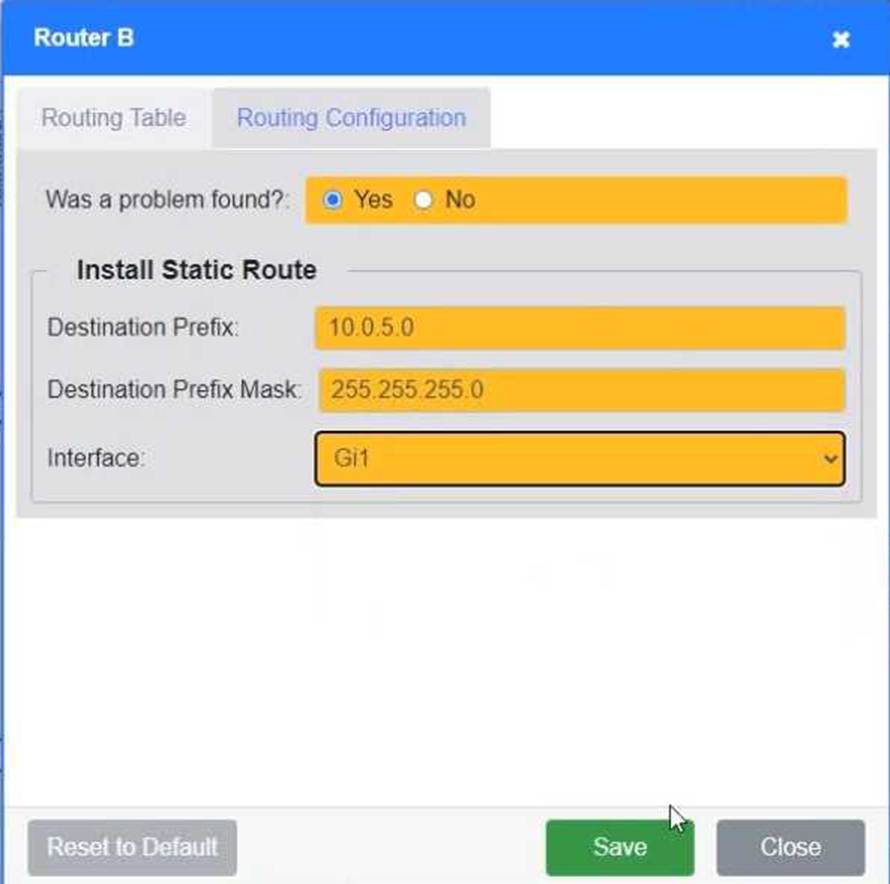
Click on each router to review output, identity any Issues, and configure the appropriate solution
If at any time you would like to bring back the initial state of trie simulation, please click the reset All button;
Which of the following is the MOST appropriate solution to extend the network to a building located across the street from the main facility?
- A . Multimode fiber
- B . 802.11ac wireless bridge
- C . Cat 6 copper
- D . Loopback adapter
B
Explanation:
An 802.11ac wireless bridge is the most practical solution to connect two nearby buildings without trenching or laying physical cable. It provides high-speed, point-to-point connectivity using directional antennas.
Which of the following protocol ports should be used to securely transfer a file?
- A . 22
- B . 69
- C . 80
- D . 3389
A
Explanation:
Port 22 is used for SFTP (Secure File Transfer Protocol) and SCP (Secure Copy Protocol), which encrypt file transfers using SSH (Secure Shell). This ensures data is transmitted securely over the network.
• Why not the other options?
• Port 69 (B) C TFTP (Trivial File Transfer Protocol): Transfers files but is not secure (no encryption).
• Port 80 (C) C HTTP: Used for web traffic, not for file transfer.
• Port 3389 (D) C RDP (Remote Desktop Protocol): Used for remote desktop access, not file transfer.
Reference: CompTIA Network+ (N10-009) Official Guide C Chapter 5: Network Protocols and Ports
A network technician is troubleshooting a faulty NIC and tests the theory.
Which of the following should the technician do next?
- A . Develop a theory.
- B . Establish a plan of action.
- C . Implement the solution.
- D . Document the findings.
C
Explanation:
Comprehensive and Detailed
Once the theory has been tested and confirmed, the next step is to implement the solution based on the CompTIA troubleshooting model.
CompTIA Troubleshooting Model:
Identify the problem.
Establish a theory of probable cause.
Test the theory.
Establish a plan of action and implement the solution. ✅ (Correct step)
Verify full system functionality.
Document findings, actions, and outcomes.
Breakdown of Options:
A network technician is troubleshooting a faulty NIC and tests the theory.
Which of the following should the technician do next?
- A . Develop a theory.
- B . Establish a plan of action.
- C . Implement the solution.
- D . Document the findings.
C
Explanation:
Comprehensive and Detailed
Once the theory has been tested and confirmed, the next step is to implement the solution based on the CompTIA troubleshooting model.
CompTIA Troubleshooting Model:
Identify the problem.
Establish a theory of probable cause.
Test the theory.
Establish a plan of action and implement the solution. ✅ (Correct step)
Verify full system functionality.
Document findings, actions, and outcomes.
Breakdown of Options:
A network technician is troubleshooting a faulty NIC and tests the theory.
Which of the following should the technician do next?
- A . Develop a theory.
- B . Establish a plan of action.
- C . Implement the solution.
- D . Document the findings.
C
Explanation:
Comprehensive and Detailed
Once the theory has been tested and confirmed, the next step is to implement the solution based on the CompTIA troubleshooting model.
CompTIA Troubleshooting Model:
Identify the problem.
Establish a theory of probable cause.
Test the theory.
Establish a plan of action and implement the solution. ✅ (Correct step)
Verify full system functionality.
Document findings, actions, and outcomes.
Breakdown of Options: