
CompTIA N10-009 Practice Exams
Last updated on Nov 16,2026- Exam Code: N10-009
- Exam Name: CompTIA Network+ Certification
- Certification Provider: CompTIA
- Latest update: Nov 16,2026
A small company has the following IP addressing strategy:
A user is unable to connect to the company fileshare server located at 192.168.10.1.
The user’s networking configuration is:
Which of the following will most likely correct the issue?
- A . Changing the IPv4 address to 192.168.10.1
- B . Changing the subnet mask to 255.255.255.0
- C . Changing the DNS servers to internet IPs
- D . Changing the physical address to 7A-01-7A-21-01-50
B
Explanation:
If the user cannot communicate with 192.168.10.1, they might be on a different subnet. Changing
the subnet mask to 255.255.255.0 ensures the user and the file server are in the same subnet.
Breakdown of Options:
Which of the following connector types would most likely be used to connect to an external antenna?
- A . BNC
- B . ST
- C . LC
- D . MPO
A
Explanation:
Comprehensive and Detailed
BNC connectors are commonly used for coaxial cables, including those connecting to external antennas in Wi-Fi, radio, and surveillance systems.
Breakdown of Options:
SIMULATION
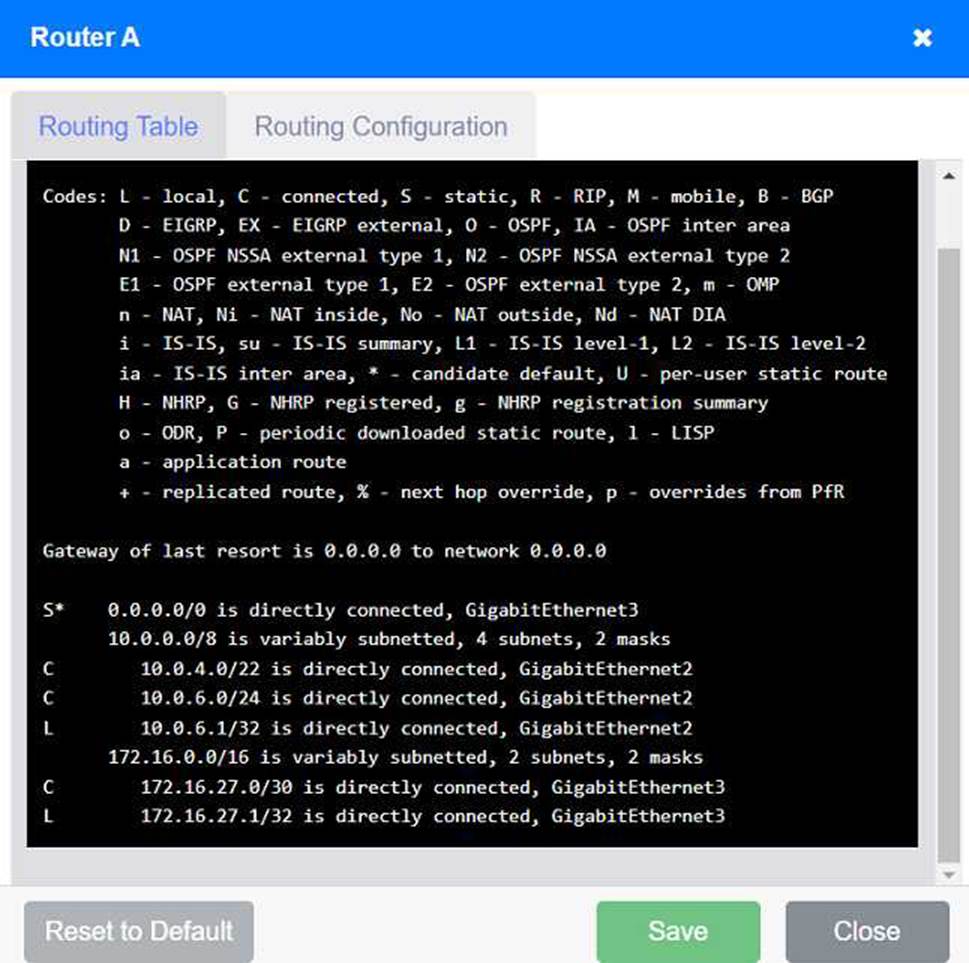
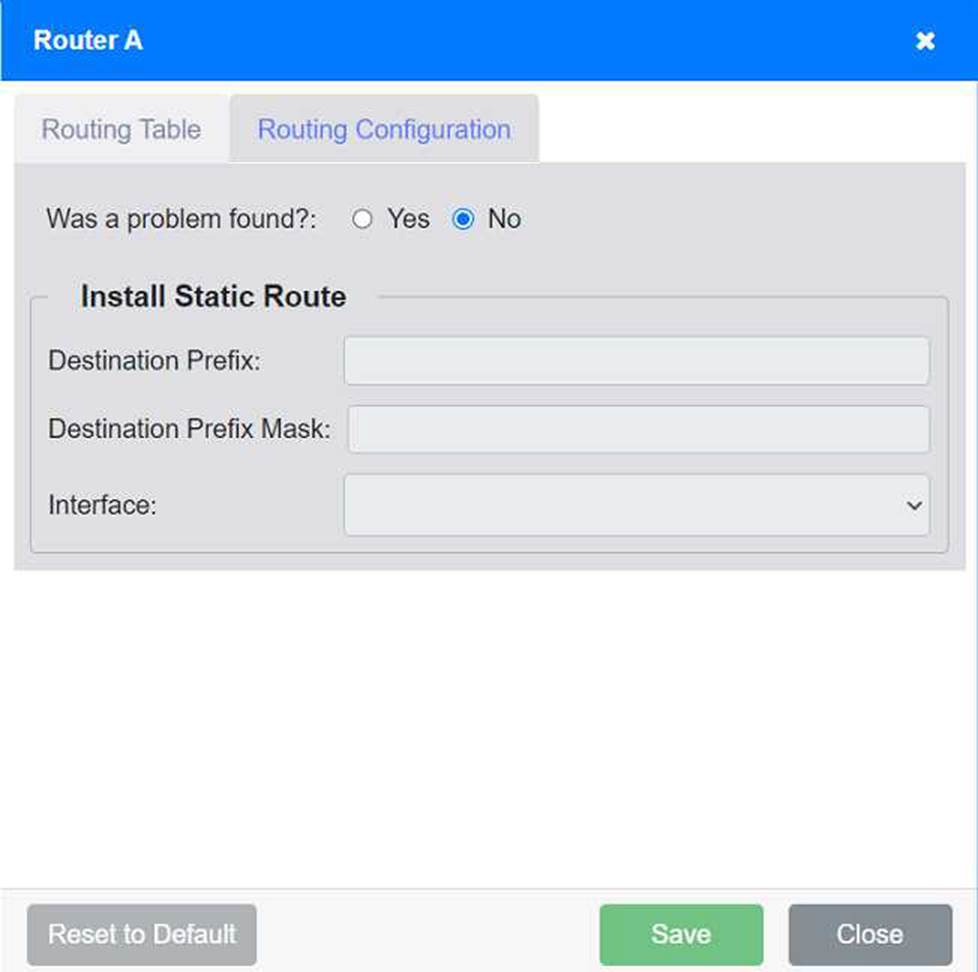
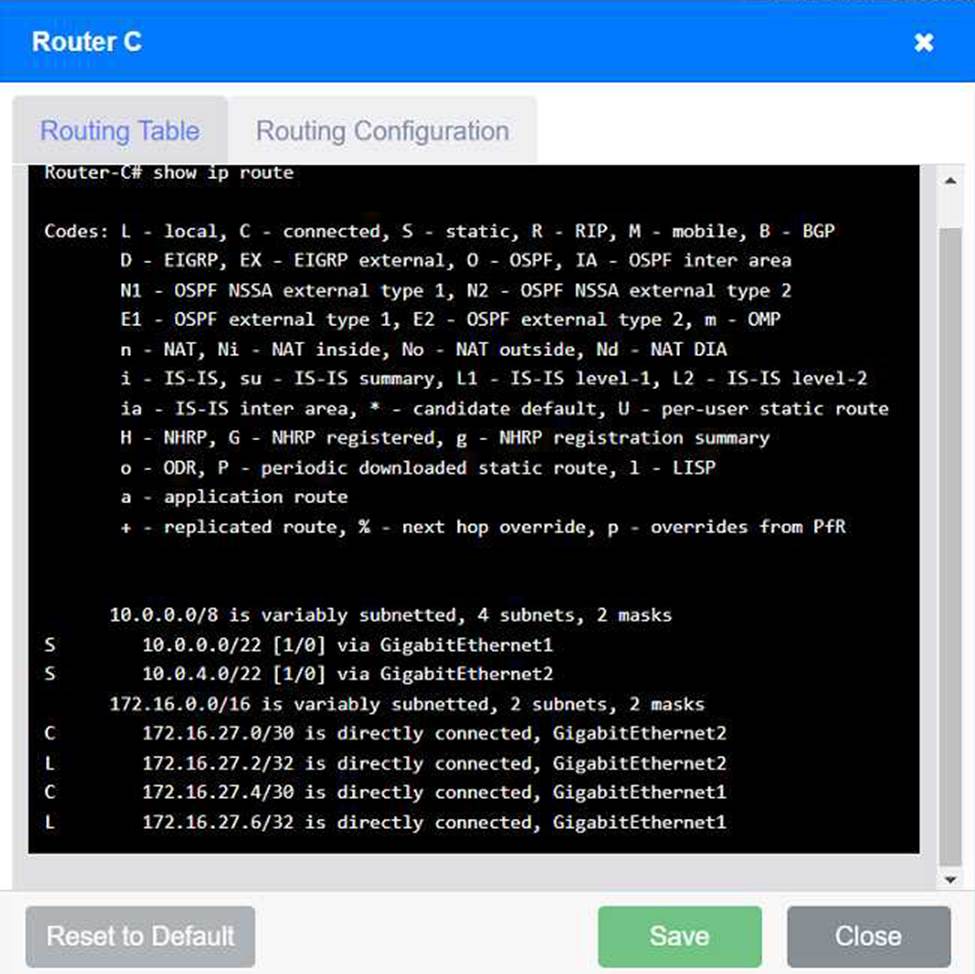
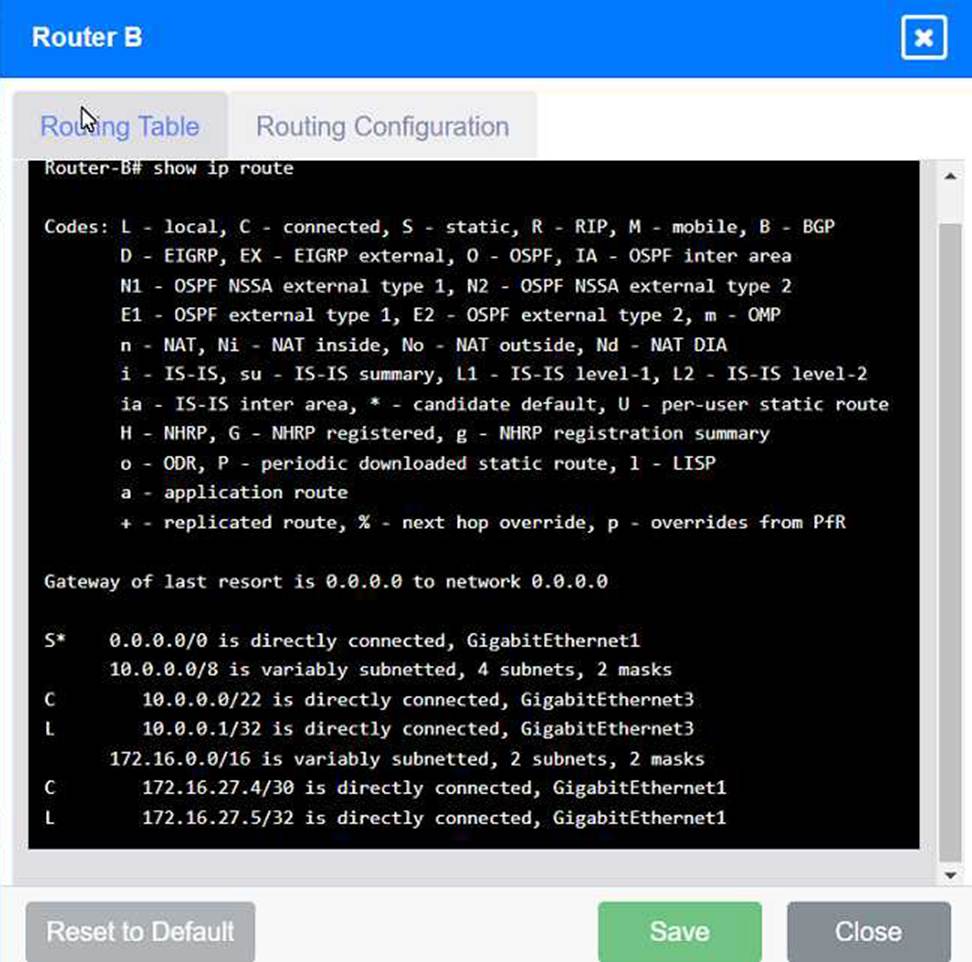
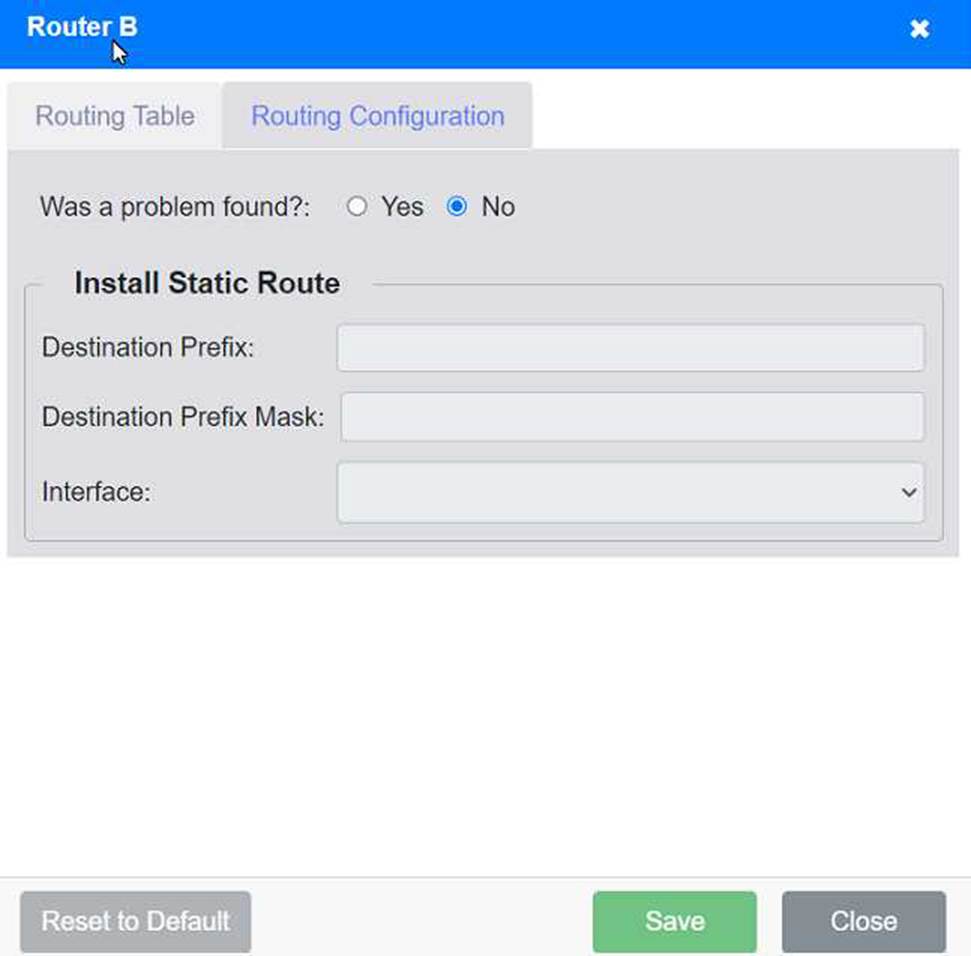
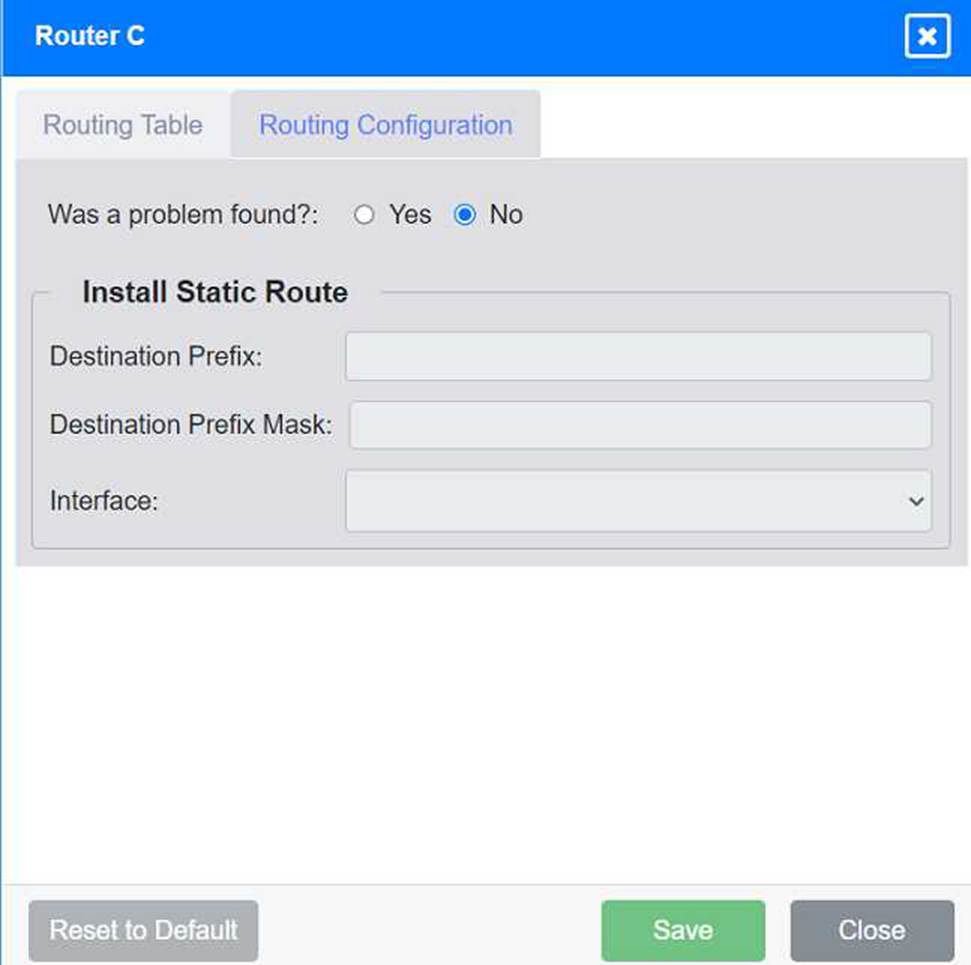
Users are unable to access files on their department share located on file server 2. The network administrator has been tasked with validating routing between networks hosting workstation A and file server 2.
INSTRUCTIONS
Click on each router to review output, identify any issues, and configure the appropriate solution.
If at any time you would like to bring back the initial state of the simulation, please click the Reset All button.
Step-by-Step Solution
Review Routing Tables:
Check the routing tables of Router A, Router B, and Router C to identify any missing routes.
Identify Missing Routes:
Ensure that each router has routes to the networks on which Workstation A and File Server 2 are located.
Add Static Routes:
If a route is missing, add a static route to the relevant destination network via the correct interface.
Detailed Analysis and Configuration
Router A:
Routing Table:
Gateway of last resort is 0.0.0.0 to network 0.0.0.0
S* 0.0.0.0/0 is directly connected, GigabitEthernet3
An organization is struggling to get effective coverage using the wireless network. The organization wants to implement a solution that will allow for continuous connectivity anywhere in the facility.
Which of the following should the network administrator suggest to ensure the best coverage?
- A . Implementing additional ad hoc access points
- B . Providing more Ethernet drops for user connections
- C . Deploying a mesh network in the building
- D . nl Changing the current frequency of the WI-FI
SIMULATION
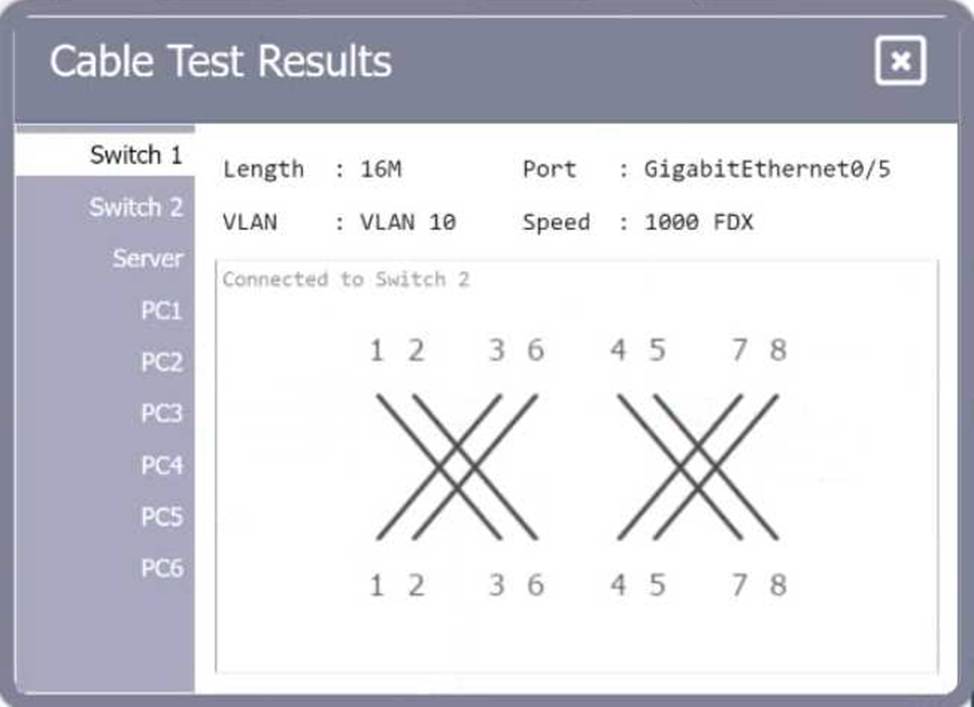
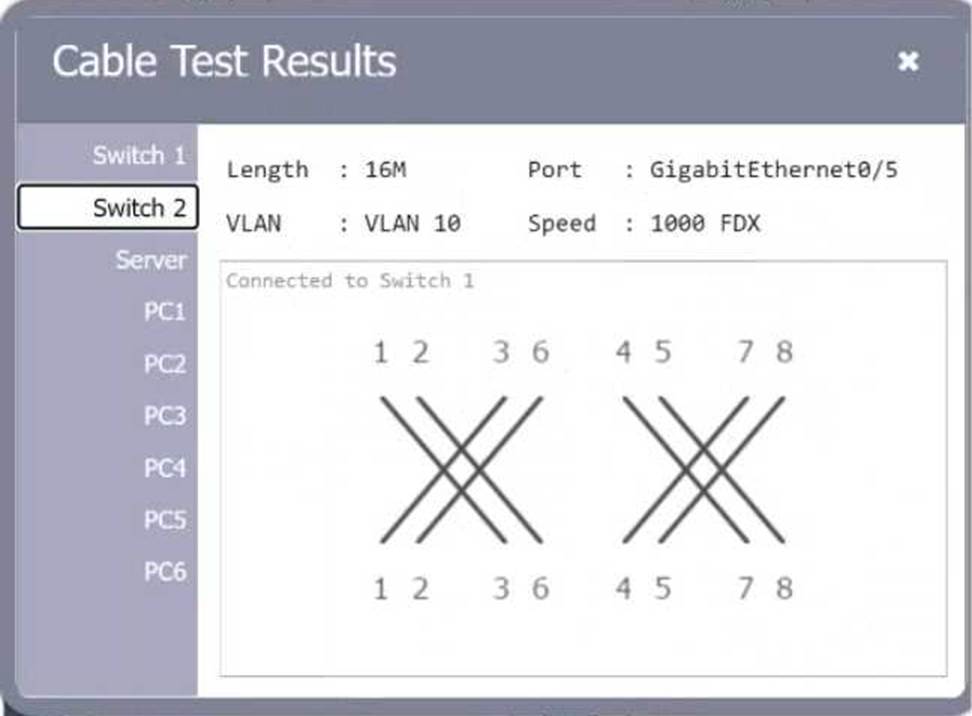
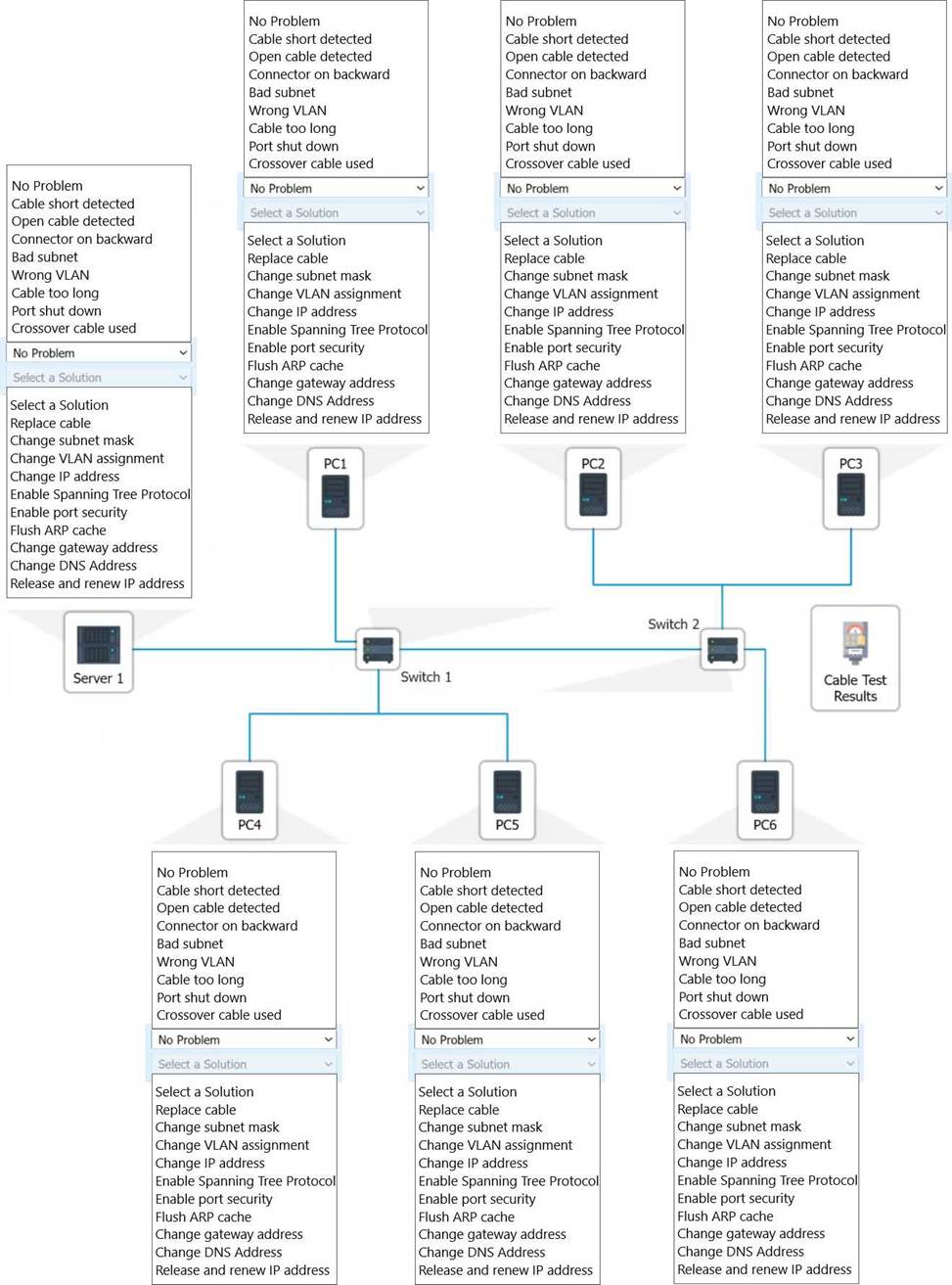
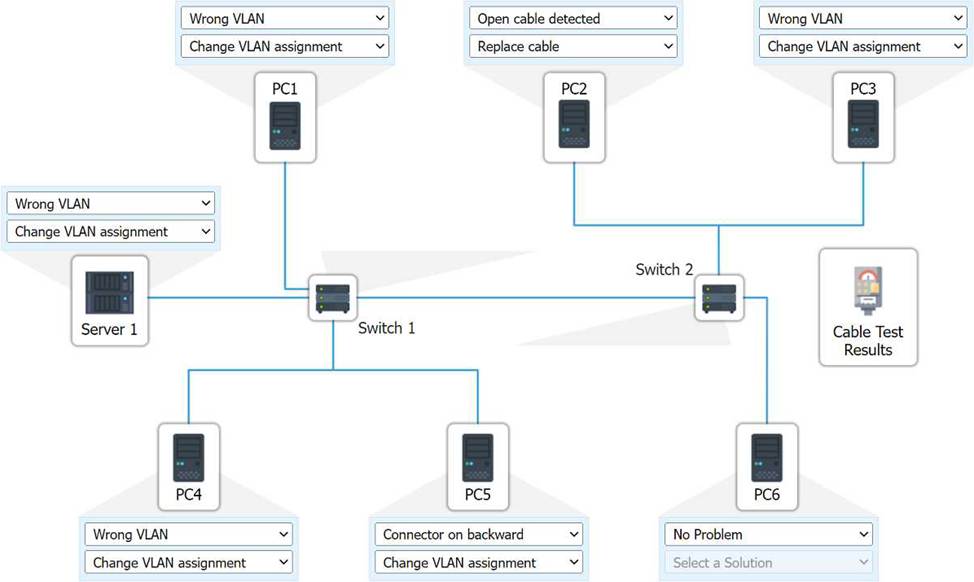
A network technician needs to resolve some issues with a customer’s SOHO network. The customer reports that some of the PCs are not connecting to the network, while others appear to be working as intended.
INSTRUCTIONS
Troubleshoot all the network components.
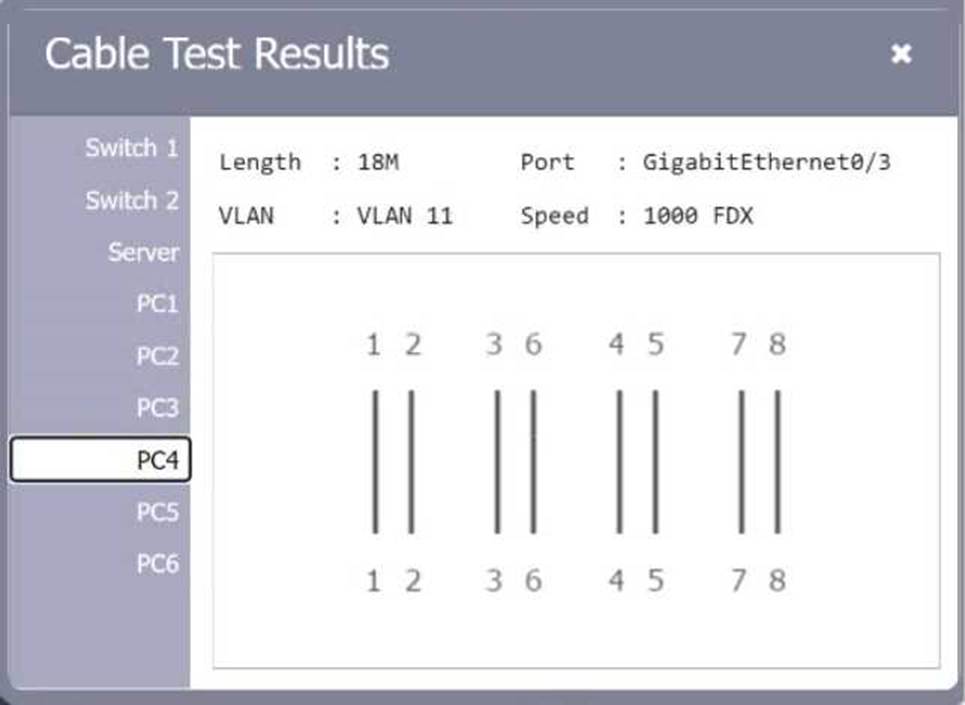
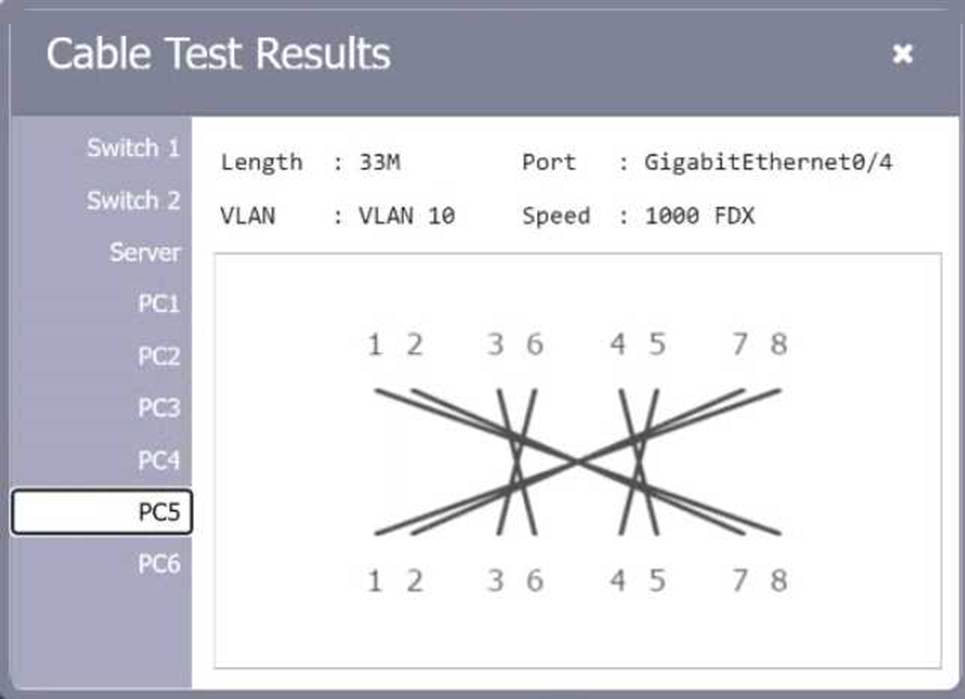
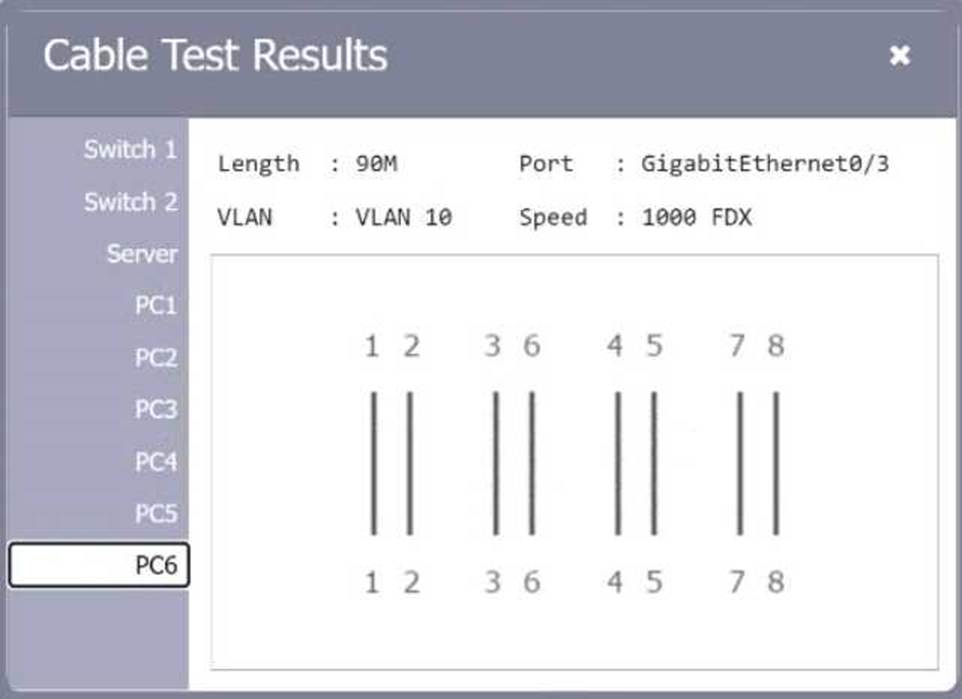
Review the cable test results first, then diagnose by clicking on the appropriate PC, server, and Layer 2 switch.
Identify any components with a problem and recommend a solution to correct each problem.
If at any time you would like to bring back the initial state of the simulation, please click the Reset All button.
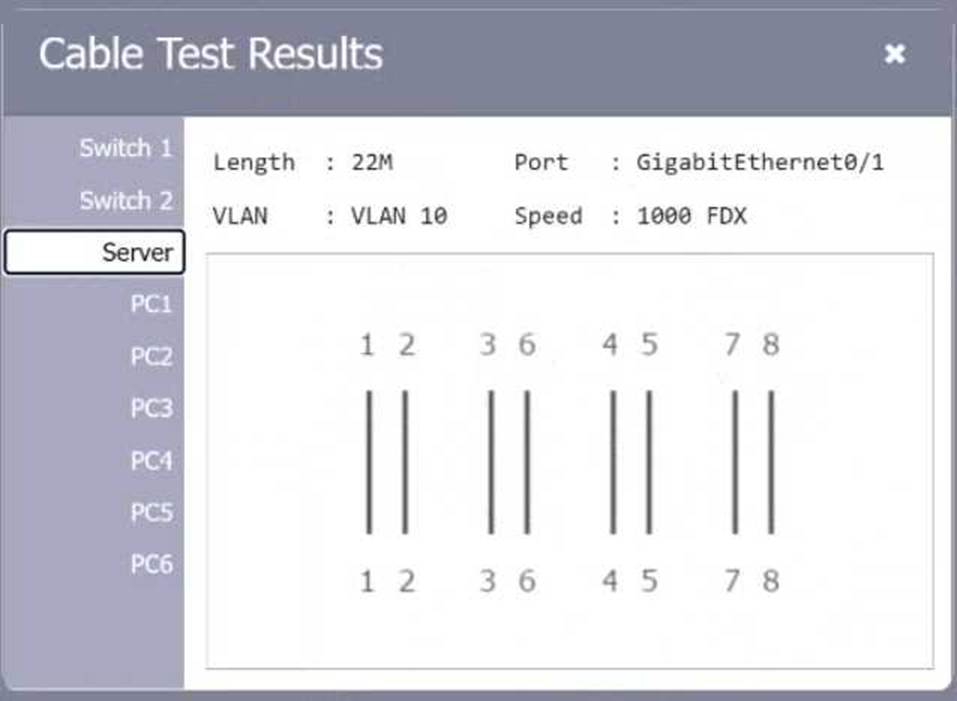
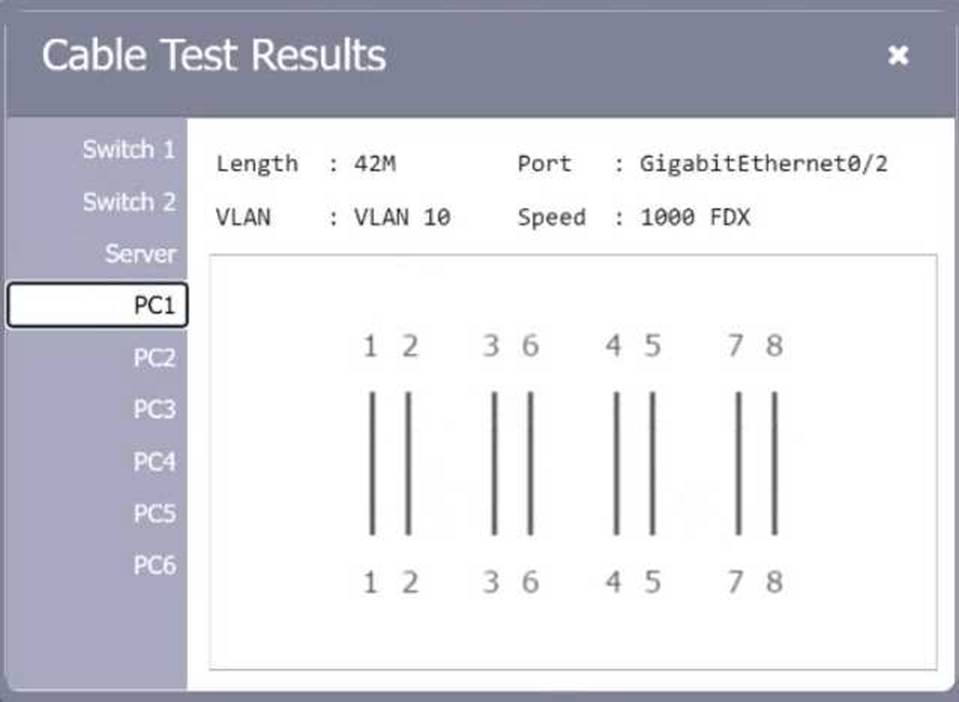
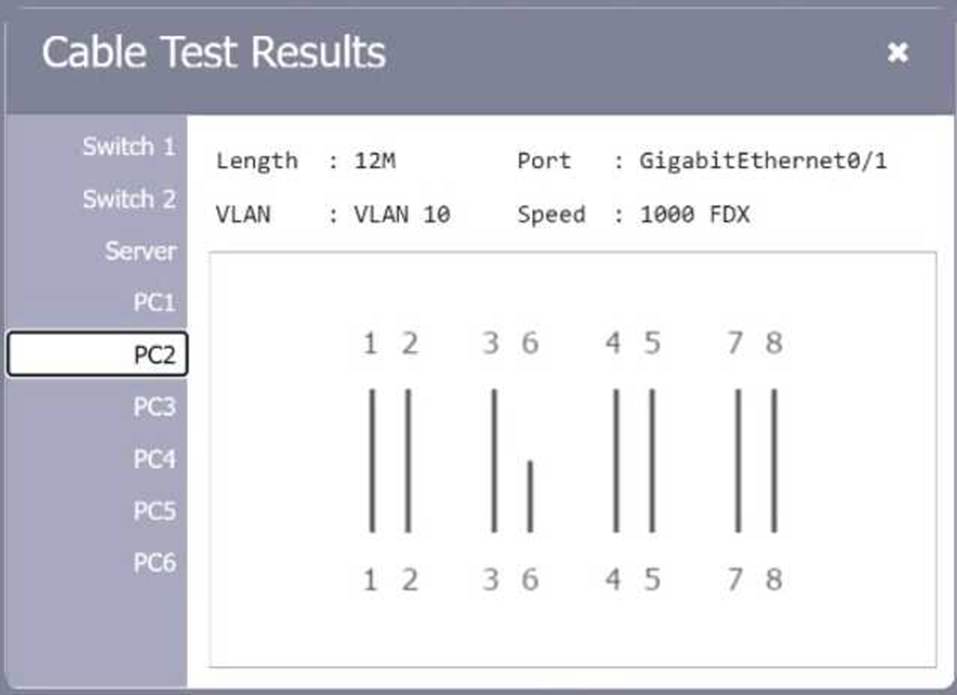
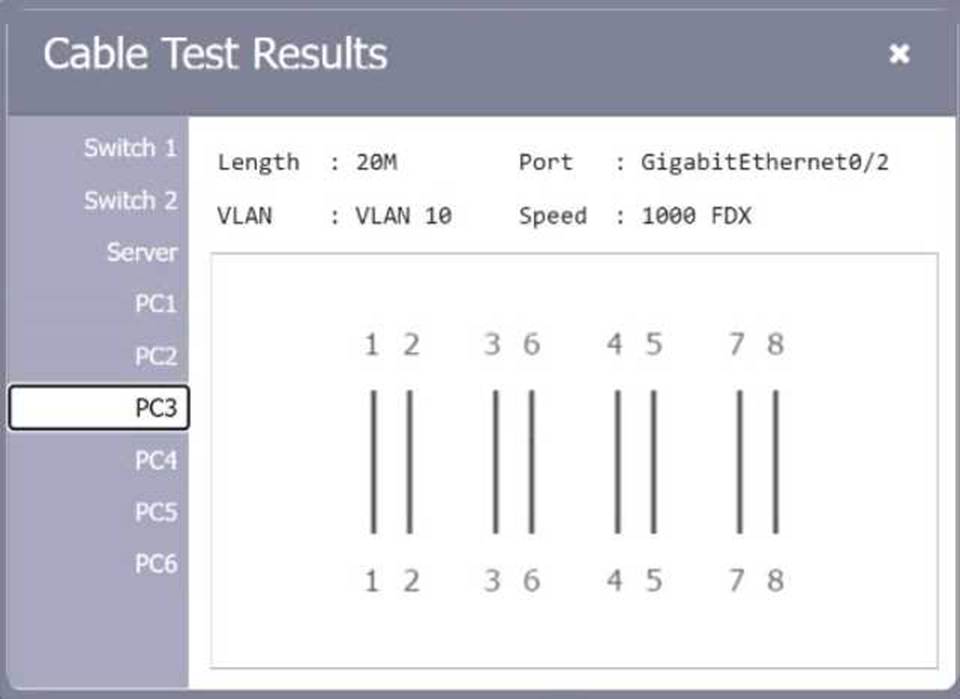
Which of the following network ports is used when a client accesses an SFTP server?
- A . 22
- B . 80
- C . 443
- D . 3389
A
Explanation:
Comprehensive and Detailed
SFTP (Secure File Transfer Protocol) operates over port 22, using SSH (Secure Shell) encryption for secure file transfers.
Breakdown of Options:
An organization has a security requirement that all network connections can be traced back to a user. A network administrator needs to identify a solution to implement on the wireless network.
Which of the following is the best solution?
- A . Implementing enterprise authentication
- B . Requiring the use of PSKs
- C . Configuring acaptive portal for users
- D . Enforcing wired equivalent protection
A
Explanation:
Enterprise authentication (such as WPA2-Enterprise) utilizes unique credentials for each user, typically integrating with an authentication server like RADIUS. This allows for tracking and logging user activity, ensuring that all connections can be traced back to individual users. PSKs (Pre-Shared Keys) are shared among users and do not provide individual accountability. Captive portals can identify users but are less secure than enterprise authentication, and Wired Equivalent Privacy (WEP) is outdated and not recommended for security purposes.
Reference: CompTIA Network+ materials highlight enterprise authentication methods as the preferred solution for secure and accountable wireless network access.
Which of the following is created to illustrate the effectiveness of wireless networking coverage in a building?
- A . Logical diagram
- B . Layer 3 network diagram
- C . Service-level agreement
- D . Heat map
D
Explanation:
Definition of Heat Maps:
A heat map is a graphical representation of data where individual values are represented by colors. In the context of wireless networking, a heat map shows the wireless signal strength in different areas of a building.
Purpose of a Heat Map:
Heat maps are used to illustrate the effectiveness of wireless networking coverage, identify dead zones, and optimize the placement of access points (APs) to ensure adequate coverage and performance.
Comparison with Other Options:
Logical Diagram: Represents the logical connections and relationships within the network.
Layer 3 Network Diagram: Focuses on the routing and IP addressing within the network.
Service-Level Agreement (SLA): A contract that specifies the expected service levels between a service provider and a customer.
Creation and Use:
Heat maps are created using specialized software or tools that measure wireless signal strength throughout the building. The data collected is then used to generate a visual map, guiding network administrators in optimizing wireless coverage.
Reference: CompTIA Network+ certification materials and wireless network planning guides.
A network administrator is notified that a user cannot access resources on the network. The network administrator checks the physical connections to the workstation labeled User 3 and sees the Ethernet is properly connected. However, the network interface’s indicator lights are not blinking on either the computer or the switch.
Which of the following Is the most likely cause?
- A . Theswitch failed.
- B . Thedefault gateway is wrong.
- C . Theport Is shut down.
- D . TheVLAN assignment is incorrect.
C
Explanation:
When a network interface’s indicator lights are not blinking on either the computer or the switch, it suggests a physical layer issue.
Here is the detailed reasoning:
Ethernet Properly Connected: The Ethernet cable is correctly connected, eliminating issues related to a loose or faulty cable.
No Indicator Lights: The absence of blinking indicator lights on both the computer and the switch typically points to the port being administratively shut down.
Switch Port Shut Down: In networking, a switch port can be administratively shut down, disabling it from passing any traffic. This state is configured by network administrators and can be verified and changed using the command-line interface (CLI) of the switch.
Command to Check and Enable Port:
bash
Copy code
Switch> enable
Switch# configure terminal
Switch(config)# interface [interface id]
Switch(config-if)# no shutdown
The command no shutdown re-enables the interface if it was previously disabled. This will restore the link and the indicator lights should start blinking, showing activity.
: Basic Configuration Commands PDF, sections on interface configuration (e.g., shutdown, no shutdown).
A network technician receives a new ticket while working on another issue. The new ticket is critical to business operations.
Which of the following documents should the technician reference to determine which ticket to complete first?
- A . NDA
- B . AUP
- C . SLA
- D . MOU
C
Explanation:
An SLA (Service Level Agreement) defines performance expectations, including response time, prioritization, and resolution time for services and support issues. It helps the technician determine which task has higher priority based on business impact.