
Cisco 500-220 Practice Exams
Last updated on Nov 16,2026- Exam Code: 500-220
- Exam Name: Engineering Cisco Meraki Solutions v1.0
- Certification Provider: Cisco
- Latest update: Nov 16,2026
What is the role of the Meraki Dashboard as the service provider when using SAML for single sign-on to the Dashboard?
- A . The Dashboard generates the SAML request.
- B . The Dashboard provides user access credentials.
- C . The Dashboard parses the SAML request and authenticates users.
- D . The Dashboard generates the SAML response.
C
Explanation:
https://documentation.meraki.com/General_Administration/Managing_Dashboard_Access/Configuring_SAML_Single_Sign-on_for_Dashboard
Which type of authentication protocol is used when using OSPF on an MX appliance?
- A . MD5
- B . certificate
- C . plaintext
- D . SHA-1
A
Explanation:
Reference: https://documentation.meraki.com/MX/Site-to-site_VPN/Using_OSPF_to_Advertise_Remote_VPN_Subnets
Company iPads are enrolled in Systems Manager without supervision, and profiles are pushed through Systems Manager.
Which outcome occurs when a user attempts to remove the “Meraki Management” profile on an iPad?
- A . The “Meraki Management” profile cannot be removed.
- B . The “Meraki Management” profile is removed and then pushed automatically by Systems Manager.
- C . The “Meraki Management” profile is removed. All the profiles that Systems Manager pushed are also removed.
- D . The “Meraki Management” profile is removed. All the profiles Systems Manager pushed remain.
C
Explanation:
On the device, navigate to Settings > General > Device Management
Select Meraki Management, and select Remove to delete the management profile and any managed configuration profiles installed via SM
DRAG DROP
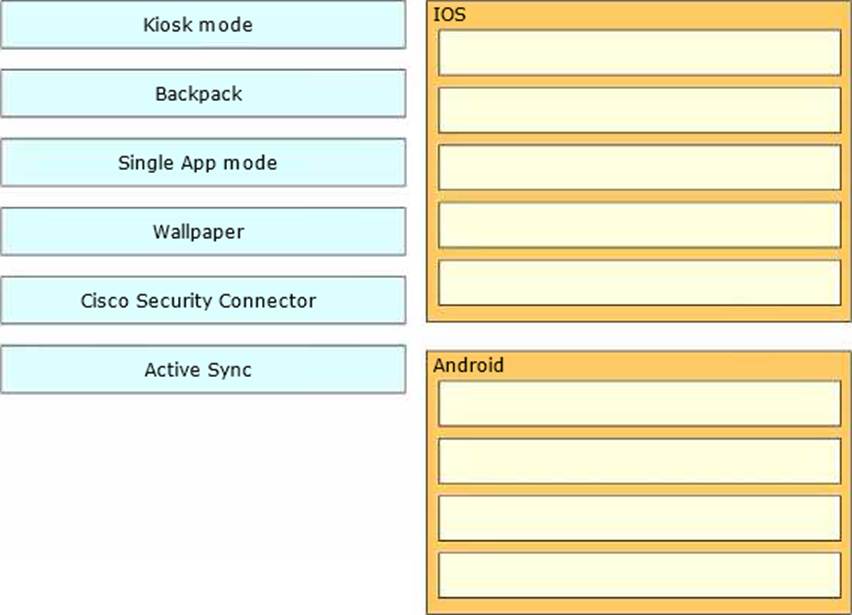
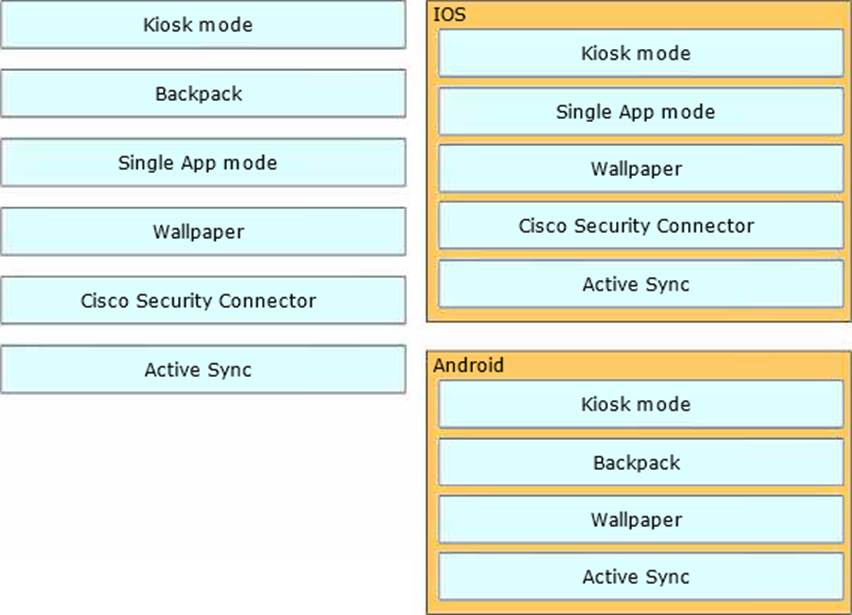
Drag and drop the settings from the left onto the OS system or systems that support it on the right Settings can be used more than once.
Explanation:
IOS:
Kiosk mode
Single App mode
Wallpaper
Cisco Security Connector
Active Sync
Android:
Kiosk mode
Backpack
Wallpaper
Active Sync
This question is related to the topic of System Manager: Getting Started in the Cisco Meraki documentation. You can find more information about this topic in the [System Manager: Getting Started] article or the [System Manager Overview] page.
https://documentation.meraki.com/SM/Profiles_and_Settings/Configuration_Settings_Payloads
Refer to the exhibit.
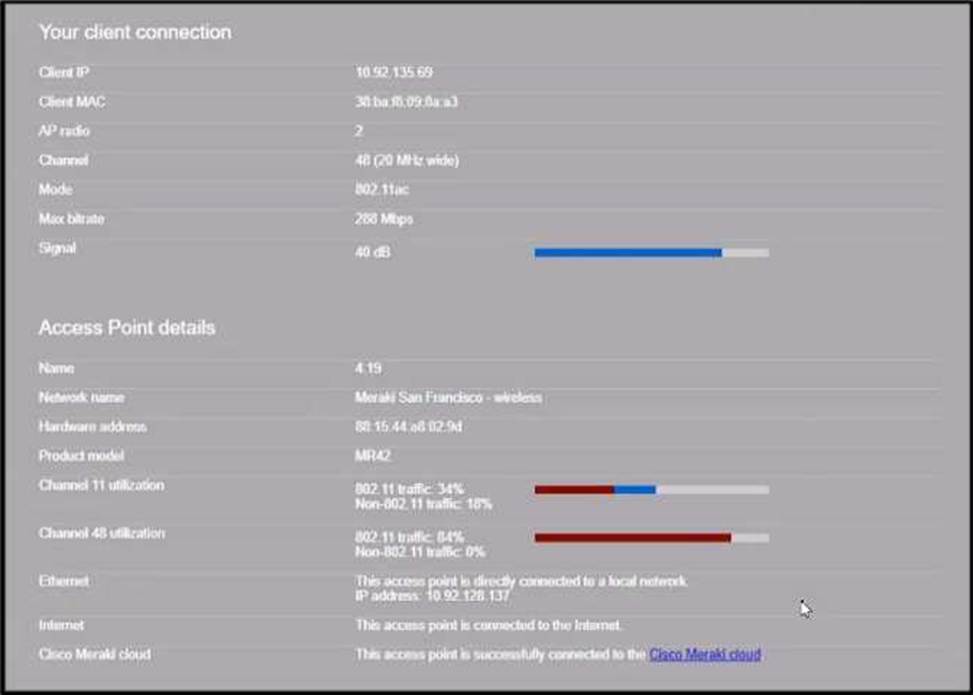
Why does the end user complain of poor wireless performance?
- A . Channel 48 utilization is at 84 percent.
- B . Non-802.11 traffic of 18 percent indicates poor AP placement.
- C . The client is connected to the secondary radio of the AP instead of the primary radio
- D . The client is using a 20 MHz channel width to connect.
What is a feature of distributed Layer 3 roaming?
- A . An MX Security Appliance is not required as a concentrator.
- B . An MX Security Appliance is required as a concentrator.
- C . All wireless client traffic can be split-tunneled.
- D . All wireless client traffic is tunneled.
A
Explanation:
https://documentation.meraki.com/Architectures_and_Best_Practices/Cisco_Meraki_Best_Practice_Design/Best_Practice_Design_-_MR_Wireless/Wireless_Layer_3_Roaming_Best_Practices
This is a feature of distributed Layer 3 roaming, which maintains layer 3 connections for end devices as they roam across layer 3 boundaries without a concentrator1. The first access point that a device connects to will become the anchor access point1.
Refer to the exhibit.
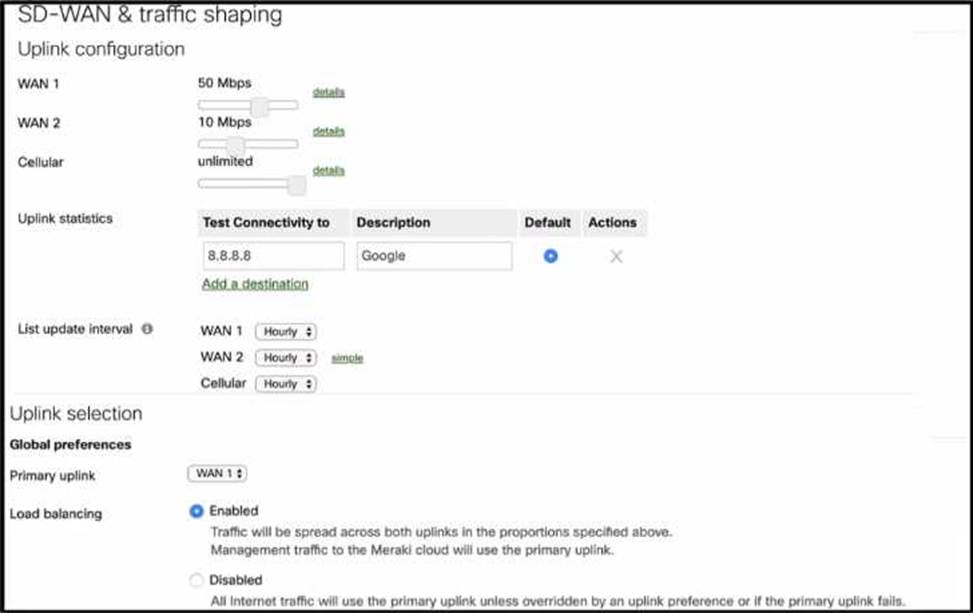
What Is the ratio of internet-bound flows that route via WAN 1 compared with WAN 2?
- A . All flows alternate in a 5:1 ratio.
- B . All flows alternate in a 2:1 ratio.
- C . All flows agrees via WAN 1:1 ratio.
- D . All flows egress via WAN1.
C
Explanation:
https://documentation.meraki.com/MX/Firewall_and_Traffic_Shaping/MX_Load_Balancing_and_Flow_Preferences#Load_Balancing
When an SSID is configured with Sign-On Splash page enabled, which two settings must be configured for unauthenticated clients to have full network access and not be allow listed? (Choose two.)
- A . Controller disconnection behavior
- B . Captive Portal strength
- C . Simultaneous logins
- D . Firewall & traffic shaping
- E . RADIUS for splash page settings
AB
Explanation:
To clarify, when an SSID is configured with Sign-On Splash page enabled, the two settings that must be configured for unauthenticated clients to have full network access and not be allow listed are: Controller disconnection behavior: This setting determines how the clients are treated when the Meraki cloud controller is unreachable. The options are Restricted or Unrestricted. The former option blocks all traffic from unauthenticated clients until the controller is reachable again. The latter option allows unauthenticated clients to access the network without signing on until the controller is reachable again1.
Captive Portal strength: This setting determines how often the clients are redirected to the splash page for authentication. The options are Block all access until sign-on is complete or Allow non-HTTP traffic prior to sign-on. The latter option allows unauthenticated clients to access other protocols such as DNS, DHCP, ICMP, etc., but blocks HTTP and HTTPS traffic until they sign on. This option is recommended for compatibility with devices that do not support web-based authentication1.
Reference: https://documentation.meraki.com/MR/Access_Control
Air Marshal has contained a malicious SSID.
What are two effects on connectivity? (Choose two.)
- A . Currently associated clients stay connected.
- B . New clients can connect.
- C . Currently associated clients are affected by restrictive traffic shaping rules.
- D . New clients cannot connect.
- E . Currently associated clients are disconnected.
DE
Explanation:
When a rogue access point is contained, clients will be unable to connect to the rogue AP. Additionally, any currently associated clients will lose their connection to the rogue AP. https://documentation.meraki.com/MR/Monitoring_and_Reporting/Air_Marshal
Refer to the exhibit.
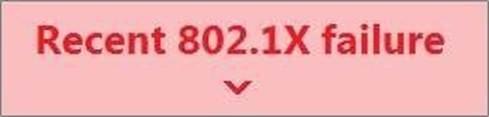
For an AP that displays this alert, which network access control method must be in use?
- A . preshared key
- B . WPA2-enterprise with my RADIUS server
- C . splash page with my RADIUS server
- D . MAC-based access control with RADIUS server
B
Explanation:
This is because the alert mentions 802.1X failure, which is a network access control method that is used with WPA2-enterprise and RADIUS servers1.
This question is related to the topic of Wireless Access Points Quick Start in the Cisco Meraki documentation. You can find more information about this topic in the Wireless Access Points Quick Start article or the Using the Cisco Meraki Device Local Status Page page.