
Cisco 500-220 Practice Exams
Last updated on Oct 01,2026- Exam Code: 500-220
- Exam Name: Engineering Cisco Meraki Solutions v1.0
- Certification Provider: Cisco
- Latest update: Oct 01,2026
There will be 100 concurrent users streaming video to their laptops. A 30/70 split between 2.4 Ghz and 5 Ghz will be used.
Roughly how many APs (rounded to the nearest whole number) are needed based on client count?
- A . 2
- B . 3
- C . 4
- D . 5
C
Explanation:
This is the approximate number of APs that are needed based on client count, assuming that each AP can support up to 25 concurrent video streaming users. This can be calculated by using the formula: Number of APs = (Number of Users x Percentage of Users on a Band) / Number of Users per AP on that Band
Where Number of Users is 100, Percentage of Users on 2.4 Ghz is 30%, Percentage of Users on 5 Ghz is 70%, Number of Users per AP on 2.4 Ghz is 15, and Number of Users per AP on 5 Ghz is 30. Therefore, Number of APs = (100 x 0.3 / 15) + (100 x 0.7 / 30) Number of APs = (3.33) + (2.33) Number of APs = 5.66
Rounding to the nearest whole number, the number of APs is 4.
This question is related to the topic of Wireless Capacity Planning in the Cisco Meraki documentation. You can find more information about this topic in the [Wireless Capacity Planning] article or the [Best Practice Design – MR Wireless] page.
DRAG DROP
Drag and drop the settings from the left onto the available or non-available methods of applying a group policy to a Cisco Meraki MR access point on the right.
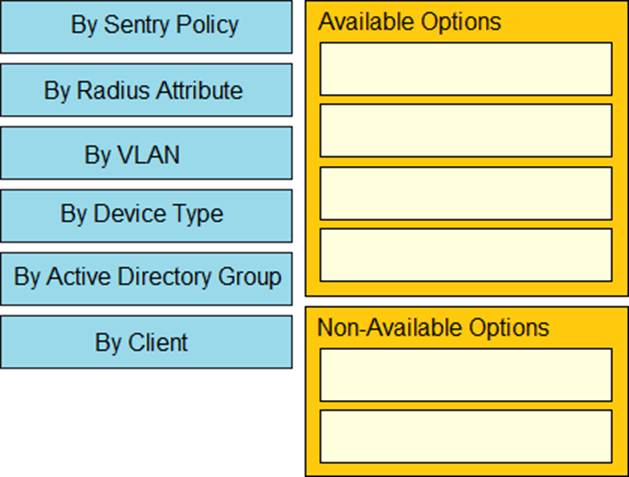
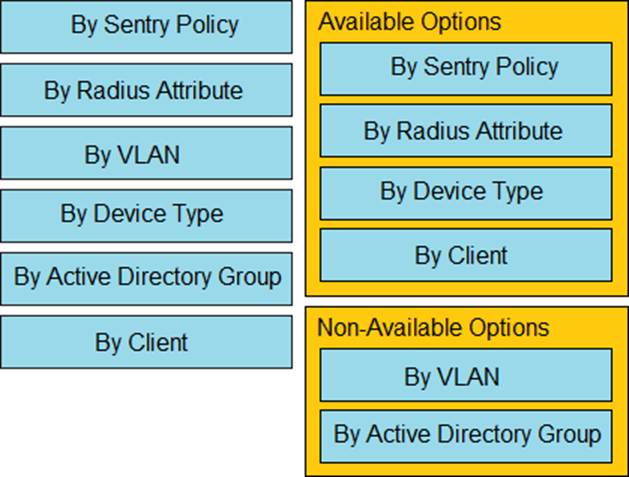
Explanation:
https://documentation.meraki.com/General_Administration/Cross-Platform_Content/Creating_and_Applying_Group_Policies
Which two primary metrics does Meraki Insight use to calculate the Application Performance Score? (Choose two.)
- A . Maximum Jitter
- B . Total Bandwidth Usage
- C . Maximum Latency
- D . Per-flow Goodput
- E . Application Response Time
DE
Explanation:
Reference: https://cloudcontrolled.uk/wp-content/uploads/2018/08/MerakiInsight.pdf (04)
Which information is used to calculate whether a WAN link has high usage?
- A . data under Security & SD WAN > Appliance Status > Uplink > Live Data
- B . total historical throughput of an uplink
- C . total number of devices that are actively passing traffic
- D . value under Security & SD WAN > SD WAN & Traffic Shaping > Uplink Configuration
D
Explanation:
Which information is used to calculate whether a WAN link has high usage not how to view (To accurately identify high utilization, users must set the ISP-provided bandwidth limits under Security and SD-WAN > SD-WAN and Traffic Shaping > Uplink Configuration for each uplink. If the bandwidth usage is higher than 80% of the defined limit, it will mark that uplink as High Usage.) https://documentation.meraki.com/MI/MI_WAN_Health#:~:text=To%20accurately%20identify%20high%20utilization,that%20uplink%20as%20High%20Usage.
A new application needs to be pushed to all iOS devices. Some devices report “NotNow” in the event log and do not install the application.
What does the “NotNow” event indicate?
- A . The application requires the most recent iOS version.
- B . The device is locked with a passcode.
- C . The device cannot connect to Apple servers.
- D . The device cannot connect to Cisco Meraki servers.
B
Explanation:
The error message “NotNow” is seen in the Event Log on an iOS device’s details page when an action cannot be performed because the device is locked with a passcode. These actions include pushing managed apps, installing profiles, and other actions. When this occurs the device will attempt to re-connect with the MDM server as soon as the device is unlocked in order to retry the action. https://documentation.meraki.com/SM/Monitoring_and_Reporting/Status_of_%22NotNow%22_in_Systems_Manager_Event_Log
Reference: https://community.meraki.com/t5/Mobile-Device-Management/Check-NotNow-Status/td-p/3887
What is out of scope when considering the Best practices for high-density wireless designs?
- A . maximum beamforming
- B . band selection
- C . minimum bitrate
- D . number of SSIDs
A
Explanation:
https://documentation.meraki.com/Architectures_and_Best_Practices/Cisco_Meraki_Best_Practice_ Design/Best_Practice_Design_-_MR_Wireless/High_Density_Wi-Fi_Deployments
Refer to the exhibit.

Which outcome occurs when logging is set to Enabled?
- A . Outbound flows are sent to a configured syslog server if a syslog sender is configured for flows.
- B . The hits counter within this section is now enabled.
- C . This firewall rule is now enabled.
- D . Inbound flows are sent to a configured syslog server if a syslog server configured for flows.
A
Explanation:
"Inbound and outbound flows will generate a syslog message showing the source and destination along with port numbers and the firewall rule that they matched. For inbound rules, 1=deny and 0=allow."
https://documentation.meraki.com/General_Administration/Monitoring_and_Reporting/Syslog_Server_Overview_and_Configuration
Refer to the exhibit.
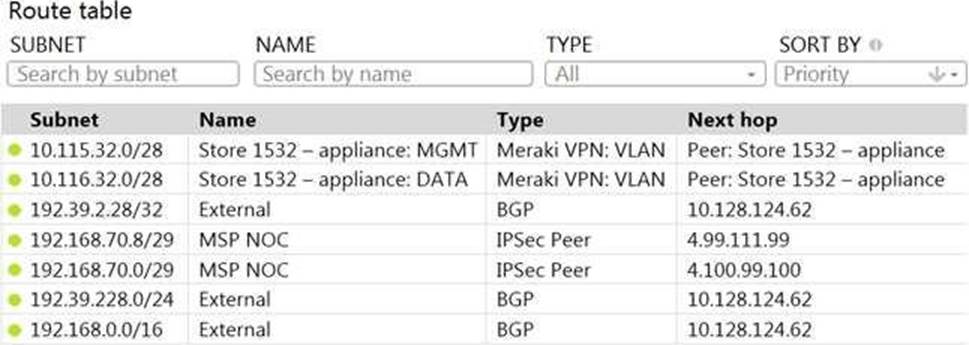
A packet arrives on the VPN concentrator with source IP 10.168.70.3 and destined for IP 10.116.32.4.
What is the next hop for the packet, based on this concentrator routing table?
- A . The concentrator gateway (10.128.124.62) is the next hop.
- B . Not enough detail is available to determine the next hop.
- C . The packet is stopped.
- D . The Auto VPN peer “Store 1532 C appliance” is the next hop.
D
Explanation:
This can be determined by looking at the concentrator routing table and finding the entry for the destination IP 10.116.32.4. The next hop for this entry is the Auto VPN peer “Store 1532 C appliance”. This question is related to the topic of Implementing Dynamic Routing Protocols in the Engineering Cisco Meraki Solutions (ECMS) official training documentation. You can find more information about this topic in the ECMS v2.2 Course Overview or the ECMS1 v2.1 Course Overview.
What is the default frequency of SD-WAN probes sent between VPN peers in a Cisco Meraki MX SD-WAN deployment?
- A . 10 milliseconds
- B . 100 milliseconds
- C . 1 second
- D . 10 seconds
C
Explanation:
https://www.ciscolive.com/c/dam/r/ciscolive/latam/docs/2019/pdf/BRKCRS-1579.pdf
Refer to the exhibit.
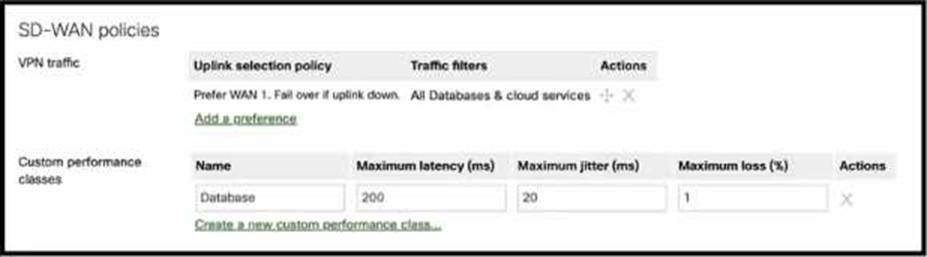
Which condition or conditions will cause the "All Databases & cloud services" SD-WAN traffic to be routed via a VPN2 tunnel on WAN2?
- A . WAN1 tunnel latency is 20 ms or less, irrespective of WAN2 tunnel performance.
- B . WAN1 tunnel latency is 20 ms or more, and WAN2 tunnel meets the configured performance criteria.
- C . WAN1 tunnel latency is 20 ms or less, and WAN2 tunnel meets the configured performance criteria.
- D . WAN1 tunnel latency is 20 ms or more, irrespective of WAN2 tunnel performance.
B
Explanation:
This is because the SD-WAN policy for “All Databases & cloud services” has the following settings:
Uplink selection policy:
Prefer WAN1, Fail over if down
Traffic filters: Custom performance classes
Custom performance classes: Database
Database performance criteria: Maximum latency 200 ms, Maximum jitter 20 ms, Maximum loss 1% This means that the SD-WAN traffic will be routed via WAN1 by default, unless WAN1 is down or fails to meet the database performance criteria. In that case, the traffic will be routed via WAN2, if WAN2 meets the database performance criteria. Therefore, the condition that will cause the traffic to be routed via WAN2 is when WAN1 tunnel latency is 20 ms or more (which exceeds the maximum jitter of 20 ms), and WAN2 tunnel meets the configured performance criteria (maximum latency 200 ms, maximum jitter 20 ms, maximum loss 1%).