
Check Point 156-315.81.20 Practice Exams
Last updated on Oct 23,2026- Exam Code: 156-315.81.20
- Exam Name: Check Point Certified Security Expert - R81.20
- Certification Provider: Check Point
- Latest update: Oct 23,2026
Question #450
The SmartEvent R81 Web application for real-time event monitoring is called:
- A . SmartView Monitor
- B . SmartEventWeb
- C . There is no Web application for SmartEvent
- D . SmartView
Correct Answer: B
B
Explanation:
The SmartEvent R81 Web application for real-time event monitoring is called SmartEventWeb.
SmartEventWeb is a web-based interface that allows administrators to view and analyze security events from various sources, such as logs, reports, incidents, and indicators. SmartEventWeb provides dashboards, widgets, filters, and drill-down options to help administrators gain insights into their security posture. The other options are either incorrect or refer to different applications.
B
Explanation:
The SmartEvent R81 Web application for real-time event monitoring is called SmartEventWeb.
SmartEventWeb is a web-based interface that allows administrators to view and analyze security events from various sources, such as logs, reports, incidents, and indicators. SmartEventWeb provides dashboards, widgets, filters, and drill-down options to help administrators gain insights into their security posture. The other options are either incorrect or refer to different applications.
Question #452
Which component is NOT required to communicate with the Web Services API?
- A . API key
- B . session ID token
- C . content-type
- D . Request payload
Correct Answer: A
A
Explanation:
The component that is not required to communicate with the Web Services API is the API key. The Web Services API uses a session ID token for authentication, which is obtained by sending a login request with a valid username and password. The other components are required for sending requests and receiving responses from the Web Services API. The content-type specifies the format of the data being sent or received, such as JSON or XML. The request payload contains the data and parameters for the API call, such as command name, object name, etc.
Reference: [Web Services API Reference Guide]
A
Explanation:
The component that is not required to communicate with the Web Services API is the API key. The Web Services API uses a session ID token for authentication, which is obtained by sending a login request with a valid username and password. The other components are required for sending requests and receiving responses from the Web Services API. The content-type specifies the format of the data being sent or received, such as JSON or XML. The request payload contains the data and parameters for the API call, such as command name, object name, etc.
Reference: [Web Services API Reference Guide]
Question #453
Which command shows detailed information about VPN tunnels?
- A . cat $FWDIR/conf/vpn.conf
- B . vpn tu tlist
- C . vpn tu
- D . cpview
Correct Answer: B
B
Explanation:
The command vpn tu tlist shows detailed information about VPN tunnels, such as the peer IP address, encryption domain, IKE phase 1 and phase 2 status, encryption algorithm, and tunnel uptime. The command vpn tu is an interactive tool that allows users to list, delete, or reconnect VPN tunnels. The command cpview is a real-time performance monitoring tool that shows various statistics about the system and network.
Reference: VPN Administration Guide, SK97638 – What is cpview Utility and How to Use it
B
Explanation:
The command vpn tu tlist shows detailed information about VPN tunnels, such as the peer IP address, encryption domain, IKE phase 1 and phase 2 status, encryption algorithm, and tunnel uptime. The command vpn tu is an interactive tool that allows users to list, delete, or reconnect VPN tunnels. The command cpview is a real-time performance monitoring tool that shows various statistics about the system and network.
Reference: VPN Administration Guide, SK97638 – What is cpview Utility and How to Use it
Question #454
Please choose the path to monitor the compliance status of the Check Point R81.20 based management.
- A . Gateways & Servers –> Compliance View
- B . Compliance blade not available under R81.20
- C . Logs & Monitor –> New Tab –> Open compliance View
- D . Security & Policies –> New Tab –> Compliance View
Correct Answer: C
C
Explanation:
The path to monitor the compliance status of the Check Point R81.20 based management is Logs & Monitor > New Tab > Open compliance View. Compliance View is a feature that allows administrators to monitor and assess the compliance level of their Check Point products and security policies based on best practices and industry standards. Compliance View provides a dashboard that shows the overall compliance status, compliance score, compliance trends, compliance issues, compliance reports, and compliance blades for different security aspects, such as data protection, threat prevention, identity awareness, etc. To access Compliance View in R81.20 SmartConsole, administrators need to go to Logs & Monitor > New Tab > Open compliance View. The other options are either incorrect or not available in R81.20.
C
Explanation:
The path to monitor the compliance status of the Check Point R81.20 based management is Logs & Monitor > New Tab > Open compliance View. Compliance View is a feature that allows administrators to monitor and assess the compliance level of their Check Point products and security policies based on best practices and industry standards. Compliance View provides a dashboard that shows the overall compliance status, compliance score, compliance trends, compliance issues, compliance reports, and compliance blades for different security aspects, such as data protection, threat prevention, identity awareness, etc. To access Compliance View in R81.20 SmartConsole, administrators need to go to Logs & Monitor > New Tab > Open compliance View. The other options are either incorrect or not available in R81.20.
Question #455
Connections to the Check Point R81 Web API use what protocol?
- A . HTTPS
- B . RPC
- C . VPN
- D . SIC
Correct Answer: A
A
Explanation:
Connections to the Check Point R81 Web API use the HTTPS protocol. The Web API is a RESTful web service that allows you to perform management tasks on the Security Management Server using HTTP requests.
Reference: Check Point Management APIs
A
Explanation:
Connections to the Check Point R81 Web API use the HTTPS protocol. The Web API is a RESTful web service that allows you to perform management tasks on the Security Management Server using HTTP requests.
Reference: Check Point Management APIs
Question #456
Which command is used to display status information for various components?
- A . show all systems
- B . show system messages
- C . sysmess all
- D . show sysenv all
Correct Answer: D
D
Explanation:
The command used to display status information for various components is show sysenv all. This command provides comprehensive status information about the system’s environment and various components, including hardware and software components. It can be useful for troubleshooting and monitoring the system’s health.
Reference: Check Point Certified Security Expert (CCSE) R81 documentation and learning resources.:
D
Explanation:
The command used to display status information for various components is show sysenv all. This command provides comprehensive status information about the system’s environment and various components, including hardware and software components. It can be useful for troubleshooting and monitoring the system’s health.
Reference: Check Point Certified Security Expert (CCSE) R81 documentation and learning resources.:
Question #457
The back-end database for Check Point R81 Management uses:
- A . DBMS
- B . MongoDB
- C . PostgreSQL
- D . MySQL
Correct Answer: C
C
Explanation:
The back end database for Check Point R81 Management uses PostgreSQL, which is an open source relational database management system2. MongoDB, MySQL, and DBMS are not used by Check Point R81 Management.
Reference: 2: Check Point Software, Getting Started, Database.
C
Explanation:
The back end database for Check Point R81 Management uses PostgreSQL, which is an open source relational database management system2. MongoDB, MySQL, and DBMS are not used by Check Point R81 Management.
Reference: 2: Check Point Software, Getting Started, Database.
Question #458
What are valid authentication methods for mutual authenticating the VPN gateways?
- A . PKI Certificates and Kerberos Tickets
- B . PKI Certificates and DynamicID OTP
- C . Pre-Shared Secrets and Kerberos Ticket
- D . Pre-shared Secret and PKI Certificates
Correct Answer: D
D
Explanation:
The valid authentication methods for mutual authenticating the VPN gateways are Pre-shared Secret and PKI Certificates. Pre-shared Secret is a method that uses a secret key that is known only to the two VPN gateways. PKI Certificates is a method that uses digital certificates that are issued by a trusted Certificate Authority (CA) and contain the public key of each VPN gateway. Both methods ensure that the VPN gateways can verify each other’s identity before establishing a secure VPN tunnel.
Reference: [Check Point R81 VPN Administration Guide]
D
Explanation:
The valid authentication methods for mutual authenticating the VPN gateways are Pre-shared Secret and PKI Certificates. Pre-shared Secret is a method that uses a secret key that is known only to the two VPN gateways. PKI Certificates is a method that uses digital certificates that are issued by a trusted Certificate Authority (CA) and contain the public key of each VPN gateway. Both methods ensure that the VPN gateways can verify each other’s identity before establishing a secure VPN tunnel.
Reference: [Check Point R81 VPN Administration Guide]
Question #459
What does it mean if Deyra sees the gateway status? (Choose the BEST answer.)
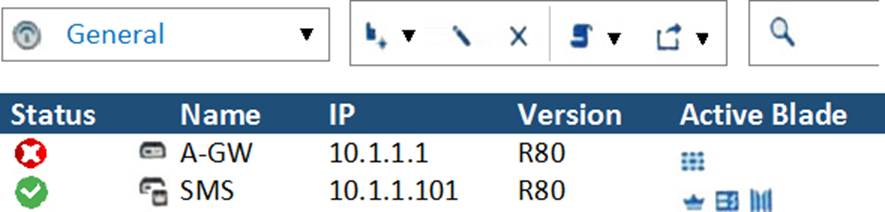
- A . SmartCenter Server cannot reach this Security Gateway.
- B . There is a blade reporting a problem.
- C . VPN software blade is reporting a malfunction.
- D . Security Gateway’s MGNT NIC card is disconnected.
Correct Answer: B
B
Explanation:
If Deyra sees the gateway status as shown in the image, it means that there is a blade reporting a problem. The red exclamation mark indicates that one or more blades on the gateway have an issue
that needs attention. The issue could be related to configuration, license, policy, or other factors. Deyra can hover over the icon to see more details about the problem.
Reference: Training & Certification | Check Point Software, New Courses and Certificates for R81.20 – Check Point CheckMates
B
Explanation:
If Deyra sees the gateway status as shown in the image, it means that there is a blade reporting a problem. The red exclamation mark indicates that one or more blades on the gateway have an issue
that needs attention. The issue could be related to configuration, license, policy, or other factors. Deyra can hover over the icon to see more details about the problem.
Reference: Training & Certification | Check Point Software, New Courses and Certificates for R81.20 – Check Point CheckMates
Question #460
What is the limitation of employing Sticky Decision Function?
- A . With SDF enabled, the involved VPN Gateways only supports IKEv1
- B . Acceleration technologies, such as SecureXL and CoreXL are disabled when activating SDF
- C . With SDF enabled, only ClusterXL in legacy mode is supported
- D . With SDF enabled, you can only have three Sync interfaces at most
Correct Answer: B
B
Explanation:
Sticky Decision Function (SDF) is a feature that ensures that VPN traffic is handled by the same core on a Security Gateway with multiple CPU cores. This improves the performance and stability of VPN tunnels by avoiding out-of-order packets and reducing encryption overhead. However, the limitation of employing SDF is that acceleration technologies, such as SecureXL and CoreXL are disabled when activating SDF. This means that SDF may reduce the overall throughput and scalability of the Security Gateway. Therefore, SDF should be used only when necessary and only on gateways that are dedicated to VPN traffic.
Reference: R81 Performance Tuning Administration Guide
B
Explanation:
Sticky Decision Function (SDF) is a feature that ensures that VPN traffic is handled by the same core on a Security Gateway with multiple CPU cores. This improves the performance and stability of VPN tunnels by avoiding out-of-order packets and reducing encryption overhead. However, the limitation of employing SDF is that acceleration technologies, such as SecureXL and CoreXL are disabled when activating SDF. This means that SDF may reduce the overall throughput and scalability of the Security Gateway. Therefore, SDF should be used only when necessary and only on gateways that are dedicated to VPN traffic.
Reference: R81 Performance Tuning Administration Guide