
Check Point 156-215.81.20 Practice Exams
Last updated on Oct 23,2026- Exam Code: 156-215.81.20
- Exam Name: Check Point Certified Security Administrator R81.20
- Certification Provider: Check Point
- Latest update: Oct 23,2026
Vanessa is attempting to log into the Gaia Web Portal. She is able to login successfully. Then she tries the same username and password for SmartConsole but gets the message in the screenshot image below. She has checked that the IP address of the Server is correct and the username and password she used to login into Gaia is also correct.
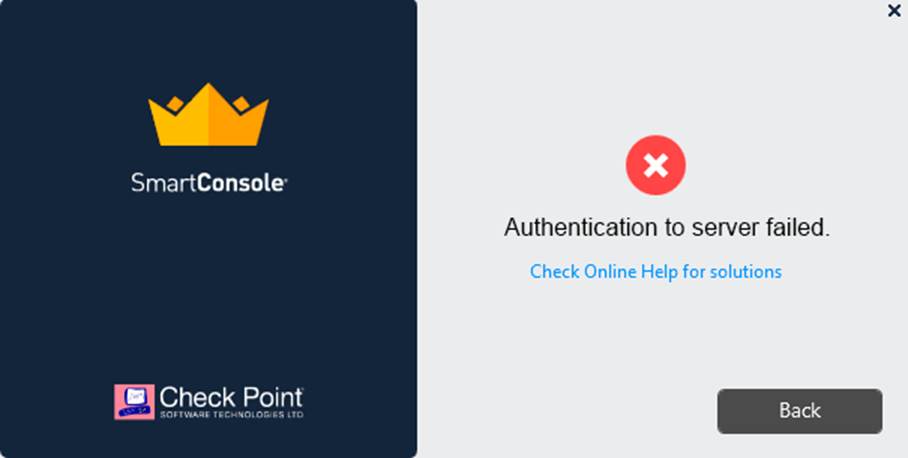
What is the most likely reason?
- A . Check Point R80 SmartConsole authentication is more secure than in previous versions and Vanessa requires a special authentication key for R80 SmartConsole. Check that the correct key details are used.
- B . Check Point Management software authentication details are not automatically the same as the Operating System authentication details. Check that she is using the correct details.
- C . SmartConsole Authentication is not allowed for Vanessa until a Super administrator has logged in first and cleared any other administrator sessions.
- D . Authentication failed because Vanessa’s username is not allowed in the new Threat Prevention console update checks even though these checks passed with Gaia.
B
Explanation:
The most likely reason for Vanessa’s authentication failure is that she is using the wrong details for SmartConsole. Check Point Management software authentication details are not automatically the same as the Operating System authentication details. She needs to use the credentials that were defined during the initial configuration of the Security Management Server, or the ones that were assigned to her by the administrator12. The other options are not valid reasons for this error.
Reference: SmartConsole Login, Check Point CCSA – R81: Practice Test & Explanation
SandBlast offers flexibility in implementation based on their individual business needs.
What is an option for deployment of Check Point SandBlast Zero-Day Protection?
- A . Smart Cloud Services
- B . Load Sharing Mode Services
- C . Threat Agent Solution
- D . Public Cloud Services
A
Explanation:
Smart Cloud Services is an option for deployment of Check Point SandBlast Zero-Day Protection. It is a cloud-based service that provides advanced threat prevention for files and URLs, without requiring any on-premise infrastructure or appliances.
Reference: [Check Point SandBlast Zero-Day Protection], [Smart Cloud Services]
Name the pre-defined Roles included in Gaia OS.
- A . AdminRole, and MonitorRole
- B . ReadWriteRole, and ReadyOnly Role
- C . AdminRole, cloningAdminRole, and Monitor Role
- D . AdminRole
A
Explanation:
The pre-defined Roles included in Gaia OS are AdminRole and MonitorRole. AdminRole is the role that has full access to all Gaia features and commands. MonitorRole is the role that has read-only access to Gaia features and commands1. The other options are not valid pre-defined Roles in Gaia OS.
In SmartEvent, a correlation unit (CU) is used to do what?
- A . Collect security gateway logs, Index the logs and then compress the logs.
- B . Receive firewall and other software blade logs in a region and forward them to the primary log
server. - C . Analyze log entries and identify events.
- D . Send SAM block rules to the firewalls during a DOS attack.
C
Explanation:
A correlation unit (CU) is a component of SmartEvent that analyzes log entries on log servers and identifies events based on predefined or custom rules1. A CU receives logs from one or more log servers and forwards them to the SmartEvent server, where they are stored in the events database
To increase security, the administrator has modified the Core protection ‘Host Port Scan’ from ‘Medium’ to ‘High’ Predefined Sensitivity.
Which Policy should the administrator install after Publishing the changes?
- A . The Access Control and Threat Prevention Policies.
- B . The Access Control Policy.
- C . The Access Control & HTTPS Inspection Policy.
- D . The Threat Prevention Policy.
D
Explanation:
To increase security, the administrator has modified the Core protection ‘Host Port Scan’ from ‘Medium’ to ‘High’ Predefined Sensitivity. The administrator should install the Threat Prevention Policy after Publishing the changes3. The Threat Prevention Policy defines how the Security Gateway inspects and protects against threats such as port scans, bot attacks, and zero-day exploits4.
Reference: Check Point R81 Firewall Administration Guide, Check Point R81 Threat Prevention Administration Guide
Fill in the blank: Once a certificate is revoked from the Security Gateway by the Security Management Server, the certificate information is _____.
- A . Stored on the Security Management Server.
- B . Stored on the Certificate Revocation List.
- C . Sent to the Internal Certificate Authority.
- D . Sent to the Security Administrator.
B
Explanation:
When a certificate is revoked from a Security Gateway, the information is stored on the Certificate Revocation List (CRL). The CRL is maintained by the Internal Certificate Authority (ICA) and is checked during certificate validation processes.
Option A (Incorrect): The Security Management Server maintains certificate information but does not store revoked certificates permanently.
Option C (Incorrect): The Internal Certificate Authority manages certificate issuance but does not store revoked certificates―it publishes a CRL instead.
Option D (Incorrect): The Security Administrator does not receive direct notifications of revoked certificates.
Thus, the correct answer is B. Stored on the Certificate Revocation List.
Reference: Check Point documentation confirms that revoked certificates are listed in the Certificate Revocation List (CRL).
What is the best sync method in the ClusterXL deployment?
- A . Use 1 cluster + 1st sync
- B . Use 1 dedicated sync interface
- C . Use 3 clusters + 1st sync + 2nd sync + 3rd sync
- D . Use 2 clusters + 1st sync + 2nd sync
B
Explanation:
The best sync method in the ClusterXL deployment is to use one dedicated sync interface56. This method provides optimal performance and reliability for synchronization traffic. Using multiple sync interfaces is not recommended as it increases CPU load and does not provide 100% sync redundancy5. Using multiple clusters is not a sync method, but a cluster topology.
Reference: Sync
Redundancy in ClusterXL, Best Practice for HA sync interface
CPU-level of your Security gateway is peaking to 100% causing problems with traffic. You suspect that the problem might be the Threat Prevention settings.
The following Threat Prevention Profile has been created.
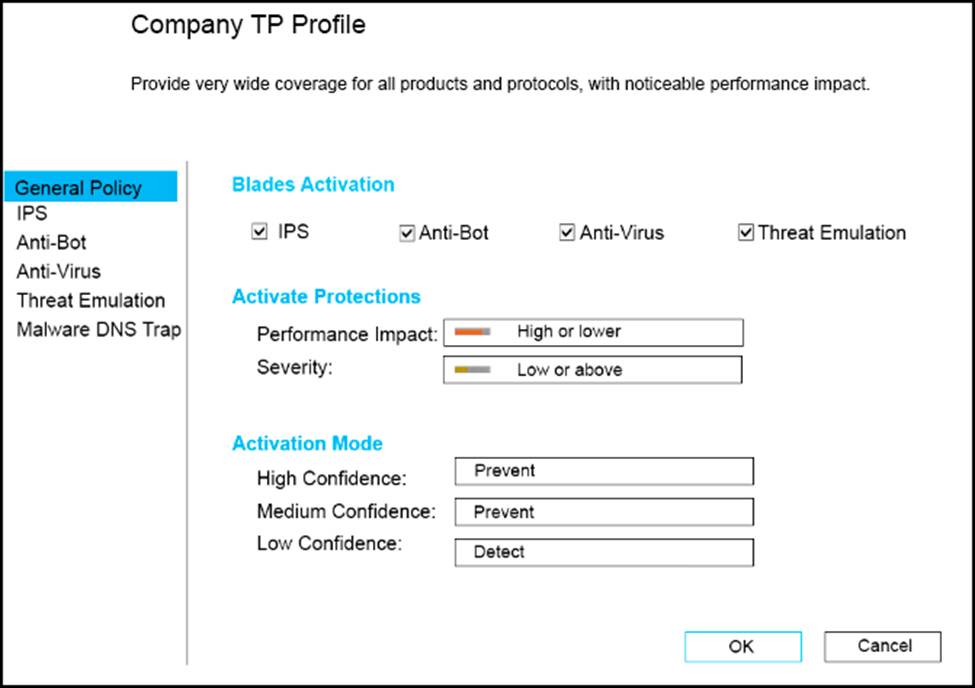
How could you tune the profile in order to lower the CPU load still maintaining security at good level? Select the BEST answer.
- A . Set High Confidence to Low and Low Confidence to Inactive.
- B . Set the Performance Impact to Medium or lower.
- C . The problem is not with the Threat Prevention Profile. Consider adding more memory to the appliance.
- D . Set the Performance Impact to Very Low Confidence to Prevent.
B
Explanation:
The BEST way to tune the profile in order to lower the CPU load still maintaining security at good level is to set the Performance Impact to Medium or lower. This will reduce the number of packets that are inspected by the Threat Prevention blades, while still providing a high level of protection. Setting High Confidence to Low and Low Confidence to Inactive will lower the security level, as it will allow more traffic that may be malicious. The problem is likely with the Threat Prevention Profile, as it can have a significant impact on the CPU utilization of the Security Gateway. Adding more memory to the appliance will not solve the problem, as memory is not the bottleneck in this case. Setting the Performance Impact to Very Low Confidence to Prevent will increase the CPU load, as it will inspect more packets and block more traffic that may be false positives.
Reference: Threat Prevention Administration Guide, Check Point R81.10