
Check Point 156-215.81.20 Practice Exams
Last updated on Oct 23,2026- Exam Code: 156-215.81.20
- Exam Name: Check Point Certified Security Administrator R81.20
- Certification Provider: Check Point
- Latest update: Oct 23,2026
View the rule below.
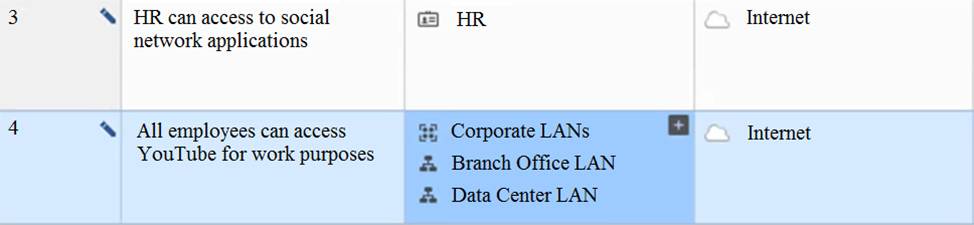
What does the pen-symbol in the left column mean?
- A . Those rules have been published in the current session.
- B . Rules have been edited by the logged in administrator, but the policy has not been published yet.
- C . Another user has currently locked the rules for editing.
- D . The configuration lock is present. Click the pen symbol in order to gain the lock.
B
Explanation:
The pen-symbol in the left column means that the rules have been edited by the logged in administrator, but the policy has not been published yet. It indicates that the changes are not yet effective and can be discarded.
Reference: Policy Editor, Publishing Changes
You want to verify if there are unsaved changes in GAiA that will be lost with a reboot.
What command can be used?
- A . show unsaved
- B . show save-state
- C . show configuration diff
- D . show config-state
D
Explanation:
The command show config-state can be used to verify if there are unsaved changes in GAiA that will be lost with a reboot. The other commands are not valid in GAiA.
Reference: [Check Point GAiA Administration Guide], [Check Point CCSA – R81: Practice Test & Explanation]
Which of the following technologies extracts detailed information from packets and stores that information in state tables?
- A . INSPECT Engine
- B . Next-Generation Firewall
- C . Packet Filtering
- D . Application Layer Firewall
B
Explanation:
The INSPECT Engine is a technology that extracts detailed information from packets and stores that information in state tables. It enables stateful inspection and application layer filtering12
Reference: INSPECT Engine, Stateful Inspection
What is the default shell of Gaia CLI?
- A . clish
- B . Monitor
- C . Read-only
- D . Bash
A
Explanation:
The default shell of Gaia CLI is clish, which stands for Check Point command line interface shell1. It provides a user-friendly interface to configure and manage Check Point products.
Reference: Check Point Gaia Administration Guide
What does it mean if Deyra sees the gateway status:
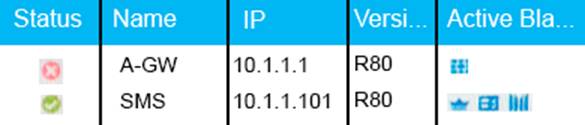
Choose the BEST answer.
- A . SmartCenter Server cannot reach this Security Gateway
- B . There is a blade reporting a problem
- C . VPN software blade is reporting a malfunction
- D . Security Gateway’s MGNT NIC card is disconnected.
B
Explanation:
If Deyra sees the gateway status as shown in the image, it means that there is a blade reporting a problem. The red “X” in the status column indicates that one or more blades on the Security Gateway have a problem that requires attention. The other options are not correct, as they do not match the status shown in the image. If the SmartCenter Server cannot reach this Security Gateway, the status column would show a yellow triangle with an exclamation mark. If the VPN software blade is reporting a malfunction, the blades column would show a red “X” on the VPN icon. If the Security Gateway’s MGNT NIC card is disconnected, the IP column would show “N/A” instead of the IP address.
Reference: Remote Access VPN R81 Administration Guide, Check Point R81.10
Which of the following is used to extract state related information from packets and store that information in state tables?
- A . STATE Engine
- B . TRACK Engine
- C . RECORD Engine
- D . INSPECT Engine
D
Explanation:
The INSPECT Engine is the core component of Check Point’s Stateful Inspection technology. It is used to extract state related information from packets and store that information in state tables. The INSPECT Engine also evaluates the security policy and enforces it on the packets1.
Reference: Check Point R81 Security Gateway Technical Administration Guide
Fill in the blank: An identity server uses a______________to trust a Terminal Server Identity Agent.
- A . One-time password
- B . Shared secret
- C . Certificate
- D . Token
What command from the CLI would be used to view current licensing?
- A . license view
- B . fw ctl tab -t license -s
- C . show license -s
- D . cplic print
D
Explanation:
The command cplic print displays the installed licenses and their expiration dates on the CLI1.
Reference: Check Point CLI Reference Card
If an administrator wants to restrict access to a network resource only allowing certain users to access it, and only when they are on a specific network what is the best way to accomplish this?
- A . Create an inline layer where the destination is the target network resource Define sub-rules allowing only specific sources to access the target resource
- B . Use a "New Legacy User at Location", specifying the LDAP user group that the users belong to, at the desired location
- C . Create a rule allowing only specific source IP addresses access to the target network resource.
- D . Create an Access Role object, with specific users or user groups specified, and specific networks defined Use this access role as the "Source" of an Access Control rule
D
Explanation:
The best way to restrict access to a network resource only allowing certain users to access it, and only when they are on a specific network, is to create an Access Role object, with specific users or user groups specified, and specific networks defined. Then, use this access role as the “Source” of an Access Control rule. This allows for granular control over network traffic based on user identity and location3.
Reference: 3: Check Point R81 Security Gateway Administration Guide, page 13.
Vanessa is attempting to log into the Gaia Web Portal. She is able to login successfully. Then she tries the same username and password for SmartConsole but gets the message in the screenshot image below. She has checked that the IP address of the Server is correct and the username and password she used to login into Gaia is also correct.
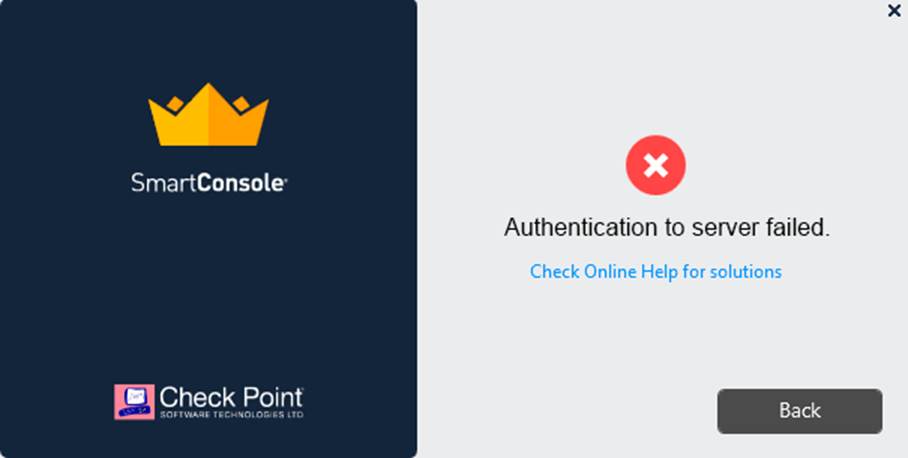
What is the most likely reason?
- A . Check Point R80 SmartConsole authentication is more secure than in previous versions and Vanessa requires a special authentication key for R80 SmartConsole. Check that the correct key details are used.
- B . Check Point Management software authentication details are not automatically the same as the Operating System authentication details. Check that she is using the correct details.
- C . SmartConsole Authentication is not allowed for Vanessa until a Super administrator has logged in first and cleared any other administrator sessions.
- D . Authentication failed because Vanessa’s username is not allowed in the new Threat Prevention console update checks even though these checks passed with Gaia.
B
Explanation:
The most likely reason for Vanessa’s authentication failure is that she is using the wrong details for SmartConsole. Check Point Management software authentication details are not automatically the same as the Operating System authentication details. She needs to use the credentials that were defined during the initial configuration of the Security Management Server, or the ones that were assigned to her by the administrator12. The other options are not valid reasons for this error.
Reference: SmartConsole Login, Check Point CCSA – R81: Practice Test & Explanation