
Atlassian ACP-610 Practice Exams
Last updated on Oct 22,2026- Exam Code: ACP-610
- Exam Name: Managing Jira Projects for Data Center and Server
- Certification Provider: Atlassian
- Latest update: Oct 22,2026
A Scrum project has the following five configured versions:
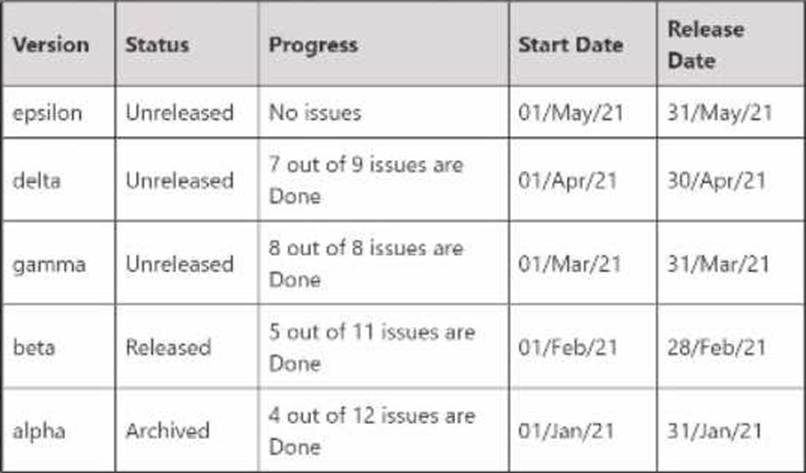
How many of them will be available in the versions panel of the project backlog?
- A . 4
- B . 1
- C . 2
- D . 5
- E . 3
E
Explanation:
Three versions will be available in the versions panel of the project backlog: epsilon, delta, and gamma. These are the three unreleased versions in the project, as shown in the image. The versions panel only shows unreleased versions, as they are used to plan and track the progress of upcoming releases. Released and archived versions are not shown in the versions panel, as they are considered completed and no longer relevant for planning purposes.
Reference: [Working with versions], [Managing Jira Projects Data Center and Server: Certification Bundle]
Quang can transition issues from Resolved to Done using the workflow button on issues in his project. However, he cannot drag then from Resolved to Done on the project’s Kanban board Identify a possible reason why.
- A . Quang lacks a project permission.
- B . Quang is not a board administrator.
- C . The statuses are mapped to the same column.
- D . The board has a sub-filter configured
C
Explanation:
If Quang can transition issues from Resolved to Done using the workflow button on issues in his project, but cannot drag them from Resolved to Done on the project’s Kanban board, a possible reason is that the statuses are mapped to the same column. The columns on a Kanban board represent the stages of work in a project. Each column can have one or more statuses mapped to it. To move an issue from one column to another, you need to drag and drop it to a column that has a different status mapped to it. If the statuses are mapped to the same column, you cannot move the issue by dragging it on the board, but you can still use the workflow button to change its status.
Reference: Configuring columns, Moving an issue
All stories in your project are linked to epics within the same project. Using a bulk operation, you moved some stories to another project.
What happens to the epics?
- A . Epics and epic links are moved automatically.
- B . Epics and epic links are unaffected
- C . Epics are moved automatically but epic links are lost
- D . Epics are unaffected but epic links are lost.
C
Explanation:
Epics are moved automatically but epic links are lost when stories are moved to another project using a bulk operation. This is because epics are a type of issue, and issues can be moved across projects. However, epic links are a type of issue link, and issue links cannot be moved across projects. Therefore, the stories will lose their epic links after the move, and the epics will remain in the original project.
Reference: [Moving multiple issues], [Managing Jira Projects Data Center and Server: Certification Bundle]
You are moving an epic between projects that share an issue type scheme.
Which issues are moved along with the epic5
- A . all standard issues in the epic
- B . all standard and sub-task issues in the epic
- C . only Story issues in the epic
- D . all sub-tasks of the epic itself
- E . all issues linked to the epic through issue links
A
Explanation:
When you move an epic between projects that share an issue type scheme, all standard issues in the epic are moved along with it. This means that any issue type that is not a sub-task or an epic will be moved to the new project. Sub-task issues in the epic will not be moved unless their parent issues are also in the epic. Story issues in the epic will be moved only if they are standard issue types, not sub-tasks. Issues linked to the epic through issue links will not be moved as they are not part of the epic hierarchy. Therefore, the correct answer is A.
Reference: Moving an issue, Working with epics
Bob can see only 20 out of 50 issues in a particular scrum project.
Browse Projects permission is granted to a single group.
What does Bob need to see all the issues?
- A . project permission
- B . security level access
- C . global permission
- D . board access
B
Explanation:
Bob needs security level access to see all the issues in the scrum project. Security levels are a way of restricting the visibility of certain issues within a project to specific users or groups. If Bob does not have the appropriate security level for some issues, he will not be able to see them. Browse Projects permission alone is not enough to see all the issues in a project that has security levels configured. Project permission, global permission, and board access are not related to issue visibility within a project.
Reference: Configuring issue-level security, Managing Jira Projects Data Center and Server: Certification Bundle
Your team works in a project that uses only one workflow, a simplified workflow.
The configuration of the corresponding Kanban board is shown:
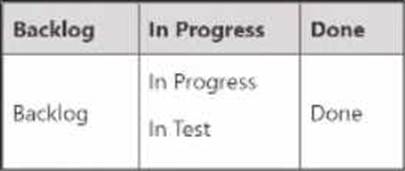
Which statement is definitely true?
- A . Bugs can be dragged from "In Progress" to "In Test" on this board.
- B . All team members can transition issues from Backlog to In Test.
- C . Issues can be transitioned freely between all workflow statuses
- D . A resolution will be set once an issue is dragged to Done
A
Explanation:
The statement that is definitely true is that bugs can be dragged from “In Progress” to “In Test” on this board. This is because the board configuration shown in the image has two columns: “In Progress” and “Done”. The “In Progress” column has three statuses mapped to it: “To Do”, “In Progress”, and “In Test”. The “Done” column has one status mapped to it: “Done”. Therefore, issues can be moved from one status to another within the same column by dragging them on the board. However, issues cannot be moved from one column to another by dragging them on the board, as this would require a workflow transition that is not available in a simplified workflow. A simplified workflow is a default workflow that allows any user with the Edit Issues permission to add or remove statuses on the fly. To move an issue from one column to another, you need to use the workflow button on the issue detail view and select a transition that matches the status of the destination column.
Reference: Configuring columns, Using a simplified workflow
A Jira administrator just created a new project based on the "Task management" project template.
Which Jira feature is enabled in this project by default?
- A . Epic issue type
- B . ranking of standard issue types
- C . Issue analysis reports
- D . Release Hub
B
Explanation:
The “Task management” project template is designed for managing simple tasks and tracking progress. By default, this template enables ranking of standard issue types, which allows you to order issues by priority on a board. The other features mentioned in the options are not enabled by default in this template. Therefore, the correct answer is B.
Reference: Creating a project, Ranking an issue
You need a field that:
• allows different options in different projects
• allows options to be disabled where necessary
• allows only a single value
• allows a default value to be configured
Which field meets these requirements?
- A . Select List (single choice)
- B . Checkboxes
- C . Component/s
- D . Labels
A
Explanation:
A select list (single choice) field meets the requirements because it allows different options in different projects, allows options to be disabled where necessary, allows only a single value, and allows a default value to be configured. A select list (single choice) field is a custom field that lets the user select one option from a list of predefined values. The values can be different for each project and can be enabled or disabled as needed. The field can also have a default value that is automatically selected when creating an issue12
Reference:
1: What are custom fields? | Jira Software Cloud | Atlassian Support
2: Configuring a custom field | Jira Software Cloud | Atlassian Support
Analyze the Epic Report shown.
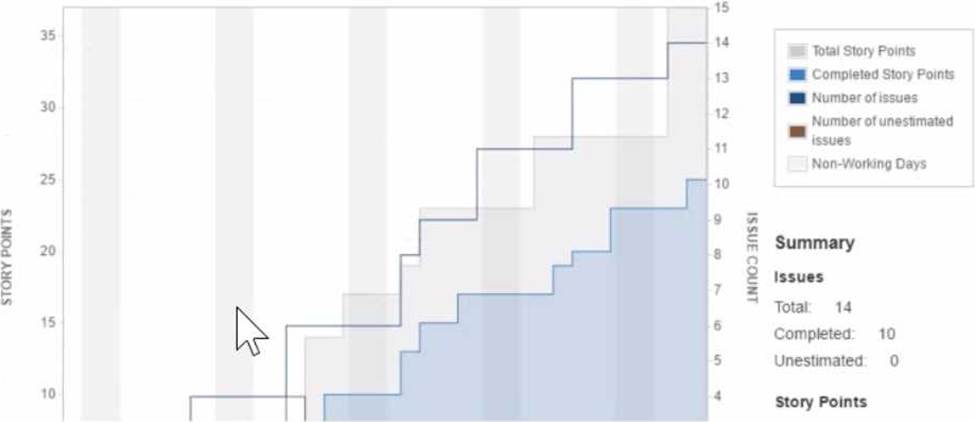
Identify why the epic completion date is hard to predict.
- A . Most stories aren’t estimated until the end of the epic
- B . The configured Working Days for the board are unrealistic.
- C . The team is using issue count for their estimation statistic.
- D . The team adds new stories throughout the epic.
D
Explanation:
The epic completion date is hard to predict because the team adds new stories throughout the epic. This means that the scope of the epic is not fixed and can change over time. The Epic Report shows the progress of an epic by comparing the estimated amount of work to the completed work. The report also shows a projected completion date based on the team’s average velocity. However, if the team keeps adding new stories to the epic, the estimated amount of work will increase and the projected completion date will be pushed further. This makes it difficult to plan and deliver the epic within a certain timeframe.
Reference: Managing Jira Projects Data Center and Server: Certification Bundle, Epic Report
Your team uses a custom field of type Labels to track keywords associated with incoming requests. Issues can have multiple keywords, and new keywords can be added at any time. They want to see keywords displayed prominently when viewing all cards on a board.
Which configuration meets this need?
- A . card layout
- B . swimlanes
- C . card colours
- D . issue detail view
A
Explanation:
The best configuration to meet the team’s need of displaying keywords prominently when viewing all cards on a board is card layout. Card layout allows you to customize what fields are shown on each card on a board, and you can choose to show any custom field of type Labels on the cards. Swimlanes are used to group issues into horizontal lanes based on certain criteria, such as assignee, priority, or query, but they do not show labels on each card. Card colours are used to highlight issues based on certain attributes, such as issue type, priority, or query, but they do not show labels on each card either. Issue detail view is used to show more information about an issue when you select it on a board, but it does not affect how cards are displayed on the board. Therefore, the correct answer is A.
Reference: [Configuring card layout], [Configuring swimlanes], [Configuring card colours], [Using boards]