
Amazon SOA-C02 Practice Exams
Last updated on Oct 24,2026- Exam Code: SOA-C02
- Exam Name: AWS Certified SysOps Administrator - Associate
- Certification Provider: Amazon
- Latest update: Oct 24,2026
The SysOps administrator needs to resolve high disk I/O issues during the bootstrap process of Nitro-based EC2 instances in an Auto Scaling group with gp3 EBS volumes. (Select TWO):
- A . Increase the EC2 instance size.
- B . Increase the EBS volume capacity.
- C . Increase the EBS volume IOPS.
- D . Increase the EBS volume throughput.
- E . Change the instance type to an instance that is not Nitro-based.
C, D
Explanation:
To address high I/O requirements during the bootstrap process, increasing both IOPS and throughput on the EBS volume is recommended:
Increase EBS Volume IOPS: Enhances the instance’s ability to handle multiple read and write operations per second, essential for data-heavy tasks like downloading Docker images.
Increase EBS Volume Throughput: Provides higher data transfer rates, reducing bottlenecks during intensive I/O operations.
Increasing instance size is unnecessary if the primary issue is disk I/O, and changing from Nitro-based instances would not address the underlying storage performance need.
A SysOps administrator is setting up an automated process to recover an Amazon EC2 instance In the event of an underlying hardware failure. The recovered instance must have the same private IP address and the same Elastic IP address that the original instance had. The SysOps team must receive an email notification when the recovery process is initiated.
Which solution will meet these requirements?
- A . Create an Amazon CloudWatch alarm for the EC2 instance, and specify the SiatusCheckFailedjnstance metric. Add an EC2 action to the alarm to recover the instance. Add an alarm notification to publish a message to an Amazon Simple Notification Service (Amazon SNS> topic. Subscribe the SysOps team email address to the SNS topic.
- B . Create an Amazon CloudWatch alarm for the EC2 Instance, and specify the
StatusCheckFailed_System metric. Add an EC2 action to the alarm to recover the instance. Add an alarm notification to publish a message to an Amazon Simple Notification Service (Amazon SNS) topic. Subscribe the SysOps team email address to the SNS topic. - C . Create an Auto Scaling group across three different subnets in the same Availability Zone with a minimum, maximum, and desired size of 1. Configure the Auto Seating group to use a launch template that specifies the private IP address and the Elastic IP address. Add an activity notification
for the Auto Scaling group to send an email message to the SysOps team through Amazon Simple Email Service (Amazon SES). - D . Create an Auto Scaling group across three Availability Zones with a minimum, maximum, and desired size of 1. Configure the Auto Scaling group to use a launch template that specifies the private IP address and the Elastic IP address. Add an activity notification for the Auto Scaling group to publish a message to an Amazon Simple Notification Service (Amazon SNS) topic. Subscribe the SysOps team email address to the SNS topic.
B
Explanation:
You can create an Amazon CloudWatch alarm that monitors an Amazon EC2 instance and automatically recovers the instance if it becomes impaired due to an underlying hardware failure or a problem that requires AWS involvement to repair. Terminated instances cannot be recovered. A recovered instance is identical to the original instance, including the instance ID, private IP addresses, Elastic IP addresses, and all instance metadata. If the impaired instance has a public IPv4 address, the instance retains the public IPv4 address after recovery. If the impaired instance is in a placement group, the recovered instance runs in the placement group. When the StatusCheckFailed_System alarm is triggered, and the recover action is initiated, you will be notified by the Amazon SNS topic that you selected when you created the alarm and associated the recover action. https://docs.aws.amazon.com/AWSEC2/latest/UserGuide/ec2-instance-recover.html
A SysOps administrator is examining the following AWS CloudFormation template:
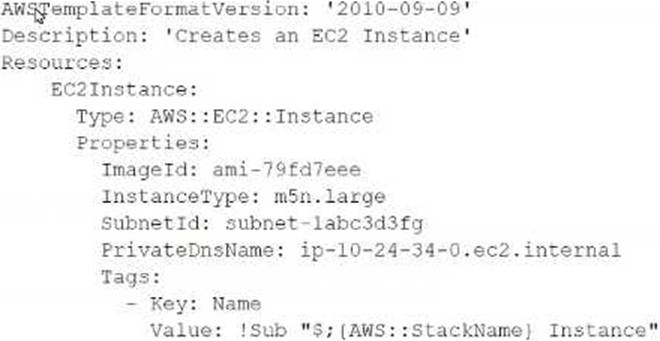
Why will the stack creation fail?
- A . The Outputs section of the Cloud Formation template was omitted.
- B . The Parameters section of the CtoudFormation template was omitted.
- C . The PnvateDnsName cannot be set from a CloudFormation template.
- D . The VPC was not specified in the CloudFormation template.
C
Explanation:
In AWS CloudFormation, the PrivateDnsName property of an EC2 instance cannot be directly set within the template. This property is automatically assigned by AWS when the instance is launched within a VPC and is associated with the private IP address of the instance. The attempt to explicitly set PrivateDnsName in a CloudFormation template will result in an error, causing the stack creation to fail. Therefore, option C is correct. For reference, the AWS documentation on EC2 instances in
CloudFormation does not list PrivateDnsName as a configurable property AWS CloudFormation User Guide.
A company has a public web application that experiences rapid traffic increases after advertisements appear on local television. The application runs on Amazon EC2 instances that are in an Auto Scaling group. The Auto Scaling group is not keeping up with the traffic surges after an advertisement runs. The company often needs to scale out to 100 EC2 instances during the traffic surges.
The instance startup times are lengthy because of a boot process that creates machine-specific data caches that are unique to each instance. The exact timing of when the advertisements will appear on television is not known. A SysOps administrator must implement a solution so that the application can function properly during the traffic surges.
Which solution will meet these requirements?
- A . Create a warm pool. Keep enough instances in the Slopped state to meet the increased demand.
- B . Start 100 instances. Allow the boot process to finish running. Store this data on the instance store volume before stopping the instances.
- C . Increase the value of the instance warmup time in the scaling policy.
- D . Use predictive scaling for the Auto Scaling group.
A
Explanation:
To address the issue of slow startup times during unexpected traffic surges, a warm pool for the Auto Scaling group is an effective solution:
Warm Pool Concept: A warm pool allows you to maintain a set of pre-initialized or partially initialized EC2 instances that are not actively serving traffic but can be quickly brought online when needed.
Management of Instances: Instances in the warm pool can be kept in a stopped state and then started much more quickly than launching new instances, as the machine-specific data caches are already created.
Scalability and Responsiveness: During a surge in traffic, especially unpredictable ones like those triggered by advertisements, instances from the warm pool can be rapidly activated to handle the increased load, ensuring that the application remains responsive without the typical delays associated with boot processes.
This method significantly reduces the time to scale out by utilizing pre-warmed instances, enhancing the application’s ability to cope with sudden and substantial increases in traffic.
A company’s SysOps administrator has created an Amazon EC2 instance with custom software that will be used as a template for all new EC2 instances across multiple AWS accounts. The Amazon Elastic Block Store (Amazon EBS) volumes that are attached to the EC2 instance are encrypted with
AWS managed keys.
The SysOps administrator creates an Amazon Machine Image (AMI) of the custom EC2 instance and plans to share the AMI with the company’s other AWS accounts. The company requires that all AMIs are encrypted with AWS Key Management Service (AWS KMS) keys and that only authorized AWS accounts can access the shared AMIs.
Which solution will securely share the AMI with the other AWS accounts?
- A . In the account where the AMI was created, create a customer master key (CMK). Modify the key policy to provide kms:DescribeKey, kms ReEncrypf, kms:CreateGrant, and kms:Decrypt permissions to the AWS accounts that the AMI will be shared with. Modify the AMI permissions to specify the AWS account numbers that the AMI will be shared with.
- B . In the account where the AMI was created, create a customer master key (CMK). Modify the key policy to provide kms:DescribeKey, kms:ReEncrypt*. kms:CreateGrant, and kms;Decrypt permissions to the AWS accounts that the AMI will be shared with. Create a copy of the AMI. and specify the CMK. Modify the permissions on the copied AMI to specify the AWS account numbers that the AMI will be shared with.
- C . In the account where the AMI was created, create a customer master key (CMK). Modify the key policy to provide kms:DescrlbeKey, kms:ReEncrypt kms:CreateGrant, and kms:Decrypt permissions to the AWS accounts that the AMI will be shared with. Create a copy of the AMI. and specify the CMK. Modify the permissions on the copied AMI to make it public.
- D . In the account where the AMI was created, modify the key policy of the AWS managed key to provide kms:DescnbeKey. kms:ReEncrypt kms:CreateGrant, and kms:Decrypt permissions to the AWS accounts that the AMI will be shared with. Modify the AMI permissions to specify the AWS account numbers that the AMI will be shared with.
B
Explanation:
Step-by-Step
Understand the Problem:
Share an AMI with other AWS accounts while ensuring it is encrypted with AWS KMS keys and accessible only to authorized accounts.
Analyze the Requirements:
Encrypt the AMI with a customer-managed key (CMK).
Share the AMI securely with specific AWS accounts.
Evaluate the Options:
Option A: Create a CMK and modify the key policy but do not create a copy of the AMI.
This does not re-encrypt the AMI with the CMK.
Option B: Create a CMK, modify the key policy, create a copy of the AMI, and specify the CMK.
This ensures the AMI is encrypted with the CMK and shared securely.
Option C: Create a CMK, modify the key policy, create a copy of the AMI, and make it public.
Making the AMI public does not meet the requirement of sharing with specific accounts only.
Option D: Modify the key policy of the AWS managed key and share the AMI.
AWS managed keys cannot have their key policies modified to add permissions for other accounts.
Select the Best Solution:
Option B: Creating a CMK, modifying the key policy, creating a copy of the AMI with the CMK, and specifying the permissions ensures the AMI is securely shared with specific AWS accounts.
Reference: Copying an AMI
Creating and Managing Keys
Sharing AMIs
This solution ensures the AMI is encrypted with a customer-managed key and shared securely with the specified AWS accounts.
A company deploys a new application on three Amazon EC2 instances across three Availability Zones The company uses a Network Load Balancer (NLB) to route traffic lo the EC2 instances. A SysOps administrator must implement a solution so that the EC2 instances allow traffic from only the NLB.
What should the SysOps administrator do to meet these requirements with the LEAST operational overhead?
- A . Configure the security group that is associated with the EC2 instances to allow traffic from only the security group that is associated with the NLB.
- B . Configure the security group that is associated with the EC2 instances to allow traffic from only the elastic network interfaces that are associated with the NLB.
- C . Create a network ACL. Associate the network ACL with the application subnets. Configure the network ACL to allow inbound traffic from only the CIDR ranges of the NLB.
- D . Use a third-party firewall solution that is installed on a separate EC2 instance. Configure a firewall rule that allows traffic to the application’s EC2 instances from only the subnets where the NLB is deployed
A
Explanation:
Configuring Security Groups:
Security groups act as virtual firewalls for your instances to control inbound and outbound traffic.
Steps:
Go to the AWS Management Console.
Navigate to EC2.
Select "Security Groups" from the left-hand menu.
Find and select the security group associated with your EC2 instances.
Choose the "Inbound rules" tab and click "Edit inbound rules."
Add a rule to allow traffic from the security group associated with the NLB. Type: Custom TCP (or the specific port your application uses) Source: Select "Custom" and enter the ID of the NLB’s security group.
This setup ensures that the EC2 instances accept traffic only from the NLB, enhancing security with minimal operational overhead.
Reference: AWS Security Groups
A company is running a website on Amazon EC2 instances behind an Application Load Balancer (ALB). The company configured an Amazon CloudFront distribution and set the ALB as the origin. The company created an Amazon Route 53 CNAME record to send all traffic through the CloudFront distribution. As an unintended side effect, mobile users are now being served the desktop version of the website.
Which action should a SysOps administrator take to resolve this issue?
- A . Configure the CloudFront distribution behavior to forward the User-Agent header.
- B . Configure the CloudFront distribution origin settings. Add a User-Agent header to the list of origin custom headers.
- C . Enable IPv6 on the ALB. Update the CloudFront distribution origin settings to use the dualstack endpoint.
- D . Enable IPv6 on the CloudFront distribution. Update the Route 53 record to use the dualstack endpoint.
A
Explanation:
To resolve the issue where mobile users are being served the desktop version of the website, you need to forward the User-Agent header from CloudFront to your origin (ALB). This allows the origin to detect the type of device and serve the appropriate content.
Login to AWS Management Console:
Open the CloudFront console at Amazon CloudFront Console.
Select the Distribution:
Choose the CloudFront distribution you want to modify.
Update Cache Behavior Settings:
Go to the Behaviors tab.
Select the default behavior (or any specific behavior that you want to update) and choose Edit.
Forward Headers:
Under Cache Key and Origin Requests, choose Origin Request Policy.
Select Create Policy and include the User-Agent header in the policy.
Save the policy and apply it to the cache behavior.
This configuration ensures that the User-Agent header is forwarded to the origin, enabling it to serve different content based on the device type.
Reference: Configuring CloudFront to Forward Headers
Creating CloudFront Cache Behaviors
A company has an application that uses a scheduled AWS Lambda function to retrieve datasets from external sources over the internet. The function is not associated with a VPC. The company is modifying the application to store the information that the Lambda function retrieves on an Amazon RDS DB instance in a private subnet. The VPC has two public subnets and two private subnets.
A SysOps administrator must deploy a solution that allows the Lambda function to access the new database and continue to access the internet.
Which solution meets these requirements?
- A . Create a new Lambda function with VPC access and an Elastic IP address. Attach the function to public subnets in two Availability Zones. Associate a security group with the Elastic IP address. Configure the security group outbound rules to allow Lambda to access the required resources.
- B . Create a new Lambda function with VPC access and two public IP addresses. Attach the function to public subnets in the same Availability Zones that the database uses. Associate a security group with the function. Configure the security group inbound rules to allow Lambda to access the required resources.
- C . Reconfigure the Lambda function for VPC access. Add NAT gateways to the public subnets in the VPAdd route table entries in the private subnets to route through the NAT gateways to the internet. Attach the function to the private subnets that support the database. Associate a security group with the function. Configure the security group outbound rules to allow Lambda to access the internet.
- D . Reconfigure the Lambda function for VPC access. Attach the function to the private subnets. Add route table entries in the private subnets to route through the internet gateway to the internet. Associate a security group with the subnets. Configure the security group inbound rules to allow Lambda to access the required resources through the internet gateway.
C
Explanation:
To allow the Lambda function to access both the new RDS database in a private subnet and the internet, the Lambda function needs to be reconfigured for VPC access with a NAT gateway setup.
Reconfigure Lambda for VPC Access:
Attach the Lambda function to the private subnets where the RDS instance is located.
Add NAT gateways to the public subnets to allow outbound internet access from the private subnets.
NAT Gateway:
NAT gateways allow instances in private subnets to connect to the internet or other AWS services, but they prevent the internet from initiating connections with those instances.
Steps to Implement:
Create NAT gateways in the public subnets.
Update the route tables of the private subnets to route internet-bound traffic through the NAT gateways.
Ensure the Lambda function has the necessary IAM role permissions to access the VPC and RDS.
Reference: Configuring a Lambda Function to Access Resources in a VPC NAT Gateways
A global company handles a large amount of personally identifiable information (Pll) through an internal web portal. The company’s application runs in a corporate data center that is connected to AWS through an AWS Direct Connect connection. The application stores the Pll in Amazon S3. According to a compliance requirement, traffic from the web portal to Amazon S3 must not travel across the internet.
What should a SysOps administrator do to meet the compliance requirement?
- A . Provision an interface VPC endpoint for Amazon S3. Modify the application to use the interface endpoint.
- B . Configure AWS Network Firewall to redirect traffic to the internal S3 address.
- C . Modify the application to use the S3 path-style endpoint.
- D . Set up a range of VPC network ACLs to redirect traffic to the Internal S3 address.
A
Explanation:
Using the interface endpoint, applications in your on-premises data center can easily query S3 buckets over AWS Direct Connect or Site-to-Site VPN. https://aws.amazon.com/blogs/architecture/choosing-your-vpc-endpoint-strategy-for-amazon-s3/
A SysOps administrator has enabled AWS CloudTrail in an AWS account If CloudTrail is disabled it must be re-enabled immediately What should the SysOps administrator do to meet these requirements WITHOUT writing custom code”
- A . Add the AWS account to AWS Organizations Enable CloudTrail in the management account
- B . Create an AWS Config rule that is invoked when CloudTrail configuration changes Apply the AWS-ConfigureCloudTrailLogging automatic remediation action
- C . Create an AWS Config rule that is invoked when CloudTrail configuration changes Configure the rule to invoke an AWS Lambda function to enable CloudTrail
- D . Create an Amazon EventBridge (Amazon CloudWatch Events) hourly rule with a schedule pattern to run an AWS Systems Manager Automation document to enable CloudTrail
B
Explanation:
To ensure CloudTrail is re-enabled immediately if it is disabled, you can use AWS Config with an automatic remediation action.
Create AWS Config Rule:
Configure an AWS Config rule that triggers when there are changes to the CloudTrail configuration.
Reference: AWS Config Rules
Apply Automatic Remediation:
Use the AWS-ConfigureCloudTrailLogging automatic remediation action to re-enable CloudTrail if it is disabled.
Reference: AWS Config Remediation
This solution ensures compliance without the need for custom code.