
Amazon SOA-C02 Practice Exams
Last updated on Oct 24,2026- Exam Code: SOA-C02
- Exam Name: AWS Certified SysOps Administrator - Associate
- Certification Provider: Amazon
- Latest update: Oct 24,2026
A company’s SysOps administrator deploys a public Network Load Balancer (NLB) in front of the company’s web application. The web application does not use any Elastic IP addresses. Users must access the web application by using the company’s domain name. The SysOps administrator needs to configure Amazon Route 53 to route traffic to the NLB.
Which solution will meet these requirements MOST cost-effectively?
- A . Create a Route 53 AAAA record for the NLB.
- B . Create a Route 53 alias record for the NLB.
- C . Create a Route 53 CAA record for the NLB.
- D . Create a Route 53 CNAME record for the NLB.
B
Explanation:
To route traffic to the Network Load Balancer (NLB) using Amazon Route 53 cost-effectively, creating an alias record is the best solution.
Alias Record:
Alias records are a Route 53-specific extension to DNS functionality.
They provide a way to map a domain name to an AWS resource, such as an NLB, without incurring additional charges.
Steps to Implement:
Open the Route 53 console.
Select the hosted zone and choose "Create Record Set."
Choose "Alias" and select the NLB from the drop-down list.
Reference: Creating Alias Records
A company has attached the following policy to an IAM user:
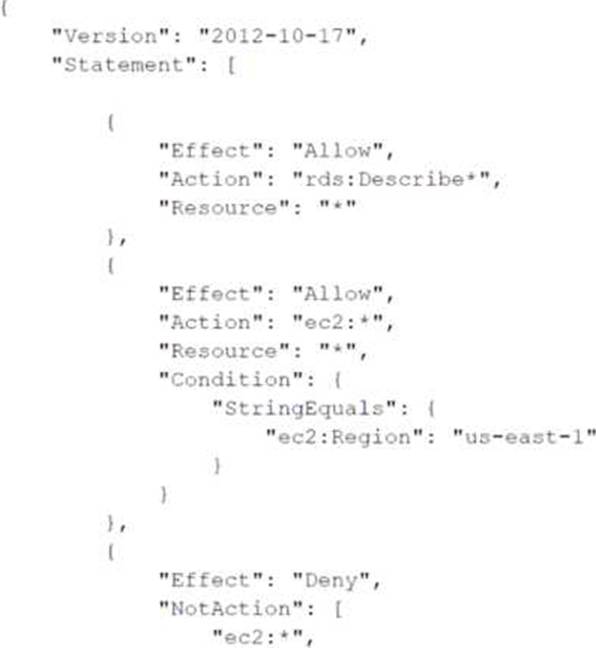
Which of the following actions are allowed for the IAM user?
- A . Amazon RDS DescribeDBInstances action in the us-east-1 Region
- B . Amazon S3 Putobject operation in a bucket named testbucket
- C . Amazon EC2 Describe Instances action in the us-east-1 Region
- D . Amazon EC2 AttachNetworkinterf ace action in the eu-west-1 Region
A
Explanation:
Based on the attached policy, the following actions are allowed for the IAM user:
Allow Amazon RDS DescribeDBInstances Action:
The policy allows rds:Describe* actions on all resources without any condition, so the user can describe RDS instances in any region.
Example action:
rds:DescribeDBInstances
Reference: Amazon RDS IAM Policies
Allow Amazon EC2 Actions in us-east-1 with Condition:
The policy allows ec2:* actions in the us-east-1 region based on the condition StringEquals for ec2:Region.
Example action:
ec2:DescribeInstances (only in us-east-1)
Reference: Amazon EC2 IAM Policies
Deny All Other EC2 Actions Globally:
The policy explicitly denies all actions that are not ec2:*, which means it blocks any other EC2 actions that don’t match the allow rule above.
Reference: IAM JSON Policy Elements: NotAction
Given these details, the only valid action among the options is:
The SysOps administrator needs to prevent launching EC2 instances without a specific tag in the application OU.
- A . Create an IAM group that has a policy allowing ec2:RunInstances when the CostCenter-Project tag is present. Place all IAM users in this group.
- B . Create a service control policy (SCP) that denies ec2:RunInstances when the CostCenter-Project tag is missing. Attach the SCP to the application OU.
- C . Create an IAM role with a policy that allows ec2:RunInstances when the CostCenter-Project tag is present. Attach the IAM role to users in the application OU accounts.
- D . Create a service control policy (SCP) that denies ec2:RunInstances when the CostCenter-Project tag is missing. Attach the SCP to the root OU.
B
Explanation:
An SCP applied to the application OU that denies ec2:RunInstances when the CostCenter-Project tag is missing ensures that all accounts in the OU adhere to the tagging policy. This approach is centralized and applies only to the intended OU.
A web application runs on Amazon EC2 instances behind an Application Load Balancer (ALB). The instances run in an Auto Scaling group across multiple Availability Zones. A SysOpe administrator notices that some of these EC2 instances show up as heathy in the Auto Scaling g-out but show up as unhealthy in the ALB target group.
What is a possible reason for this issue?
- A . Security groups ate rot allowing traffic between the ALB and the failing EC2 instances
- B . The Auto Seating group health check is configured for EC2 status checks
- C . The EC2 instances are failing to launch and failing EC2 status checks.
- D . The target group health check is configured with an incorrect port or path
D
Explanation:
The issue where EC2 instances show up as healthy in the Auto Scaling group but unhealthy in the ALB target group is likely due to the target group health check being configured with an incorrect port or path.
Health Checks:
ALB target groups use health checks to determine the health of instances. These health checks are configured with a specific port and path.
If the health check configuration does not match the actual application endpoint on the instances, the instances will fail the health check.
Troubleshooting Steps:
Verify the health check settings for the target group in the ALB. Ensure the port and path are correctly configured to match the application on the EC2 instances.
Adjust the settings if necessary and monitor the health status of the instances in the target group.
Reference: Target Group Health Checks
A development team recently deployed a new version of a web application to production After the release, penetration testing revealed a cross-site scripting vulnerability that could expose user data
Which AWS service will mitigate this issue?
- A . AWS Shield Standard
- B . AWS WAF
- C . Elastic Load Balancing
- D . Amazon Cognito
B
Explanation:
AWS WAF (Web Application Firewall) is designed to protect web applications from common web exploits that could affect application availability, compromise security, or consume excessive resources. AWS WAF can help mitigate cross-site scripting (XSS) vulnerabilities by allowing users to create rules to filter specific types of HTTP requests.
Create a Web ACL:
Go to the AWS WAF & Shield console.
Click "Create web ACL" and specify a name and the AWS resource to protect (e.g., an Application Load Balancer).
Add Rules to Mitigate XSS:
Within the Web ACL, add a new rule.
Select "Rule builder" and choose a rule type. For mitigating XSS, use "AWS Managed Rules" or create a custom rule.
AWS Managed Rules include a predefined set for XSS that you can enable.
Configure the XSS Rule:
If using a custom rule, configure it to inspect requests and block any that contain XSS patterns. Use regular expressions or specific patterns to identify malicious scripts. Deploy the Web ACL:
Once configured, save the Web ACL.
Associate it with your Application Load Balancer or CloudFront distribution to start filtering requests.
Monitor and Adjust:
Monitor the requests being blocked by AWS WAF.
Adjust the rules as necessary to ensure legitimate traffic is not affected and the application remains protected.
Reference: AWS WAF Developer Guide
AWS WAF Managed Rules
A SysOps administrator must create a solution that immediately notifies software developers if an AWS Lambda function experiences an error.
Which solution will meet this requirement?
- A . Create an Amazon Simple Notification Service (Amazon SNS) topic with an email subscription for each developer. Create an Amazon CloudWatch alarm by using the Errors metric and the Lambda function name as a dimension. Configure the alarm to send a notification to the SNS topic when the alarm state reaches ALARM.
- B . Create an Amazon Simple Notification Service (Amazon SNS) topic with a mobile subscription for each developer. Create an Amazon EventBridge (Amazon CloudWatch Events) alarm by using LambdaError as the event pattern and the SNS topic name as a resource. Configure the alarm to send a notification to the SNS topic when the alarm state reaches ALARM.
- C . Verify each developer email address in Amazon Simple Email Service (Amazon SES). Create an Amazon CloudWatch rule by using the LambdaError metric and developer email addresses as dimensions. Configure the rule to send an email through Amazon SES when the rule state reaches ALARM.
- D . Verify each developer mobile phone in Amazon Simple Email Service {Amazon SES). Create an Amazon EventBridge (Amazon CloudWatch Events) rule by using Errors as the event pattern and the Lambda function name as a resource. Configure the rule to send a push notification through Amazon SES when the rule state reaches ALARM.
A
Explanation:
To immediately notify software developers if an AWS Lambda function experiences an error, follow these steps:
Create an SNS Topic:
Navigate to the Amazon SNS console and create a new topic. Add email subscriptions for each developer to the SNS topic.
Reference: Creating an Amazon SNS Topic Create a CloudWatch Alarm:
Go to the Amazon CloudWatch console and create an alarm based on the Errors metric for the specific Lambda function.
Use the Lambda function name as a dimension.
Configure the alarm to trigger when the metric exceeds a threshold indicating an error.
Reference: Creating Alarms in Amazon CloudWatch
Configure Notification:
Set the CloudWatch alarm action to send a notification to the SNS topic created in step 1 when the alarm state reaches ALARM.
Reference: Using Amazon SNS for CloudWatch Alarms
This configuration ensures that developers are notified immediately via email if the Lambda function experiences an error.
A company needs to take an inventory of applications that are running on multiple Amazon EC2 instances. The company has configured users and roles with the appropriate permissions for AWS
Systems Manager. An updated version of Systems Manager Agent has been installed and is running on every instance. While configuring an inventory collection, a SysOps administrator discovers that not all the instances in a single subnet are managed by Systems Manager.
What must the SysOps administrator do to fix this issue?
- A . Ensure that all the EC2 instances have the correct tags for Systems Manager access.
- B . Configure AWS Identity and Access Management Access Analyzer to determine and automatically remediate the issue.
- C . Ensure that all the EC2 instances have an instance profile with Systems Manager access.
- D . Configure Systems Manager to use an interface VPC endpoint.
C
Explanation:
Ensuring that all the EC2 instances have an instance profile with Systems Manager access is the most effective way to fix this issue. Having an instance profile with Systems Manager access will allow the SysOps administrator to configure the inventory collection for all the instances in the subnet, regardless of whether or not they are managed by Systems Manager.
A company plans to migrate several of its high performance computing (MPC) virtual machines (VMs) to Amazon EC2 instances on AWS. A SysOps administrator must identify a placement group for this deployment. The strategy must minimize network latency and must maximize network throughput between the HPC VMs.
Which strategy should the SysOps administrator choose to meet these requirements?
- A . Deploy the instances in a cluster placement group in one Availability Zone.
- B . Deploy the instances in a partition placement group in two Availability Zones
- C . Deploy the instances in a partition placement group in one Availability Zone
- D . Deploy the instances in a spread placement group in two Availably Zones
A
Explanation:
For high-performance computing (HPC) applications that require minimized network latency and maximized network throughput, the best strategy is to use a cluster placement group.
Here’s why:
Cluster Placement Group:
Instances in a cluster placement group are placed within a single Availability Zone, which allows them to communicate using high-bandwidth, low-latency connections.
This is ideal for HPC workloads that require high network throughput and low latency.
Reference: Placement Groups
High-Bandwidth, Low-Latency Networking:
Instances in a cluster placement group benefit from enhanced networking features, which significantly improve the communication speed between instances.
Reference: Enhanced Networking on Linux
Operational Benefits:
By grouping instances in a single Availability Zone, network traffic remains local to the zone, reducing latency compared to inter-zone communication.
This setup also simplifies the architecture for performance-critical applications.
By deploying your HPC instances in a cluster placement group in one Availability Zone, you ensure that network latency is minimized and throughput is maximized, meeting the performance requirements of your HPC applications.
A company’s security policy states that connecting to Amazon EC2 instances is not permitted through SSH and RDP. If access is required, authorized staff can connect to instances by using AWS Systems Manager Session Manager.
Users report that they are unable to connect to one specific Amazon EC2 instance that is running Ubuntu and has AWS Systems Manager Agent (SSM Agent) pre-installed These users are able to use Session Manager to connect to other instances in the same subnet, and they are in an 1AM group that has Session Manager permission for all instances.
What should a SysOps administrator do to resolve this issue?
- A . Add an inbound rule for port 22 in the security group associated with the Ubuntu instance.
- B . Assign the AmazonSSMManagedlnstanceCore managed policy to the EC2 instance profile for the Ubuntu instance.
- C . Configure the SSM Agent to log in with a user name of "ubuntu".
- D . Generate a new key pair, configure Session Manager to use this new key pair, and provide the private key to the users.
B
Explanation:
If users are unable to connect to a specific Ubuntu EC2 instance using AWS Systems Manager Session Manager while other instances are accessible, the issue is likely due to IAM permissions:
Instance Profile Permissions: Ensure that the EC2 instance has the necessary IAM permissions to interact with Systems Manager. The AmazonSSMManagedInstanceCore managed policy includes permissions required for the SSM Agent on the instance to communicate with the AWS Systems Manager service.
Attach Managed Policy: Attach the AmazonSSMManagedInstanceCore policy to the IAM role that is associated with the Ubuntu instance’s instance profile. This step is crucial as it authorizes the instance to use Systems Manager services, including Session Manager.
Verify Configuration and Connectivity: After updating the instance profile, verify that users can connect via Session Manager. This solution does not require any changes to network security settings like security groups.
By ensuring that the instance has the appropriate IAM permissions, you resolve issues related to access control and Systems Manager functionality, allowing authorized personnel to connect securely without using SSH or RDP.
A company maintains a large set of sensitive data in an Amazon S3 bucket. The company’s security team asks a SyeOps administrator to help verify that all current objects in the S3 bucket are encrypted.
What is the MOST operationally efficient solution that meets these requirements?
- A . Create a script that runs against the S3 bucket and outputs the status of each object.
- B . Create an S3 Inventory configuration on the S3 bucket Induce the appropriate status fields.
- C . Provide the security team with an IAM user that has read access to the S3 bucket.
- D . Use the AWS CLI to output a list of all objects in the S3 bucket.
B
Explanation:
To meet the requirement of consistent performance of 10,000 IOPS with the least cost, the SysOps administrator should use a General Purpose SSD (gp3) Amazon EBS volume:
General Purpose SSD (gp3) EBS Volume:
The gp3 volume type can be provisioned with the required IOPS without the need for additional capacity, making it a cost-effective solution compared to Provisioned IOPS SSD (io1) volumes.
Reference: Amazon EBS Volume Types
Configuration Steps:
Create a gp3 EBS volume and specify 10,000 IOPS and the required throughput.
Attach the volume to the EC2 instance running the Windows workload.
Reference: Modifying the Size, IOPS, or Throughput of an EBS Volume