
Amazon MLS-C01 Practice Exams
Last updated on Oct 22,2026- Exam Code: MLS-C01
- Exam Name: AWS Certified Machine Learning - Specialty
- Certification Provider: Amazon
- Latest update: Oct 22,2026
A credit card company wants to identify fraudulent transactions in real time. A data scientist builds a machine learning model for this purpose. The transactional data is captured and stored in Amazon S3. The historic data is already labeled with two classes: fraud (positive) and fair transactions (negative). The data scientist removes all the missing data and builds a classifier by using the XGBoost algorithm in Amazon SageMaker.
The model produces the following results:
• True positive rate (TPR): 0.700
• False negative rate (FNR): 0.300
• True negative rate (TNR): 0.977
• False positive rate (FPR): 0.023
• Overall accuracy: 0.949
Which solution should the data scientist use to improve the performance of the model?
- A . Apply the Synthetic Minority Oversampling Technique (SMOTE) on the minority class in the training dataset. Retrain the model with the updated training data.
- B . Apply the Synthetic Minority Oversampling Technique (SMOTE) on the majority class in the training dataset. Retrain the model with the updated training data.
- C . Undersample the minority class.
- D . Oversample the majority class.
A
Explanation:
The solution that the data scientist should use to improve the performance of the model is to apply the Synthetic Minority Oversampling Technique (SMOTE) on the minority class in the training dataset, and retrain the model with the updated training data. This solution can address the problem of class imbalance in the dataset, which can affect the model’s ability to learn from the rare but important positive class (fraud).
Class imbalance is a common issue in machine learning, especially for classification tasks. It occurs when one class (usually the positive or target class) is significantly underrepresented in the dataset compared to the other class (usually the negative or non-target class). For example, in the credit card fraud detection problem, the positive class (fraud) is much less frequent than the negative class (fair transactions). This can cause the model to be biased towards the majority class, and fail to capture the characteristics and patterns of the minority class. As a result, the model may have a high overall accuracy, but a low recall or true positive rate for the minority class, which means it misses many fraudulent transactions.
SMOTE is a technique that can help mitigate the class imbalance problem by generating synthetic samples for the minority class. SMOTE works by finding the k-nearest neighbors of each minority class instance, and randomly creating new instances along the line segments connecting them. This way, SMOTE can increase the number and diversity of the minority class instances, without duplicating or losing any information. By applying SMOTE on the minority class in the training dataset, the data scientist can balance the classes and improve the model’s performance on the positive class1.
The other options are either ineffective or counterproductive. Applying SMOTE on the majority class would not balance the classes, but increase the imbalance and the size of the dataset. Undersampling the minority class would reduce the number of instances available for the model to learn from, and potentially lose some important information. Oversampling the majority class would also increase the imbalance and the size of the dataset, and introduce redundancy and overfitting.
References:
1: SMOTE for Imbalanced Classification with Python – Machine Learning Mastery
A data scientist wants to improve the fit of a machine learning (ML) model that predicts house prices. The data scientist makes a first attempt to fit the model, but the fitted model has poor accuracy on both the training dataset and the test dataset.
Which steps must the data scientist take to improve model accuracy? (Select THREE.)
- A . Increase the amount of regularization that the model uses.
- B . Decrease the amount of regularization that the model uses.
- C . Increase the number of training examples that that model uses.
- D . Increase the number of test examples that the model uses.
- E . Increase the number of model features that the model uses.
- F . Decrease the number of model features that the model uses.
B, C, E
Explanation:
When a model shows poor accuracy on both the training and test datasets, it often indicates underfitting.
To improve the model’s accuracy, the data scientist can:
Decrease regularization: Excessive regularization can lead to underfitting by constraining the model too much. Reducing it allows the model to capture more complexity.
Increase the number of training examples: Adding more data can help the model learn better and generalize well, especially if the dataset was previously insufficient.
Increase the number of model features: Adding relevant features can help the model capture more predictive information, thus potentially improving accuracy.
Options A, D, and F would either reduce the complexity or impact the generalization capability, which is not desirable in the case of underfitting.
A data scientist is using an Amazon SageMaker notebook instance and needs to securely access data stored in a specific Amazon S3 bucket.
How should the data scientist accomplish this?
- A . Add an S3 bucket policy allowing GetObject, PutObject, and ListBucket permissions to the Amazon SageMaker notebook ARN as principal.
- B . Encrypt the objects in the S3 bucket with a custom AWS Key Management Service (AWS KMS) key that only the notebook owner has access to.
- C . Attach the policy to the IAM role associated with the notebook that allows GetObject, PutObject, and ListBucket operations to the specific S3 bucket.
- D . Use a script in a lifecycle configuration to configure the AWS CLI on the instance with an access key ID and secret.
C
Explanation:
The best way to securely access data stored in a specific Amazon S3 bucket from an Amazon SageMaker notebook instance is to attach a policy to the IAM role associated with the notebook that allows GetObject, PutObject, and ListBucket operations to the specific S3 bucket. This way, the notebook can use the AWS SDK or CLI to access the S3 bucket without exposing any credentials or requiring any additional configuration. This is also the recommended approach by AWS for granting access to S3 from SageMaker.
References:
Amazon SageMaker Roles
Accessing Amazon S3 from a SageMaker Notebook Instance
A company is building a new version of a recommendation engine. Machine learning (ML) specialists need to keep adding new data from users to improve personalized recommendations. The ML specialists gather data from the users’ interactions on the platform and from sources such as external websites and social media.
The pipeline cleans, transforms, enriches, and compresses terabytes of data daily, and this data is stored in Amazon S3. A set of Python scripts was coded to do the job and is stored in a large Amazon EC2 instance. The whole process takes more than 20 hours to finish, with each script taking at least an hour. The company wants to move the scripts out of Amazon EC2 into a more managed solution that will eliminate the need to maintain servers.
Which approach will address all of these requirements with the LEAST development effort?
- A . Load the data into an Amazon Redshift cluster. Execute the pipeline by using SQL. Store the results in Amazon S3.
- B . Load the data into Amazon DynamoDB. Convert the scripts to an AWS Lambda function. Execute the pipeline by triggering Lambda executions. Store the results in Amazon S3.
- C . Create an AWS Glue job. Convert the scripts to PySpark. Execute the pipeline. Store the results in Amazon S3.
- D . Create a set of individual AWS Lambda functions to execute each of the scripts. Build a step function by using the AWS Step Functions Data Science SDK. Store the results in Amazon S3.
C
Explanation:
The best approach to address all of the requirements with the least development effort is to create an AWS Glue job, convert the scripts to PySpark, execute the pipeline, and store the results in Amazon S3. This is because:
AWS Glue is a fully managed extract, transform, and load (ETL) service that makes it easy to prepare and load data for analytics 1. AWS Glue can run Python and Scala scripts to process data from various
sources, such as Amazon S3, Amazon DynamoDB, Amazon Redshift, and more 2. AWS Glue also provides a serverless Apache Spark environment to run ETL jobs, eliminating the need to provision and manage servers 3.
PySpark is the Python API for Apache Spark, a unified analytics engine for large-scale data processing 4. PySpark can perform various data transformations and manipulations on structured and unstructured data, such as cleaning, enriching, and compressing 5. PySpark can also leverage the distributed computing power of Spark to handle terabytes of data efficiently and scalably 6.
By creating an AWS Glue job and converting the scripts to PySpark, the company can move the scripts out of Amazon EC2 into a more managed solution that will eliminate the need to maintain servers. The company can also reduce the development effort by using the AWS Glue console, AWS SDK, or AWS CLI to create and run the job 7. Moreover, the company can use the AWS Glue Data Catalog to store and manage the metadata of the data sources and targets 8. The other options are not as suitable as option C for the following reasons:
Option A is not optimal because loading the data into an Amazon Redshift cluster and executing the pipeline by using SQL will incur additional costs and complexity for the company. Amazon Redshift is a fully managed data warehouse service that enables fast and scalable analysis of structured data.
However, it is not designed for ETL purposes, such as cleaning, transforming, enriching, and compressing data. Moreover, using SQL to perform these tasks may not be as expressive and flexible as using Python scripts. Furthermore, the company will have to provision and configure the Amazon Redshift cluster, and load and unload the data from Amazon S3, which will increase the development effort and time.
Option B is not feasible because loading the data into Amazon DynamoDB and converting the scripts to an AWS Lambda function will not work for the company’s use case. Amazon DynamoDB is a fully managed key-value and document database service that provides fast and consistent performance at any scale. However, it is not suitable for storing and processing terabytes of data daily, as it has limits on the size and throughput of each table and item. Moreover, using AWS Lambda to execute the pipeline will not be efficient or cost-effective, as Lambda has limits on the memory, CPU, and execution time of each function. Therefore, using Amazon DynamoDB and AWS Lambda will not meet the company’s requirements for processing large amounts of data quickly and reliably.
Option D is not relevant because creating a set of individual AWS Lambda functions to execute each of the scripts and building a step function by using the AWS Step Functions Data Science SDK will not address the main issue of moving the scripts out of Amazon EC2. AWS Step Functions is a fully managed service that lets you coordinate multiple AWS services into serverless workflows. The AWS Step Functions Data Science SDK is an open source library that allows data scientists to easily create workflows that process and publish machine learning models using Amazon SageMaker and AWS Step Functions. However, these services and tools are not designed for ETL purposes, such as cleaning, transforming, enriching, and compressing data. Moreover, as mentioned in option B, using AWS Lambda to execute the scripts will not be efficient or cost-effective for the company’s use case.
References:
What Is AWS Glue?
AWS Glue Components
AWS Glue Serverless Spark ETL
PySpark – Overview
PySpark – RDD
PySpark – SparkContext
Adding Jobs in AWS Glue
Populating the AWS Glue Data Catalog
[What Is Amazon Redshift?]
[What Is Amazon DynamoDB?]
[Service, Account, and Table Quotas in DynamoDB]
[AWS Lambda quotas]
[What Is AWS Step Functions?]
[AWS Step Functions Data Science SDK for Python]
A Machine Learning Specialist is packaging a custom ResNet model into a Docker container so the company can leverage Amazon SageMaker for training. The Specialist is using Amazon EC2 P3 instances to train the model and needs to properly configure the Docker container to leverage the NVIDIA GPUs
What does the Specialist need to do1?
- A . Bundle the NVIDIA drivers with the Docker image
- B . Build the Docker container to be NVIDIA-Docker compatible
- C . Organize the Docker container’s file structure to execute on GPU instances.
- D . Set the GPU flag in the Amazon SageMaker Create TrainingJob request body
B
Explanation:
To leverage the NVIDIA GPUs on Amazon EC2 P3 instances, the Machine Learning Specialist needs to build the Docker container to be NVIDIA-Docker compatible. NVIDIA-Docker is a tool that enables GPU-accelerated containers to run on Docker. It automatically configures the container to access the NVIDIA drivers and libraries on the host system. The Specialist does not need to bundle the NVIDIA drivers with the Docker image, as they are already installed on the EC2 P3 instances. The Specialist does not need to organize the Docker container’s file structure to execute on GPU instances, as this is not relevant for GPU compatibility. The Specialist does not need to set the GPU flag in the Amazon SageMaker Create TrainingJob request body, as this is only required for using Elastic Inference accelerators, not EC2 P3 instances.
References: NVIDIA-Docker, Using GPU-Accelerated Containers, Using Elastic Inference in Amazon SageMaker
A Machine Learning Specialist is using Apache Spark for pre-processing training data As part of the Spark pipeline, the Specialist wants to use Amazon SageMaker for training a model and hosting it.
Which of the following would the Specialist do to integrate the Spark application with SageMaker? (Select THREE)
- A . Download the AWS SDK for the Spark environment
- B . Install the SageMaker Spark library in the Spark environment.
- C . Use the appropriate estimator from the SageMaker Spark Library to train a model.
- D . Compress the training data into a ZIP file and upload it to a pre-defined Amazon S3 bucket.
- E . Use the sageMakerModel. transform method to get inferences from the model hosted in SageMaker
- F . Convert the DataFrame object to a CSV file, and use the CSV file as input for obtaining inferences from SageMaker.
B, C, E
Explanation:
The SageMaker Spark library is a library that enables Apache Spark applications to integrate with Amazon SageMaker for training and hosting machine learning models.
The library provides several features, such as:
Estimators: Classes that allow Spark users to train Amazon SageMaker models and host them on Amazon SageMaker endpoints using the Spark MLlib Pipelines API. The library supports various built-in algorithms, such as linear learner, XGBoost, K-means, etc., as well as custom algorithms using Docker containers.
Model classes: Classes that wrap Amazon SageMaker models in a Spark MLlib Model abstraction. This allows Spark users to use Amazon SageMaker endpoints for inference within Spark applications. Data sources: Classes that allow Spark users to read data from Amazon S3 using the Spark Data Sources API. The library supports various data formats, such as CSV, LibSVM, RecordIO, etc.
To integrate the Spark application with SageMaker, the Machine Learning Specialist should do the following:
Install the SageMaker Spark library in the Spark environment. This can be done by using Maven, pip, or downloading the JAR file from GitHub.
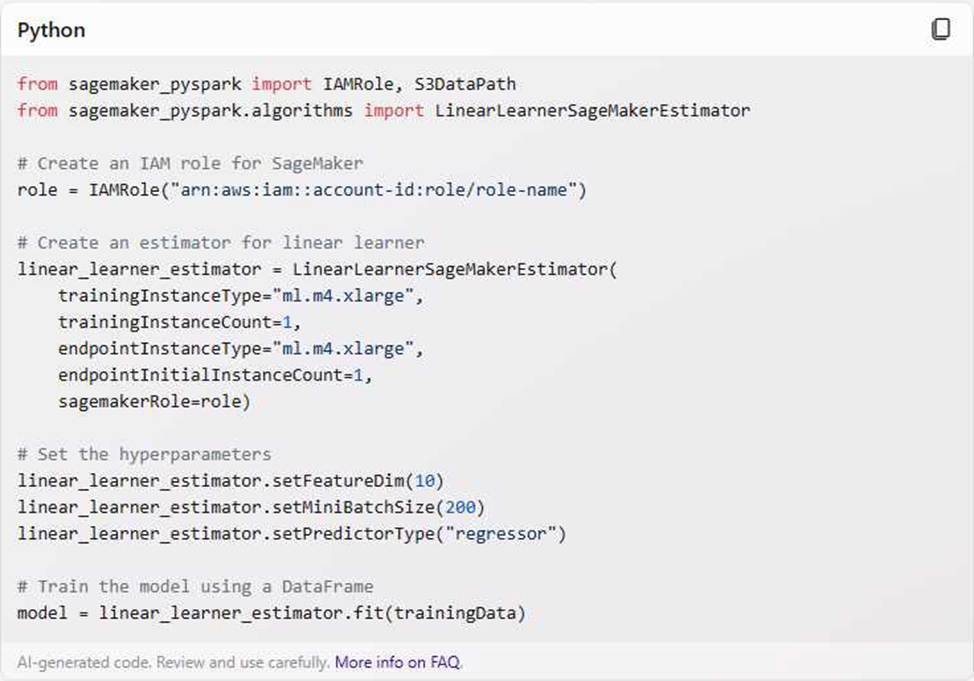
Use the appropriate estimator from the SageMaker Spark Library to train a model.
For example, to train a linear learner model, the Specialist can use the following code:
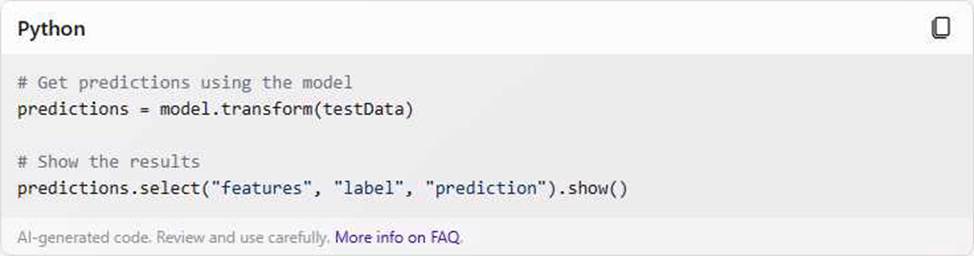
Use the sageMakerModel. transform method to get inferences from the model hosted in SageMaker.
For example, to get predictions for a test DataFrame, the Specialist can use the following code:
References:
[SageMaker Spark]: A documentation page that introduces the SageMaker Spark library and its features.
[SageMaker Spark GitHub Repository]: A GitHub repository that contains the source code, examples, and installation instructions for the SageMaker Spark library.
A Data Scientist is building a model to predict customer churn using a dataset of 100 continuous numerical features. The Marketing team has not provided any insight about which features are relevant for churn prediction. The Marketing team wants to interpret the model and see the direct impact of relevant features on the model outcome. While training a logistic regression model, the Data Scientist observes that there is a wide gap between the training and validation set accuracy.
Which methods can the Data Scientist use to improve the model performance and satisfy the Marketing team’s needs? (Choose two.)
- A . Add L1 regularization to the classifier
- B . Add features to the dataset
- C . Perform recursive feature elimination
- D . Perform t-distributed stochastic neighbor embedding (t-SNE)
- E . Perform linear discriminant analysis
A, C
Explanation:
The Data Scientist is building a model to predict customer churn using a dataset of 100 continuous numerical features. The Marketing team wants to interpret the model and see the direct impact of relevant features on the model outcome. However, the Data Scientist observes that there is a wide gap between the training and validation set accuracy, which indicates that the model is overfitting the data and generalizing poorly to new data.
To improve the model performance and satisfy the Marketing team’s needs, the Data Scientist can use the following methods:
Add L1 regularization to the classifier: L1 regularization is a technique that adds a penalty term to the loss function of the logistic regression model, proportional to the sum of the absolute values of the coefficients. L1 regularization can help reduce overfitting by shrinking the coefficients of the less important features to zero, effectively performing feature selection. This can simplify the model and make it more interpretable, as well as improve the validation accuracy.
Perform recursive feature elimination: Recursive feature elimination (RFE) is a feature selection technique that involves training a model on a subset of the features, and then iteratively removing the least important features one by one until the desired number of features is reached. The idea behind RFE is to determine the contribution of each feature to the model by measuring how well the model performs when that feature is removed. The features that are most important to the model will have the greatest impact on performance when they are removed. RFE can help improve the model performance by eliminating the irrelevant or redundant features that may cause noise or multicollinearity in the data. RFE can also help the Marketing team understand the direct impact of the relevant features on the model outcome, as the remaining features will have the highest weights in the model.
References:
Regularization for Logistic Regression
Recursive Feature Elimination
A retail company wants to build a recommendation system for the company’s website. The system needs to provide recommendations for existing users and needs to base those recommendations on each user’s past browsing history. The system also must filter out any items that the user previously purchased.
Which solution will meet these requirements with the LEAST development effort?
- A . Train a model by using a user-based collaborative filtering algorithm on Amazon SageMaker. Host the model on a SageMaker real-time endpoint. Configure an Amazon API Gateway API and an AWS Lambda function to handle real-time inference requests that the web application sends. Exclude the items that the user previously purchased from the results before sending the results back to the web application.
- B . Use an Amazon Personalize PERSONALIZED_RANKING recipe to train a model. Create a real-time filter to exclude items that the user previously purchased. Create and deploy a campaign on Amazon
Personalize. Use the GetPersonalizedRanking API operation to get the real-time recommendations. - C . Use an Amazon Personalize USER_ PERSONAL IZATION recipe to train a model Create a real-time filter to exclude items that the user previously purchased. Create and deploy a campaign on Amazon Personalize. Use the GetRecommendations API operation to get the real-time recommendations.
- D . Train a neural collaborative filtering model on Amazon SageMaker by using GPU instances. Host the model on a SageMaker real-time endpoint. Configure an Amazon API Gateway API and an AWS Lambda function to handle real-time inference requests that the web application sends. Exclude the items that the user previously purchased from the results before sending the results back to the web application.
C
Explanation:
Amazon Personalize is a fully managed machine learning service that makes it easy for developers to create personalized user experiences at scale. It uses the same recommender system technology that Amazon uses to create its own personalized recommendations. Amazon Personalize provides several pre-built recipes that can be used to train models for different use cases. The USER_PERSONALIZATION recipe is designed to provide personalized recommendations for existing users based on their past interactions with items. The PERSONALIZED_RANKING recipe is designed to re-rank a list of items for a user based on their preferences. The USER_PERSONALIZATION recipe is more suitable for this use case because it can generate recommendations for each user without requiring a list of candidate items. To filter out the items that the user previously purchased, a real-time filter can be created and applied to the campaign. A real-time filter is a dynamic filter that uses the latest interaction data to exclude items from the recommendations. By using Amazon Personalize, the development effort is minimized because it handles the data processing, model training, and deployment automatically. The web application can use the GetRecommendations API operation to get the real-time recommendations from the campaign.
References:
Amazon Personalize
What is Amazon Personalize?
USER_PERSONALIZATION recipe
PERSONALIZED_RANKING recipe
Filtering recommendations
GetRecommendations API operation
Acybersecurity company is collecting on-premises server logs, mobile app logs, and loT sensor data. The company backs up the ingested data in an Amazon S3 bucket and sends the ingested data to Amazon OpenSearch Service for further analysis. Currently, the company has a custom ingestion pipeline that is running on Amazon EC2 instances. The company needs to implement a new serverless ingestion pipeline that can automatically scale to handle sudden changes in the data flow.
Which solution will meet these requirements MOST cost-effectively?
- A . Create two Amazon Data Firehose delivery streams to send data to the S3 bucket and OpenSearch Service. Configure the data sources to send data to the delivery streams.
- B . Create one Amazon Kinesis data stream. Create two Amazon Data Firehose delivery streams to send data to the S3 bucket and OpenSearch Service. Connect the delivery streams to the data stream. Configure the data sources to send data to the data stream.
- C . Create one Amazon Data Firehose delivery stream to send data to OpenSearch Service. Configure the delivery stream to back up the raw data to the S3 bucket. Configure the data sources to send data to the delivery stream.
- D . Create one Amazon Kinesis data stream. Create one Amazon Data Firehose delivery stream to send data to OpenSearch Service. Configure the delivery stream to back up the data to the S3 bucket. Connect the delivery stream to the data stream. Configure the data sources to send data to the data stream.
B
Explanation:
To build a scalable, serverless, and cost-effective data ingestion pipeline, this solution uses a Kinesis data stream to handle fluctuations in data flow, buffering and distributing incoming data in real time. By connecting two Amazon Kinesis Data Firehose delivery streams to the Kinesis data stream, the company can simultaneously route data to Amazon S3 for backup and Amazon OpenSearch Service for analysis.
This approach meets all requirements by providing automatic scaling, reducing operational overhead, and ensuring data storage and analysis without duplicating efforts or needing additional infrastructure.
A company is using Amazon SageMaker to build a machine learning (ML) model to predict customer churn based on customer call transcripts. Audio files from customer calls are located in an on-premises VoIP system that has petabytes of recorded calls. The on-premises infrastructure has high-velocity networking and connects to the company’s AWS infrastructure through a VPN connection over a 100 Mbps connection.
The company has an algorithm for transcribing customer calls that requires GPUs for inference. The company wants to store these transcriptions in an Amazon S3 bucket in the AWS Cloud for model development.
Which solution should an ML specialist use to deliver the transcriptions to the S3 bucket as quickly as possible?
- A . Order and use an AWS Snowball Edge Compute Optimized device with an NVIDIA Tesla module to run the transcription algorithm. Use AWS DataSync to send the resulting transcriptions to the transcription S3 bucket.
- B . Order and use an AWS Snowcone device with Amazon EC2 Inf1 instances to run the transcription algorithm Use AWS DataSync to send the resulting transcriptions to the transcription S3 bucket
- C . Order and use AWS Outposts to run the transcription algorithm on GPU-based Amazon EC2 instances. Store the resulting transcriptions in the transcription S3 bucket.
- D . Use AWS DataSync to ingest the audio files to Amazon S3. Create an AWS Lambda function to run the transcription algorithm on the audio files when they are uploaded to Amazon S3. Configure the function to write the resulting transcriptions to the transcription S3 bucket.
A
Explanation:
The company needs to transcribe petabytes of audio files from an on-premises VoIP system to an S3 bucket in the AWS Cloud. The transcription algorithm requires GPUs for inference, which are not available on the on-premises system. The VPN connection over a 100 Mbps connection is not sufficient to transfer the large amount of data quickly. Therefore, the company should use an AWS Snowball Edge Compute Optimized device with an NVIDIA Tesla module to run the transcription algorithm locally and leverage the GPU power. The device can store up to 42 TB of data and can be shipped back to AWS for data ingestion. The company can use AWS DataSync to send the resulting transcriptions to the transcription S3 bucket in the AWS Cloud. This solution minimizes the network bandwidth and latency issues and enables faster data processing and transfer.
Option B is incorrect because AWS Snowcone is a small, portable, rugged, and secure edge computing and data transfer device that can store up to 8 TB of data. It is not suitable for processing petabytes of data and does not support GPU-based instances.
Option C is incorrect because AWS Outposts is a service that extends AWS infrastructure, services, APIs, and tools to virtually any data center, co-location space, or on-premises facility. It is not designed for data transfer and ingestion, and it would require additional infrastructure and maintenance costs.
Option D is incorrect because AWS DataSync is a service that makes it easy to move large amounts of data to and from AWS over the internet or AWS Direct Connect. However, using DataSync to ingest the audio files to S3 would still be limited by the network bandwidth and latency. Moreover, running the transcription algorithm on AWS Lambda would incur additional costs and complexity, and it would not leverage the GPU power that the algorithm requires.
References:
AWS Snowball Edge Compute Optimized
AWS DataSync
AWS Snowcone
AWS Outposts
AWS Lambda