
Amazon MLS-C01 Practice Exams
Last updated on Oct 22,2026- Exam Code: MLS-C01
- Exam Name: AWS Certified Machine Learning - Specialty
- Certification Provider: Amazon
- Latest update: Oct 22,2026
A Data Scientist is developing a binary classifier to predict whether a patient has a particular disease on a series of test results. The Data Scientist has data on 400 patients randomly selected from the population. The disease is seen in 3% of the population.
Which cross-validation strategy should the Data Scientist adopt?
- A . A k-fold cross-validation strategy with k=5
- B . A stratified k-fold cross-validation strategy with k=5
- C . A k-fold cross-validation strategy with k=5 and 3 repeats
- D . An 80/20 stratified split between training and validation
B
Explanation:
A stratified k-fold cross-validation strategy is a technique that preserves the class distribution in each fold. This is important for imbalanced datasets, such as the one in the question, where the disease is seen in only 3% of the population. If a random k-fold cross-validation strategy is used, some folds may have no positive cases or very few, which would lead to poor estimates of the model performance. A stratified k-fold cross-validation strategy ensures that each fold has the same proportion of positive and negative cases as the whole dataset, which makes the evaluation more reliable and robust. A k-fold cross-validation strategy with k=5 and 3 repeats is also a possible option, but it is more computationally expensive and may not be necessary if the stratification is done properly. An 80/20 stratified split between training and validation is another option, but it uses less data for training and validation than k-fold cross-validation, which may result in higher variance and lower accuracy of the estimates.
References:
AWS Machine Learning Specialty Certification Exam Guide AWS Machine Learning Training: Model Evaluation
How to Fix k-Fold Cross-Validation for Imbalanced Classification
A data scientist stores financial datasets in Amazon S3. The data scientist uses Amazon Athena to query the datasets by using SQL.
The data scientist uses Amazon SageMaker to deploy a machine learning (ML) model. The data scientist wants to obtain inferences from the model at the SageMaker endpoint However, when the data …. ntist attempts to invoke the SageMaker endpoint, the data scientist receives SOL statement failures. The data scientist’s 1AM user is currently unable to invoke the SageMaker endpoint.
Which combination of actions will give the data scientist’s 1AM user the ability to invoke the SageMaker endpoint? (Select THREE.)
- A . Attach the AmazonAthenaFullAccess AWS managed policy to the user identity.
- B . Include a policy statement for the data scientist’s 1AM user that allows the 1AM user to perform the sagemaker: lnvokeEndpoint action,
- C . Include an inline policy for the data scientist’s 1AM user that allows SageMaker to read S3 objects
- D . Include a policy statement for the data scientist’s 1AM user that allows the 1AM user to perform the sagemakerGetRecord action.
- E . Include the SQL statement "USING EXTERNAL FUNCTION ml_function_name" in the Athena SQL query.
- F . Perform a user remapping in SageMaker to map the 1AM user to another 1AM user that is on the hosted endpoint.
BCE
Explanation:
The correct combination of actions to enable the data scientist’s IAM user to invoke the SageMaker endpoint is B, C, and E, because they ensure that the IAM user has the necessary permissions, access, and syntax to query the ML model from Athena.
These actions have the following benefits:
B: Including a policy statement for the IAM user that allows the sagemaker:InvokeEndpoint action grants the IAM user the permission to call the SageMaker Runtime InvokeEndpoint API, which is used to get inferences from the model hosted at the endpoint1.
C: Including an inline policy for the IAM user that allows SageMaker to read S3 objects enables the IAM user to access the data stored in S3, which is the source of the Athena queries2.
E: Including the SQL statement “USING EXTERNAL FUNCTION ml_function_name” in the Athena SQL query allows the IAM user to invoke the ML model as an external function from Athena, which is a feature that enables querying ML models from SQL statements3.
The other options are not correct or necessary, because they have the following drawbacks:
A: Attaching the AmazonAthenaFullAccess AWS managed policy to the user identity is not sufficient, because it does not grant the IAM user the permission to invoke the SageMaker endpoint, which is required to query the ML model4.
D: Including a policy statement for the IAM user that allows the IAM user to perform the sagemaker:GetRecord action is not relevant, because this action is used to retrieve a single record from a feature group, which is not the case in this scenario5.
F: Performing a user remapping in SageMaker to map the IAM user to another IAM user that is on the hosted endpoint is not applicable, because this feature is only available for multi-model endpoints, which are not used in this scenario.
References:
1: InvokeEndpoint – Amazon SageMaker
2: Querying Data in Amazon S3 from Amazon Athena – Amazon Athena
3: Querying machine learning models from Amazon Athena using Amazon SageMaker | AWS Machine Learning Blog
4: AmazonAthenaFullAccess – AWS Identity and Access Management
5: GetRecord – Amazon SageMaker Feature Store Runtime
: [Invoke a Multi-Model Endpoint – Amazon SageMaker]
A Machine Learning Specialist kicks off a hyperparameter tuning job for a tree-based ensemble model using Amazon SageMaker with Area Under the ROC Curve (AUC) as the objective metric This workflow will eventually be deployed in a pipeline that retrains and tunes hyperparameters each night to model click-through on data that goes stale every 24 hours
With the goal of decreasing the amount of time it takes to train these models, and ultimately to decrease costs, the Specialist wants to reconfigure the input hyperparameter range(s).
Which visualization will accomplish this?
- A . A histogram showing whether the most important input feature is Gaussian.
- B . A scatter plot with points colored by target variable that uses (-Distributed Stochastic Neighbor Embedding (I-SNE) to visualize the large number of input variables in an easier-to-read dimension.
- C . A scatter plot showing (he performance of the objective metric over each training iteration
- D . A scatter plot showing the correlation between maximum tree depth and the objective metric.
D
Explanation:
A scatter plot showing the correlation between maximum tree depth and the objective metric is a visualization that can help the Machine Learning Specialist reconfigure the input hyperparameter range(s) for the tree-based ensemble model. A scatter plot is a type of graph that displays the relationship between two variables using dots, where each dot represents one observation. A scatter plot can show the direction, strength, and shape of the correlation between the variables, as well as any outliers or clusters. In this case, the scatter plot can show how the maximum tree depth, which is a hyperparameter that controls the complexity and depth of the decision trees in the ensemble model, affects the AUC, which is the objective metric that measures the performance of the model in terms of the trade-off between true positive rate and false positive rate. By looking at the scatter plot, the Machine Learning Specialist can see if there is a positive, negative, or no correlation between the maximum tree depth and the AUC, and how strong or weak the correlation is. The Machine Learning Specialist can also see if there is an optimal value or range of values for the maximum tree depth that maximizes the AUC, or if there is a point of diminishing returns or overfitting where increasing the maximum tree depth does not improve or even worsens the AUC. Based on the scatter plot, the Machine Learning Specialist can reconfigure the input hyperparameter range(s) for the maximum tree depth to focus on the values that yield the best AUC, and avoid the values that result in poor AUC. This can decrease the amount of time and cost it takes to train the model, as the hyperparameter tuning job can explore fewer and more promising combinations of values. A scatter plot can be created using various tools and libraries, such as Matplotlib, Seaborn, Plotly, etc12
The other options are not valid or relevant for reconfiguring the input hyperparameter range(s) for the tree-based ensemble model. A histogram showing whether the most important input feature is Gaussian is a visualization that can help the Machine Learning Specialist understand the distribution and shape of the input data, but not the hyperparameters. A histogram is a type of graph that displays the frequency or count of values in a single variable using bars, where each bar represents a bin or interval of values. A histogram can show if the variable is symmetric, skewed, or multimodal, and if it follows a normal or Gaussian distribution, which is a bell-shaped curve that is often assumed by many machine learning algorithms. In this case, the histogram can show if the most important input feature, which is a variable that has the most influence or predictive power on the output variable, is Gaussian or not. However, this does not help the Machine Learning Specialist reconfigure the input hyperparameter range(s) for the tree-based ensemble model, as the input feature is not a hyperparameter that can be tuned or optimized. A histogram can be created using various tools and libraries, such as Matplotlib, Seaborn, Plotly, etc34
A scatter plot with points colored by target variable that uses t-Distributed Stochastic Neighbor Embedding (t-SNE) to visualize the large number of input variables in an easier-to-read dimension is a visualization that can help the Machine Learning Specialist understand the structure and clustering of the input data, but not the hyperparameters. t-SNE is a technique that can reduce the dimensionality of high-dimensional data, such as images, text, or gene expression, and project it onto a lower-dimensional space, such as two or three dimensions, while preserving the local similarities and distances between the data points. t-SNE can help visualize and explore the patterns and relationships in the data, such as the clusters, outliers, or separability of the classes. In this case, the scatter plot can show how the input variables, which are the features or predictors of the output variable, are mapped onto a two-dimensional space using t-SNE, and how the points are colored by the target variable, which is the output or response variable that the model tries to predict. However, this does not help the Machine Learning Specialist reconfigure the input hyperparameter range(s) for the tree-based ensemble model, as the input variables and the target variable are not hyperparameters that can be tuned or optimized. A scatter plot with t-SNE can be created using various tools and libraries, such as Scikit-learn, TensorFlow, PyTorch, etc5
A scatter plot showing the performance of the objective metric over each training iteration is a visualization that can help the Machine Learning Specialist understand the learning curve and convergence of the model, but not the hyperparameters. A scatter plot is a type of graph that displays the relationship between two variables using dots, where each dot represents one observation. A scatter plot can show the direction, strength, and shape of the correlation between the variables, as well as any outliers or clusters. In this case, the scatter plot can show how the objective metric, which is the performance measure that the model tries to optimize, changes over each training iteration, which is the number of times that the model updates its parameters using a batch of data. A scatter plot can show if the objective metric improves, worsens, or stagnates over time, and if the model converges to a stable value or oscillates or diverges. However, this does not help the Machine Learning Specialist reconfigure the input hyperparameter range(s) for the tree-based ensemble model, as the objective metric and the training iteration are not hyperparameters that can be tuned or optimized. A scatter plot can be created using various tools and libraries, such as Matplotlib, Seaborn, Plotly, etc.
A machine learning (ML) specialist is administering a production Amazon SageMaker endpoint with model monitoring configured. Amazon SageMaker Model Monitor detects violations on the SageMaker endpoint, so the ML specialist retrains the model with the latest dataset. This dataset is statistically representative of the current production traffic. The ML specialist notices that even after deploying the new SageMaker model and running the first monitoring job, the SageMaker endpoint still has violations.
What should the ML specialist do to resolve the violations?
- A . Manually trigger the monitoring job to re-evaluate the SageMaker endpoint traffic sample.
- B . Run the Model Monitor baseline job again on the new training set. Configure Model Monitor to use the new baseline.
- C . Delete the endpoint and recreate it with the original configuration.
- D . Retrain the model again by using a combination of the original training set and the new training set.
B
Explanation:
The ML specialist should run the Model Monitor baseline job again on the new training set and configure Model Monitor to use the new baseline. This is because the baseline job computes the statistics and constraints for the data quality and model quality metrics, which are used to detect violations. If the training set changes, the baseline job should be updated accordingly to reflect the new distribution of the data and the model performance. Otherwise, the old baseline may not be representative of the current production traffic and may cause false alarms or miss violations.
References:
Monitor data and model quality – Amazon SageMaker
Detecting and analyzing incorrect model predictions with Amazon SageMaker Model Monitor and Debugger | AWS Machine Learning Blog
A Mobile Network Operator is building an analytics platform to analyze and optimize a company’s operations using Amazon Athena and Amazon S3
The source systems send data in CSV format in real lime. The Data Engineering team wants to transform the data to the Apache Parquet format before storing it on Amazon S3.
Which solution takes the LEAST effort to implement?
- A . Ingest .CSV data using Apache Kafka Streams on Amazon EC2 instances and use Kafka Connect S3 to serialize data as Parquet
- B . Ingest .CSV data from Amazon Kinesis Data Streams and use Amazon Glue to convert data into Parquet.
- C . Ingest .CSV data using Apache Spark Structured Streaming in an Amazon EMR cluster and use Apache Spark to convert data into Parquet.
- D . Ingest .CSV data from Amazon Kinesis Data Streams and use Amazon Kinesis Data Firehose to convert
data into Parquet.
D
Explanation:
Amazon Kinesis Data Streams is a service that can capture, store, and process streaming data in real time. Amazon Kinesis Data Firehose is a service that can deliver streaming data to various destinations, such as Amazon S3, Amazon Redshift, or Amazon Elasticsearch Service. Amazon Kinesis Data Firehose can also transform the data before delivering it, such as converting the data format, compressing the data, or encrypting the data. One of the supported data formats that Amazon Kinesis Data Firehose can convert to is Apache Parquet, which is a columnar storage format that can improve the performance and cost-efficiency of analytics queries. By using Amazon Kinesis Data Streams and Amazon Kinesis Data Firehose, the Mobile Network Operator can ingest the .CSV data from the source systems and use Amazon Kinesis Data Firehose to convert the data into Parquet before storing it on Amazon S3. This solution takes the least effort to implement, as it does not require any additional resources, such as Amazon EC2 instances, Amazon EMR clusters, or Amazon Glue jobs. The solution can also leverage the built-in features of Amazon Kinesis Data Firehose, such as data buffering, batching, retry, and error handling.
References:
Amazon Kinesis Data Streams – Amazon Web Services
Amazon Kinesis Data Firehose – Amazon Web Services
Data Transformation – Amazon Kinesis Data Firehose
Apache Parquet – Amazon Athena
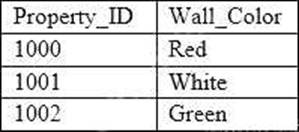
A machine learning specialist is developing a regression model to predict rental rates from rental listings. A variable named Wall_Color represents the most prominent exterior wall color of the property.
The following is the sample data, excluding all other variables:
The specialist chose a model that needs numerical input data.
Which feature engineering approaches should the specialist use to allow the regression model to learn from the Wall_Color data? (Choose two.)
- A . Apply integer transformation and set Red = 1, White = 5, and Green = 10.
- B . Add new columns that store one-hot representation of colors.
- C . Replace the color name string by its length.
- D . Create three columns to encode the color in RGB format.
- E . Replace each color name by its training set frequency.
B, D
Explanation:
In this scenario, the specialist should use one-hot encoding and RGB encoding to allow the regression model to learn from the Wall_Color data. One-hot encoding is a technique used to convert categorical data into numerical data. It creates new columns that store one-hot representation of colors. For example, a variable named color has three categories: red, green, and blue.
After one-hot encoding, the new variables should be like this:
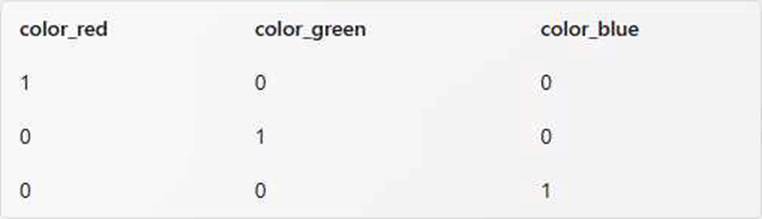
One-hot encoding can capture the presence or absence of a color, but it cannot capture the intensity or hue of a color. RGB encoding is a technique used to represent colors in a digital image. It creates three columns to encode the color in RGB format.
For example, a variable named color has three categories: red, green, and blue.
After RGB encoding, the new variables should be like this:
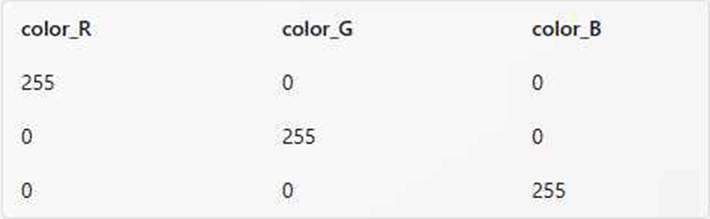
RGB encoding can capture the intensity and hue of a color, but it may also introduce correlation among the three columns. Therefore, using both one-hot encoding and RGB encoding can provide more information to the regression model than using either one alone.
References:
Feature Engineering for Categorical Data
How to Perform Feature Selection with Categorical Data
A Data Scientist is training a multilayer perception (MLP) on a dataset with multiple classes. The target class of interest is unique compared to the other classes within the dataset, but it does not achieve and acceptable ecall metric. The Data Scientist has already tried varying the number and size of the MLP’s hidden layers,
which has not significantly improved the results. A solution to improve recall must be implemented as quickly as possible.
Which techniques should be used to meet these requirements?
- A . Gather more data using Amazon Mechanical Turk and then retrain
- B . Train an anomaly detection model instead of an MLP
- C . Train an XGBoost model instead of an MLP
- D . Add class weights to the MLP’s loss function and then retrain
D
Explanation:
The best technique to improve the recall of the MLP for the target class of interest is to add class weights to the MLP’s loss function and then retrain. Class weights are a way of assigning different importance to each class in the dataset, such that the model will pay more attention to the classes with higher weights. This can help mitigate the class imbalance problem, where the model tends to favor the majority class and ignore the minority class. By increasing the weight of the target class of interest, the model will try to reduce the false negatives and increase the true positives, which will improve the recall metric. Adding class weights to the loss function is also a quick and easy solution, as it does not require gathering more data, changing the model architecture, or switching to a different algorithm.
References:
AWS Machine Learning Specialty Exam Guide
AWS Machine Learning Training – Deep Learning with Amazon SageMaker AWS Machine Learning Training – Class Imbalance and Weighted Loss Functions
Example Corp has an annual sale event from October to December. The company has sequential sales data from the past 15 years and wants to use Amazon ML to predict the sales for this year’s upcoming event.
Which method should Example Corp use to split the data into a training dataset and evaluation dataset?
- A . Pre-split the data before uploading to Amazon S3
- B . Have Amazon ML split the data randomly.
- C . Have Amazon ML split the data sequentially.
- D . Perform custom cross-validation on the data
C
Explanation:
A sequential split is a method of splitting data into training and evaluation datasets while preserving the order of the data records. This method is useful when the data has a temporal or sequential structure, and the order of the data matters for the prediction task. For example, if the data contains sales data for different months or years, and the goal is to predict the sales for the next month or year, a sequential split can ensure that the training data comes from the earlier period and the evaluation data comes from the later period. This can help avoid data leakage, which occurs when the training data contains information from the future that is not available at the time of prediction. A sequential split can also help evaluate the model performance on the most recent data, which may be more relevant and representative of the future data.
In this question, Example Corp has sequential sales data from the past 15 years and wants to use Amazon ML to predict the sales for this year’s upcoming annual sale event. A sequential split is the most appropriate method for splitting the data, as it can preserve the order of the data and prevent data leakage. For example, Example Corp can use the data from the first 14 years as the training dataset, and the data from the last year as the evaluation dataset. This way, the model can learn from the historical data and be tested on the most recent data.
Amazon ML provides an option to split the data sequentially when creating the training and evaluation datasources. To use this option, Example Corp can specify the percentage of the data to use for training and evaluation, and Amazon ML will use the first part of the data for training and the remaining part of the data for evaluation. For more information, see Splitting Your Data – Amazon Machine Learning.
A company’s machine learning (ML) specialist is designing a scalable data storage solution for Amazon SageMaker. The company has an existing TensorFlow-based model that uses a train.py script. The model relies on static training data that is currently stored in TFRecord format.
What should the ML specialist do to provide the training data to SageMaker with the LEAST development overhead?
- A . Put the TFRecord data into an Amazon S3 bucket. Use AWS Glue or AWS Lambda to reformat the data to protobuf format and store the data in a second S3 bucket. Point the SageMaker training invocation to the second S3 bucket.
- B . Rewrite the train.py script to add a section that converts TFRecord data to protobuf format. Point the SageMaker training invocation to the local path of the data. Ingest the protobuf data instead of the TFRecord data.
- C . Use SageMaker script mode, and use train.py unchanged. Point the SageMaker training invocation to the local path of the data without reformatting the training data.
- D . Use SageMaker script mode, and use train.py unchanged. Put the TFRecord data into an Amazon S3 bucket. Point the SageMaker training invocation to the S3 bucket without reformatting the training data.
D
Explanation:
Amazon SageMaker script mode allows users to bring custom training scripts (such as train.py) without needing extensive modifications for specific data formats like TFRecord. By storing the TFRecord data in an Amazon S3 bucket and pointing the SageMaker training job to this bucket, the model can directly access the data, allowing the ML specialist to train the model without additional reformatting or data processing steps.
This approach minimizes development overhead and leverages SageMaker’s built-in support for custom training scripts and S3 integration, making it the most efficient choice.
A Machine Learning team runs its own training algorithm on Amazon SageMaker. The training algorithm requires external assets. The team needs to submit both its own algorithm code and algorithm-specific parameters to Amazon SageMaker.
What combination of services should the team use to build a custom algorithm in Amazon SageMaker?
(Choose two.)
- A . AWS Secrets Manager
- B . AWS CodeStar
- C . Amazon ECR
- D . Amazon ECS
- E . Amazon S3
C, E
Explanation:
The Machine Learning team wants to use its own training algorithm on Amazon SageMaker, and submit both its own algorithm code and algorithm-specific parameters. The best combination of services to build a custom algorithm in Amazon SageMaker are Amazon ECR and Amazon S3.
Amazon ECR is a fully managed container registry service that allows you to store, manage, and deploy Docker container images. You can use Amazon ECR to create a Docker image that contains your training algorithm code and any dependencies or libraries that it requires. You can also use Amazon ECR to push, pull, and manage your Docker images securely and reliably.
Amazon S3 is a durable, scalable, and secure object storage service that can store any amount and type of data. You can use Amazon S3 to store your training data, model artifacts, and algorithm-specific parameters. You can also use Amazon S3 to access your data and parameters from your training algorithm code, and to write your model output to a specified location.
Therefore, the Machine Learning team can use the following steps to build a custom algorithm in Amazon SageMaker:
Write the training algorithm code in Python, using the Amazon SageMaker Python SDK or the Amazon SageMaker Containers library to interact with the Amazon SageMaker service. The code should be able to read the input data and parameters from Amazon S3, and write the model output to Amazon S3.
Create a Dockerfile that defines the base image, the dependencies, the environment variables, and the commands to run the training algorithm code. The Dockerfile should also expose the ports that Amazon SageMaker uses to communicate with the container.
Build the Docker image using the Dockerfile, and tag it with a meaningful name and version.
Push the Docker image to Amazon ECR, and note the registry path of the image.
Upload the training data, model artifacts, and algorithm-specific parameters to Amazon S3, and note the S3 URIs of the objects.
Create an Amazon SageMaker training job, using the Amazon SageMaker Python SDK or the AWS CLI. Specify the registry path of the Docker image, the S3 URIs of the input and output data, the algorithm-specific parameters, and other configuration options, such as the instance type, the number of instances, the IAM role, and the hyperparameters.
Monitor the status and logs of the training job, and retrieve the model output from Amazon S3.
References:
Use Your Own Training Algorithms
Amazon ECR – Amazon Web Services
Amazon S3 – Amazon Web Services