
Adobe AD0-E608 Practice Exams
Last updated on Oct 22,2026- Exam Code: AD0-E608
- Exam Name: Adobe Customer Journey Analytics Business Practitioner Professional
- Certification Provider: Adobe
- Latest update: Oct 22,2026
Which project management action ensures organized report distribution across multiple teams?
- A . Use Folder-Based Project Organization
- B . Enable Campaign Sync Mode
- C . Create Custom Data Exports
- D . Use Real-Time Project Assignment
Which actions are necessary when configuring a data view in Adobe CJA? (Select two.)
- A . Assigning Metrics and Dimensions
- B . Activating API Event Triggers
- C . Defining Component Labels
- D . Enabling Data Encryption
Which features should be enabled to ensure secure report sharing with external stakeholders in Adobe CJA? (Select two.)
- A . Enable Access Permissions
- B . Apply Data Encryption Rules
- C . Activate Scheduled Exports
- D . Enable Profile Merge Policies
At Company A, you are directed to reorganize projects and use subfolders to further group associated Workspaces.
What is the maximum number of subfolder levels in a single folder within Customer Journey Analytics Projects folder management system?
- A . 10 subfolders
- B . 5 subfolders
- C . 50 subfolders
- D . 100 subfolders
Which visualization best represents how visitors leave or continue through a predefined sequence of touchpoints?
- A . Fallout
- B . Flow
- C . Scatterplot
- D . Cohort Analysis
Which feature allows restricting report access to specific team members in Adobe CJA?
- A . Report Permissions
- B . Data Export Rules
- C . Campaign Quotas
- D . Profile Identity Lock
Which steps should be taken when creating reports for external business partners? (Select two.)
- A . Apply Data Privacy Rules
- B . Create Custom Data Views
- C . Assign Temporary Report Access
- D . Use Report Export Templates
What is the ideal column-setting element to use when creating a report broken out by day with a future end date?
- A . Conditional formatting
- B . Auto-generated
- C . Interpret zero as no value
- D . Custom row formatting
You are building a dashboard to answer the question of how someone’s demographic information may relate to their web behavior. In particular, you want to learn how the Page Views Metric changes as people’s education level changes.
To do so, you enable the persistence of the education level Dimension with a “Most Recent” Allocation Model and “Person Reporting Window” Expiration.
Why would setting persistence be helpful?
- A . Persistence allows you to non-retroactively (applying to future events) relate the education level Dimension to the Page Views Metric past just the event it is initially set on
- B . Persistence allows you to filter down the education level Dimension so that only events with corresponding Page Views are seen in the dashboard
- C . Persistence allows you to retroactively relate the education level Dimension to the Page Views Metric past just the event it is initially set on
- D . Persistence allows you to override the education level Dimension with other demographic data
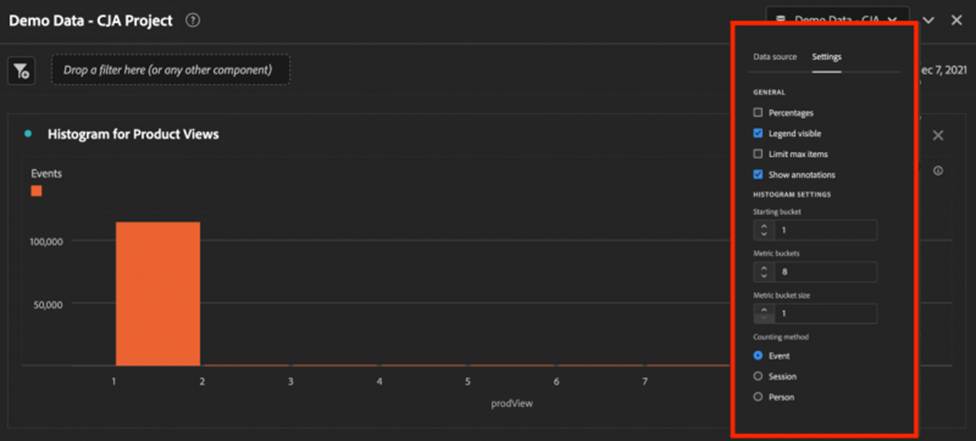
When you drag a Histogram visualization into your report, you notice that the first bar is quite large, but the other items have no value.
Given the settings displayed in the image, what can you do to try to improve the visualization?
- A . Select the Limit max items radio button.
- B . Change the Starting Bucket to 1.
- C . Change the Counting Method to Session.
- D . Change the Counting Method to Metric.