
CyberArk PAM-DEF Practice Exams
Last updated on Oct 21,2026- Exam Code: PAM-DEF
- Exam Name: CyberArk Defender – PAM
- Certification Provider: CyberArk
- Latest update: Oct 21,2026
PSM for Windows (previously known as “RDP Proxy”) supports connections to the following target systems
- A . Windows
- B . UNIX
- C . Oracle
- D . All of the above
D
Explanation:
PSM for Windows supports connections to various types of target systems, including Windows, UNIX, Oracle, and others. PSM for Windows uses different connection components to establish and manage the sessions, depending on the type and protocol of the target system. For example, PSM-RDP is used for Windows systems, PSM-SSH and PSM-Telnet are used for UNIX systems, PSM-Toad and PSM-SQLPlus are used for Oracle databases, and so on.
Reference: PSM for Windows
Connect through Privileged Session Manager for Windows Supported connection components
You have been asked to turn off the time access restrictions for a safe.
Where is this setting found?
- A . PrivateArk Client
- B . RestAPI
- C . PVWA
- D . Vault
C
Explanation:
The setting to turn off the time access restrictions for a safe is found in the Password Vault Web Access (PVWA). The PVWA provides a web interface through which users can manage safes, including setting and modifying various safe properties such as access restrictions. By accessing the safe settings in the PVWA, you can adjust the time access restrictions as required1.
Reference: CyberArk Docs: Safe Settings1
Which command configures email alerts within PTA if settings need to be changed post install?
- A . /opt/tomcat/utility/emailConfiguration.sh
- B . /opt/PTA/emailConfiguration.sh
- C . /opt/PTA/utility/emailConfig.sh
- D . /opt/tomcat/utility/emailSetup.sh
A
Explanation:
The command to configure email alerts within PTA (Privileged Threat Analytics) after the initial
installation is /opt/tomcat/utility/emailConfiguration.sh. This command is used to start the PTA
utility that allows you to set up email notifications for various alerts. During the configuration
process, you will be prompted to enter details such as the SMTP/S protocol, email server IP address,
SMTP port, sender’s email address, and recipient’s email address. If the mail server requires
authentication, you will also need to provide the username and password for the user that will send
email notifications1.
Reference: CyberArk’s official documentation provides a detailed procedure on how to configure PTA to send alerts to emails, including the use of the /opt/tomcat/utility/emailConfiguration.sh command
As long as you are a member of the Vault Admins group, you can grant any permission on any safe that you have access to.
- A . TRUE
- B . FALSE
B
Explanation:
Being a member of the Vault Admins group does not automatically grant you any permission on any safe that you have access to. The Vault Admins group is a predefined group that is created during the installation or upgrade of the vault. This group has the Vault Admin authorization, which allows its members to perform administrative tasks on the vault, such as managing users, groups, platforms, policies, and safes1. However, this authorization does not include any safe member authorizations, such as View, Retrieve, Use, or Manage Safe2. Therefore, to grant any permission on a safe, you need to be added as a safe member with the appropriate authorizations, either directly or through another group. The Vault Admins group can be added to safes with all safe member authorizations, but this is not done automatically for all safes. By default, this group is only added to a number of system safes, such as the Password Manager Safe, the PVWAConfig Safe, and the Notification Methods Safe3. For other safes, the Vault Admins group can be added manually by the safe owner or another user with the Manage Safe authorization4.
Reference: 1: Predefined users and groups, Predefined groups subsection
2: [CyberArk Privileged Access Security Implementation Guide], Chapter 3: Managing Safes, Section:
Safe Authorizations, Table 2-1: Safe Authorizations
3: What default groups can be automatically added to Safes when they are created?
4: [CyberArk Privileged Access Security Administration Guide], Chapter 3: Managing Safes, Section:
Adding Safe Members
VAULT authorizations may be granted to_____.
- A . Vault Users
- B . Vault Groups
- C . LDAP Users
- D . LDAP Groups
AC
Explanation:
Vault Authorizations
• Can be assigned only to users (not groups).
• Cannot be inherited via group membership.
• Defined only via the Private Ark Client. Safe Auth
• Assigned to users and/or groups.
• Can be inherited via group membership.
• Can be defined in the Private Ark Client or PVWA
Due to network activity, ACME Corp’s PrivateArk Server became active on the OR Vault while the Primary Vault was also running normally. All the components continued to point to the Primary Vault.
Which steps should you perform to restore DR replication to normal?
- A . Replicate data from DR Vault to Primary Vault > Shutdown PrivateArk Server on DR Vault > Start replication on DR vault
- B . Shutdown PrivateArk Server on DR Vault > Start replication on DR vault
- C . Shutdown PrivateArk Server on Primary Vault > Replicate data from DR Vault to Primary Vault > Shutdown PrivateArk Server on DR Vault > Start replication on DR vault
- D . Shutdown PrivateArk Server on DR Vault > Replicate data from DR Vault to Primary Vault > Shutdown PrivateArk Server on DR Vault > Start replication on DR vault
B
Explanation:
To restore DR replication to normal after network activity caused the PrivateArk Server on the DR Vault to become active while the Primary Vault was also running, you should first shut down the PrivateArk Server on the DR Vault. This ensures that the DR Vault is no longer active and can be prepared for replication. After shutting down the server, you should then start the replication process on the DR Vault to synchronize the data from the Primary Vault1.
Reference: CyberArk’s official documentation on initiating a DR failback to the Production Vault provides a detailed procedure for restoring DR replication to normal1.
Additional information on monitoring backup and DR replications can be found in CyberArk’s documentation2.
For further study and understanding of the CyberArk Defender PAM course objectives and documents, the official CyberArk training resources and study guides are recommended3.
If a password is changed manually on a server, bypassing the CPM, how would you configure the account so that the CPM could resume management automatically?
- A . Configure the Provider to change the password to match the Vault’s Password
- B . Associate a reconcile account and configure the platform to reconcile automatically
- C . Associate a logon account and configure the platform to reconcile automatically
- D . Run the correct auto detection process to rediscover the password
B
Explanation:
A reconcile account is a privileged account that has the permission to reset the password of another account on the target system. By associating a reconcile account with the account that has been changed manually, the CPM can use the reconcile account to restore the password of the account to the value that is stored in the Vault, in case it is changed or out of sync. This process is called password reconciliation and it ensures that the passwords are synchronized and available for use. To configure the account so that the CPM can resume management automatically, the platform that the account belongs to must have the following parameters set1: RCAutomaticReconcileWhenUnsynched: This parameter determines whether passwords will be reconciled automatically after the CPM detects a password on a remote machine that is not synchronized with its corresponding password in the Vault. The acceptable values are Yes or No. RCReconcileReasons: This parameter determines the codes that represent the CPM plugin errors that will launch a reconciliation process. The acceptable values are plug-in return codes separated by a comma.
RCFromHour, RCToHour: These parameters determine the time frame in hours during which the CPM can reconcile passwords, either manually or automatically. The acceptable values are 0-23 or -1 for none.
RCExecutionDays: This parameter determines the days of the week when the CPM will reconcile passwords. The acceptable values are days of the week, separated by commas.
Reference: 1: Password Reconciliation
Which processes reduce the risk of credential theft? (Choose two.)
- A . require dual control password access approval
- B . require password change every X days
- C . enforce check-in/check-out exclusive access
- D . enforce one-time password access
B, D
Explanation:
You want to build a connector that connects to a website through the Web applications for PSM framework.
Which default connector do you duplicate and modify?
- A . PSM-ChromeSample
- B . PSM-WebForm
- C . PSM-WebApp
- D . PSM-WebAppSample
D
Explanation:
When building a connector to connect to a website through the Web applications for PSM framework, you would duplicate and modify the default connector PSM-WebAppSample. This sample connector serves as a template that can be customized to fit the specific requirements of the web application you are targeting. It provides a starting point with predefined settings that can be adjusted to create a new, functional connector for the desired web application12.
Reference: CyberArk Docs – Web applications for PSM2
CyberArk Docs – Configure PSM to connect to Web applications1
DRAG DROP
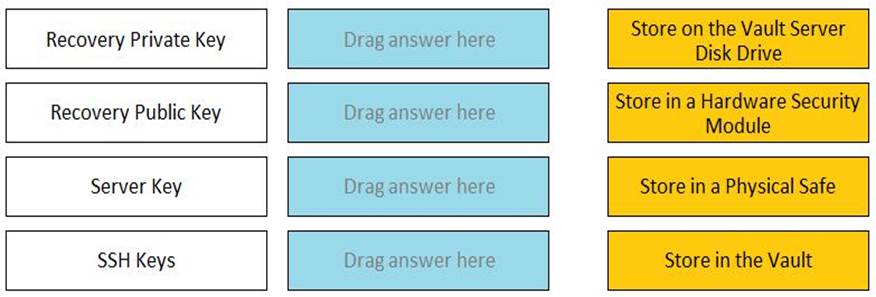
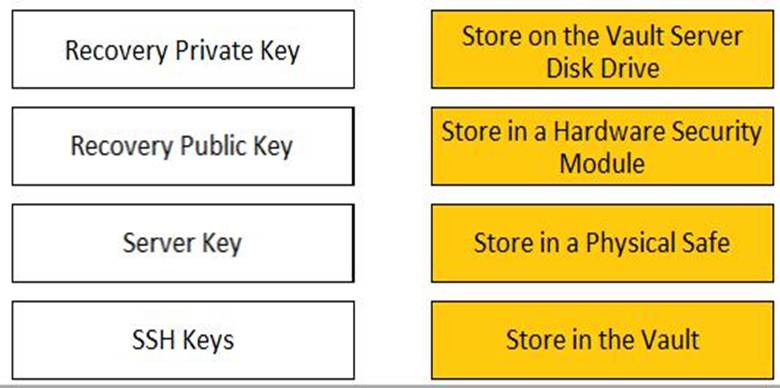
Match each key to its recommended storage location.
The recommended storage locations for each key are as follows:
Recovery Private Key: It is recommended to store the Recovery Private Key on the Vault Server Disk Drive. This is because the Recovery Private Key is used to decrypt the data stored in the Vault. Recovery Public Key: It is recommended to store the Recovery Public Key in a Hardware Security Module. This is because the Recovery Public Key is used to encrypt the data stored in the Vault. Server Key: It is recommended to store the Server Key in a Physical Safe. This is because the Server Key is used to open the Vault, much like the key of a physical Vault. The key is required to start the Vault, after which the Server Key can be removed until the Server is restarted. When the Vault is stopped, the information stored in the Vault is completely inaccessible without that key.
SSH Keys: It is recommended to store the SSH Keys in the Vault. This is because the SSH Keys are used to connect to remote machines using the SSH protocol. The Vault can manage the passwords and sessions for the SSH Keys and provide secure access to the target systems.
Reference: Server keys – CyberArk, Cyberark Key Storage Plugin (Enterprise) – Rundeck