
CyberArk PAM-DEF Practice Exams
Last updated on Oct 21,2026- Exam Code: PAM-DEF
- Exam Name: CyberArk Defender – PAM
- Certification Provider: CyberArk
- Latest update: Oct 21,2026
PSM captures a record of each command that was executed in Unix.
- A . TRIE
- B . FALSE
A
Explanation:
PSM captures a record of each command that was executed in Unix by using the SSH text recorder. This is a feature that enables PSM to record all the keystrokes that are typed during privileged sessions on SSH connections, including Unix systems. The SSH text recorder can be configured in the Platform Management settings for each platform that uses the SSH protocol. The text recordings are stored and protected in the Vault server and are accessible to authorized auditors. The text recordings can also be used for auditing and compliance purposes, as they provide a detailed trace of the actions performed by the users on the target systems1.
Reference: 1: Introduction to PSM for SSH, How it works subsection, Text recordings paragraph
A new HTML5 Gateway has been deployed in your organization.
Where do you configure the PSM to use the HTML5 Gateway?
- A . Administration > Options > Privileged Session Management > Configured PSM Servers > Connection Details > Add PSM Gateway
- B . Administration > Options > Privileged Session Management > Add Configured PSM Gateway Servers
- C . Administration > Options > Privileged Session Management > Configured PSM Servers > Add PSM Gateway
- D . Administration > Options > Privileged Session Management > Configured PSM Servers > Connection Details
C
Explanation:
After deploying a new HTML5 Gateway in your organization, you configure the PSM to use the
HTML5 Gateway by navigating to the Administration section in the PVWA. From there, you go to
Options, then Privileged Session Management, and under Configured PSM Servers, you will find the
option to Add PSM Gateway1. This is where you can specify the details of the newly deployed HTML5
Gateway to ensure that the PSM can utilize it for secure remote access to target machines through an
HTML5-based session.
Reference: CyberArk’s official documentation provides a step-by-step guide on how to install and configure the PSM HTML5 Gateway, including the process of adding the gateway to the PSM configuration1.
For more detailed instructions and best practices on configuring the PSM with an HTML5 Gateway, refer to the CyberArk Defender PAM course materials and study guides
DRAG DROP
Which authorizations are required in a recording safe to allow a group to view recordings?
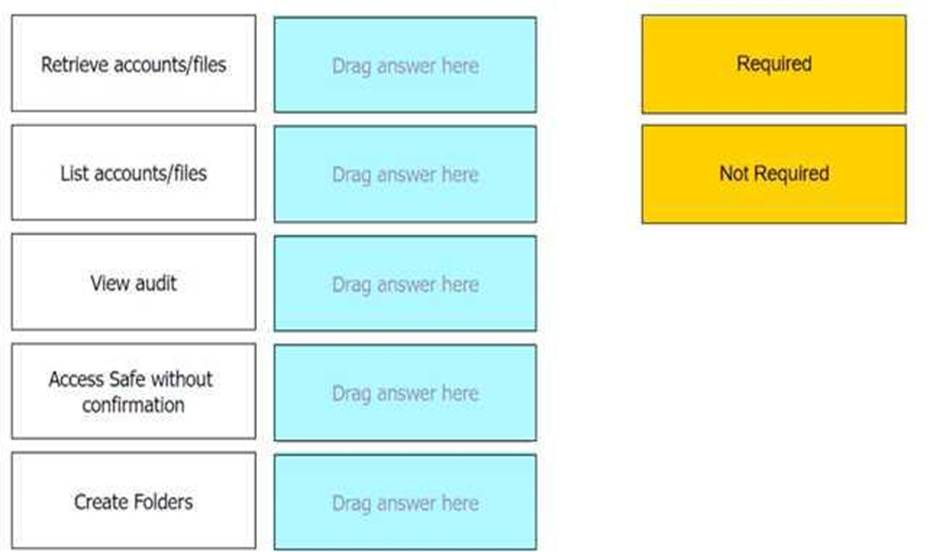
Retrieve accounts/files: Required
List accounts/files: Required
View audit: Required
Access Safe without confirmation: Not Required
Create Folders: Not Required
Comprehensive To allow a group to view recordings in a recording safe, the required authorizations
are Retrieve accounts/files, List accounts/files, and View audit. These authorizations enable the
group members to access and view the session recordings stored within the safe. The Retrieve
accounts/files permission allows users to retrieve files during PSM sessions. The List
accounts/files permission enables users to see the list of accounts and files within the safe. The View
audit authorization is necessary for users to view the audit records associated with the recordings1.
Reference: CyberArk Docs – Monitor Privileged Sessions
A Vault administrator have associated a logon account to one of their Unix root accounts in the vault.
When attempting to verify the root account’s password the Central Policy Manager (CPM) will:
- A . ignore the logon account and attempt to log in as root
- B . prompt the end user with a dialog box asking for the login account to use
- C . log in first with the logon account, then run the SU command to log in as root using the password in the Vault
- D . none of these
C
Explanation:
According to the web search results, when a Vault administrator has associated a logon account to one of their Unix root accounts in the vault, the CPM will log in first with the logon account, then run the SU command to log in as root using the password in the Vault1. This is a common use case for using a logon account, as the best practice for Unix systems is to disallow the root user from logging in using SSH, which is what the CPM uses to sign in to a system to manage the password2. The logon account can be defined on the target account level or on the platform level, making it available to all accounts associated with the platform2. The CPM can also use the logon account to initiate PSM sessions to the target machine3.
An auditor initiates a live monitoring session to PSM server to view an ongoing live session. When the auditor’s machine makes an RDP connection the PSM server, which user will be used?
- A . PSMAdminConnect
- B . Shadowuser
- C . PSMConnect
- D . Credentials stored in the Vault for the target machine
A
Explanation:
According to the web search results, when an auditor initiates a live monitoring session to PSM server to view an ongoing live session, the auditor’s machine makes an RDP connection to the PSM server using the PSMAdminConnect user. The PSMAdminConnect user is a local or domain user that starts PSM sessions on the PSM machine for authorized users who want to monitor or terminate active sessions1. The PSMAdminConnect user has limited permissions and access rights on the PSM server, and its credentials are managed by the CPM. The PSMAdminConnect user retrieves the credentials of the target account from the vault and uses them to establish a secure connection to the target machine. The auditor can then view the live session through the PSM session, while the PSM server records and audits the session activity.
The Accounts Feed contains:
- A . Accounts that were discovered by CyberArk in the last 30 days
- B . Accounts that were discovered by CyberArk that have not yet been onboarded
- C . All accounts added to the vault in the last 30 days
- D . All users added to CyberArk in the last 30 days
B
Explanation:
The Accounts Feed is a feature of the CyberArk Privileged Access Security Solution that enables the discovery and provisioning of privileged accounts in the environment. The Accounts Feed contains the accounts that were discovered by CyberArk that have not yet been onboarded to the Vault. These accounts are displayed in the Pending Accounts page in the PVWA, where the user can view, analyze, and onboard them according to various criteria. The Accounts Feed helps the user to identify and manage the unmanaged privileged accounts that pose a security risk1. The other options are not correct, because:
For a safe with Object Level Access enabled you can turn off Object Level Access Control when it no longer needed on the safe.
- A . TRUE
- B . FALSE
B
Explanation:
According to the CyberArk documentation1, once Object Level Access Control is enabled for a Safe, it cannot be disabled. This feature allows granular control over user access to passwords and files in the Safe, regardless of their Safe level member authorizations2. To enable Object Level Access Control, users need to have the Manage Safe authorization in the Vault1.
The vault supports Subnet Based Access Control.
- A . TRUE
- B . FALSE
A
Explanation:
According to the web page in the edge browser, the vault supports Subnet Based Access Control. This is a feature that allows you to restrict access to a key vault to a specified virtual network and subnet. You can also use firewall settings to deny internet traffic and allow only specific IP addresses. This way, you can enhance the security and privacy of your key vault data12
What does the minvalidity parameter on a platform policy determine?
- A . time between a password retrieval and the account becoming eligible for a password change
- B . timeout for users signed into the PVWA as configured in the global settings
- C . minimum amount of time that Just in Time access is valid
- D . time in minutes before an empty safe will be automatically deleted
A
Explanation:
The minvalidity parameter on a platform policy in CyberArk determines the minimum amount of time that must pass between the retrieval of a password and when the account becomes eligible for a password change. This parameter ensures that a user has a guaranteed period to use the password before it is changed again, providing stability and predictability in password
management1.
Reference: The information provided is based on general knowledge of CyberArk PAM best practices and the functionality of the minvalidity parameter as outlined in CyberArk’s official documentation
When should vault keys be rotated?
- A . when it is copied to file systems outside the vault
- B . annually
- C . whenever a CyberArk user leaves the organization
- D . when migrating to a new data center
D
Explanation:
Vault keys should be rotated when there is a significant event that could potentially compromise the security of the keys, such as when migrating to a new data center. This is because the keys may be exposed to new environments and systems, and rotating them ensures that any potential exposure does not result in a security breach. Additionally, periodic rotation of encryption keys is recommended to maintain the integrity of the encryption and to adhere to best practices for security1.
Reference: CyberArk Docs: Credentials Rotation Policy2
HashiCorp Developer: Key Rotation