
Netskope NSK200 Practice Exams
Last updated on Oct 21,2026- Exam Code: NSK200
- Exam Name: Netskope Certified Cloud Security Integrator (NCCSI)
- Certification Provider: Netskope
- Latest update: Oct 21,2026
You want to reduce false positives by only triggering policies when contents of your customer database are uploaded to Dropbox. Your maximum database size is 2 MB.
In this scenario, what are two ways to accomplish this task? (Choose two.)
- A . Upload the .csv export lo the Netskope tenant DLP rules section to create an exact match hash.
- B . Use the Netskope client to upload the .csv export to the Netskope management plane DLP container.
- C . Send the .csv export to Netskope using a support ticket with the subject, "create exact match hash".
- D . Use a Netskope virtual appliance to create an exact match hash.
AD
Explanation:
To reduce false positives by only triggering policies when contents of your customer database are uploaded to Dropbox, you can use two methods: Upload the .csv export to the Netskope tenant DLP rules section to create an exact match hash. This is a method that allows you to upload a file containing structured data, such as a customer database, to the Netskope tenant and generate a hash of the data. The hash is then used to match the data in the cloud traffic and trigger DLP policies. This method is suitable for files that are less than 10 MB in size. To upload the file, you need to go to Policies > Data Protection > DLP Rules and click on Exact Match Hashes. Then you can select the file from your local system and upload it. Use a Netskope virtual appliance to create an exact match hash. This is a method that allows you to create a file containing structured data, such as a customer database, and upload it to the Netskope cloud using a virtual appliance. The virtual appliance encrypts the file before uploading it and generates a hash of the data. The hash is then used to match the data in the cloud traffic and trigger DLP policies. This method is suitable for files that are larger than 10 MB in size. To create the file, you need to follow a specific format and save it as a .csv file. To upload the file, you need to use the request dlp-pdd upload command on the virtual appliance CLI. The other options are not valid methods for this task. You cannot use the Netskope client to upload the .csv export to the Netskope management plane DLP container, as this is not a supported feature of the client. You cannot send the .csv export to Netskope using a support ticket with the subject, “create exact match hash”, as this is not a secure or efficient way of creating an exact match hash.
Reference: Create an Exact Match Hash from the UI1, Create an Exact Match Hash from a Virtual Appliance2
Your customer implements Netskope Secure Web Gateway to secure all Web traffic. While they have created policies to block certain categories, there are many new sites available dally that are not yet categorized. The customer’s users need quick access and cannot wait to put in a request to gain access requiring a policy change or have the site’s category changed.
To solve this problem, which Netskope feature would provide quick, safe access to these types of sites?
- A . Netskope Cloud Firewall (CFW)
- B . Netskope Remote Browser Isolation (RBI)
- C . Netskope Continuous Security Assessment (CSA)
- D . Netskope SaaS Security Posture Management (SSPM)
B
Explanation:
To solve the problem of providing quick, safe access to uncategorized and risky websites, the Netskope feature that the customer should use is Netskope Remote Browser Isolation (RBI). Netskope RBI is a part of the Netskope Secure Web Gateway offering that intercepts a user’s browsing session to a website, acting as a proxy that fetches the content for that user and renders the content in an isolated browsing instance. The rendered content is delivered to the user’s browser as a safe stream of pixels. This safely silos the end user’s device and the enterprise network and systems, separating it from their browsing activity and restricting the ability of an attacker to establish control and / or breach other systems and exfiltrate data1. Netskope RBI can be easily invoked with an ‘isolate’ policy action within the Netskope Security Cloud for any website category or domain2. Therefore, option B is correct and the other options are incorrect.
Reference: Remote Browser Isolation – Netskope Knowledge Portal, Netskope Remote Browser Isolation – Netskope
You use Netskope to provide a default Malware Scan profile for use with your malware policies. Also, you want to create a custom malware detection profile.
In this scenario, what are two additional requirements to complete this task? (Choose two.)
- A . Add a custom hash list as an allowlist.
- B . Add a quarantine profile.
- C . Add a remediation profile.
- D . Add a custom hash list as a blocklist.
BD
Explanation:
To create a custom malware detection profile, adding a quarantine profile ensures that detected threats are appropriately isolated. Additionally, a custom hash list as a blocklist allows you to block specific known malware hashes, further enhancing the customization of the malware detection profile.
The risk team at your company has determined that traffic from the sales team to a custom Web application should not be inspected by Netskope. All other traffic to the Web application should continue to be inspected.
In this scenario, how would you accomplish this task?
- A . Create a Do Not Decrypt Policy using User Group and Domain in the policy page.
- B . Create a Do Not Decrypt Policy using Application in the policy page and a Steering Exception for Group
- C . Create a Do Not Decrypt Policy using Destination IP and Application in the policy page.
- D . Create a Do Not Decrypt Policy using Source IP and Application in the policy page.
A
Explanation:
To prevent traffic from the sales team to a custom Web application from being inspected by Netskope, you need to create a Do Not Decrypt Policy using User Group and Domain in the policy page. A Do Not Decrypt Policy allows you to specify the traffic you want to leave encrypted and not further analyzed by Netskope via the Real-time Protection policies3. You can use the User Group criteria to match the sales team members and the Domain criteria to match the custom Web application. This way, only the traffic from the sales team to the custom Web application will be exempted from decryption, while all other traffic to the Web application will continue to be inspected.
Review the exhibit.
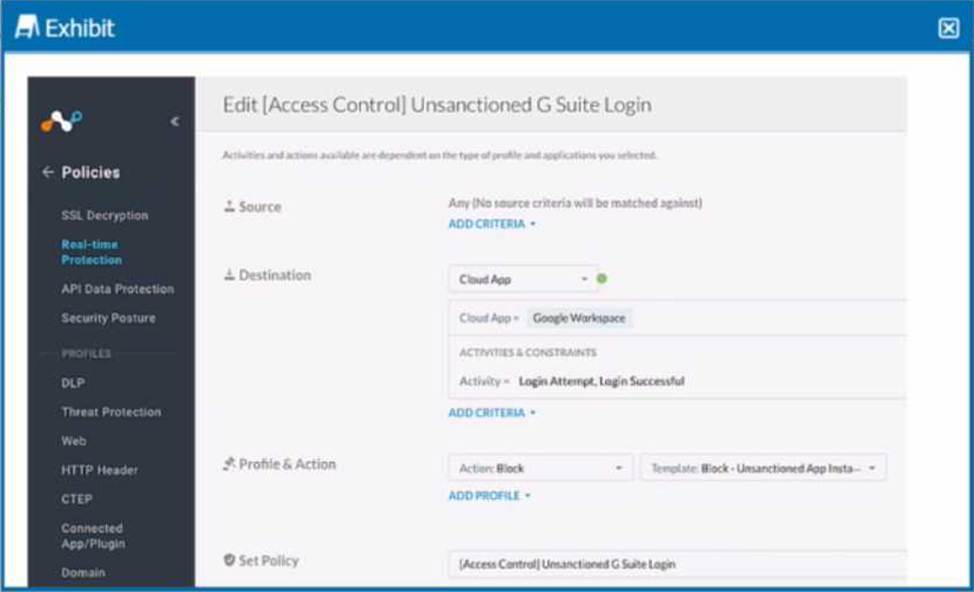
Your company uses Google as the corporate collaboration suite; however, corporate policy restricts the use of personal Google services. The exhibit provides a partially completed policy to ensure that users cannot log into their personal account.
What should be added to achieve the desired outcome in this scenario?
- A . Google Gmail app
- B . User Constraint
- C . DLP profile
- D . Device classification
B
Explanation:
In order to restrict users from logging into their personal Google accounts, the policy should include a user constraint. This will ensure that only users with corporate accounts can access the corporate collaboration suite. The user constraint can be added by selecting the “User” option in the “Source” field and then choosing the appropriate user group or identity provider. The other options are not relevant for this scenario.
Reference: [Creating a Policy to Block Personal Google Services], [Policy Creation], [User Constraint]
Your company asks you to use Netskope to integrate with Endpoint Detection and Response (EDR) vendors such as Crowdstrike.
Which two requirements are needed for a successful integration and sharing of threat data? (Choose two.)
- A . Remediation profile
- B . Device classification
- C . API Client ID
- D . Custom log parser
AC
Explanation:
Integrating with EDR vendors like Crowdstrike requires an API Client ID for authentication and data sharing. A remediation profile is also necessary to define automated actions that can be taken when threats are detected, ensuring effective response to endpoint threats.
Review the exhibit.
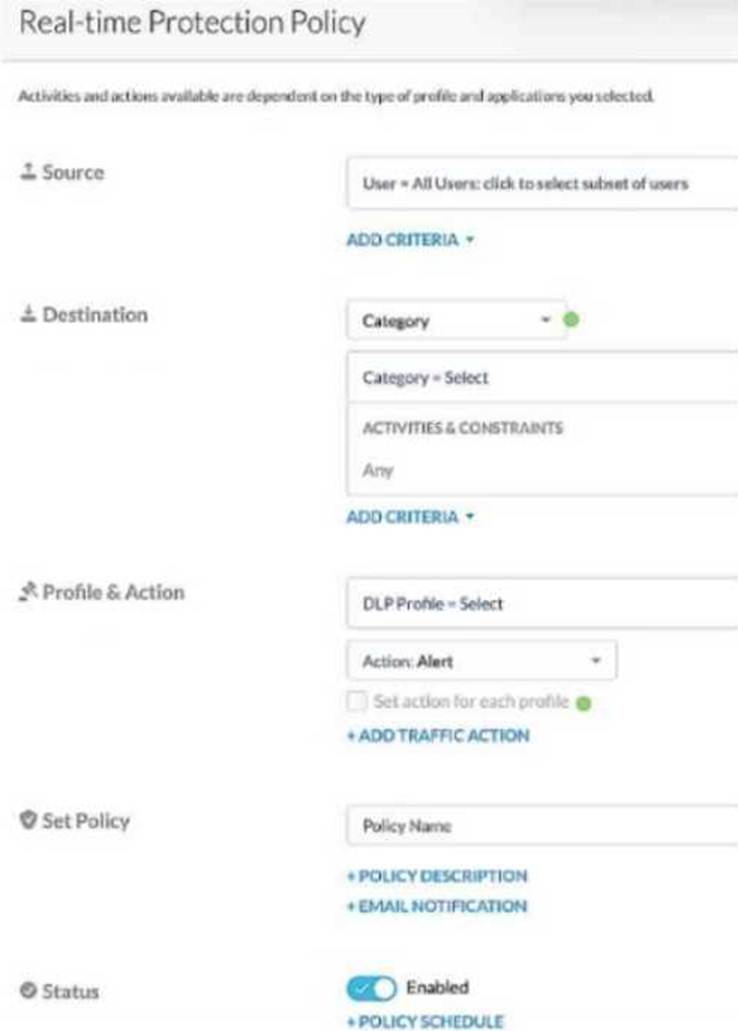
Given the information shown below:
– for PCI data uploads, you want to provide no notification,
– for PHI data uploads, you want to allow users to proceed by clicking OK,
– for GDPR data uploads, you want to provide block notification,
– if none of the above matches, you want to provide no notification.
You want to reduce the number of policies by combining multiple DLP profiles Into one policy.
Referring to the exhibit, which two statements are true? (Choose two.)
- A . You must open a support ticket to enable the Advanced Policies feature.
- B . You must check the "set action for each profile" flag.
- C . You can have only one action if you use multiple DLP profiles in the same policy.
- D . You can apply a unique action to each profile In the same policy.
BD
Explanation:
To apply different actions for each DLP profile in the same policy, you need to enable the "set action for each profile" flag. This allows you to configure unique actions (e.g., block, allow) for each DLP profile within a single combined policy, thus reducing the total number of policies needed
Your company has many users that are remote and travel often. You want to provide the greatest visibility into their activities, even while traveling. Using Netskope. which deployment method would be used in this scenario?
- A . Use proxy chaining.
- B . Use a Netskope client.
- C . Use an IPsec tunnel.
- D . Use a GRE tunnel.
B
Explanation:
The best deployment method for remote and traveling users is to use a Netskope client. The Netskope client is a lightweight software agent that runs on the user’s device and steers web and cloud traffic to the Netskope cloud for real-time inspection and policy enforcement1. The Netskope client provides an always-on end user remote access experience and avoids backhauling (or hairpinning) remote users through the corporate network to access applications in public cloud environments2. The Netskope client also supports offline mode, which allows users to work offline and sync their policies when they reconnect to the internet
After deploying the Netskope client to a number of devices, users report that the Client status indicates "Admin Disabled". User and gateway information is displayed correctly in the client configuration dialog
Why are clients installing in an "Admin Disabled" state in this scenario?
- A . All devices were previously disabled by the administrator.
- B . The user’s identity is not synchronized to Netskope.
- C . The user’s password was incorrect during enrollment.
- D . The user’s account has no mail ID attribute In Active Directory.
A
Explanation:
The Netskope client can be disabled by the administrator from the Netskope console. This is useful for troubleshooting or maintenance purposes. When the client is disabled by the administrator, it shows the status as “Admin Disabled” and does not apply any policies or steer any traffic. The user cannot enable the client unless the administrator enables it from the console. The other options are not valid reasons for the client to be in an “Admin Disabled” state.
Reference: Netskope Client Status 1, Enable or Disable Netskope Client 2
Which statement describes a requirement for deploying a Netskope Private Application (NPA) Publisher?
- A . The publisher must be deployed in a public cloud environment, such as AWS.
- B . The publisher must be deployed in a private data center.
- C . The publisher must be deployed on the network where the private application will be accessed.
- D . The publisher’s name must match the name of the application process that it will access.
C
Explanation:
The statement that describes a requirement for deploying a Netskope Private Application (NPA) Publisher is C. The publisher must be deployed on the network where the private application will be accessed. A NPA Publisher is a software component that enables Netskope to discover resources that users will connect to via NPA. A NPA Publisher must be deployed on the same network as the private application that it will publish, such as a public cloud environment (AWS, Azure, GCP) or a private data center3. This ensures that the NPA Publisher can communicate with the private application and relay its traffic to the NPA service in the Netskope cloud. Therefore, option C is correct and the other options are incorrect.
Reference: Deploy a Publisher – Netskope Knowledge Portal