
Microsoft AZ-204 Practice Exams
Last updated on Oct 21,2026- Exam Code: AZ-204
- Exam Name: Developing Solutions for Microsoft Azure
- Certification Provider: Microsoft
- Latest update: Oct 21,2026
You are building a B2B web application that uses Azure B2B collaboration for authentication Paying customers authenticate to Azure B2B using federation
The application allows users to sign up for trial accounts using any email address
When a user converts to a paying customer, the data associated with the teal should be kept, but the user must authenticate using federation
You need to update the user in Azure Active Directory (Azure AD) when they convert to a paying customer
Which Graph API parameter is used to change authentication from one-time passé odes to federation?
- A . uscrFlowType
- B . Status
- C . invittdUstr
- D . resetRedemption
You are building a B2B web application that uses Azure B2B collaboration for authentication Paying customers authenticate to Azure B2B using federation
The application allows users to sign up for trial accounts using any email address
When a user converts to a paying customer, the data associated with the teal should be kept, but the user must authenticate using federation
You need to update the user in Azure Active Directory (Azure AD) when they convert to a paying customer
Which Graph API parameter is used to change authentication from one-time passé odes to federation?
- A . uscrFlowType
- B . Status
- C . invittdUstr
- D . resetRedemption
DRAG DROP
You develop a web application.
You need to register the application with an active Azure Active Directory (Azure AD) tenant.
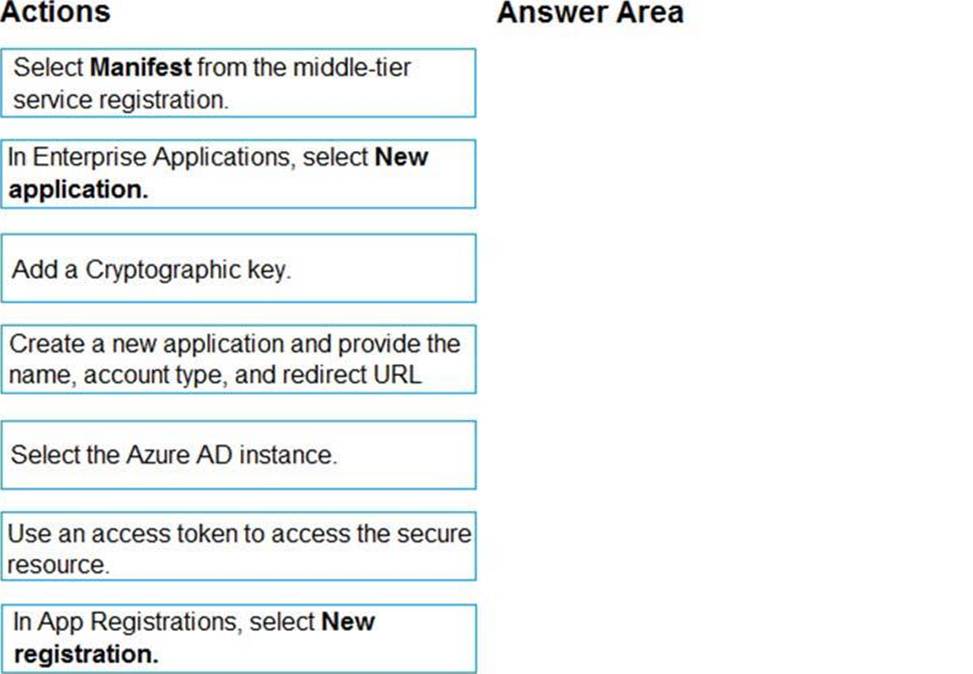
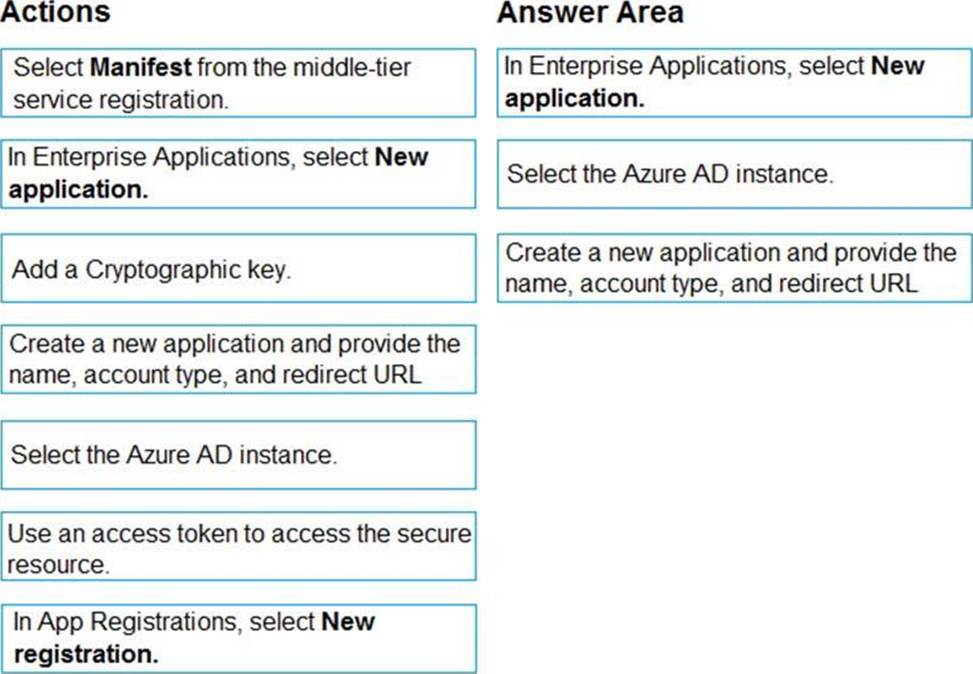
Which three actions should you perform in sequence? To answer, move all actions from the list of actions to the answer area and arrange them in the correct order.
Explanation:
Register a new application using the Azure portal
Sign in to the Azure portal using either a work or school account or a personal Microsoft account.
If your account gives you access to more than one tenant, select your account in the upper right corner. Set your portal session to the Azure AD tenant that you want.
Search for and select Azure Active Directory. Under Manage, select App registrations.
Select New registration. (Step 1)
In Register an application, enter a meaningful application name to display to users.
Specify who can use the application. Select the Azure AD instance. (Step 2)
Under Redirect URI (optional), select the type of app you’re building: Web or Public client (mobile & desktop). Then enter the redirect URI, or reply URL, for your application. (Step 3)
When finished, select Register.
HOTSPOT
You are working for Contoso, Ltd.
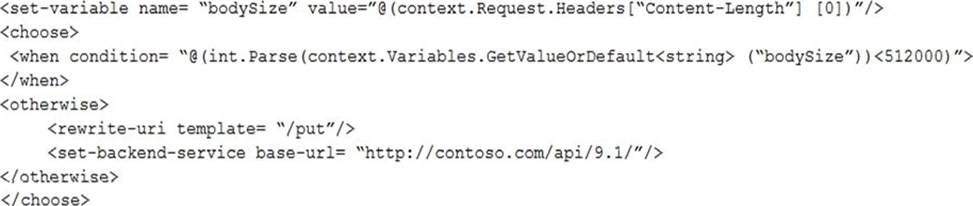
You define an API Policy object by using the following XML markup:
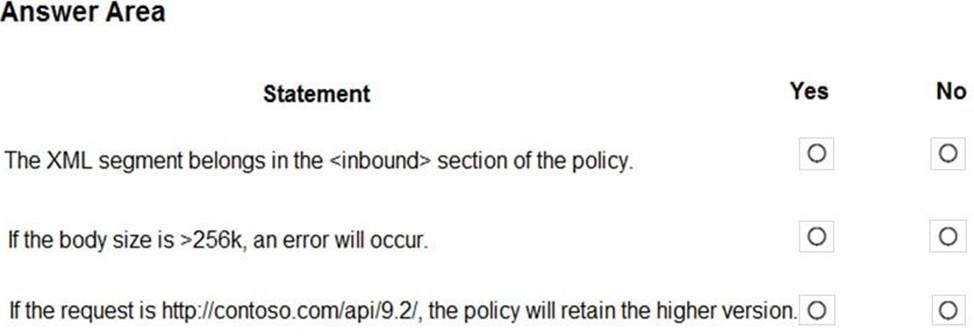
For each of the following statements, select Yes if the statement is true. Otherwise, select No. NOTE: Each correct selection is worth one point.
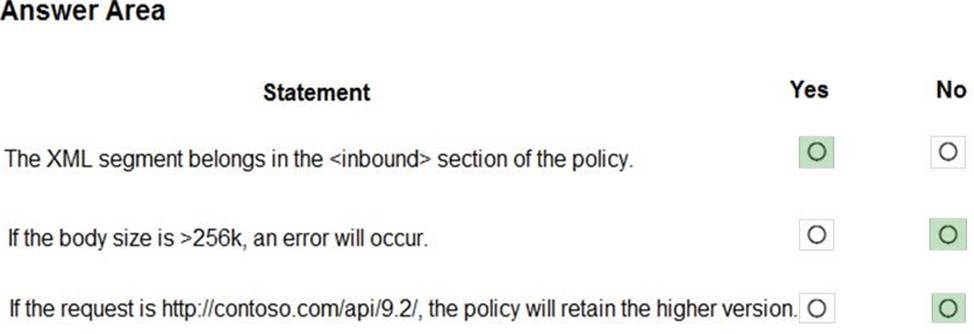
Explanation:
Box 1: Yes
Use the set-backend-service policy to redirect an incoming request to a different backend than the one specified in the API settings for that operation. Syntax: <set-backend-service base-url="base URL of the backend service" />
Box 2: No
The condition is on 512k, not on 256k.
Box 3: No
The set-backend-service policy changes the backend service base URL of the incoming request to the one specified in the policy.
Reference: https://docs.microsoft.com/en-us/azure/api-management/api-management-transformation-policies
Note: This question is part of a series of questions that present the same scenario. Each question in the series contains a unique solution that might meet the stated goals. Some question sets might have more than one correct solution, while others might not have a correct solution.
After you answer a question in this section, you will NOT be able to return to it. As a result, these questions will not appear in the review screen.
You develop a software as a service (SaaS) offering to manage photographs. Users upload photos to a web service which then stores the photos in Azure Storage Blob storage. The storage account type is General-purpose V2.
When photos are uploaded, they must be processed to produce and save a mobile-friendly version of the image. The process to produce a mobile-friendly version of the image must start in less than one minute.
You need to design the process that starts the photo processing.
Solution: Create an Azure Function app that uses the Consumption hosting model and that is triggered from the blob upload.
Does the solution meet the goal?
- A . Yes
- B . No
A
Explanation:
In the Consumption hosting plan, resources are added dynamically as required by your functions.
Reference: https://docs.microsoft.com/en-us/azure/azure-functions/functions-create-storage-blob-triggered-function
HOTSPOT
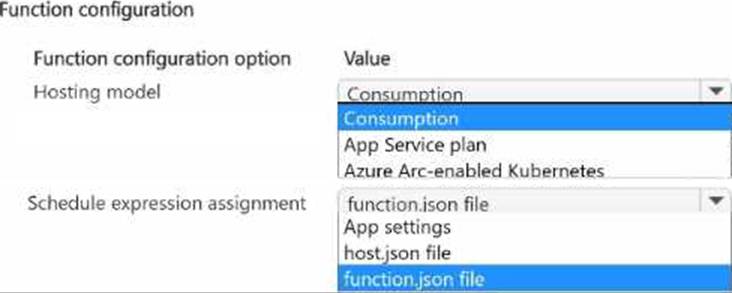
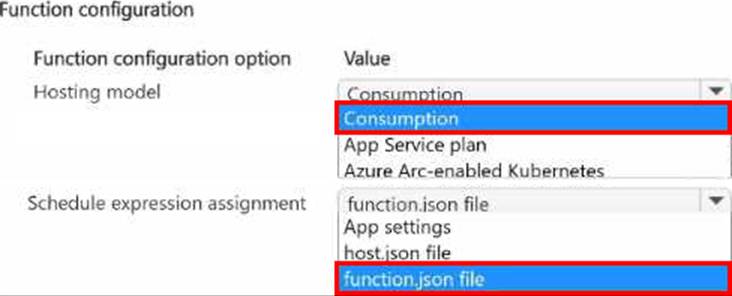
You plan to implement an Azure function named Function1 that will use the timer trigger.
You plan to use a TimeSpan value to set the schedule of function execution.
You need to select the hosting model and the schedule expression assignment method.
Which hosting model and schedule expression assignment method should you use? To answer, select the appropriate options in the answer area. NOTE: Each correct selection is worth one point.
HOTSPOT
You plan to implement an Azure function named Function1 that will use the timer trigger.
You plan to use a TimeSpan value to set the schedule of function execution.
You need to select the hosting model and the schedule expression assignment method.
Which hosting model and schedule expression assignment method should you use? To answer, select the appropriate options in the answer area. NOTE: Each correct selection is worth one point.
HOTSPOT
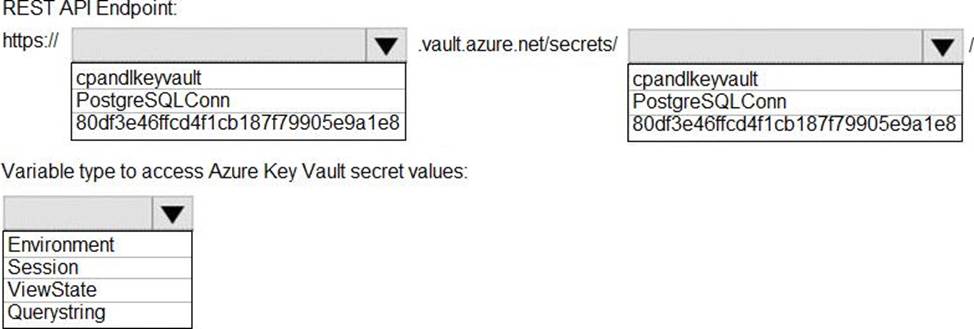
You need to retrieve the database connection string.
Which values should you use? To answer, select the appropriate options in the answer area. NOTE: Each correct selection is worth one point.
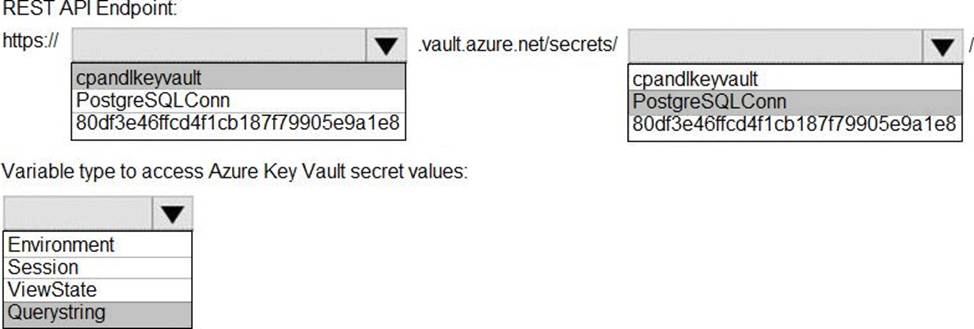
Explanation:
Azure database connection string retrieve REST API vault.azure.net/secrets/
Box 1: cpandlkeyvault
We specify the key vault, cpandlkeyvault.
Scenario: The database connection string is stored in Azure Key Vault with the following attributes:
Azure Key Vault name: cpandlkeyvault
Secret name: PostgreSQLConn
Id: 80df3e46ffcd4f1cb187f79905e9a1e8
Box 2: PostgreSQLConn
We specify the secret, PostgreSQLConn
Example, sample request:
https://myvault.vault.azure.net//secrets/mysecretname/4387e9f3d6e14c459867679a90fd0f79?api-version=7.1
Box 3: Querystring
Reference: https://docs.microsoft.com/en-us/rest/api/keyvault/getsecret/getsecret
HOTSPOT
You are preparing to deploy a Python website to an Azure Web App using a container. The solution will use multiple containers in the same container group.
The Dockerfile that builds the container is as follows:

You build a container by using the following command.
The Azure Container Registry instance named images is a private registry.

The user name and password for the registry is admin.
The Web App must always run the same version of the website regardless of future builds.
You need to create an Azure Web App to run the website.
How should you complete the commands? To answer, select the appropriate options in the answer area. NOTE: Each correct selection is worth one point.
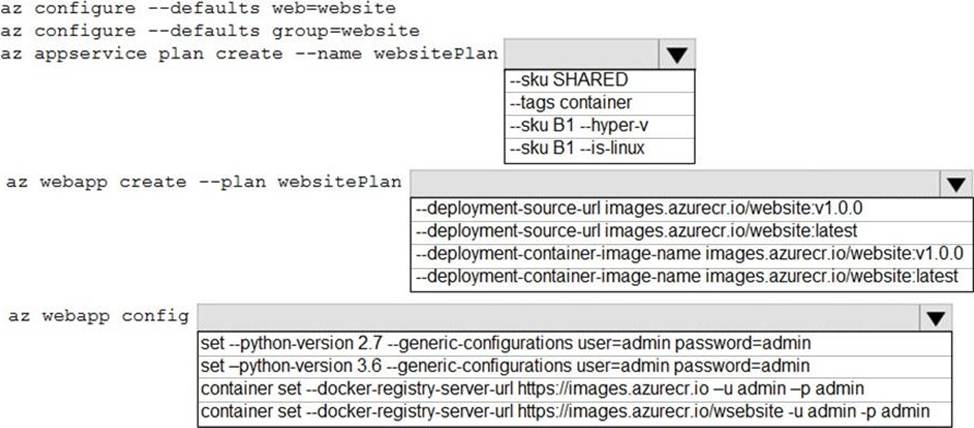
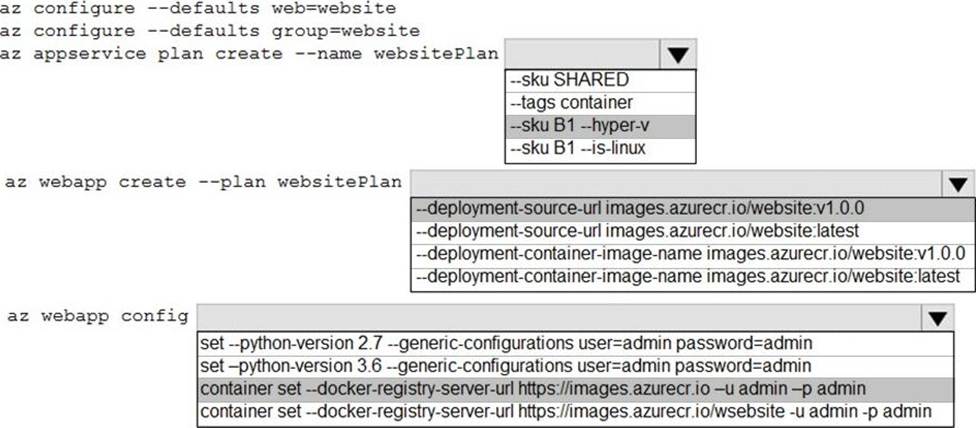
Explanation:
Box 1: –SKU B1 –hyper-v
–hyper-v
Host web app on Windows container.
Box 2: –deployment-source-url images.azurecr.io/website:v1.0.0 –deployment-source-url -u
Git repository URL to link with manual integration.
The Web App must always run the same version of the website regardless of future builds.
Incorrect:
–deployment-container-image-name -i
Linux only. Container image name from Docker Hub, e.g. publisher/image-name:tag.
Box 3: az webapp config container set -url https://images.azurecr.io -u admin -p admin
az webapp config container set
Set a web app container’s settings.
Paremeter: –docker-registry-server-url -r
The container registry server url.
The Azure Container Registry instance named images is a private registry.
Example:
az webapp config container set –docker-registry-server-url
https://{azure-container-registry-name}.azurecr.io
Reference: https://docs.microsoft.com/en-us/cli/azure/appservice/plan
HOTSPOT
You are validating the configuration of an Azure Search indexer.
The service has been configured with an indexer that uses the Import Data option.
The index is configured using options as shown in the Index Configuration exhibit. (Click the Index Configuration tab.)
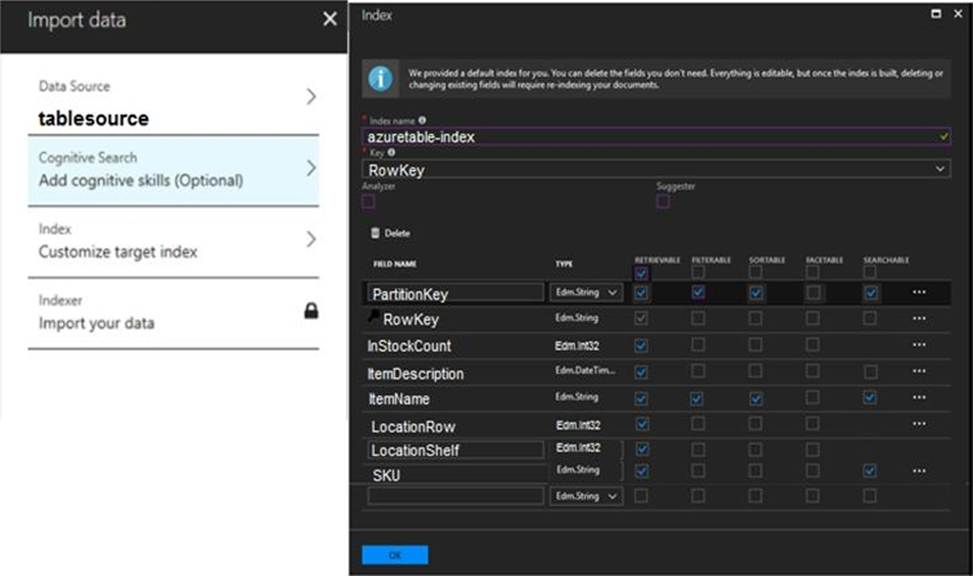
You use an Azure table as the data source for the import operation. The table contains three records with item inventory data that matches the fields in the Storage data exhibit.

These records were imported when the index was created. (Click the Storage Data tab.) When users search with no filter, all three records are displayed.
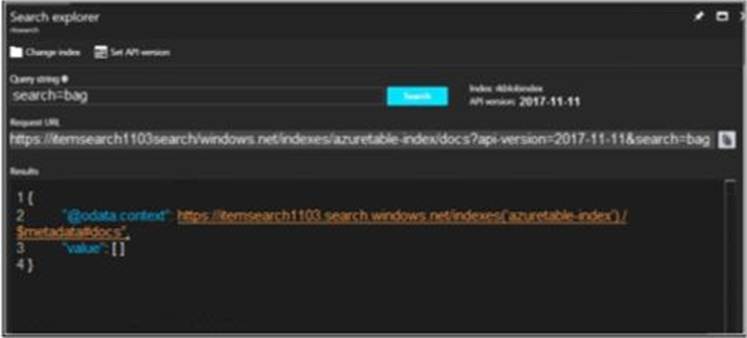
When users search for items by description, Search explorer returns no records. The Search Explorer exhibit shows the query and results for a test. In the test, a user is trying to search for all items in the table that have a description that contains the word bag. (Click the Search Explorer tab.)
You need to resolve the issue.
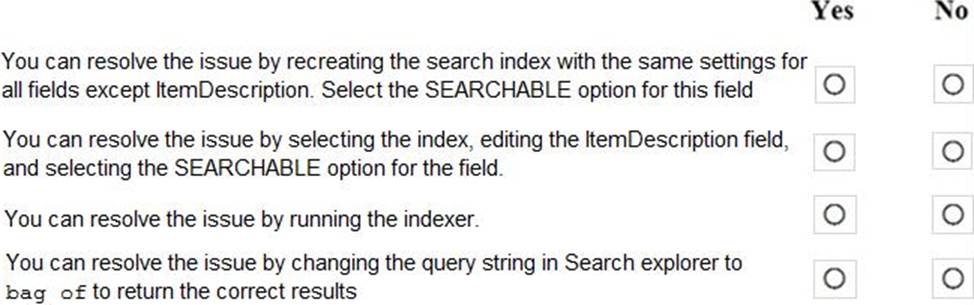
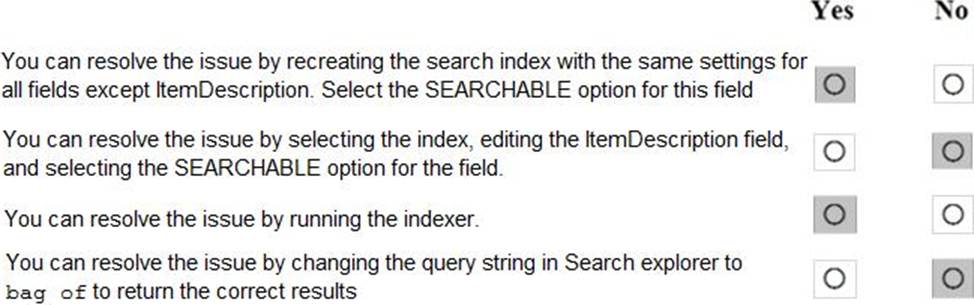
For each of the following statements, select Yes if the statement is true. Otherwise, select No. NOTE: Each correct selection is worth one point.
Explanation:
Box 1: Yes
The ItemDescription field in not searchable.
Box 2: No
The ItemDescription field in not searchable, but we would need to recreate the index.
Box 3: Yes
An indexer in Azure Search is a crawler that extracts searchable data and metadata from an external Azure data source and populates an index based on field-to-field mappings between the index and your data source. This approach is sometimes referred to as a ‘pull model’ because the service pulls data in without you having to write any code that adds data to an index.
Box 4: No
Reference:
https://docs.microsoft.com/en-us/azure/search/search-what-is-an-index
https://docs.microsoft.com/en-us/azure/search/search-indexer-overview