
VMware 2V0-32.24 Practice Exams
Last updated on Oct 22,2026- Exam Code: 2V0-32.24
- Exam Name: VMware Cloud Operations 8.x Professional V2
- Certification Provider: VMware
- Latest update: Oct 22,2026
An administrator has been tasked with updating vRealize Suite Lifecycle Manager (vRSLCM) to a specific version to support the phased upgrade of the vRealize Suite.
Which three steps should the administrator take to ensure vRSLCM is upgraded to the correct version? (Choose three.)
- A . Connect the ISO to the vRSLCM Appliance as a Virtual CD-ROM
- B . Use the CD-ROM repository for the source of the upgrade files
- C . Use the Online repository for the source of the upgrade fifes
- D . Download the vRealize Suite Lifecycle Manager Upgrade ISO
- E . Download the vRealize Suite Lifecycle Manager Easy installer ISO
- F . Update to the latest Product Support Pack in vRSLCM
C, D, F
Explanation:
To ensure vRealize Suite Lifecycle Manager (vRSLCM) is upgraded to the correct version for a phased upgrade of the vRealize Suite, follow these steps:
C . Use the Online repository for the source of the upgrade files : Utilize the online repository within vRSLCM to access the available upgrade files. This ensures you have the latest versions and necessary components for the upgrade.
D . Download the vRealize Suite Lifecycle Manager Upgrade ISO : Download the specific vRSLCM Upgrade ISO that corresponds to the desired target version. This ISO contains the necessary files for the upgrade process.
F . Update to the latest Product Support Pack in vRSLCM : Before upgrading to a new version, ensure vRSLCM is updated to the latest Product Support Pack. This ensures compatibility and addresses any known issues.
The following options are not necessary or recommended:
A cloud administrator is deploying a new software-defined data center (SDDC) in VMware Cloud on AWS. Long-term planning indicates that a minimum of 30 hosts are required.
What is a valid management network CIDR based on the requirements?
- A . 10.4.0.0/23
- B . 10.3.0.0/24
- C . 10.2.0.0/16
- D . 10.1.0.0/20
D
Explanation:
A valid management network CIDR based on the requirements is 10.1.0.0/20, as this provides a range of 4096 IP addresses, which is more than enough for 30 hosts. A /23 CIDR only provides 512 IP addresses, which is not enough for 30 hosts, while a /24 CIDR provides 256 IP addresses and a /16 CIDR provides 65,536 IP addresses, which is more than is needed for the 30 hosts. https://blogs.vmware.com/cloud/2019/10/03/selecting-ip-subnets-sddc/
A cloud administrator needs to create an isolated network segment for use in disaster recovery test.
Which type of network segment is required?
- A . Private
- B . Routed
- C . Extended
- D . Disconnected
A
Explanation:
A private network segment is an isolated network segment that is used for disaster recovery testing. Private network segments provide a secure and isolated environment for testing, allowing administrators to test their disaster recovery plans without risking the stability of their production environment. Private network segments also provide additional security, as they are not connected to the public internet, making them less vulnerable to external attacks. [1]
[1] https://docs.vmware.com/en/VMware-Cloud-on-AWS/services/com.vmware.vmc-aws.networking/GUID-64D7A8F3-45C9-4A83-8528-A8C2A2C7001D.html
Which Tanzu Kubernetes Grid component is used to create, scale, upgrade and delete workload clusters?
- A . Tanzu Kubernetes cluster
- B . Tanzu CLI
- C . Tanzu Supervisor cluster
- D . Tanzu Kubernetes Grid extensions
B
Explanation:
https://docs.vmware.com/en/VMware-vSphere/7.0/vmware-vsphere-with-tanzu/GUID-4D0D375F-C001-4F1D-AAB1-1789C5577A94.html
Tanzu CLI is a command-line interface used to create, scale, upgrade, and delete workload clusters that are part of the Tanzu Kubernetes Grid [1]. Tanzu CLI also allows you to manage the components of the Tanzu Kubernetes Grid [1], such as the Tanzu Kubernetes cluster and the Tanzu Supervisor cluster. It also provides access to the Tanzu Kubernetes Grid extensions [1], which allow you to extend the functionality of the Tanzu Kubernetes cluster.
A cloud administrator Is tasked with deploying two virtual machines (APP01 and APP02) to a software-defined data center (SDDC) with multiple clusters hosted.
In VMware Cloud on AWS based on the following requirements:
• APP01 and APP02 should NOT run on the same host.
• Only three hosts in the SDDC are entitled to run the software installed on these servers.
• All entitled hosts are in cluster 1.
Which two actions should the administrator take to meet these requirements? (Choose two)
- A . Create a Disable DRS vMotion policy.
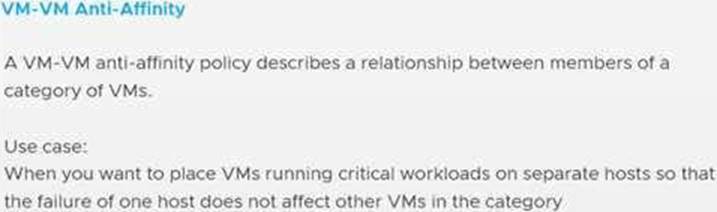
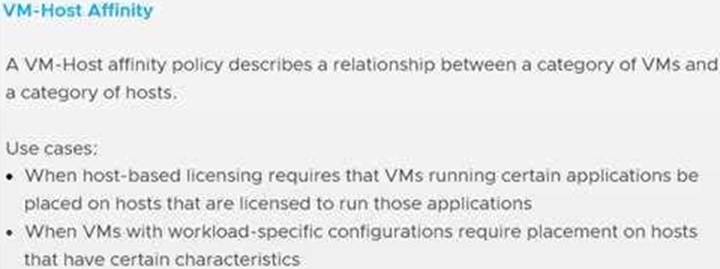
- B . Create a VM-VM anti-affinity policy.
- C . Deploy APP01 to Cluster 1 and APP02 to cluster 2. a Create a VM-Host anti-affinity policy.
- D . Create a VM-Host affinity policy.
BD
Explanation:
A cloud administrator needs to create a virtual machine that requires layer 2 connectivity to an on-premises workload.
Which type of network segment Is required?
- A . Existing
- B . Outbound
- C . Extended
- D . Routed
C
Explanation:
An extended network segment is required for a cloud administrator to create a virtual machine that requires layer 2 connectivity to an on-premises workload. Extended networks allow for the virtual machines to communicate directly with the on-premises workload while remaining isolated from the public cloud. This allows for the virtual machines to access the same services and workloads as the on-premises workloads while still remaining secure.
Which statement describes the VMware Multi-Cloud vision?
- A . Flexibility to operate globally and consistently
- B . Flexibility to choose any hardware vendor
- C . Flexibility to manage infrastructure through outsourcing
- D . Flexibility to choose any hypervisor
A
Explanation:
https://www.vmware.com/cloud-solutions/multi-cloud.html
Multi-Cloud Solutions Redefine the foundation of IT to power every application on any cloud. With Multi-Cloud solutions from VMware, you can migrate to the cloud without recoding your apps, modernize your infrastructure, and operate consistently across the data center, the edge, and any cloud.
A cloud administrator needs to create a secure connection over the Internet between an on-premises data center and a VMware Cloud software-defined data center (SDDC).
Which solution can accomplish this goal?
- A . VMware Site Recovery Manager
- B . VMware vRealize Network Insight
- C . VMware NSX
- D . VMware Cloud Director
C
Explanation:
VMware NSX is a network virtualization and security platform that provides a range of features for creating and managing virtual networks, including the ability to create secure connections over the Internet between on-premises data centers and VMware Cloud software-defined data centers (SDDCs). NSX allows you to create logical networks that are isolated from the underlying physical infrastructure, providing enhanced security and flexibility. With NSX, you can create secure, encrypted connections between your on-premises data center and your VMware Cloud SDDC, allowing you to easily and securely connect your workloads and applications running in the cloud to your on-premises resources.
Which three factors determine the size of vRealize Log Insight (vRLI) deployment? (Choose three.)
- A . Syslog connections
- B . Number of endpoints
- C . Events per second
- D . Type of vRLI Agents
- E . Log ingestion per day
- F . Log message format
B, C, E
Explanation:
When planning a vRealize Log Insight (vRLI) deployment, it’s crucial to consider factors that influence the system’s performance and scalability.
The three primary factors that determine the size of a vRLI deployment are:
Number of Endpoints (B):
This refers to the total number of devices, servers, or applications sending logs to vRLI.
A higher number of endpoints increases the volume of log data ingested, impacting the required resources for processing and storage.
Events Per Second (C):
This metric measures the rate at which log events are received by vRLI. A higher events per second (EPS) rate demands more processing power and can influence the sizing of the deployment to ensure efficient data ingestion and analysis. Log Ingestion Per Day (E):
This represents the total volume of log data ingested daily. Larger daily log volumes require increased storage capacity and can affect the overall sizing considerations for the vRLI deployment.
Additional Considerations:
Syslog Connections (A): While the number of syslog connections contributes to the overall log ingestion, it’s the cumulative effect on EPS and daily log volume that directly impacts sizing.
Type of vRLI Agents (D): Different agents may have varying efficiencies, but they don’t significantly influence the core sizing factors compared to EPS and log volume.
Log Message Format (F): The format can affect processing complexity but doesn’t directly determine deployment size.
Reference: For detailed sizing guidelines, refer to VMware’s official documentation: Sizing the vRealize Log Insight Virtual Appliance
Utilize the vRealize Log Insight Sizing Calculator to estimate the appropriate deployment size based on your environment’s specifics.
DRAG DROP
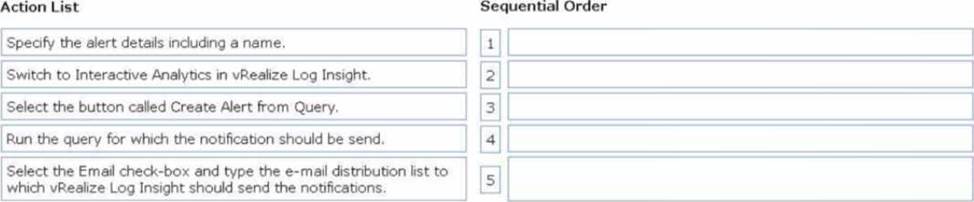
An Administrator needs to create a new alert in vRealize Log Insight that will send email notifications
to a distribution list based on the defined query.
Drag and drop the five actions the administrator must complete in order to create the alert from the action list on the left and place the actions into the correct sequence on the right (Choose five.)
Explanation:
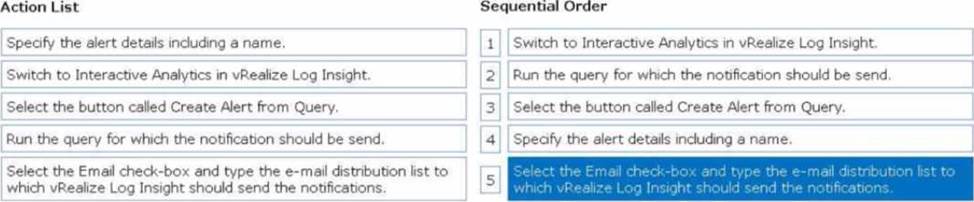
Switch to Interactive Analytics in vRealize Log Insight:
Start in the Interactive Analytics tab, where you can create queries to analyze log data.
Run the query for which the notification should be sent:
Input the desired query to filter the log data that will trigger the alert.
Select the button called Create Alert from Query:
Once the query produces the desired results, click the Create Alert from Query button to begin configuring the alert.
Specify the alert details including a name:
Provide a meaningful name and details for the alert to identify its purpose.
Select the Email check-box and type the e-mail distribution list to which vRealize Log Insight should send the notifications:
Enable email notifications, and enter the email addresses or distribution list where the alerts will be sent.