
VMware 2V0-32.24 Practice Exams
Last updated on Oct 22,2026- Exam Code: 2V0-32.24
- Exam Name: VMware Cloud Operations 8.x Professional V2
- Certification Provider: VMware
- Latest update: Oct 22,2026
How is a Tanzu Kubernetes cluster deployed in a VMware Cloud environment?
- A . Using the VMware Cloud Console
- B . Using VMware Tanzu Mission Control
- C . Using the standard open-source kubectl
- D . Using the vSphere Plugln for kubectl
A
Explanation:
Tanzu Kubernetes clusters can be deployed in a VMware Cloud environment using the VMware Cloud Console. The VMware Cloud Console provides a user-friendly interface that allows users to quickly deploy and manage Tanzu Kubernetes clusters. The standard open-source kubectl can also be used to deploy Tanzu Kubernetes clusters. However, this requires a more in-depth knowledge of the kubectl command-line interface. Additionally, users can use the vSphere Plugin for kubectl to deploy and manage Tanzu Kubernetes clusters. This plugin provides a graphical user interface to manage the clusters, as well as additional features such as the ability to make cluster-level changes
When configuring Hybrid Linked Mode, what is the maximum supported latency between an on-premises environment and a VMware Cloud on AWS software-defined data center (SDDC)?
- A . 200 milliseconds round trip
- B . 250 milliseconds round trip
- C . 150 milliseconds round trip
- D . 100 milliseconds round trip
D
Explanation:
Hybrid Linked Mode can tolerate a time skew of up to ten minutes between the on-premises data center and the cloud SDDC. The maximum latency between your cloud SDDC and on-premises data center cannot exceed 100 msec roundtrip.
https://docs.vmware.com/en/VMware-Cloud-on-AWS/services/com.vmware.vsphere.vmc-aws-manage-data-center-vms.doc/GUID-BE75F0F1-2864-4926-97FE-37E635471C43.html
When configuring Hybrid Linked Mode, what is the maximum supported latency between an on-premises environment and a VMware Cloud on AWS software-defined data center (SDDC)?
- A . 200 milliseconds round trip
- B . 250 milliseconds round trip
- C . 150 milliseconds round trip
- D . 100 milliseconds round trip
D
Explanation:
Hybrid Linked Mode can tolerate a time skew of up to ten minutes between the on-premises data center and the cloud SDDC. The maximum latency between your cloud SDDC and on-premises data center cannot exceed 100 msec roundtrip.
https://docs.vmware.com/en/VMware-Cloud-on-AWS/services/com.vmware.vsphere.vmc-aws-manage-data-center-vms.doc/GUID-BE75F0F1-2864-4926-97FE-37E635471C43.html
A cloud administrator is tasked with moving critical business workloads between two VMware Cloud on AWS software-defined data centers (SDDCs) located in different geographical regions.
The following requirements must be met:
• Migrate 300 virtual machines from region A to region B with minimal downtime of the applications.
• Non-disruptively resume application access of the targeted virtual machines in the event the migration fails.
• Support concurrent switch over of the application workloads to occur during a pre-defined maintenance window.
Which VMware HCX migration type should be used to meet these requirements?
- A . VMware HCX Cold Migration
- B . VMware HCX Bulk Migration
- C . VMware HCX vMotion
- D . VMware HCX Replication Assisted vMotion
D
Explanation:
https://docs.vmware.com/en/VMware-HCX/4.5/hcx-user-guide/GUID-741F47D5-A3C9-4D74-9672-E54D8791D8F0.html
"VMware HCX Replication Assisted vMotion (RAV) uses the HCX Interconnect appliance along with replication and vMotion technologies to provide large scale, parallel migrations with zero downtime." Understanding VMware HCX Replication Assisted vMotion: https://docs.vmware.com/en/VMware-HCX/4.6/hcx-user-guide/GUID-741F47D5-A3C9-4D74-9672-E54D8791D8F0.html#GUID-741F47D5-A3C9-4D74-9672-E54D8791D8F0
A cloud administrator is managing a VMware Cloud on AWS environment. Currently, there Is a single
cluster consisting of four 13.metal hosts. Due to an increased demand, cluster capacity has to be
expanded by 60 cores and 640 GB of memory.
What should the administrator do to meet the demand?
- A . Add 16 CPU cores to the existing hosts.
- B . Add three c4.metal hosts to the cluster.
- C . Add two i3.metal hosts to the cluster.
- D . Add one i3en.metal host to the cluster.
C
Explanation:
According to the VMware Cloud on AWS documentation, the minimum capacity of an i3.metal host is 8 vCPUs and 64 GB of memory. Therefore, to meet the demand of an additional 60 cores and 640 GB of memory, the administrator should add two i3.metal hosts to the cluster. For more information, please refer to the official VMware Cloud on AWS documentation at: https://docs.vmware.com/en/VMware-Cloud-on-AWS/index.html.
Refer to the exhibit.
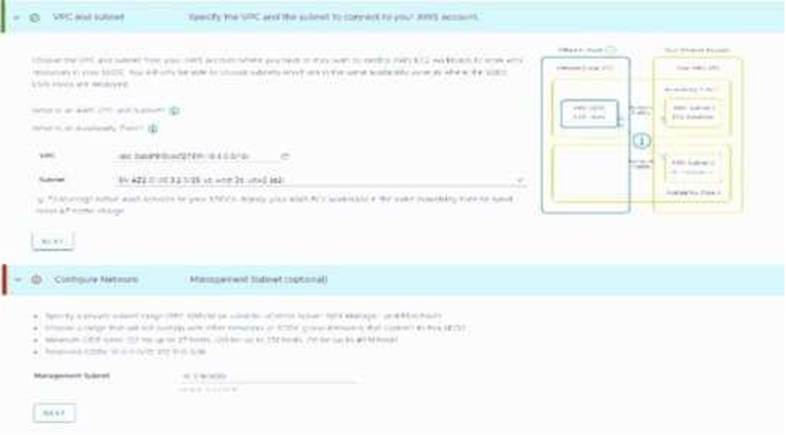
A cloud administrator is deploying a new VMware Cloud on AWS virtual private cloud (VPC). After clicking on deploy, the screen refreshes and displays the information that is provided in the exhibit.
What is the issue with the management CIDR that is causing the deployment to fall?
- A . It overlaps with the AWS subnet.
- B . It overlaps with the AWS VPC CIDR.
- C . It is part of the reserved CIDRs.
- D . It is an invalid size.
A
Explanation:
https://docs.aws.amazon.com/whitepapers/latest/sddc-deployment-and-best-practices/deploying-vmware-cloud-on-aws-sddc.htmlThis must be a RFC1918 private address space (10.0.0.0/8, 172.16.0.0/12, or 192.168.0.0/16) with CIDR block sizes of /16, /20, or /23. The management CIDR block cannot be changed after the SDDC is deployed. Choose a range of IP addresses that does not overlap with the AWS subnet you are connecting to. If you plan to connect the SDDC to an on-premises DC or another environment, the IP subnet must be unique within your enterprise network infrastructure. Choose a CIDR that will give you future scalability.
Which VMware technology ensures availability of the VMs in your SDDC and uses multiple ESXi hosts to provide rapid recovery from outages and cost-effective high availability for applications? (Select one option)
- A . vSphere DRaaS
- B . vSphere HA
- C . vSphere DPM
- D . vSphere eDRS
B
Explanation:
The VMware technology that ensures availability of the VMs in your SDDC and uses multiple ESXi hosts to provide rapid recovery from outages and cost-effective high availability for applications is B. vSphere HA. vSphere HA is an agentless cluster-level availability solution that enables rapid recovery from outages and cost-effective high availability for applications. vSphere DRaaS, vSphere DPM, and vSphere eDRS are not suitable for this purpose.
What are two incident management services included in the VMware Cloud on AWS service management process? (Choose two)
- A . VMware Tools management
- B . Incident Management
- C . Microsoft License management
- D . Capacity management
- E . Workload OS management
BD
Explanation:
The two incident management services included in the VMware Cloud on AWS Service Management process are Incident Management and Capacity Management.
Incident Management is responsible for detecting, classifying, and resolving incidents quickly and effectively. It includes monitoring and alerting, incident response, and problem management. Capacity Management is responsible for predicting, measuring, and managing the capacity of the infrastructure. It includes capacity planning, performance analysis, and resource optimization.
Reference: [1] https://www.vmware.com/content/dam/digitalmarketing/vmware/en/pdf/cloud-management/vmware-cloud-on-aws-service-management-process.pdf [2] https://docs.vmware.com/en/VMware-Cloud-on-AWS/services/com.vmware.vmc-aws.admin.doc/GUID-684D1A84-C57F-4EC1-8A18-7A9A9EB9B7FF.html
An administrator is tasked with collecting a support bundle from a Tanzu Kubernetes cluster for a support case.
How can the administrator collect this support bundle for the Tanzu Kubernetes cluster?
- A . Run the -tkc-support-bundler command.
- B . Run the kubact1 logs my-pod command
- C . Run a compression tool of the log files located in /var/log/vmware/wcp/.
- D . Run the vm-support command.
A
Explanation:
https://kb.vmware.com/s/article/80949
Tanzu Kubernetes Grid (TKG) provides a command line tool called tkg-support-bundler which can be used to collect the necessary information and logs for troubleshooting and support cases. The command can be run on the TKG CLI and it will gather all the necessary information and logs from the TKG control plane and worker nodes, and package them into a single compressed bundle file. This bundle file can then be provided to VMware support for further analysis.
An administrator is tasked with collecting a support bundle from a Tanzu Kubernetes cluster for a support case.
How can the administrator collect this support bundle for the Tanzu Kubernetes cluster?
- A . Run the -tkc-support-bundler command.
- B . Run the kubact1 logs my-pod command
- C . Run a compression tool of the log files located in /var/log/vmware/wcp/.
- D . Run the vm-support command.
A
Explanation:
https://kb.vmware.com/s/article/80949
Tanzu Kubernetes Grid (TKG) provides a command line tool called tkg-support-bundler which can be used to collect the necessary information and logs for troubleshooting and support cases. The command can be run on the TKG CLI and it will gather all the necessary information and logs from the TKG control plane and worker nodes, and package them into a single compressed bundle file. This bundle file can then be provided to VMware support for further analysis.