
VMware 2V0-31.24 Practice Exams
Last updated on Oct 01,2026- Exam Code: 2V0-31.24
- Exam Name: VMware Aria Automation 8.10 Professional V2
- Certification Provider: VMware
- Latest update: Oct 01,2026
An administrator creates a content source and would like to share all the imported VMware Aria Automation templates dynamically with the project members.
Which content sharing option should the administrator select to achieve this?
- A . Static Content
- B . Content Sources
- C . Dynamic Content
- D . All Content
C
Explanation:
To share all the imported VMware Aria Automation templates dynamically with project members, the administrator should select the "Dynamic Content" sharing option. This option ensures that any new templates added to the content source are automatically shared with the project members without requiring manual updates.
Reference: VMware Aria Automation 8.10 Reference Architecture Guide Getting Started with VMware Aria Automation
Which step must an administrator take when performing a VMware Aria Automation manual installation using VMware Aria Suite Lifecycle?
- A . Configure storage policies
- B . Set up a certificate in the certificate locker
- C . Integrate Active Directory
- D . Configure an additional network interface
B
Explanation:
When performing a manual installation of VMware Aria Automation using VMware Aria Suite Lifecycle, one of the critical steps is to set up a certificate in the certificate locker. This step is necessary for securing communication between different components of the Aria Automation suite and ensuring that the deployment meets security standards. Proper certificate management is essential for the integrity and security of the VMware environment.
Reference: Manual installation steps for VMware Aria Automation
An administrator creates a new project in VMware Aria Automation mapping compute resources to a specific group of users.
Which object is used to assign compute resources with a project?
- A . vCenter Server
- B . Cloud Zone
- C . Cloud Account
- D . vSphere Cluster
B
Explanation:
In VMware Aria Automation, a Cloud Zone is used to assign compute resources to a project. A Cloud Zone is a logical construct that maps to a specific set of compute resources within a Cloud Account, such as a vCenter Server or AWS region. When creating a new project, administrators map these Cloud Zones to the project, thereby defining which resources are available for provisioning within that project. This allows for granular control over resource allocation and ensures that the resources are used by the designated group of users within the project.
Reference
VMware Aria Automation Projects and Cloud Zones
An administrator is preparing to deploy only VMware Aria Automation using the clustered deployment model.
Which three ports are required for the successful communication between VMware Aria Automation components? (Choose three.)
- A . 25
- B . 8080
- C . 443
- D . 22
- E . 80
- F . 8008
C, D, F
Explanation:
For a clustered deployment of VMware Aria Automation, several key ports are essential for ensuring proper communication between its components.
The required ports are:
443 (HTTPS): This port is used for secure web traffic and is necessary for communication between various components such as the VMware Identity Manager, VMware Aria Automation Appliance, and VMware Aria Suite Lifecycle Appliance.
22 (SSH): This port is used for secure shell access, which is necessary for administrative tasks and inter-node communication within the cluster.
8008 (Health Monitor): This port is used for health monitoring purposes to ensure the components within the cluster are functioning correctly.
These ports are crucial for the proper functioning and management of the VMware Aria Automation
components in a clustered setup.
Reference
VMware Aria Automation Port Requirements
VMware Aria Automation 8.x Reference Architecture
Installing and Configuring VMware Aria Automation
Exhibit.
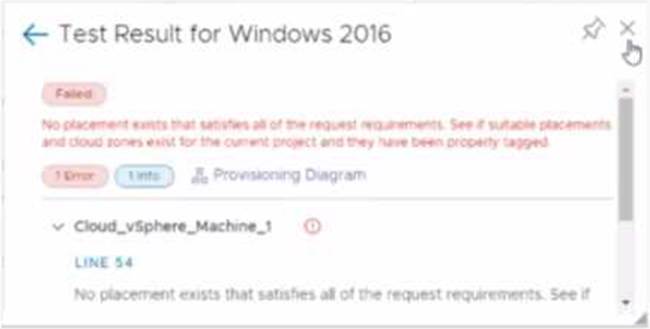
An administrator is testing a newly created Windows 2016 template in VMware Aria Automation Assembler. While using the Test option from within the VMware Aria Automation template, the attached error appears.
What is a possible cause for this error message?
- A . The administrator did not associate a cloud zone to the project.
- B . During the machine allocation phase. VMware Aria Automation Assembler could not find enough resources.
- C . The administrator did not add a cloud account.
- D . The network profile created did not have the correct capability tag.
Which VMware Aria Automation service allows an administrator to import released cloud templates and Amazon Web Services CloudFormation templates that users can deploy?
- A . VMware Aria Automation Orchestrator
- B . VMware Aria Automation Consumption
- C . VMware Aria Automation Assembler
- D . VMware Aria Automation Pipelines
C
Explanation:
VMware Aria Automation Assembler is the service within VMware Aria Automation that allows an administrator to import released cloud templates and Amazon Web Services (AWS) CloudFormation templates for deployment. This service provides a central point for designing, creating, and managing cloud templates and blueprints, facilitating a streamlined process for deploying cloud resources across different environments.
By using Aria Automation Assembler, administrators can leverage pre-built templates, customize them as needed, and ensure that users can deploy consistent and compliant resources.
Reference
VMware Aria Automation Assembler Documentation
Importing Templates in VMware Aria Automation
What scripting languages are supported for writing VMware Aria Automation Action Based Extensibility (ABX) code?
- A . Java, Spring, and NodeJS
- B . NodsJs, .net, and JavaScript
- C . Python, Ruby, and .net
- D . PowerShell, Python and NodeJS
D
Explanation:
VMware Aria Automation supports multiple scripting languages for writing Action Based Extensibility (ABX) code, including PowerShell, Python, and NodeJS. These languages allow administrators to create custom automation scripts that can be executed in response to various events or as part of a workflow, providing flexibility and control over the automation processes within VMware Aria Automation.
Reference: VMware Aria Automation Documentation
Which kub-ctl command should an administrator run to check VMware Aria Automation service pod resource usage?
- A . kubectl -n prelude get pods
- B . kubectl -n prelude describe <pod-name>
- C . kubectl -n prelude top pods
- D . kubectl -n prelude log -f <pod-name>
C
Explanation:
To check the resource usage (CPU and memory) of the VMware Aria Automation service pods, the kubectl top pods command is used within the specific namespace. The top command provides a live view of resource utilization for pods, showing the current CPU and memory consumption. By specifying the namespace with -n prelude, this command targets the VMware Aria Automation pods specifically.
This approach is efficient for monitoring and troubleshooting, as it provides immediate feedback on resource usage, helping administrators manage and optimize their Kubernetes cluster’s performance.
Reference: Stack Overflow: Check pod resources consumption
Kubernetes Documentation: Monitoring resources
Within VMware Aria Automation Assembler, what would an administrator configure to allow a flavor mapping to be selected?
- A . VMware Aria Automation Custom forms
- B . VMware Aria Automation Templates
- C . VMware Aria Automation Cloud zones
- D . VMware Aria Automation Projects
D
Explanation:
In VMware Aria Automation Assembler, flavor mappings are configured within the context of projects. Projects define the scope and access for users and resources. By configuring flavor mappings within a project, administrators can control which flavor options are available for deployments under that project. This ensures that the appropriate resources and configurations are utilized for different environments or use cases.
Reference: VMware Aria Automation Documentation
VMware Aria Automation User Guide
Which two actions can be performed against a VMware Aria Automation Assembler machine-based deployment? (Choose two.)
- A . Resize the deployment.
- B . Power off the deployment.
- C . Change machine IP address assignment to DHCP.
- D . Change lease for the deployment.
- E . Run machine-level actions including adding USB controller.
A, B
Explanation:
VMware Aria Automation Assembler allows for various post-deployment management actions, often referred to as "Day 2 operations." Among these actions, two significant ones that can be performed on a machine-based deployment are resizing the deployment and powering off the deployment: Resize the deployment: This action enables administrators to adjust the resource allocation of a virtual machine, such as increasing or decreasing CPU, memory, or storage resources. This capability is crucial for adapting to changing workload demands and optimizing performance and resource utilization.
Power off the deployment: This action allows administrators to shut down a virtual machine safely. It is a basic but essential operation for managing the state of virtual machines, facilitating maintenance, and controlling resource usage.
These actions provide flexibility and control over the deployed infrastructure, allowing administrators to manage and optimize their environments effectively.
Reference: VMware Aria Automation: Nested OOTB Day 2 Actions with Resource Actions VMware Aria Operations for Networks Deployment