
UiPath UiPath-ASAPv1 Practice Exams
Last updated on Oct 21,2026- Exam Code: UiPath-ASAPv1
- Exam Name: UiPath Automation Solution Architect Professional v1.0 Exam
- Certification Provider: UiPath
- Latest update: Oct 21,2026
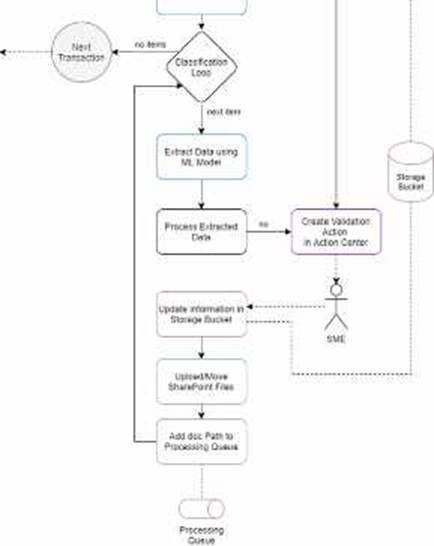
What type of automation is recommended for the following high-level solution diagram?
- A . Attended with UI Interaction.
- B . Attended without UI interaction.
- C . Unattended with UI interaction.
- D . Unattended without UI interaction
D
Explanation:
According to the UiPath documentation and the UiPath Academy course, unattended automation is best suited for back-office processes that do not require human intervention or supervision, such as data processing, report generation, file management, etc. Unattended automation can run in the background, on a different machine than the user, and can be scheduled or triggered by events12.
The high-level solution diagram you provided shows a process that involves extracting data from an input file using a machine learning model, updating information in a storage bucket, uploading files to SharePoint, and adding the document path to a processing queue. These tasks do not require any user interface interaction or human input, and can be performed by an unattended robot without any disruption to the user’s work. Therefore, unattended without UI interaction is the recommended type of automation for this scenario.
Reference: Attended, Unattended and Hybrid – UiPath1
UiPath Automation Solution Architect | UiPath Academy2
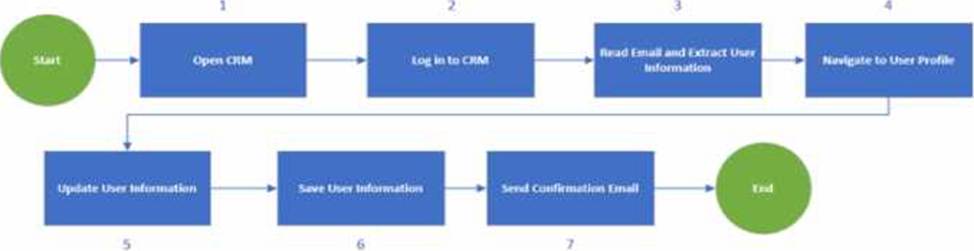
Given the blowing diagram how on the process be optimized from the steps perspective?
- A . Read the email as a first step and open CRM and tog in only if there’s an email.
- B . Do not send a confirmation email as part of this process
- C . Navigate to the User Profile directly after the login
- D . Log out from CRM before login so the environment is ready lot automation
A
Explanation:
The process shown in the diagram can be optimized by reading the email as the first step and opening CRM and logging in only if there’s an email. This way, the process can avoid unnecessary steps and save time and resources. If there is no email, the process can end without opening CRM. If there is an email, the process can extract the user information from the email and use it to log in to CRM and navigate to the user profile. This can also reduce the risk of errors and exceptions due to invalid or missing user information. Reading the email as the first step can also help the process to prioritize the emails based on their importance or urgency and handle them accordingly.
Reference: UiPath Process Mining: Use process monitoring and optimization to propel RPA
Optimizing Processes with UiPath Process Mining Optimization maximum utilisation – UiPath Community Forum
How does scalability impact the design of a UiPath automaton flowchart and what strategies can ensure it handles increased process volume?
- A . Scalability primarily focuses on reducing the number of steps in the flowchart to make it more efficient for smaller-scale processes
- B . To achieve salacity flowchart design should be rigid and not allow for changes or adaptations to the process response lo evolving business needs.
- C . Scalability is crucial in high-level flowchart design to handle larger volumes efficiently involving design adjustments and resource optimization if needed
- D . Scalability is irrelevant in high-level flowchart design, as it is solely a concern for the deployment phase
C
Explanation:
Scalability is the ability of a system or a process to handle growing amounts of work or demand in a graceful manner. Scalability impacts the design of a UiPath automation flowchart because it determines how well the automation can cope with increased process volume, complexity, or variability.
A scalable flowchart design should consider the following strategies:
Modularization: Breaking down the process into smaller, reusable, and maintainable components that can be easily modified or replaced if needed. Modularization also facilitates testing, debugging, and error handling.
Parameterization: Using variables, arguments, configuration files, assets, or queues to store and pass data that can change depending on the process execution. Parameterization allows for flexibility and adaptability of the automation to different scenarios or environments.
Optimization: Reducing unnecessary or redundant steps, activities, or data in the flowchart to improve the performance, efficiency, and reliability of the automation. Optimization also involves choosing the best methods or techniques to achieve the desired outcome, such as using selectors, data scraping, or computer vision.
Orchestration: Managing the resources, schedules, triggers, and dependencies of the automation to ensure that it runs smoothly and effectively. Orchestration also involves monitoring, logging, and reporting the status and results of the automation, as well as handling exceptions and alerts.
Reference: Enhancing UiPath Solutions’ Design Scalability, Roles of a Solution Architect in Automation, RPA Setting, Studio – Flowcharts.
Which of the following is a characteristic of UiPath Automation Cloud?
- A . It requires manual installation and maintenance.
- B . Can have single or multi-node deployment options.
- C . Major updates are provided twice yearly as one install for the entire suite
- D . It scales up easily as your automation needs grow
D
Explanation:
UiPath Automation Cloud is a cloud-based enterprise automation solution that lets you start and scale your automation from the cloud with SaaS robots and self-hosted robots. It offers security, compliance, governance, and insights for your RPA initiatives. It does not require manual installation and maintenance, as it is delivered as a service. It does not have single or multi-node deployment options, as it is hosted on UiPath’s infrastructure. It does not provide major updates twice yearly, as it is updated continuously with new features and improvements.
Reference: Complete cloud-based enterprise automation solution | UiPath Automation Cloud – UiPath Documentation Portal
Automation Cloud – About Automation Cloud – UiPath Documentation Portal
According to the solution design principles, what does ‘Maintainability’ primary focus on when designing an RPA solution?
- A . Adhering to meaning names for workflow file: activities arguments, and variables.
- B . Create a clear code structure in accordance with development standards.
- C . Prioritizing complex configurations and dependencies for flexibility.
- D . Ensuring exception handling and error reporting are comprehensive.
B
Explanation:
Maintainability is one of the solution design principles that aims to ensure that the automation solution can be easily modified, updated, and repaired in the future. One of the key aspects of maintainability is to create a clear code structure in accordance with development standards, such as the UiPath Robotic Enterprise Framework, the UiPath Automation Implementation Methodology, and the UiPath Development Guidelines. A clear code structure helps to improve the readability, reusability, and scalability of the automation solution, as well as to reduce the complexity, duplication, and technical debt. A clear code structure also facilitates the testing, debugging, and documentation of the automation solution, as well as the knowledge transfer and collaboration among the development team. (https://docs.uipath.com/studio/docs/automation-best-practices)
Reference: Automation Best Practices – UiPath Studio
UiPath Robotic Enterprise Framework Template
UiPath Automation Implementation Methodology
UiPath Development Guidelines
In regards to UiPath Automation Cloud licensing- what happens when the Trail plan’s evaluation period ends?
- A . After the trial expires; your organization will be changed for the pro plan unless you downgrade manually.
- B . You need to manually choose a plan, or your UiPath cloud account will be suspended.
- C . After the trial expires; your organization is automatically downgraded to the free plan.
- D . The pro Trial plan will automatically renew itself for another 60 days
C
Explanation:
The Pro Trial plan is a plan intended solely for internal non-production purposes, such as evaluation and testing, while fully complying with the Acceptable Use Policy outlined in the Terms of Use. It is available free of charge for a limited amount of time. You can upgrade to the Pro Trial plan if you want to experiment with more robotic power and premium services. With a Pro Trial plan, you can try the extended platform capabilities that come with a paid Pro plan. The evaluation period is limited to 60 days. After the trial expires, your organization is automatically downgraded to the Free plan1.
Reference: Automation Cloud – About licensing
What are the permissions required for a document validation user?
- A . View and edit on Actions, View, edit, and create on Storage files. View on Storage Bucket View and edit on Action Assignments.
- B . View on Actions, view, on storage files, view on Storage Buckets View and edit on Action Assignments.
- C . View on Action, View and edit on Storage Files. View and create on Storage Buckets View and edit on Action Assignments.
- D . View and edit Actions. View, edit, and create on Storage Files. View on Storage Buckets View on Action Assignments.
A
Explanation:
A document validation user is a user who can see and validate the form and document validation actions assigned to them in the My Actions view of UiPath Action Center. To perform this role, the user needs the following permissions in UiPath Orchestrator:
View and edit on Actions: This allows the user to access and complete the actions assigned to them. View, edit, and create on Storage files: This allows the user to upload, download, and modify the files associated with the actions, such as the document images and the extraction results.
View on Storage Buckets: This allows the user to view the storage buckets where the files are stored. View and edit on Action Assignments: This allows the user to view and change the assignment status of the actions, such as claiming, releasing, or reassigning them.
Reference: Action Center – Roles and Permissions – UiPath Documentation Portal Create Document Validation Action – UiPath Documentation Portal
Create Document Validation Action: You are not authorized – Action Center – UiPath Community Forum
What can be slated as tactual when it comes to Multi-node HA-ready production deployment?
- A . A multi node HA ready production deployment involves one server node behind a toad balancer
- B . A multi-node HA-ready production deployment involves a single-server node
- C . A multi-node HA-ready production deployment involves 3 or more server nodes behind a toad balancer
- D . A multi-node HA-ready production deployment has a knitted number of agent nodes
C
Explanation:
A multi-node HA-ready production deployment is the only configuration supported for production use by UiPath Automation Suite. It ensures that the cluster can handle increased workloads and demand, as well as provide resilience and availability in case of node failures or disasters. A multi-node HA-ready production deployment requires at least 3 server nodes behind a load balancer, which distributes the incoming requests among the nodes and manages the cluster state. The number of agent nodes, which run the UiPath products and shared components, is optional and depends on the actual usage and capacity. A specialized agent node with GPU support is recommended for running special tasks like Task Mining analysis and Document Understanding pipelines, which require high computational power.
Reference: Automation Suite – Deployment architecture – UiPath, Automation Suite – Manual: Multi-node HA-ready production profile requirements and installation – UiPath.
In the license estimation process, what might indicate the need for additional licenses during the process design stage?
- A . Number of Data Service entities used.
- B . High runtime, high volume, and low SLA.
- C . Number of UiPath Studio project created
- D . Low runtime, low volume, and medium-high SLA
B
Explanation:
This answer is correct because high runtime, high volume, and low SLA indicate that the automation process is complex, frequent, and critical, which requires more resources and licenses to execute and manage. For example, more unattended robots may be needed to run the process without human intervention, more Orchestrator tenants may be needed to isolate and scale the process across different environments, and more Studio licenses may be needed to design and test the process12
Reference: Automation Pricing – Complete UiPath Enterprise Solution | UiPath UiPath Pricing 2024: Its 3 RPA Pricing Models, Clearly Explained
What is the main advantage of creating a UiPath App?
- A . To create a custom data types and data structure for automation projects.
- B . To Automate software version control and deployment.
- C . To store and manage digital files and content storage.
- D . To develop and share custom applications using low-code development.
D
Explanation:
UiPath Apps is a low-code application development platform that enables you to build and share enterprise-grade custom applications that deliver engaging user experiences. Using UiPath Apps, you can quickly build custom business applications that connect to data in any underlying cloud or on-premises system using the power of automation. Apps built with UiPath App Studio provide rich controls for data access and update as well as conditional logic for complex business needs. The underlying UiPath RPA platform provides advanced workflow and business logic capabilities to automate your entire end to end business process.
Reference: Apps – Introduction – UiPath Documentation Portal Introducing UiPath Apps: A Robot-Powered Low-Code Platform