
UiPath UiPath-ADAv1 Practice Exams
Last updated on Oct 22,2026- Exam Code: UiPath-ADAv1
- Exam Name: UiPath Automation Developer Associate v1 Exam
- Certification Provider: UiPath
- Latest update: Oct 22,2026
A developer has created an automation process that includes:
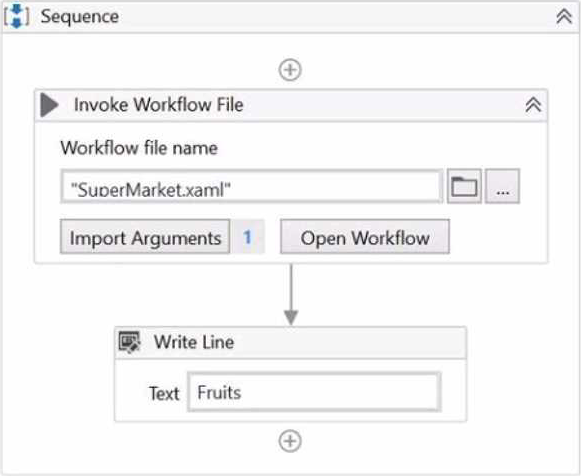
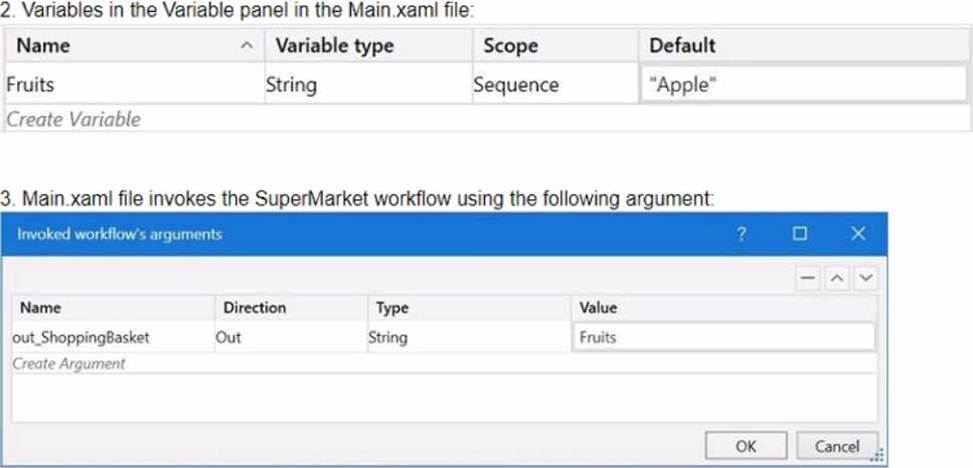
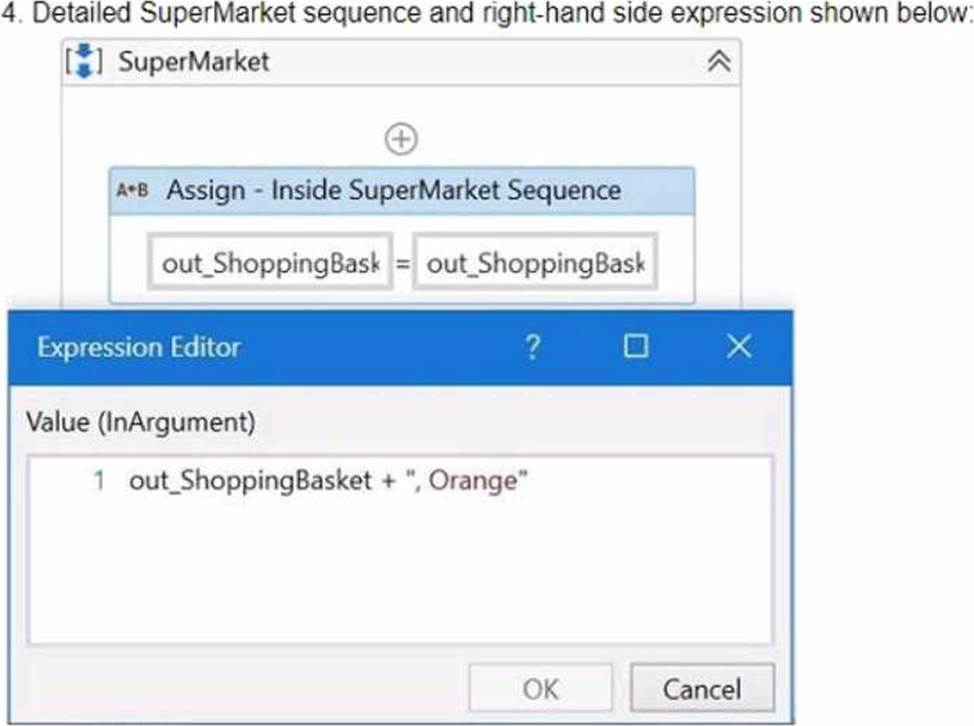
Based on the information shown in the exhibits, what is the output of the Write Line activity in the Main xaml file?
- A . Apple
- B . Orange
- C . Apple Orange
- D . Orange Apple
B
Explanation:
The Write Line activity is used to write a specified text to the Output panel. The text can be a string literal, a variable, or an expression. In this case, the Write Line activity in the Main xaml file has the text "out_ShoppingBasket + “, “Orange””. The out_ShoppingBasket is a variable of type String, which is declared in the Main xaml file and has the default value of “Apple”. The variable is passed as an argument to the SuperMarket xaml file, where it is assigned a new value of “Orange”. The argument direction is Out, which means that the value of the argument is passed back to the Main xaml file after the execution of the SuperMarket xaml file. Therefore, the value of the out_ShoppingBasket variable in the Main xaml file is changed from “Apple” to “Orange”. The expression "out_ShoppingBasket + “, “Orange”” concatenates the value of the out_ShoppingBasket variable with a comma and a space, followed by the string literal “Orange”. The result of this expression is “Orange, Orange”. The Write Line activity writes this text to the Output panel. Therefore, the answer is B. Orange.
References: Write Line, Variables, Arguments
What is the main benefit of importing profiling sessions?
- A . Enables the analysis of potential flow issues.
- B . Provides context menu options for profiling actions.
- C . Disables focus on imported profiling sessions.
- D . Disables the analysis of potential flow issues.
A
Explanation:
The main benefit of importing profiling sessions is that it enables the analysis of potential flow issues in the automation workflows. By importing profiling sessions, the developer can examine previous runs and compare them with the current run. This can help the developer to identify which workflows or activities take longer to execute, which ones consume more resources, and which ones cause errors or exceptions. The developer can also use the Profiler app to visualize the profiling data and drill down into the details of each operation. This way, the developer can optimize the performance and reliability of the automation workflows and improve the user experience..
References: Studio – Profile Execution – UiPath Documentation Portal
Process Mining – Application Profiling – UiPath Documentation Portal
Which of the following is the correct method to manage assets for a specific folder in UiPath Orchestrator?
- A . Open the folder’s contextual menu by clicking the three-dot icon, then select "Link Resources" and choose "Asset".
- B . Select "Tenant" from the sidebar menu, then click the "Assets" tab.
- C . Navigate to "Tenant" > "Folders", choose the desired folder, and click the "Manage Access" tab.
- D . Select the folder from the sidebar menu, then click the "Assets" tab.
D
Explanation:
To manage assets for a specific folder in UiPath Orchestrator, you should select the folder from the sidebar menu and then click the "Assets" tab. This allows you to manage assets that are available to the processes running within the selected folder. Therefore, the correct answer is D.
Reference: UiPath Orchestrator Guide: Managing Assets in Orchestrator
A developer is working with an application that allows all types of input methods for the Type Into activity.
Which property should be enabled for the fastest execution?
- A . Click before typing
- B . Empty field
- C . Simulate
- D . Window Messages
C
Explanation:
The Simulate option is a property of the Type Into activity that enables the fastest execution of the activity. This is because the Simulate option does not rely on the hardware drivers or the UI elements to perform the typing action. Instead, it uses the technology of the target application to directly inject the text as a stream of characters. This makes the Simulate option faster, more reliable, and more compatible than the other input methods. The Simulate option also allows the activity to run in the background, meaning that it does not require the application to be in focus or visible..
References: Type Into – UiPath Activities
Input Methods – UiPath Studio
UiPath Type Into Activity: Step-by-Step Guide with Examples – RPA Tutorial
A developer has stored a birth date in a String variable and must input this value into a custom form. The developer must ensure the date format corresponds to the accepted input format.
Which method or activity is best suited to validate the format?
- A . RegEx Check Activity
- B . Is Match Activity
- C . String.Equals() Method
- D . String.Contains() Method
B
Explanation:
The "Is Match Activity" is best suited to validate the format of a date stored in a string variable. This activity uses regular expressions (RegEx) to check if the string matches a specific pattern, which in this case would be the date format required by the custom form.
Reference: UiPath Studio Guide: Is Match Activity
The "Main.xaml" file has an "In" argument of type String with a default value of "String.Empty".
What is the runtime value of the argument when executing the process from the Start Job window in UiPath Orchestrator?
- A . A runtime error will occur as arguments are not allowed in the "Main.xaml" file.
- B . Only the default value of "String.Empty" will be used, overriding any values provided in Orchestrator.
- C . @ If any input arguments are provided in Orchestrator, those values will be used; otherwise, the default value of "String.Empty" will be used.
- D . An Input Dialog box will prompt the user to input a value and that value will be used.
C
Explanation:
When a process is executed from the Start Job window in UiPath Orchestrator, the runtime value of an "In" argument in the "Main.xaml" file will be the value provided in Orchestrator if specified. If no value is provided in Orchestrator for this argument, then the default value specified in the "Main.xaml" file will be used, in this case, "String.Empty". Therefore, option C is correct. Arguments can be passed to the "Main.xaml" file from Orchestrator, and there is a mechanism to handle default values for arguments in case they are not provided at runtime.
Reference: UiPath Orchestrator Guide: Starting a Job
UiPath Studio Guide: Managing Arguments
Which activity enables a developer to run three sequences asynchronously in the process they are developing?
- A . Parallel
- B . Switch
- C . For Each
- D . Flow Switch
A
Explanation:
The "Parallel" activity in UiPath is used to run multiple sequences or activities simultaneously, i.e., asynchronously. This activity can host multiple branches, each with a sequence of activities that can run in parallel with others. It is suitable for scenarios where tasks can be performed at the same time without depending on the completion of others. Hence, the correct answer is A.
Reference: UiPath Activities Guide: Parallel Activity
How would you define a linear process in UiPath?
- A . The steps of the process repeat multiple times over different data items. However, the automation design is such that each repeatable part processes independently.
- B . The steps of the process are performed multiple times, but each time different data items are used.
- C . The steps of the process refer to the execution of steps in a sequential manner, where each subsequent step depends on the successful completion of the previous step.
- D . The process steps are performed only once. If the need is to process additional data, then the automation must execute again.
D
Explanation:
A linear process in UiPath is a type of automation process that consists of a series of steps that are executed only once for a single data item or transaction. A linear process does not have any loops or iterations, and it does not depend on any external factors or conditions. A linear process is suitable for scenarios where the automation process is simple, straightforward, and does not require any dynamic branching or decision making. (UiPath Automation Developer study guide)
References:
Framework for linear process or single transaction
How to modify ReFramework to Linear Process
Difference between Linear process and Transactional process
A developer is building a process that needs to click an element which requires a mouse hover to become visible. However, the element does not appear with the default click setting. The input method for the Click activity is Send Window Message
Which property should the developer configure to be able to click the element?
- A . The developer should change the input method to Hardware Events and the CursorMotionType to Smooth.
- B . The property AlterlfDisabled should be set to True.
- C . The developer should change the input method to Simulate and the CursorMotionType to Instant.
- D . The property AlterlfDisabled should be set to False.
A
Explanation:
The input method for the Click activity determines how the click is performed on the target element. The Send Window Message input method is fast and reliable, but it does not support hovering over elements. Therefore, the developer should use the Hardware Events input method, which simulates the real mouse and keyboard actions. The CursorMotionType property specifies how the cursor moves to the target element. The Smooth option makes the cursor move in a natural way, which can trigger the hover effect on the element. (UiPath Studio documentation12).
References:
1: Input Methods – UiPath Studio.
2: Click – UiPath Activities.
In the context of a linear process, implemented with REFramework, how many times will the process
enter the Get Transaction Data state?
- A . 1 time.
- B . 2 times.
- C . The process will not enter the Get Transaction Data state because a linear process is not transactional.
- D . Until there are no more queue items left unprocessed in Orchestrator.
D
Explanation:
The Get Transaction Data state is responsible for retrieving the next transaction item to be processed from the queue in Orchestrator. The state will loop until there are no more items in the queue or an exception occurs. A linear process can be implemented with REFramework by using a single queue item that contains all the data required for the process. (UiPath ReFramework documentation1).
References:1: Robotic Enterprise Framework Template – UiPath Studio.