
The SecOps Group CNSP Practice Exams
Last updated on Oct 21,2026- Exam Code: CNSP
- Exam Name: Certified Network Security Practitioner (CNSP)
- Certification Provider: The SecOps Group
- Latest update: Oct 21,2026
What types of attacks are phishing, spear phishing, vishing, scareware, and watering hole?
- A . Probes
- B . Insider threats
- C . Social engineering
- D . Ransomware
C
Explanation:
Social engineering exploits human psychology to manipulate individuals into divulging sensitive information, granting access, or performing actions that compromise security. Unlike technical exploits, it targets the "human factor," often bypassing technical defenses.
The listed attacks fit this category:
Phishing: Mass, untargeted emails (e.g., fake bank alerts) trick users into entering credentials on spoofed sites. Uses tactics like urgency or trust (e.g., typo squatting domains).
Spear Phishing: Targeted phishing against specific individuals/organizations (e.g., CEO fraud), leveraging reconnaissance (e.g., LinkedIn data) for credibility.
Vishing (Voice Phishing): Phone-based attacks (e.g., fake tech support calls) extract info via verbal manipulation. Often spoofs caller ID.
Scareware: Fake alerts (e.g., “Your PC is infected!” pop-ups) scare users into installing malware or paying for bogus fixes. Exploits fear and urgency.
Watering Hole: Compromises trusted websites frequented by a target group (e.g., industry forums), infecting visitors via drive-by downloads. Relies on habitual trust. Technical Details:
Delivery: Email (phishing), VoIP (vishing), web (watering hole/scareware).
Payloads: Credential theft, malware (e.g., trojans), or financial fraud.
Mitigation: User training, email filters (e.g., DMARC), endpoint protection.
Security Implications: Social engineering accounts for ~90% of breaches (e.g., Verizon DBIR 2023), as it exploits unpatchable human error. CNSP likely emphasizes awareness (e.g., phishing simulations) and layered defenses (e.g., MFA).
Why other options are incorrect:
WannaCry, an attack, spread throughout the world in May 2017 using machines running on outdated Microsoft operating systems.
What is WannaCry?
- A . Ransomware
- B . Malware
A
Explanation:
WannaCry is a ransomware attack that erupted in May 2017, infecting over 200,000 systems across 150 countries. It exploited the EternalBlue vulnerability (MS17-010) in Microsoft Windows SMBv1, targeting unpatched systems (e.g., Windows XP, Server 2003). Developed by the NSA and leaked by the Shadow Brokers, EternalBlue allowed remote code execution.
Ransomware Mechanics:
Encryption: WannaCry used RSA-2048 and AES-128 to encrypt files, appending extensions like .wcry.
Ransom Demand: Displayed a message demanding $300C$600 in Bitcoin, leveraging a hardcoded wallet.
Worm Propagation: Self-replicated via SMB, scanning internal and external networks, unlike typical ransomware requiring user interaction (e.g., phishing).
Malware Context: While WannaCry is malware (malicious software), "ransomware" is the precise subcategory, distinguishing it from viruses, trojans, or spyware. Malware is a broad term encompassing any harmful code; ransomware specifically encrypts data for extortion. CNSP likely classifies WannaCry as ransomware to focus on its payload and mitigation (e.g., patching, backups).
Why other options are incorrect:
B. Malware: Correct but overly generic. WannaCry’s defining trait is ransomware behavior, not just maliciousness. Specificity matters in security taxonomy for threat response (e.g., NIST IR 8019). Real-World Context: WannaCry crippled NHS hospitals, highlighting patch management’s criticality. A kill switch (a domain sinkhole) halted it, but variants persist.
Reference: CNSP Official Study Guide (Malware and Exploits); Microsoft Security Bulletin MS17-010, NIST IR 8019.
How many octets are there in an IPv6 address?
- A . 16
- B . 32
- C . 64
- D . 128
A
Explanation:
An IPv6 address, defined in RFC 4291, is a 128-bit address designed to replace IPv4’s 32-bit scheme, vastly expanding address space (2^128 vs. 2^32). An octet is 8 bits (1 byte). To calculate octets in IPv6:
128 bits ÷ 8 bits/octet = 16 octets.
Representation:
IPv6 is written as eight 16-bit hexadecimal blocks (e.g., 2001:0db8:85a3:0000:0000:8a2e:0370:7334), separated by colons.
Each block is 16 bits (2 bytes), so 8 blocks = 16 octets.
Contrast with IPv4 (e.g., 192.168.0.1), which has 4 octets (32 bits).
Technical Note: Your original input flagged this question’s phrasing as potentially misleading, suggesting "octets" is an IPv4 term, while IPv6 uses "16-bit groups" or "hextets." While technically accurate (RFC 4291 uses "16-bit blocks"), "octets" remains a common, if informal, term in security contexts for byte-wise analysis (e.g., packet crafting). CNSP might use "octets" to test byte-level understanding, though "groups" is more precise for IPv6. Here, 16 octets (128 bits) is correct either way.
Security Implications: IPv6’s larger address space complicates scanning (e.g., Nmap struggles with 2^128 possibilities) but introduces risks like misconfigured Neighbor Discovery Protocol (NDP). Understanding its structure aids in firewall rules and IDS signatures.
Why other options are incorrect:
B. 32: Implies 256 bits (32 × 8), far exceeding IPv6’s 128-bit design.
C. 64: Suggests 512 bits (64 × 8), unrelated to IPv6 or any IP standard.
D. 128: Misinterprets octets as bits; 128 bits = 16 octets, not 128 octets. Real-World Context: IPv6 packet analysis (e.g., Wireshark) breaks addresses into 16 octets for raw data inspection.
Reference: CNSP Official Documentation (IPv6 Networking); RFC 4291 (IP Version 6 Addressing Architecture).
How would you establish a null session to a Windows host from a Windows command prompt?
- A . net use hostnamec$ "" /u:NULL
- B . net use hostnamec$ "" /u:""
- C . net use hostnameipc$ "" /u:""
- D . net use hostnameipc$ "" /u:NULL
C
Explanation:
A null session in Windows is an unauthenticated connection to certain administrative shares, historically used for system enumeration. The net use command connects to a share, and the IPC$ (Inter-Process Communication) share is the standard target for null sessions, allowing access without credentials when configured to permit it.
Why C is correct: The command net use \hostnameipc$ "" /u:"" specifies the IPC$ share and uses empty strings for the password (first "") and username (/u:""), establishing a null session. This syntax is correct for older Windows systems (e.g., XP or 2003) where null sessions were more permissive, a topic covered in CNSP for legacy system vulnerabilities.
Why other options are incorrect:
A: Targets the c$ share (not typically used for null sessions) and uses /u:NULL, which is invalid syntax; the username must be an empty string ("").
B: Targets c$ instead of ipc$, making it incorrect for null session establishment.
D: Uses ipc$ correctly but specifies /u:NULL, which is not the proper way to denote an empty username.
Reference: CNSP "Windows Security Basics" (Section on Null Session Exploitation) details the use of net use with IPC$ for enumeration, noting syntax and historical vulnerabilities.
In a Linux-based architecture, what does the /mnt directory contain?
- A . Temporary-mounted filesystems
- B . System configuration files and initialization scripts
- C . Loadable driver modules needed to boot the system
- D . System files which represent the current state of the kernel
A
Explanation:
The Linux Filesystem Hierarchy Standard (FHS), per FHS 3.0, defines directory purposes:
/mnt: Designated for temporarily mounted filesystems, typically by system administrators.
Use: Mount points for removable media (e.g., USB drives: mount /dev/sdb1 /mnt/usb) or network shares (e.g., NFS).
Nature: Transient, user-managed, not persistent across reboots (unlike /etc/fstab mounts).
Contrast:
/media: Auto-mounts removable devices (e.g., by desktop environments like GNOME).
/mnt vs. /media: /mnt is manual, /media is system-driven.
Technical Details:
Empty by default; subdirectories (e.g., /mnt/usb) are created as needed.
Permissions: Typically root-owned (0755), requiring sudo for mounts.
Security Implications: Misconfigured /mnt mounts (e.g., world-writable) risk unauthorized access.
CNSP likely covers mount security (e.g., nosuid option).
Why other options are incorrect:
B. System config/init scripts: Found in /etc (e.g., /etc/passwd, /etc/init.d).
C. Driver modules: Located in /lib/modules/<kernel-version>.
D. Kernel state: Resides in /proc (e.g., /proc/cpuinfo).
Real-World Context: Admins mount ISOs at /mnt during server provisioning (e.g., mount -o loop image.iso /mnt).
Reference: CNSP Official Study Guide (Linux Filesystems); FHS 3.0 Documentation.
According to the screenshot below, which of the following statements are correct?
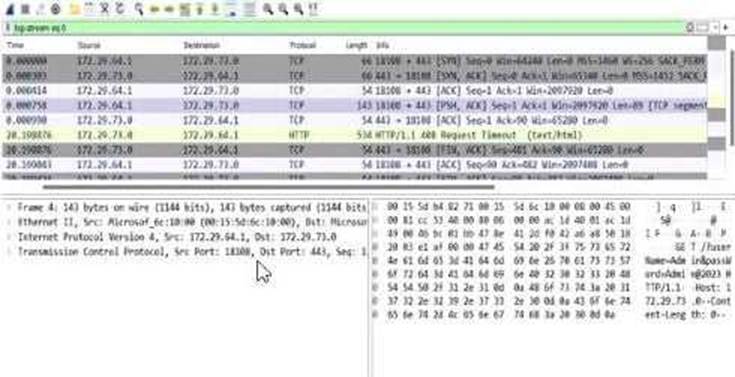
- A . The application is running on port 443 and the HTTPS protocol.
- B . The credentials have been submitted over the HTTP protocol.
- C . The credentials have been submitted over the HTTPS protocol.
- D . The application is running on port 80 and the HTTP protocol.
A
Explanation:
The screenshot is from Wireshark, a network protocol analyzer, displaying captured network traffic. The relevant columns include the source and destination IP addresses, ports, protocol, and additional information about the packets.
Let’s break down the details:
Destination Port Analysis: The screenshot shows multiple packets with a destination port of 443 (e.g., in the "Destination" column, entries like "172.72.61.9:443"). Port 443 is the default port for HTTPS (HTTP Secure), which is HTTP traffic encrypted using SSL/TLS. This indicates that the application is communicating over HTTPS.
Protocol Analysis: The "Protocol" column lists "TLSv1.2" for most packets (e.g., frame numbers 2000084, 2000086). TLS (Transport Layer Security) is the cryptographic protocol used by HTTPS to secure HTTP communications. This confirms that the traffic is HTTPS, not plain HTTP.
Packet Details: The "Info" column provides additional context, such as "Application Data" for TLS packets, indicating encrypted application-layer data (typical of HTTPS). There are also HTTP packets (e.g., frame 2000088), but these are likely part of the HTTPS session (e.g., HTTP/2 over TLS, as noted by "HTTP2").
Now, let’s evaluate the options:
Option A: "The application is running on port 443 and the HTTPS protocol."
This is correct. The destination port 443 and the use of TLSv1.2 confirm that the application is using HTTPS. HTTPS is the standard protocol for secure web communication, and port 443 is its designated port. CNSP documentation emphasizes that HTTPS traffic on port 443 indicates a secure application-layer protocol, often used for web applications handling sensitive data.
Option B: "The credentials have been submitted over the HTTP protocol."
This is incorrect. HTTP typically uses port 80, but the screenshot shows traffic on port 443 with TLS, indicating HTTPS. Credentials submitted over this connection would be encrypted via HTTPS, not sent in plaintext over HTTP. CNSP highlights the security risks of HTTP for credential submission due to lack of encryption, which isn’t the case here.
Option C: "The credentials have been submitted over the HTTPS protocol."
While this statement could be true (since HTTPS is in use, any credentials would likely be submitted securely), the question asks for the "correct" statement based on the screenshot. The screenshot doesn’t explicitly show credential submission (e.g., a POST request with form data); it only shows the protocol and port.
Option A is more directly supported by the screenshot as it focuses on the application’s protocol and port, not the specific action of credential submission. CNSP notes that HTTPS ensures confidentiality, but this option requires more specific evidence of credentials.
Option D: "The application is running on port 80 and the HTTP protocol."
This is incorrect. Port 80 is the default for HTTP, but the screenshot clearly shows port 443 and TLS, indicating HTTPS. CNSP documentation contrasts HTTP (port 80, unencrypted) with HTTPS (port 443, encrypted), making this option invalid.
Conclusion: Option A is the most accurate and comprehensive statement directly supported by the screenshot, confirming the application’s use of port 443 and HTTPS. While Option C might be true in a broader context, it’s less definitive without explicit evidence of credential submission in the captured packets.
Reference: CNSP "Network Traffic Analysis" (Section on Protocol Identification) explains that port 443 with TLS indicates HTTPS, and contrasts it with HTTP on port 80. The "Wireshark Analysis" section further details how to interpret destination ports and protocol fields for identifying application-layer protocols.
Which one of the following is not an online attack?
- A . Brute force attack
- B . Rainbow table attack
- C . Password spraying attack
- D . Phishing attack
B
Explanation:
Online attacks require real-time interaction with a target system (e.g., a login interface), whereas offline attacks occur without direct system interaction, typically after obtaining data like password hashes. A rainbow table attack is an offline method that uses precomputed tables of hash values to reverse-engineer passwords from stolen hash databases, distinguishing it from the other options, which are online.
Why B is correct: Rainbow table attacks are performed offline after an attacker has already acquired a hash (e.g., from a compromised database). The attacker matches the hash against precomputed tables to find the plaintext password, requiring no interaction with the target system during the attack. CNSP classifies this as an offline password recovery technique.
Why other options are incorrect:
A: Brute force attacks involve repeatedly submitting password guesses to a live system (e.g., via SSH or a web login), making it an online attack.
C: Password spraying attacks test a few common passwords across many accounts on a live system, also an online attack aimed at avoiding lockouts.
D: Phishing attacks trick users into submitting credentials through fake interfaces (e.g., emails or websites), requiring real-time interaction and thus classified as online.
Reference: CNSP "Password Attack Methodologies" (Section on Online vs. Offline Attacks) defines rainbow table attacks as offline and contrasts them with online methods like brute force and phishing.
You are performing a security audit on a company’s network infrastructure and have discovered the SNMP community string set to the default value of "public" on several devices.
What security risks could this pose, and how might you exploit it?
- A . The potential risk is that an attacker could use the SNMP protocol to gather sensitive information about the devices. You might use a tool like Snmpwalk to query the devices for information.
- B . The potential risk is that an attacker could use the SNMP protocol to modify the devices’ configuration settings. You might use a tool like Snmpset to change the settings.
- C . Both A and B.
- D . None of the above.
A
Explanation:
SNMP (Simple Network Management Protocol) uses community strings as a basic form of authentication. The default read-only community string "public" is widely known, and if left unchanged, it exposes devices to unauthorized access. The primary risk with "public" is information disclosure, as it typically grants read-only access, allowing attackers to gather sensitive data (e.g., device configurations, network topology) without altering settings.
Why A is correct: With the "public" string, an attacker can use tools like snmpwalk to enumerate device details (e.g., system uptime, interfaces, or software versions) via SNMP queries. This aligns with CNSP’s focus on reconnaissance risks during security audits, emphasizing the danger of default credentials enabling passive data collection.
Why other options are incorrect:
B: While modifying settings is a risk with SNMP, the default "public" string is typically read-only. Changing configurations requires a read-write community string (e.g., "private"), which isn’t implied here. Thus, snmpset would not work with "public" alone.
C: Since B is incorrect in this context, C (both A and B) cannot be the answer.
D: The risk in A is valid, so "none of the above" is incorrect.
Reference: CNSP "Network Device Security" (Section on SNMP Security) highlights the reconnaissance risk of default "public" strings and tools like snmpwalk for exploitation, distinguishing read-only from read-write access.
Which of the following is true for SNMP?
A) The default community string for read-only access is "public."
B) The default community string for read/write access is "private."
- A . Only A
- B . Only B
- C . Both A and B
- D . None of the above
C
Explanation:
SNMP community strings authenticate access, with defaults posing security risks if unchanged.
Why C is correct:
A: "public" is the standard read-only default, per SNMP specs and CNSP.
B: "private" is the standard read-write default, also per SNMP and CNSP. Both are true, making C the answer.
Why other options are incorrect:
1, 2: Exclude one true statement each.
4: Both statements are true, so "none" is wrong.
Reference: CNSP "SNMP Security" (Section on Defaults) confirms "public" and "private" as standard community strings.
In the context of the SSH (Secure Shell) public-private key authentication mechanism, which key is uploaded to the server and which key is used by the end-user for authentication?
- A . The public key is uploaded to the server and the private key is used by the end user for authentication.
- B . The private key is uploaded to the server and the public key is used by the end user for authentication.
A
Explanation:
SSH (Secure Shell), per RFC 4251, uses asymmetric cryptography (e.g., RSA, ECDSA) for secure authentication:
Key Pair:
Public Key: Freely shareable, used to encrypt or verify.
Private Key: Secret, used to decrypt or sign.
Process:
User generates a key pair (e.g., ssh-keygen -t rsa -b 4096).
Public Key is uploaded to the server, appended to ~/.ssh/authorized_keys (e.g., via ssh-copy-id).
Private Key (e.g., ~/.ssh/id_rsa) stays on the user’s machine.
Authentication: Client signs a challenge with the private key; server verifies it with the public key.
Technical Details:
Protocol: SSH-2 (RFC 4253) uses a Diffie-Hellman key exchange, then public-key auth.
Files: authorized_keys (server, 0644 perms), private key (client, 0600 perms).
Security: Private key exposure compromises all systems trusting the public key.
Security Implications: CNSP likely stresses key management (e.g., passphrases, rotation) and server-
side authorized_keys hardening (e.g., PermitRootLogin no).
Why other options are incorrect:
B: Uploading the private key reverses the model, breaking security―anyone with the server’s copy could authenticate as the user. Asymmetric crypto relies on the private key remaining secret. Real-World Context: GitHub uses SSH public keys for repository access, with private keys on user devices.
Reference: CNSP Official Documentation (SSH Security); RFC 4253 (SSH Authentication Protocol).