
Splunk SPLK-2002 Practice Exams
Last updated on Oct 07,2026- Exam Code: SPLK-2002
- Exam Name: Splunk Enterprise Certified Architect Exam
- Certification Provider: Splunk
- Latest update: Oct 07,2026
A Splunk environment collecting 10 TB of data per day has 50 indexers and 5 search heads. A single-site indexer cluster will be implemented.
Which of the following is a best practice for added data resiliency?
- A . Set the Replication Factor to 49.
- B . Set the Replication Factor based on allowed indexer failure.
- C . Always use the default Replication Factor of 3.
- D . Set the Replication Factor based on allowed search head failure.
B
Explanation:
The correct answer is
B. Set the Replication Factor based on allowed indexer failure. This is a best practice for adding data resiliency to a single-site indexer cluster, as it ensures that there are enough copies of each bucket to survive the loss of one or more indexers without affecting the searchability of the data1. The Replication Factor is the number of copies of each bucket that the cluster maintains across the set of peer nodes2. The Replication Factor should be set according to the number of indexers that can fail without compromising the cluster’s ability to serve data1. For example, if the cluster can tolerate the loss of two indexers, the Replication Factor should be set to three1.
The other options are not best practices for adding data resiliency.
Option A, setting the Replication Factor to 49, is not recommended, as it would create too many copies of each bucket and consume excessive disk space and network bandwidth1.
Option C, always using the default Replication Factor of 3, is not optimal, as it may not match the customer’s requirements and expectations for data availability and performance1.
Option D, setting the Replication Factor based on allowed search head failure, is not relevant, as the Replication Factor does not affect the search head availability, but the searchability of the data on the indexers1. Therefore, option B is the correct answer, and options A, C, and D are incorrect.
1: Configure the replication factor 2: About indexer clusters and index replication
Which of the following server. conf stanzas indicates the Indexer Discovery feature has not been fully configured (restart pending) on the Master Node?
A)

B)

C)

D)

- A . Option A
- B . Option B
- C . Option C
- D . Option D
A
Explanation:
The Indexer Discovery feature enables forwarders to dynamically connect to the available peer nodes in an indexer cluster. To use this feature, the manager node must be configured with the [indexer_discovery] stanza and a pass4SymmKey value. The forwarders must also be configured with the same pass4SymmKey value and the master_uri of the manager node. The pass4SymmKey value must be encrypted using the splunk _encrypt command. Therefore, option A indicates that the Indexer Discovery feature has not been fully configured on the manager node, because the pass4SymmKey value is not encrypted. The other options are not related to the Indexer Discovery feature.
Option B shows the configuration of a forwarder that is part of an indexer cluster.
Option C shows the configuration of a manager node that is part of an indexer cluster.
Option D shows an invalid configuration of the [indexer_discovery] stanza, because the pass4SymmKey value is not encrypted and does not match the forwarders’ pass4SymmKey value12
1: https://docs.splunk.com/Documentation/Splunk/9.1.2/Indexer/indexerdiscovery 2: https://docs.splunk.com/Documentation/Splunk/9.1.2/Security/Secureyourconfigurationfiles#Encry pt_the_pass4SymmKey_setting_in_server.conf
When Splunk is installed, where are the internal indexes stored by default?
- A . SPLUNK_HOME/bin
- B . SPLUNK_HOME/var/lib
- C . SPLUNK_HOME/var/run
- D . SPLUNK_HOME/etc/system/default
B
Explanation:
Splunk internal indexes are the indexes that store Splunk’s own data, such as internal logs, metrics, audit events, and configuration snapshots. By default, Splunk internal indexes are stored in the SPLUNK_HOME/var/lib/splunk directory, along with other user-defined indexes. The SPLUNK_HOME/bin directory contains the Splunk executable files and scripts. The SPLUNK_HOME/var/run directory contains the Splunk process ID files and lock files. The SPLUNK_HOME/etc/system/default directory contains the default Splunk configuration files.
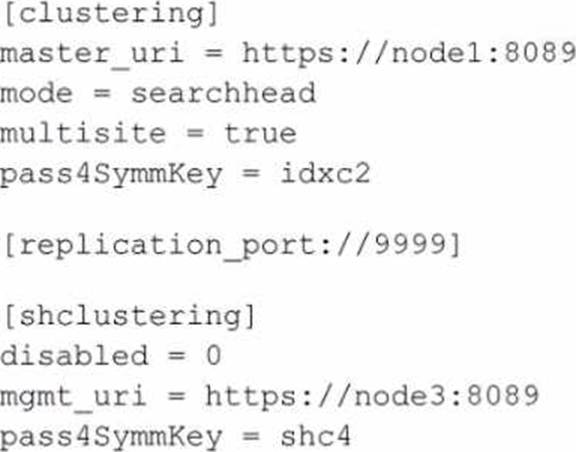
A search head cluster member contains the following in its server .conf.
What is the Splunk server name of this member?
- A . node1
- B . shc4
- C . idxc2
- D . node3
D
Explanation:
The Splunk server name of the member can typically be determined by the serverName attribute in the server.conf file, which is not explicitly shown in the provided snippet. However, based on the provided configuration snippet, we can infer that this search head cluster member is configured to communicate with a cluster master (master_uri) located at node1 and a management node (mgmt_uri) located at node3. The serverName is not the same as the master_uri or mgmt_uri; these URIs indicate the location of the master and management nodes that this member interacts with.
Since the serverName is not provided in the snippet, one would typically look for a setting under the [general] stanza in server.conf. However, given the options and the common naming conventions in a Splunk environment, node3 would be a reasonable guess for the server name of this member, since it is indicated as the management URI within the [shclustering] stanza, which suggests it might be the name or address of the server in question.
For accurate identification, you would need to access the full server.conf file or the Splunk Web on the search head cluster member and look under Settings > Server settings > General settings to find the actual serverName. Reference for these details would be found in the Splunk documentation regarding the configuration files, particularly server.conf.
Which of the following should be included in a deployment plan?
- A . Business continuity and disaster recovery plans.
- B . Current logging details and data source inventory.
- C . Current and future topology diagrams of the IT environment.
- D . A comprehensive list of stakeholders, either direct or indirect.
A, B, C
Explanation:
A deployment plan should include business continuity and disaster recovery plans, current logging details and data source inventory, and current and future topology diagrams of the IT environment. These elements are essential for planning, designing, and implementing a Splunk deployment that meets the business and technical requirements. A comprehensive list of stakeholders, either direct or indirect, is not part of the deployment plan, but rather part of the project charter. For more information, see Deployment planning in the Splunk documentation.
Which of the following statements about integrating with third-party systems is true? (Select all that apply.)
- A . A Hadoop application can search data in Splunk.
- B . Splunk can search data in the Hadoop File System (HDFS).
- C . You can use Splunk alerts to provision actions on a third-party system.
- D . You can forward data from Splunk forwarder to a third-party system without indexing it first.
C, D
Explanation:
The following statements about integrating with third-party systems are true: You can use Splunk alerts to provision actions on a third-party system, and you can forward data from Splunk forwarder to a third-party system without indexing it first. Splunk alerts are triggered events that can execute custom actions, such as sending an email, running a script, or calling a webhook. Splunk alerts can be used to integrate with third-party systems, such as ticketing systems, notification services, or automation platforms. For example, you can use Splunk alerts to create a ticket in ServiceNow, send a message to Slack, or trigger a workflow in Ansible. Splunk forwarders are Splunk instances that collect and forward data to other Splunk instances, such as indexers or heavy forwarders. Splunk forwarders can also forward data to third-party systems, such as Hadoop, Kafka, or AWS Kinesis, without indexing it first. This can be useful for sending data to other data processing or storage systems, or for integrating with other analytics or monitoring tools. A Hadoop application cannot search data in Splunk, because Splunk does not provide a native interface for Hadoop applications to access Splunk data. Splunk can search data in the Hadoop File System (HDFS), but only by using the Hadoop Connect app, which is a Splunk app that enables Splunk to index and search data stored in HDFS
Which of the following is true for indexer cluster knowledge bundles?
- A . Only app-name/local is pushed.
- B . app-name/default and app-name/local are merged before pushing.
- C . Only app-name/default is pushed.
- D . app-name/default and app-name/local are pushed without change.
B
Explanation:
According to the Splunk documentation1, indexer cluster knowledge bundles are the configuration files that the cluster master distributes to the peer nodes as part of the cluster configuration bundle. The knowledge bundles contain the knowledge objects, such as event types, tags, lookups, and so on, that are relevant for indexing and searching the data. The cluster master creates the knowledge bundles by merging the app-name/default and app-name/local directories from the apps that reside on the master node. The cluster master then pushes the knowledge bundles to the peer nodes, where they reside under the $SPLUNK_HOME/var/run directory2.
The other options are false because:
Only app-name/local is pushed. This is false because the cluster master pushes both the app-name/default and app-name/local directories, after merging them, to the peer nodes. The app-name/local directory contains the local customizations of the app configuration, while the app-name/default directory contains the default app configuration3.
Only app-name/default is pushed. This is false because the cluster master pushes both the app-name/default and app-name/local directories, after merging them, to the peer nodes. The app-name/default directory contains the default app configuration, while the app-name/local directory contains the local customizations of the app configuration3.
app-name/default and app-name/local are pushed without change. This is false because the cluster master merges the app-name/default and app-name/local directories before pushing them to the peer nodes. This ensures that the peer nodes have the latest and consistent configuration of the apps3.
To improve Splunk performance, parallelIngestionPipelines setting can be adjusted on which of the following components in the Splunk architecture? (Select all that apply.)
- A . Indexers
- B . Forwarders
- C . Search head
- D . Cluster master
A, B
Explanation:
The parallelIngestionPipelines setting can be adjusted on the indexers and forwarders to improve Splunk performance. The parallelIngestionPipelines setting determines how many concurrent data pipelines are used to process the incoming data. Increasing the parallelIngestionPipelines setting can improve the data ingestion and indexing throughput, especially for high-volume data sources. The parallelIngestionPipelines setting can be adjusted on the indexers and forwarders by editing the limits.conf file. The parallelIngestionPipelines setting cannot be adjusted on the search head or the cluster master, because they are not involved in the data ingestion and indexing process.
Stakeholders have identified high availability for searchable data as their top priority.
Which of the following best addresses this requirement?
- A . Increasing the search factor in the cluster.
- B . Increasing the replication factor in the cluster.
- C . Increasing the number of search heads in the cluster.
- D . Increasing the number of CPUs on the indexers in the cluster.
A
Explanation:
Increasing the search factor in the cluster will best address the requirement of high availability for searchable data. The search factor determines how many copies of searchable data are maintained by the cluster. A higher search factor means that more indexers can serve the data in case of a failure or a maintenance event. Increasing the replication factor will improve the availability of raw data, but not searchable data. Increasing the number of search heads or CPUs on the indexers will improve the search performance, but not the availability of searchable data. For more information, see Replication factor and search factor in the Splunk documentation.
Data for which of the following indexes will count against an ingest-based license?
- A . summary
- B . main
- C . _metrics
- D . _introspection
B
Explanation:
Splunk Enterprise licensing is based on the amount of data that is ingested and indexed by the Splunk platform per day1. The data that counts against the license is the data that is stored in the indexes that are visible to the users and searchable by the Splunk software2. The indexes that are visible and searchable by default are the main index and any custom indexes that are created by the users or the apps3. The main index is the default index where Splunk Enterprise stores all data, unless otherwise specified4.
Option B is the correct answer because the data for the main index will count against the ingest-based license, as it is a visible and searchable index by default.
Option A is incorrect because the summary index is a special type of index that stores the results of scheduled reports or accelerated data models, which do not count against the license.
Option C is incorrect because the _metrics index is an internal index that stores metrics data about the Splunk platform performance, which does not count against the license.
Option D is incorrect because the _introspection index is another internal index that stores data about the impact of the Splunk software on the host system, such as CPU, memory, disk, and network usage, which does not count against the license.
Reference: 1: How Splunk Enterprise licensing works – Splunk Documentation 2: What data counts against my license? – Splunk Documentation 3: [About indexes and indexers – Splunk Documentation] 4: [The main index – Splunk Documentation] : [Summary indexing – Splunk Documentation] : [About metrics indexes – Splunk Documentation] : [About the Monitoring Console – Splunk Documentation]