
Snowflake COF-C02 Practice Exams
Last updated on Oct 24,2026- Exam Code: COF-C02
- Exam Name: SnowPro Core Certification Exam
- Certification Provider: Snowflake
- Latest update: Oct 24,2026
When unloading data, which file format preserves the data values for floating-point number columns?
- A . Avro
- B . CSV
- C . JSON
- D . Parquet
D
Explanation:
When unloading data, the Parquet file format is known for its efficiency in preserving the data values for floating-point number columns. Parquet is a columnar storage file format that offers high compression ratios and efficient data encoding schemes. It is especially effective for floating-point data, as it maintains high precision and supports efficient querying and analysis.
References:
Snowflake Documentation: Using the Parquet File Format for Unloading Data
What is a key feature of Snowflake architecture?
- A . Zero-copy cloning creates a mirror copy of a database that updates with the original
- B . Software updates are automatically applied on a quarterly basis
- C . Snowflake eliminates resource contention with its virtual warehouse implementation
- D . Multi-cluster warehouses allow users to run a query that spans across multiple clusters
- E . Snowflake automatically sorts DATE columns during ingest for fast retrieval by date
C
Explanation:
One of the key features of Snowflake’s architecture is its unique approach to eliminating resource contention through the use of virtual warehouses. This is achieved by separating storage and compute resources, allowing multiple virtual warehouses to operate independently on the same data without affecting each other. This means that different workloads, such as loading data, running queries, or performing complex analytics, can be processed simultaneously without any performance degradation due to resource contention.
References:
Snowflake Documentation on Virtual Warehouses
SnowPro® Core Certification Study Guide
Which file function gives a user or application access to download unstructured data from a Snowflake stage?
- A . BUILD_SCOPED_FILE_URL
- B . BUILD_STAGE_FILE_URL
- C . GET_PRESIGNED_URL
- D . GET STAGE LOCATION
C
Explanation:
The function that provides access to download unstructured data from a Snowflake stage is:
C. GET_PRESIGNED_URL: This function generates a presigned URL for a single file within a stage. The generated URL can be used to directly access or download the file without needing to go through Snowflake. This is particularly useful for unstructured data such as images, videos, or large text files, where direct access via a URL is needed outside of the Snowflake environment.
Example usage:
SELECT GET_PRESIGNED_URL(‘stage_name’, ‘file_path’);
This function simplifies the process of securely sharing or accessing files stored in Snowflake stages with external systems or users.
References:
Snowflake Documentation: GET_PRESIGNED_URL Function at Snowflake Documentation
A user creates a stage using the following command:
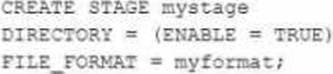
What will be the outcome?
- A . A stage with a directory table set to automatically refresh will be created.
- B . A stage with a directory table that has metadata that must be manually refreshed will be created.
- C . An error will be received stating that the storage location for the stage must be identified when creating a stage with a directory table.
- D . The command will fail to run because the name of the directory table is not specified.
Given the statement template below, which database objects can be added to a share? (Select TWO).
GRANT <privilege> ON <object> <object_name> To SHARE <share_name>;
- A . Secure functions
- B . Stored procedures
- C . Streams
- D . Tables
- E . Tasks
C, D
Explanation:
In Snowflake, shares are used to share data across different Snowflake accounts securely. When you create a share, you can include various database objects that you want to share with consumers. According to Snowflake’s documentation, the types of objects that can be shared include tables, secure views, secure materialized views, and streams. Secure functions and stored procedures are not shareable objects. Tasks also cannot be shared directly. Therefore, the correct answers are streams (C) and tables (D).
To share a stream or a table, you use the GRANT statement to grant privileges on these objects to a share. The syntax for sharing a table or stream involves specifying the type of object, the object name, and the share to which you are granting access.
For example:
GRANT SELECT ON TABLE my_table TO SHARE my_share; GRANT SELECT ON STREAM my_stream TO
SHARE my_share;
These commands grant the SELECT privilege on a table named my_table and a stream named my_stream to a share named my_share. This enables the consumer of the share to access these objects according to the granted privileges.
Reference: Snowflake Documentation on Shares and Database Objects (https://docs.snowflake.com)
How is Single Sign-On (SSO) authentication used in Snowflake?
- A . SSO is an authentication method which uses a pair of keys, a public key and a private key. to verify the identity of a user.
- B . SSO is an authentication method that uses a username and password in the API request header.
- C . SSO is an authentication method that allows a user to sign into multiple applications with a single set of credentials.
- D . SSO is an integrated Snowflake feature powered by the Duo Security service which is managed completely by Snowflake.
Which Snowflake feature or tool helps troubleshoot issues in SQL query expressions that commonly
cause performance bottlenecks?
- A . Persisted query results
- B . QUERY_HISTORY View
- C . Query acceleration service
- D . Query Profile
D
Explanation:
The Snowflake feature that helps troubleshoot issues in SQL query expressions and commonly identify performance bottlenecks is the Query Profile. The Query Profile provides a detailed breakdown of a query’s execution plan, including each operation’s time and resources consumed. It visualizes the steps involved in the query execution, highlighting areas that may be causing inefficiencies, such as full table scans, large joins, or operations that could benefit from optimization.
By examining the Query Profile, developers and database administrators can identify and troubleshoot performance issues, optimize query structures, and make informed decisions about potential schema or indexing changes to improve performance.
References: Snowflake Documentation on Query Profile: Using the Query Profile
While unloading data into a stage, how can the user ensure that the output will be a single file?
- A . Use the copy option files=single.
- B . Use the COPY Option SINGLE=TRUE.
- C . Use the get option SINGLE-TRUE.
- D . Use the GET option FILES-SINGLE.
B
Explanation:
To ensure that the output will be a single file when unloading data into a stage, you should use the COPY option SINGLE=TRUE. This option specifies that the result of the COPY INTO command should be written to a single file, rather than multiple files.
References: Snowflake Documentation: COPY INTO <location>
True or False: Fail-safe can be disabled within a Snowflake account.
- A . True
- B . False
B
Explanation:
Reference: https://docs.snowflake.com/en/user-guide/data-failsafe.html
Separate and distinct from Time Travel, Fail-safe ensures historical data is protected in the event of a system failure or other catastrophic event, e.g. a hardware failure or security breach. Fail-safe feature cannot be enabled or disabled from the user end.
The following JSON is stored in a VARIANT column called src of the CAR_SALES table:
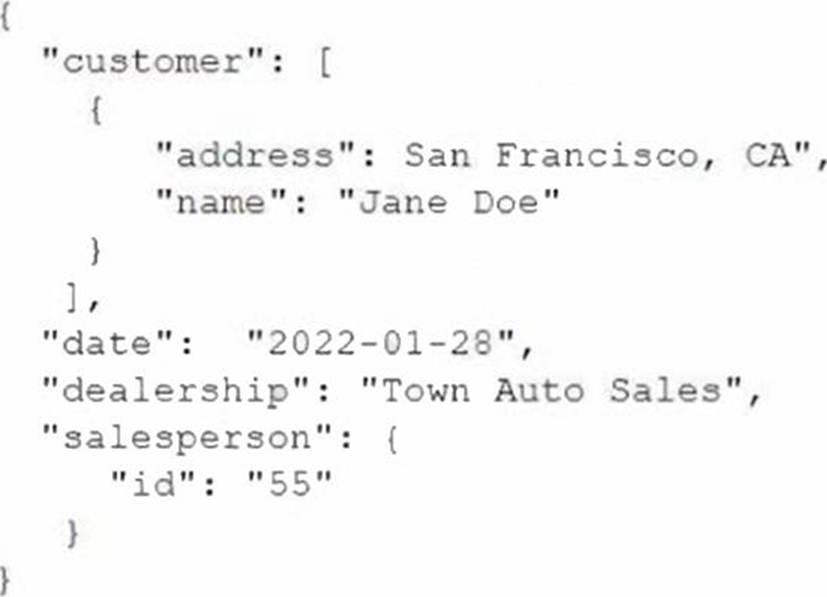
A user needs to extract the dealership information from the JSON.
How can this be accomplished?
- A . select src:dealership from car_sales;
- B . select src.dealership from car_sales;
- C . select src:Dealership from car_sales;
- D . select dealership from car_sales;
B
Explanation:
In Snowflake, to extract a specific element from a JSON stored in a VARIANT column, the correct syntax is to use the dot notation. Therefore, the query select src.dealership from car_sales; will return the dealership information contained within each JSON object in the src column.
References: For a detailed explanation, please refer to the Snowflake documentation on querying semi-structured data.