
Snowflake COF-C02 Practice Exams
Last updated on Oct 23,2026- Exam Code: COF-C02
- Exam Name: SnowPro Core Certification Exam
- Certification Provider: Snowflake
- Latest update: Oct 23,2026
Which type of workload traditionally benefits from the use of the query acceleration service?
- A . Workloads with a predictable data volume for each query
- B . Workloads that include on-demand data analyses
- C . Queries with small scans and non-selective filters
- D . Queries that do not have filters or aggregation
B
Explanation:
The query acceleration service in Snowflake is beneficial for workloads that include on-demand data analyses. This service optimizes query performance by dynamically allocating additional resources to execute queries faster, particularly useful for ad-hoc analysis where data volume and complexity can vary.
References: Snowflake Documentation: Query Acceleration Service
Refer to the exhibit.
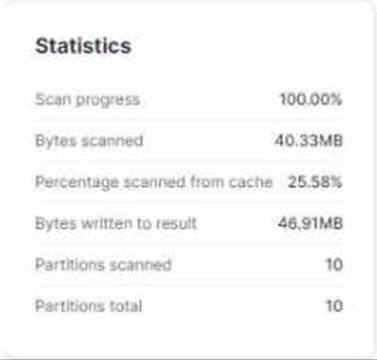
What do these Query Profile metrics indicate about the query micro-partition pruning?
- A . No micro-partitions were pruned during execution.
- B . The query used the local disk cache and pruning was not required.
- C . The size of the data queried was too small to trigger micro-partition pruning.
- D . Since the bytes scanned is less than the bytes written to results some pruning has occurred.
What happens to the shared objects for users in a consumer account from a share, once a database has been created in that account?
- A . The shared objects are transferred.
- B . The shared objects are copied.
- C . The shared objects become accessible.
- D . The shared objects can be re-shared.
C
Explanation:
Once a database has been created in a consumer account from a share, the shared objects become accessible to users in that account. The shared objects are not transferred or copied; they remain in the provider’s account and are accessible to the consumer account
How long can a data consumer who has a pre-signed URL access data files using Snowflake?
- A . Indefinitely
- B . Until the result_cache expires
- C . Until the retention_time is met
- D . Until the expiration time is exceeded
D
Explanation:
A data consumer who has a pre-signed URL can access data files using Snowflake until the expiration time is exceeded. The expiration time is set when the pre-signed URL is generated and determines how long the URL remains valid3.
How can a Snowflake user traverse semi-structured data?
- A . Insert a colon (:) between the VARIANT column name and any first-level element.
- B . Insert a colon (:) between the VARIANT column name and any second-level element.
- C . Insert a double colon (: 🙂 between the VARIANT column name and any first-level element.
- D . Insert a double colon (: 🙂 between the VARIANT column name and any second-level element.
A
Explanation:
To traverse semi-structured data in Snowflake, a user can insert a colon (:) between the VARIANT column name and any first-level element. This path syntax is used to retrieve elements in a VARIANT column4.
A stream can be created on which Snowflake objects to record data manipulation language (DML) changes? (Select TWO).
- A . Database
- B . Standard tables
- C . Standard tables
- D . Standard views
- E . Schemas
- F . Pipes
B, C
Explanation:
Snowflake streams are objects that enable users to track changes (inserts, updates, and deletes) to the data in tables, facilitating real-time data processing and integration workflows. Streams can be created on standard tables, capturing DML changes made to these tables so that downstream processes can consume the changes incrementally. This feature supports efficient data ETL, replication, and real-time analytics by providing a mechanism to process only the data that has changed. Note: The correct options should likely include a distinction between "Standard tables" and another object type such as "External tables" rather than repeating "Standard tables" twice.
References: Snowflake Documentation on Streams
Which type of URL gives permanent access to files in cloud storage?
- A . Pre-signed URL
- B . Account URL
- C . Scoped URL
- D . File URL
What affects whether the query results cache can be used?
- A . If the query contains a deterministic function
- B . If the virtual warehouse has been suspended
- C . If the referenced data in the table has changed
- D . If multiple users are using the same virtual warehouse
C
Explanation:
The query results cache can be used as long as the data in the table has not changed since the last time the query was run. If the underlying data has changed, Snowflake will not use the cached results and will re-execute the query1.
Which task privilege does a Snowflake role need in order to suspend or resume a task?
- A . USAGE
- B . OPERATE
- C . MONITOR
- D . OWNERSHIP
B
Explanation:
In Snowflake, the OPERATE privilege is required for a role to suspend or resume a task. This privilege allows the role to perform operational tasks such as starting and stopping tasks, which includes suspending and resuming them6
What command is used to export or unload data from Snowflake?
- A . PUT @mystage
- B . GET @mystage
- C . COPY INTO @mystage
- D . INSERT @mystage
A
Explanation:
The command used to export or unload data from Snowflake to a stage (such as a file in an S3 bucket, Azure Blob Storage, or Google Cloud Storage) is the PUT command. The PUT command is designed to upload data files from a local file system (in the case of SnowSQL or other client) or a virtual warehouse to a specified stage. This functionality is critical for scenarios where data needs to be extracted from Snowflake for use in external systems, backups, or further processing.
The syntax for the PUT command follows the structure: PUT file://<local_file_path>
@<stage_name>, where <local_file_path> specifies the path to the file(s) on the local file system that you wish to upload, and <stage_name> specifies the destination stage in Snowflake.
It’s important to distinguish that the PUT command is used for exporting data out of Snowflake,
whereas the COPY INTO <table> command is used for importing data into Snowflake from a stage. The GET command, on the other hand, is used to download files from a stage to the local file system, essentially the inverse operation of the PUT command.
References:
Snowflake Documentation on Loading and Unloading Data: [Loading and Unloading Data](https://docs.snowflake.com/en/user-guide/data-load