
SAP C_THR92_2411 Practice Exams
Last updated on Nov 16,2026- Exam Code: C_THR92_2411
- Exam Name: SAP Certified Associate - Implementation Consultant - SAP SuccessFactors People Analytics: Reporting
- Certification Provider: SAP
- Latest update: Nov 16,2026
You are using a pivot table in your canvas report but the report does NOT display the most recent data.
What could be the reason?
- A . You are using a query with a static date filter.
- B . You are NOT using a template.
- C . You are using a wrong People Scope.
- D . You are using the percent of total option.
How do you give an analyst permission to build tiles?
- A . Add the analyst to the role-based permission group Dashboard Administrators.
- B . Assign the analyst as a dashboard administrator in Provisioning.
- C . Assign the role-based permission in the Manage Dashboards/Reports RBP Category.
- D . Assign the role-based permission in the Analytics RBP Category.
How do you give an analyst permission to build tiles?
- A . Add the analyst to the role-based permission group Dashboard Administrators.
- B . Assign the analyst as a dashboard administrator in Provisioning.
- C . Assign the role-based permission in the Manage Dashboards/Reports RBP Category.
- D . Assign the role-based permission in the Analytics RBP Category.
What is the first step to make Ad Hoc reporting available for a customer?
- A . Enable Ad Hoc report builder and domain schemas in Provisioning.
- B . Enable Table reports by assigning Role Based Permissions.
- C . Enable Table reports in Admin Center-> Upgrade Center.
- D . Enable Table reports in Admin Center-> Reporting & Analytics.
You are using Report Center to share a canvas report.
You share the report with a Dynamic Group (see attached image). 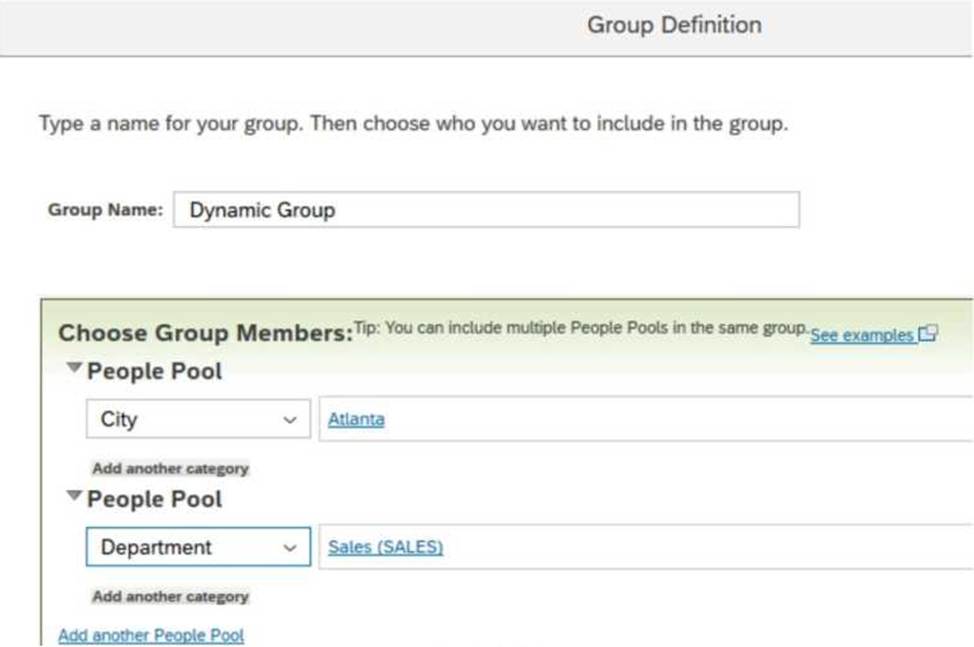
Who is the report shared with?
- A . Employees of the Sales department
- B . Employees of the Sales departments and all employees of Atlanta
- C . Employees of the Sales department of Atlanta
- D . Employees of Atlanta
User A maintains a canvas report of employee contact information. User A leaves the company. Another report designer, user B, is assigned the responsibility to maintain the report, but currently CANNOT modify the report.
How do you allow user B to modify only this report?
- A . Edit user B’s WFA Role configuration.
- B . Assign User B the permission Access All Reports.
- C . Update the reports’ sharing to include user B.
- D . Edit authorship of the report.
The data source used by the two tables only displays current (active) employees.
How would you configure a filter on the table End of Previous Year Headcount by Location to display data accurately? 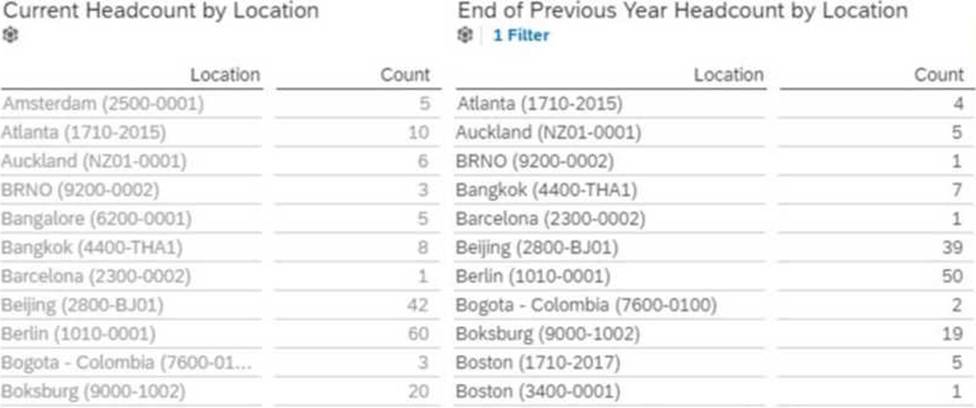
Note: There are 2 correct answers to this question.
- A . Set a filter on Hire Date (Range)
- B . Set the Range type to Offset
- C . Set the Range type to Standard
- D . Set a filter on Hire Date (Member)
The data source used by the two tables only displays current (active) employees.
How would you configure a filter on the table End of Previous Year Headcount by Location to display data accurately?
Note: There are 2 correct answers to this question.
- A . Set a filter on Hire Date (Range)
- B . Set the Range type to Offset
- C . Set the Range type to Standard
- D . Set a filter on Hire Date (Member)
A report consumer claims that a canvas report shared with them is NO longer available in Report Center. Upon your investigation, you find the report has been deleted. You need to reproduce the report as quickly as possible.
What action do you take?
- A . Use the Restore Deleted Report tool to restore the report.
- B . Use the Recycle Bin to restore the Report.
- C . Create a new report and add orphaned pages. Share the report.
- D . Contact Successfactors support to request the report be restored.
A report consumer claims that a canvas report shared with them is NO longer available in Report Center. Upon your investigation, you find the report has been deleted. You need to reproduce the report as quickly as possible.
What action do you take?
- A . Use the Restore Deleted Report tool to restore the report.
- B . Use the Recycle Bin to restore the Report.
- C . Create a new report and add orphaned pages. Share the report.
- D . Contact Successfactors support to request the report be restored.