
Salesforce JavaScript Developer I Practice Exams
Last updated on Nov 16,2026- Exam Code: JavaScript Developer I
- Exam Name: Salesforce Certified JavaScript Developer I
- Certification Provider: Salesforce
- Latest update: Nov 16,2026
A developer wrote the following code:
01 let X = object.value;
02
03 try {
4 handleObjectValue(X);
5 } catch (error) {
6 handleError(error);
7 }
The developer has a getNextValue function to execute after handleObjectValue(), but does not want to execute getNextValue() if an error occurs.
How can the developer change the code to ensure this behavior?
- A . 03 try{
4 handleObjectValue(x);
5 } catch(error){
6 handleError(error);
7 } then {
8 getNextValue();
9 } - B . 03 try{
4 handleObjectValue(x);
5 } catch(error){
6 handleError(error);
7 } finally {
8 getNextValue();
10 } - C . 03 try{
4 handleObjectValue(x);
5 } catch(error){
6 handleError(error);
07 }
8 getNextValue(); - D . 03 try {
4 handleObjectValue(x)
5 ……………………
Refer to the code below:
<html lang=”en”>
<table onclick=”console.log(Table log’);”>
<tr id=”row1”>
<td>Click me!</td>
</tr>
<table>
<script>
functionprintMessage(event) {
console.log(‘Row log’);
}
Let elem = document.getElementById(‘row1’);
elem.addEventListener(‘click’, printMessage, false);
</script>
</html>
Which code change should be made for the console to log only Row log when ‘Click me! ’ is clicked?
- A . Add.event.stopPropagation(); to window.onLoad event handler.
- B . Add event.stopPropagation(); to printMessage function.
- C . Add event.removeEventListener(); to window.onLoad event handler.
- D . Add event.removeEventListener(); toprintMessage function.
Given the following code:
document.body.addEventListener(‘ click ’, (event) => {
if (/* CODE REPLACEMENT HERE */) {
console.log(‘button clicked!’);
)
});
Which replacement for the conditional statement on line 02 allows a developer to correctly determine that a button on page is clicked?
- A . Event.clicked
- B . e.nodeTarget ==this
- C . event.target.nodeName == ‘BUTTON’
- D . button.addEventListener(‘click’)
How do you create a deep copy of an object in JavaScript?
- A . Using the spread operator {…obj}
- B . Using Object.assign({}, obj)
- C . Using JSON.parse(JSON.stringify(obj))
- D . None of the above
A developer has the following array of student test grades:
Let arr = [ 7, 8, 5, 8, 9];
The Teacher wants to double each score and then see an array of the students who scored more than 15 points.
How should thedeveloper implement the request?
- A . Let arr1 = arr.filter(( val) => (return val > 15 )) .map (( num) => (return num *2 ))
- B . Let arr1 = arr.mapBy (( num) => (return num *2 )) .filterBy (( val ) => return val > 15 )) ;
- C . Let arr1 = arr.map((num) => num*2). Filter (( val) => val > 15);
- D . Let arr1 = arr.map((num) => (num *2)).filterBy((val) => (val >15 ));
Refer to the code below:
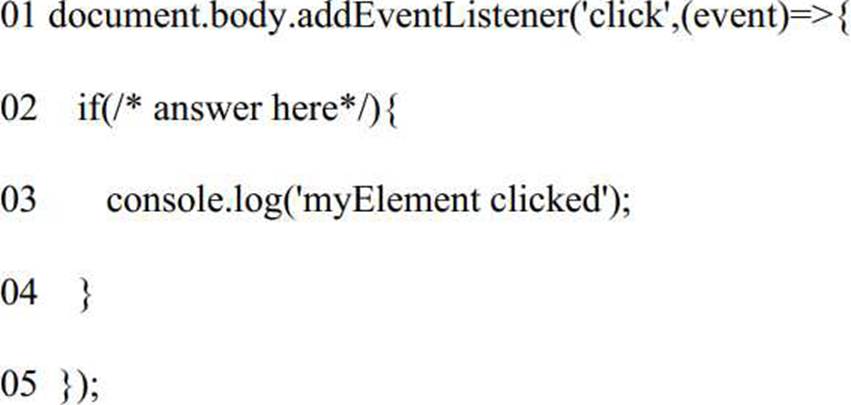
Which replacement for the conditional statement on line 02 allows a developer to correctly determine that a specific element, myElement on the page had been clicked?
- A . event.target.id ==’myElement’
Which three browser specific APIs are available for developers to persist data between page loads? Choose 3 answers
- A . IIFEs
- B . indexedDB
- C . Global variables
- D . Cookies
- E . localStorage.
Refer to code below:
Const objBook = {
Title: ‘Javascript’,
};
Object.preventExtensions(objBook);
Const newObjBook = objBook;
newObjectBook.author =‘Robert’;
What are the values of objBook and newObjBook respectively?
- A . [title: “javaScript”] [title: “javaScript”]
- B . {author: “Robert”, title: “javaScript}Undefined
- C . {author: “Robert”, title: “javaScript}{author: “Robert”, title: “javaScript}
- D . {author: “Robert”}{author: “Robert”, title: “javaScript}
Which three statements are true about promises? Choose 3 answers
- A . The executor of a new Promise runs automatically.
- B . A Promise has a .then() method.
- C . A fulfilled or rejected promise will not change states .
- D . A settled promise can become resolved.
- E . A pending promise canbecome fulfilled, settled, or rejected.
The developer wants to test the array shown:
const arr = Array(5).fill(0)
Which two tests are the most accurate for this array? Choose 2 answers:
- A . console.assert( arr.length === 5 );
- B . arr.forEach(elem => console.assert(elem === 0)) ;
- C . console.assert(arr[0] === 0 && arr[ arr.length] === 0);
- D . console.assert (arr.length >0);