
Salesforce JavaScript Developer I Practice Exams
Last updated on Nov 16,2026- Exam Code: JavaScript Developer I
- Exam Name: Salesforce Certified JavaScript Developer I
- Certification Provider: Salesforce
- Latest update: Nov 16,2026
Refer to the code:
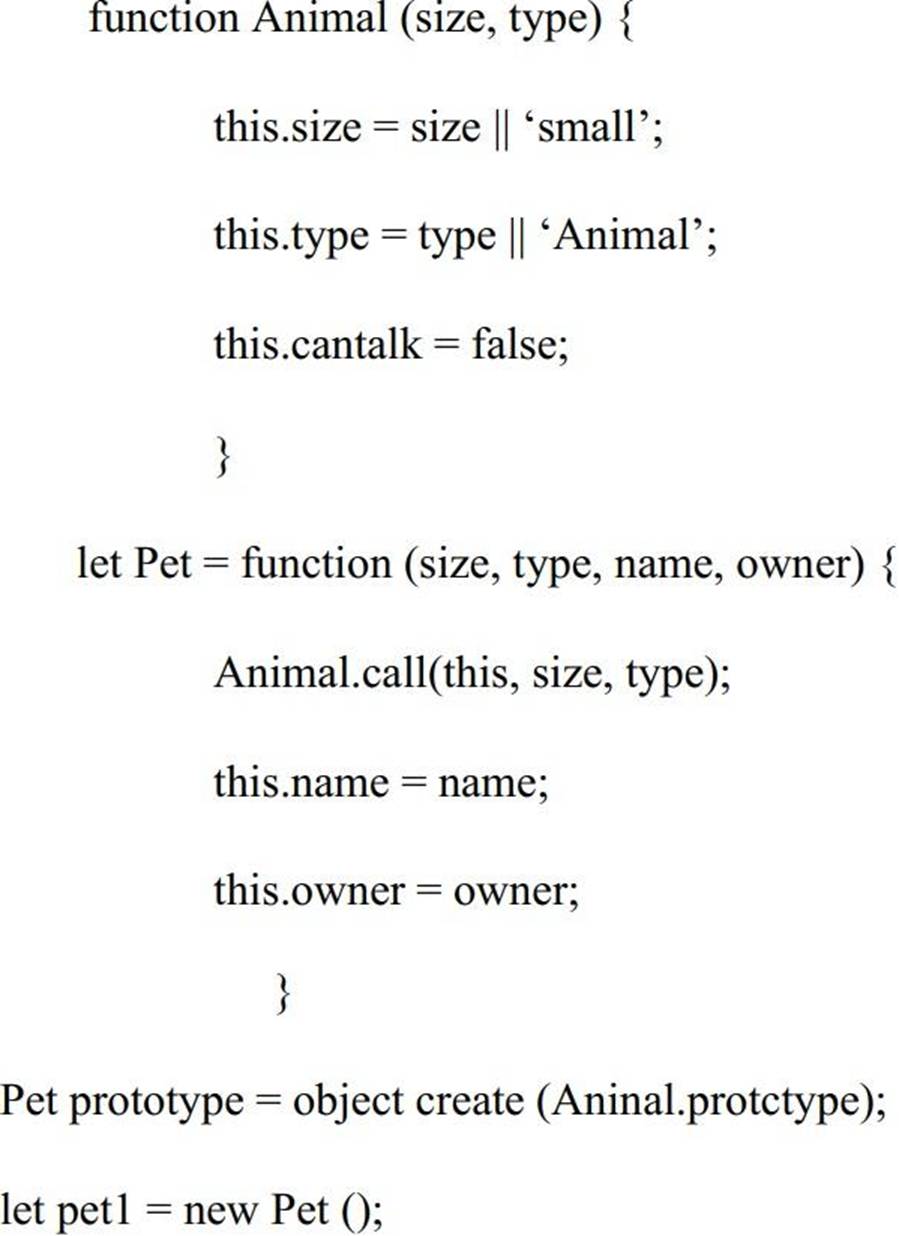
Given the code above, which three properties are set for pet1? Choose 3 answers
- A . name
- B . owner
- C . type
- D . canTalk
- E . size
developer removes the HTML class attribute from the checkout button, so now it is simply:
<button>Checkout</button>.
There is a test to verify the existence of the checkout button, however it looks fora button with class= “blue”. The test fails because no such button is found.
Which type of test category describes this test?
- A . True positive
- B . True negative
- C . False positive
- D . False negative
Given code below:
setTimeout (() => (
console.log (1);
). 0);
console.log (2);
New Promise ((resolve, reject)) = > (
setTimeout(() => (
reject (console.log (3));
). 1000);
)).catch (() => (
console.log (4);
));
console.log (5);
What is logged to the console?
- A . 21435
- B . 25134
- C . 12435
- D . 12534
A developer creates an object where its properties should be immutable and prevent properties from being added or modified.
Which method should be used to execute this business requirement?
- A . Object.const()
- B . Object.eval()
- C . Object.lock()
- D . Object.freeze()
Given the following code:
Let x =(‘15’ + 10)*2;
What is the value of a?
- A . 3020
- B . 1520
- C . 50
- D . 35
A developer creates a simple webpage with an input field. When a user enters text in the input field and clicks the button, the actual value of the field must be displayed in the console.
Here is the HTML file content:
<input type =” text” value=” Hello” name =” input”>
<button type =” button” >Display </button>
The developer wrote the javascript codebelow:
Const button = document.querySelector(‘button’);
button.addEvenListener(‘click’, () => (
Const input = document.querySelector(‘input’);
console.log(input.getAttribute(‘value’));
When the user clicks the button, the output is always “Hello”.
What needs to be done make this code work as expected?
- A . Replace line 04 with console.log(input .value);
- B . Replace line 03 with const input = document.getElementByName(‘input’);
- C . Replace line 02 with button.addEventListener(“onclick”, function() {
- D . Replace line 02 with button.addCallback(“click”, function() {
Referto the following code:
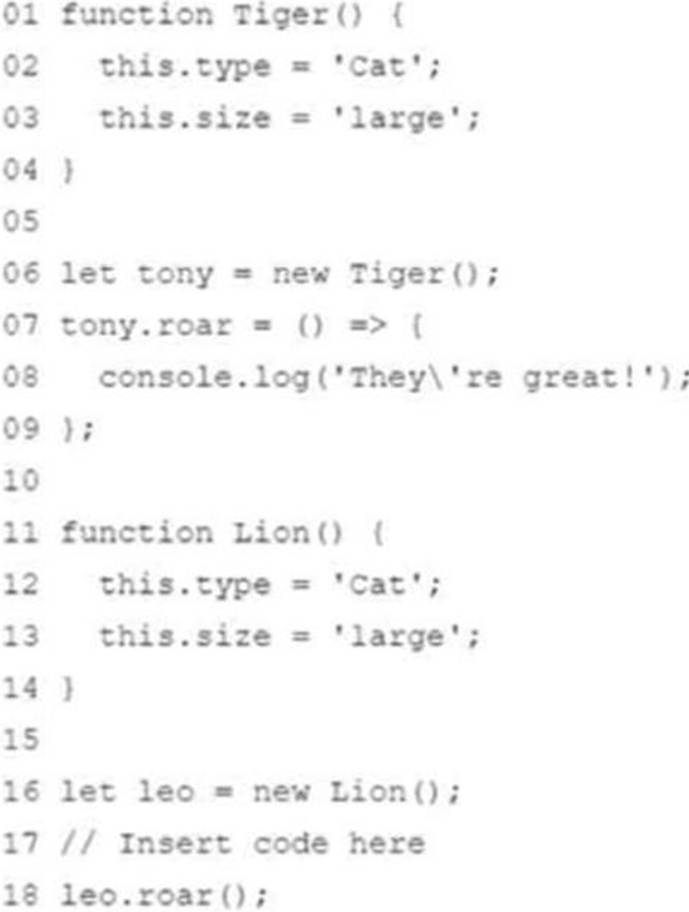
Which two statement could be icn call on line 18? Choose 2 answers
- A . Object.assign (leo, tony);
- B . Object.assign (leo. Tiger);
- C . leo.roar = () => { console.log(‘They’re pretty good!’); );
- D . leo.prototype.roar = () =>( console.log(‘They’re pretty good!’); };
After user acceptance testing, the developer is asked to change the webpage background based on user’s location. This change was implemented and deployed for testing.
The tester reports that the background is not changing, however it works as required when viewing on the developer’s computer.
Which two actions will help determine accurate results? Choose 2 answers
- A . The developer should inspect their browser refresh settings.
- B . The tester should disable their browser cache.
- C . The developer should rework the code.
- D . The tester should dear their browser cache.
Refer to the code below:
Let foodMenu1 = [‘pizza’, ‘burger’, ‘French fries’];
Let finalMenu = foodMenu1;
finalMenu.push(‘Garlic bread’);
What is the value of foodMenu1 after the code executes?
- A . [ ‘pizza’,’Burger’, ‘French fires’, ‘Garlic bread’]
- B . [ ‘pizza’,’Burger’, ‘French fires’]
- C . [ ‘Garlic bread’, ‘pizza’,’Burger’, ‘French fires’ ]
- D . [ ‘Garlicbread’]
Refer to the code below:
Function changeValue(obj) {
Obj.value = obj.value/2;
}
Const objA = (value: 10);
Const objB = objA;
changeValue(objB);
Const result = objA.value;
What is the value of result after the code executes?
- A . 10
- B . Nan
- C . 5
- D . Undefined