
Salesforce CRM Analytics and Einstein Discovery Consultant Practice Exams
Last updated on Oct 21,2026- Exam Code: CRM Analytics and Einstein Discovery Consultant
- Exam Name: Salesforce Certified CRM Analytics and Einstein Discovery Consultant Exam
- Certification Provider: Salesforce
- Latest update: Oct 21,2026
The CRM Analytics consultant at Cloud Kicks is asked to make sure the data on the CRM Analytics dashboard be as real-time as possible.
It was agreed to set the sync refresh time to 5 minutes for one of the local connections. The org has a CRM Analytics Plus license but users are noticing that the earliest available time is 1 hour. The minutes option is not visible to the user.
What is causing the issue?
- A . The consultant does not have the Edit CRM Analytics Dataflows permission assigned.
- B . Setting up the schedule to 5 minutes feature is not available in sandbox orgs.
- C . The earliest available time is 1 hour for CRM Analytics Plus license.
C
Explanation:
In the scenario where Cloud Kicks wants to set the sync refresh time to 5 minutes but finds that the minimum available time is 1 hour, the limitation is due to the licensing and feature availability in CRM Analytics Plus.
Here’s the detailed explanation:
License Restrictions: The CRM Analytics Plus license typically sets the minimum refresh interval at 1 hour. This is a built-in restriction that reflects the platform’s capabilities and resource allocation norms.
Platform Capabilities: While more frequent refreshes would be ideal for achieving near-real-time data synchronization, such capabilities might require additional customization or advanced setup, potentially involving higher tiers of service or additional Salesforce products.
Operational Considerations: Frequent data refreshes, especially in shorter intervals like 5 minutes, can significantly impact system performance and resource utilization. Therefore, such options are generally restricted or managed tightly within Salesforce environments.
This understanding aligns with Salesforce’s documentation and product specifications, which outline what features and capabilities are available under different licensing agreements.
Cloud Kicks (CK) has a dashboard in CRM Analytics with forecasting data. One widget is a compare table using the timeseries function showing the quarterly forecast. However, CK is interested in enhancing the dashboard with a weekly forecast per customer.
How should CK achieve this?
- A . An SAQL query with a timeseries statement specifying Opportunity Name as the partition and Y-M-W as the Date Cols
- B . An SAQL query with a timeseries statement specifying Account Name as the partition and Y-M-W as the Date Cols
- C . An SAQL query with @ timeseries statement specifying Account Name as the partition and Y-M-D as the Date Cols
B
Explanation:
To create a weekly forecast per customer, an SAQL (Salesforce Analytics Query Language) query can be used. The timeseries function generates forecast data based on a specified date range. In this case, the forecast is customer-specific, meaning the partition should be based on Account Name to ensure that the forecast is generated for each customer. The date column (Date Cols) should be set to Y-M-W to aggregate the forecast data on a weekly basis.
Reference: The use of SAQL and timeseries functions is covered in the Wave Analytics Explorer and Advanced SAQL modules, where partitioning and date-based aggregations are explained in detail.
A consultant sets up a Sales Analytics templated app that is very useful for sales operations at Universal Containers (UC).
UC wants to make sure all of the data assets associated with the app, including:
recipes, dataflows, connectors, Einstein Discovery models, and prediction definitions are refreshed everyday at 6:00 AM EST.
How should the consultant proceed?
- A . Use the Data Manager and schedule each item to run at 6:00 AM EST based on ‘Time-based Scheduling’.
- B . Use the Data Manager and schedule the recipes/dataflows to run at 6:00 AM EST based on ‘Time-based Scheduling’.
- C . Use the App Install History under Analytics Settings and schedule the app to run at 6:00 AM EST.
A customer has a dataset consisting of over 300 unique product names. They request a prediction model with the product names included.
Which action should the CRM Analytics consultant take?
- A . Split the analysis into multiple models with each having fewer products.
- B . Run the model using the default variables in the Product object.
- C . Use SKU numbers rather than product names to increase clarity.
Which timeseries statement will fix the query?
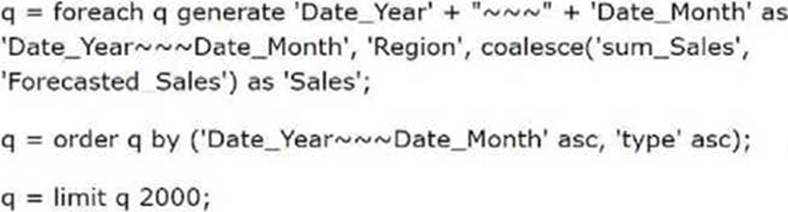
- A . q= timeseries q generate ‘sum_Sales’ as ‘Forecasted_Sales’ with (dateCols= (‘Date_Year’, ‘Date Quarter’, "Y-Q"), partition=’Region’, seasonality=4);
- B . q = timeserles q generate ‘sum_Sales’ as ‘Forecasted_Sales’ with (length=12, dateCols=("Date_Year’, ‘Date_Month’, "Y-M"), partition=’Region’);
- C . q = timeseries q generate ‘sum_Sales’ as ‘Forecasted_Sales’ with (dateCols= (‘Date_Quarter’, ‘Date_Month’, "Q-M"), partition=’Region’, ignoreLast=true);
A consultant is tasked with creating a dataset and a dashboard for a sales team. During the requirements gathering, it was highlighted that security of the data is important.
It was noted that the Opportunity object has organization-wide defaults set to Private with access via the role hierarchy. Sales wants to keep this security in place for the dashboard. Looking at the Opportunity data, the consultant sees that the VP of sales can have access to up to 20,000 records and is unsure if sharing inheritance can be used.
Which approach ensures data security for the new Opportunity dataset?
- A . Enable Inherit Sharing from Salesforce in the analytics settings and set Opportunity as the source on the dataset.
- B . Flatten the role hierarchy in the dataflow recipe and set a security predicate based on Opportunity owner and role path.
- C . Run the Sharing Inheritance Coverage Assessment for the Opportunity object in the analytics settings.
C
Explanation:
For ensuring that the security settings on the Opportunity object are appropriately replicated in the CRM Analytics environment, running the Sharing Inheritance Coverage Assessment is an effective strategy.
Here’s why:
Assessment of Inheritance Feasibility: This tool assesses whether sharing rules on the Opportunity object can be effectively inherited in the analytics environment, ensuring that the organization-wide defaults and role hierarchy are maintained.
Identification of Limitations: The assessment will identify any potential issues or limitations with inheriting sharing settings due to the large number of records (up to 20,000 for the VP of Sales), providing clear insights on how to proceed.
Guided Decision Making: Based on the outcome of the assessment, the consultant can make informed decisions about whether to directly inherit sharing or consider alternative strategies like flattening the role hierarchy or using security predicates.
A consultant wants to understand what the important predictors are in a model.
Where is this information found?
- A . Einstein Recommendations
- B . Model Settings
- C . Model Deployment Wizard
B
Explanation:
The important predictors of a model in CRM Analytics can typically be found under the Model Settings. This area provides detailed information about the configuration and the inputs (predictors) used to train the model. Insights into which predictors have the most significant impact on the model’s outcomes can be gleaned from this section, enabling a deeper understanding of the model’s internal workings and the factors driving predictions.
Cloud Kicks needs a CRM Analytics consultant to install the Appointment Analytics App. After installation, they realize the wrong field was picked and the app did not have access to a newly created field that should be used instead of the old one.
What is the first step the consultant should take to prevent erroneous dataset/dashboard creation?
- A . Cancel running installations from Setup
- B . Stop the recipe from running in Data Manager.
- C . Update the app with the new field after installation.
B
Explanation:
If the wrong field is selected in the initial setup of an app or dataset, it is important to stop any data processing activities (like recipe executions) to prevent erroneous data from being loaded into datasets and dashboards. In this case, stopping the recipe from running in Data Manager is the correct first step. Once the recipe is stopped, the consultant can update the field selection or make other necessary corrections before restarting the process.
Reference: The Data Manager section in CRM Analytics outlines how recipes and data flows are managed, including how to stop or pause recipes.
CRM Analytics users at Cloud Kicks are granted access to an app with specific dashboards. When trying to download a specific widget, they are unable to do so.
What is causing the issue?
- A . The users have access to the dashboard but not the dataset.
- B . The dashboard has been created for internal use and the users have a view only license.
- C . The permission set for the users Is missing the download data permission.
C
Explanation:
As in the previous question, the issue is related to permissions. Users can be granted access to dashboards and apps, but if their permission set does not explicitly allow the "Download Data" action, they will not be able to download the widget data. This is a common issue encountered when users have restricted permissions, especially in environments where security and data access are tightly controlled.
Reference: The role of permission sets and the "Download Data" permission is covered in Salesforce CRM Analytics training, particularly in relation to managing user access and security in the platform.
A CRM Analytics consultant has been tasked with providing access to CRM Analytics for a few users.
They should be able to view the data but unable to export it.
Which permission should the consultant make sure to NOT include?
- A . Export CRM Analytics data
- B . Download CRM Analytics data
- C . View CRM Analytics Assets