
RedHat EX200 Practice Exams
Last updated on Oct 22,2026- Exam Code: EX200
- Exam Name: Red Hat Certified System Administrator - RHCSA
- Certification Provider: RedHat
- Latest update: Oct 22,2026
CORRECT TEXT
Part 1 (on Node1 Server)
Task 6 [Accessing Linux File Systems]
Find all lines in the file /usr/share/mime/packages/freedesktop.org.xml that contain the string ich.
Put a copy of these lines in the original order in the file /root/lines.
/root/lines should contain no empty lines and all lines must be exact copies of the original lines in
/usr/share/mime/packages/freedesktop.org.xml
CORRECT TEXT
Part 1 (on Node1 Server)
Task 6 [Accessing Linux File Systems]
Find all lines in the file /usr/share/mime/packages/freedesktop.org.xml that contain the string ich.
Put a copy of these lines in the original order in the file /root/lines.
/root/lines should contain no empty lines and all lines must be exact copies of the original lines in
/usr/share/mime/packages/freedesktop.org.xml
CORRECT TEXT
Part 1 (on Node1 Server)
Task 6 [Accessing Linux File Systems]
Find all lines in the file /usr/share/mime/packages/freedesktop.org.xml that contain the string ich.
Put a copy of these lines in the original order in the file /root/lines.
/root/lines should contain no empty lines and all lines must be exact copies of the original lines in
/usr/share/mime/packages/freedesktop.org.xml
CORRECT TEXT
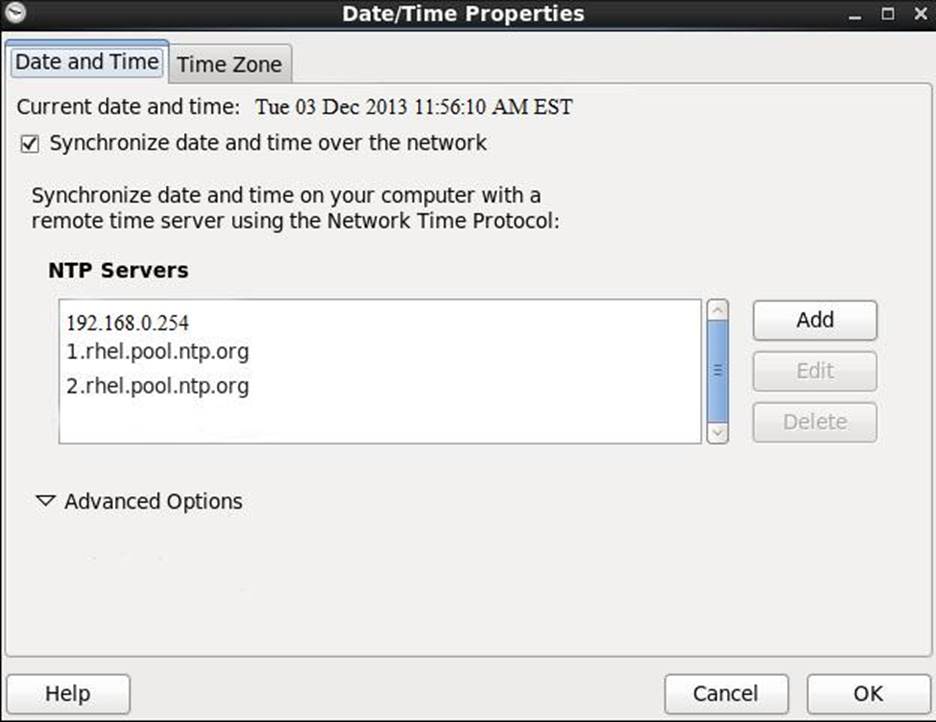
Configure the NTP service in your system.
CORRECT TEXT
Configure the NTP service in your system.
CORRECT TEXT
Your System is going to use as a Router for two networks. One Network is 192.168.0.0/24 and Another Network is 192.168.1.0/24. Both network’s IP address has assigned.
How will you forward the packets from one network to another network?
CORRECT TEXT
There are two different networks, 192.168.0.0/24 and 192.168.1.0/24. Your System is in 192.168.0.0/24 Network. One RHEL6 Installed System is going to use as a Router. All required configuration is already done on Linux Server. Where 192.168.0.254 and 192.168.1.254 IP Address are assigned on that Server.
How will make successfully ping to 192.168.1.0/24 Network’s Host?
Web server start automatically at system startup
Web server start automatically at system startup
CORRECT TEXT
: 107 SIMULATION
Add an additional swap partition of 754 MB to your system.
The swap partition should automatically mount when your system boots.
Do not remove or otherwise alter any existing swap partitions on your system.