RedHat EX200 Practice Exams
Last updated on Oct 22,2026- Exam Code: EX200
- Exam Name: Red Hat Certified System Administrator - RHCSA
- Certification Provider: RedHat
- Latest update: Oct 22,2026
CORRECT TEXT
Configure the permissions of /var/tmp/fstab
Copy the file /etc/fstab to /var/tmp/fstab. Configure the permissions of /var/tmp/fstab so that:
the file /var/tmp/fstab is owned by the root user.
the file /var/tmp/fstab belongs to the group root.
the file /var/tmp/fstab should not be executable by anyone.
the user natasha is able to read and write /var/tmp/fstab.
the user harry can neither write nor read /var/tmp/fstab.
all other users (current or future) have the ability to read /var/tmp/fstab.
CORRECT TEXT
Some users home directory is shared from your system. Using showmount -e localhost command, the shared directory is not shown. Make access the shared users home directory.
CORRECT TEXT
Some users home directory is shared from your system. Using showmount -e localhost command, the shared directory is not shown. Make access the shared users home directory.
CORRECT TEXT
Part 1 (on Node1 Server)
Task 5 [Controlling Access to Files with ACLs]
Copy the file /etc/fstab to /var/tmp. Configure the following permissions on /var/tmp/fstab.
The file /var/tmp/fstab is owned by root user
The file /var/tmp/fstab is belongs to the root group
The file /var/tmp/fstab should be executable by anyone
The user harry is able to read and write on /var/tmp/fstab
The user natasha can neither read or write on /var/tmp/fstab
All other users (Current or future) have the ability to read /var/tmp/fstab
CORRECT TEXT
Part 2 (on Node2 Server)
Task 3 [Managing Logical Volumes]
Create a new volume group in the name of datavg and physical volume extent is 16 MB
Create a new logical volume in the name of datalv with the size of 250 extents and file system must xfs
Then the logical volume should be mounted automatically mounted under /data at system boot time
CORRECT TEXT
A YUM repository has been provided at http://server.domain11.example.com/pub/x86_64/Server.
Configure your system to use this location as a default repository.
CORRECT TEXT
A YUM repository has been provided at http://server.domain11.example.com/pub/x86_64/Server.
Configure your system to use this location as a default repository.
CORRECT TEXT
Part 1 (on Node1 Server)
Task 15 [Running Containers]
Create a container named logserver with the image rhel8/rsyslog found from the registry registry.domain15.example.com:5000
The container should run as the root less user shangrila. use redhat as password [sudo user]
Configure the container with systemd services as the shangrila user using the service name, “container-logserver” so that it can be persistent across reboot.
Use admin as the username and admin123 as the credentials for the image registry.
Configure a user account
Configure the user user2, which the user ID is 3388. The password for this user should be to be 123.
CORRECT TEXT
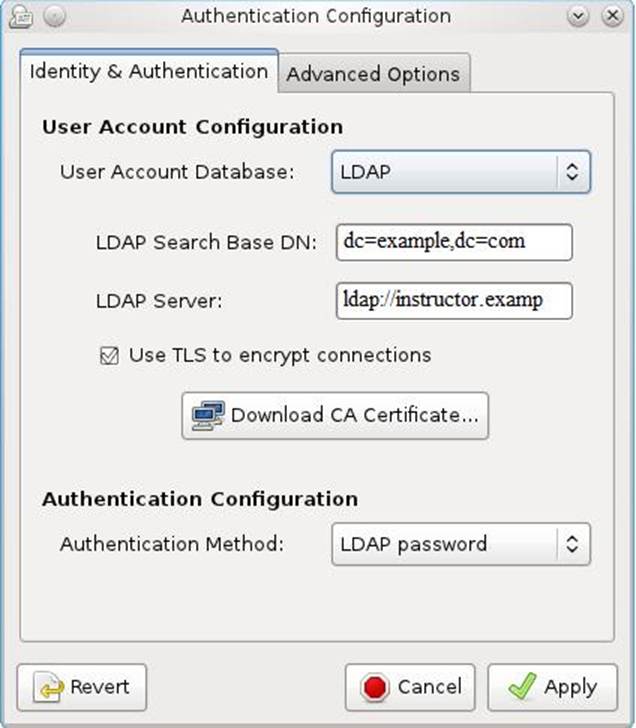
The user authentication has been provided by ldap domain in 192.168.0.254. According the following requirements to get ldapuser.
-LdapuserX must be able to login your system, X is your hostname number. But the ldapuser’s home directory cannot be mounted, until you realize automatically mount by autofs server.
– All ldap user’s password is "password".