
Nutanix NCP-DB-6.5 Practice Exams
Last updated on Oct 08,2026- Exam Code: NCP-DB-6.5
- Exam Name: Nutanix Certified Professional - Database Automation (NCP-DB) v6.5
- Certification Provider: Nutanix
- Latest update: Oct 08,2026
Refer to the exhibit.

An administrator, whose accounts are shown in the exhibit, is trying to add a new database admin as a local user to NDB, but is unable to complete the task.
What is most likely the cause of the issue?
- A . The administrator is logged in with the Super Admin account.
- B . An email address is required for the Super Admin account.
- C . The administrator is logged in with the Database Admin account.
- D . Only users in the domain admins group can create local users.
C
Explanation:
Based on the exhibit, the administrator is logged in with the Database Admin account ([email protected]), which does not have the permission to create local users on NDB. Only the Super Admin account (bsmith) has this permission, as indicated by the User type column. Therefore, the administrator needs to log out and log in again with the Super Admin account to add a new database admin as a local user to NDB.
Reference: Nutanix Database Automation (NCP-DB) Course Details, Nutanix Database Automation (NCP-DB) Certification Details, Nutanix Database Automation (NCP-DB) YouTube Playlist, Nutanix Database Automation User Guide.
A database administrator wants to define initialization variables for different types of database engines and workloads, like OLTP and DW.
What type of profile would be used?
- A . Software Profile Version
- B . Network
- C . Compute
- D . Database Parameters
D
Explanation:
The database parameters profile is used to define the initialization variables for different types of database engines and workloads, such as OLTP and DW. The database parameters profile allows the database administrator to customize the configuration settings for each database engine, such as Oracle, SQL Server, PostgreSQL, and MySQL. The database parameters profile can also be applied to different database operations, such as provisioning, cloning, and patching. The database parameters profile helps to optimize the performance and functionality of the databases according to the specific requirements and best practices of each database engine and workload.
The software profile version is used to define the software version and edition for each database engine, such as Oracle 19c Enterprise Edition or SQL Server 2019 Standard Edition. The software profile version is required for provisioning new databases and patching existing databases. The software profile version helps to ensure the compatibility and compliance of the databases with the supported software versions and editions.
The network profile is used to define the network configuration and security settings for the database server VMs and the databases, such as the IP address, subnet mask, gateway, DNS, firewall rules, and SSL certificates. The network profile is required for registering new database server VMs and provisioning new databases. The network profile helps to ensure the connectivity and protection of the database server VMs and the databases within the network environment.
The compute profile is used to define the compute resources and storage policies for the database server VMs and the databases, such as the CPU, memory, disk size, disk type, compression, deduplication, and replication factor. The compute profile is required for provisioning new databases and cloning existing databases. The compute profile helps to ensure the availability and efficiency of the database server VMs and the databases within the Nutanix cluster.
Reference: Nutanix Database Management & Automation Training Course, Module 4: Nutanix Era Configuration, Lesson 4.1: Nutanix Era Configuration, slides 6-9.
Nutanix Database Management & Automation Training Course, Module 5: Nutanix Era Operations,
Lesson 5.1: Nutanix Era Operations, slides 5-8, 11-12, 15-16.
Which two ports can be used by external applications to make API calls to Era? (Choose two.)
- A . 9443
- B . 443
- C . 8443
- D . 9440
B D
Explanation:
Nutanix Era is a database management system that provides API endpoints for automation and integration with external applications. These API calls are typically made over HTTPS for security, and the standard ports for HTTPS are 443 and 94401. Please note that the actual ports used can depend on the specific configuration of the Nutanix Era system. It’s always a good idea to check the system’s documentation or consult with the system administrator for the most accurate information.
What behavior is observed when applying patch profiles as a Super Admin?
- A . Unpublished patches can be applied.
- B . Published patches cannot be applied if currently deprecated.
- C . Hidden patches can be applied.
- D . Deprecated patches can be applied.
B
Explanation:
In the context of Nutanix Database Automation (NCP-DB), a Super Admin has the authority to apply patch profiles. However, if a patch is marked as deprecated, even if it’s published, it cannot be applied. This is because deprecation is a status that indicates the patch is outdated or has been superseded by a newer version, and thus should not be used1. This behavior ensures that only the most up-to-date and secure patches are applied to the system, maintaining the integrity and security of the database environment1.
Which two Oracle software components does Era patch? (Choose two.)
- A . Grid home
- B . Oracle home
- C . Application home
- D . user home
A, B
Explanation:
According to the Nutanix Database Automation (NCP-DB) learning documents, Era provides out-of-band patching of databases to eliminate database configuration sprawl1. The two Oracle software components that Era patches are:
A) Grid home2 B) Oracle home2
These components are crucial for the operation of Oracle databases and keeping them updated ensures data security and efficient validation of critical database updates1. Please refer to the official Nutanix documentation and training materials for more detailed information2.
Which two Oracle software components does Era patch? (Choose two.)
- A . Grid home
- B . Oracle home
- C . Application home
- D . user home
A, B
Explanation:
According to the Nutanix Database Automation (NCP-DB) learning documents, Era provides out-of-band patching of databases to eliminate database configuration sprawl1. The two Oracle software components that Era patches are:
A) Grid home2 B) Oracle home2
These components are crucial for the operation of Oracle databases and keeping them updated ensures data security and efficient validation of critical database updates1. Please refer to the official Nutanix documentation and training materials for more detailed information2.
Refer to the exhibit.
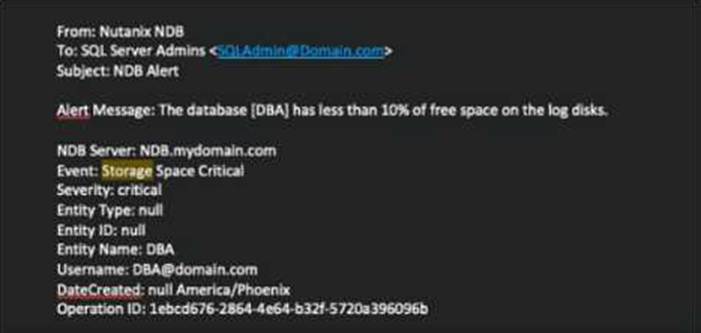
An administrator is receiving critical NDB email alerts regarding storage for the DBA database, which is a member of a database group.
How would the administrator remediate the issue within NDB?
- A . From the Database Summary page for the DBA database, use the Scale option to grow the storage accordingly.
- B . From the Databases page, select the Database group and Scale the storage from the Database Actions menu.
- C . From Prism Central, add additional storage to the VM, then expand the log storage via the database tools.
- D . From the Alerts page, select the alert, choose Set Status to Resolved, and Scale the storage via the Resolve Now dialogue box.
A
Explanation:
The administrator can remediate the issue of critical storage alerts by scaling up the storage directly from the Database Summary page for that specific DBA database. This action allows for an increase in storage capacity to alleviate space constraints and prevent future critical alerts related to storage space1. The other options are not correct, as they either involve scaling the entire database group, which may not be necessary or desired, or require additional steps outside of NDB, which may not be feasible or efficient.
Reference: 1: Nutanix Database Automation (NCP-DB) course, Module 2: Database Provisioning, Lesson 2.4: Database Scaling, slide 5
How can an administrator exclude Kernel patches for the Linux OS using the most efficient means?
- A . Define a pre-script to disable the repositories in the Patch Now advanced options
- B . Exclude the appropriate repositories on the VM prior to patching.
- C . Exclude the appropriate repositories on the VM and reboot prior to patching.
- D . Define a pre-script to disable the repositories in the Maintenance Window advanced options.
B
Explanation:
NDB supports Linux OS patching for database server VMs. Linux OS patching is performed by using the yum or apt package managers, depending on the Linux distribution. To exclude Kernel patches for the Linux OS, the administrator can disable or exclude the appropriate repositories on the VM prior to patching. This can be done by editing the yum.conf or apt.conf files, or by using the –disablerepo or –exclude options in the yum or apt commands. This way, the administrator can control which patches are applied to the VM without affecting other VMs or requiring additional scripts or reboots.
Reference: Nutanix Database Automation (NCP-DB) Course Details, Section 4.2: NDB Linux OS Patching Nutanix Database Automation (NCP-DB) Certification Details, Objective 4.2: Perform Linux OS Patching
Nutanix Database Automation (NCP-DB) YouTube Playlist, Video 4.2: NDB Linux OS Patching
Nutanix Database Automation (NCP-DB) User Guide, Section 4.5: Patch Linux OS Software
Which policies define Time Machine data availability across multiple registered clusters in NDB?
- A . Recovery Plans
- B . Data Access Management
- C . Data Protection
- D . Service Level Agreements
A
Explanation:
The recovery plans policy defines the Time Machine data availability across multiple registered clusters in NDB. The recovery plans policy allows the database administrator to specify the source and target clusters, the frequency and retention of the cross-cluster snapshots, and the network and compute profiles for the recovery operations. The recovery plans policy helps to ensure the disaster recovery and business continuity of the NDB-managed databases in case of a cluster failure or outage.
The data access management policy defines the access permissions and roles for the NDB users and groups. The data access management policy allows the database administrator to grant or revoke access to the NDB instance, the database server VMs, the databases, and the database operations. The data access management policy helps to ensure the security and compliance of the NDB-managed databases and users.
The data protection policy defines the backup and restore settings for the NDB-managed databases. The data protection policy allows the database administrator to specify the frequency, retention, and compression of the database snapshots, and the backup location and encryption for the database backups. The data protection policy helps to ensure the backup and recovery of the NDB-managed databases within the same cluster.
The service level agreements policy defines the performance and availability metrics for the NDB-
managed databases. The service level agreements policy allows the database administrator to
monitor and enforce the database uptime, latency, throughput, and IOPS. The service level
agreements policy helps to ensure the quality of service and performance of the NDB-managed
databases.
Reference: Nutanix Database Management & Automation Training Course, Module 4: Nutanix Era Configuration, Lesson 4.1: Nutanix Era Configuration, slide 9.
Nutanix Database Management & Automation Training Course, Module 5: Nutanix Era Operations,
Lesson 5.1: Nutanix Era Operations, slides 8, 12, 16, 20.
Nutanix Database Management & Automation Training Course, Module 6: Nutanix Era Disaster
Recovery, Lesson 6.1: Nutanix Era Disaster Recovery, slides 5-7.
An administrator is trying to register a Nutanix cluster for Multi-Cluster provisioning.
The Era cluster is setup with following configuration:
• Era Multi-Cluster is enabled.
Era Server storage container and Era provisioning container are different on the Era cluster.
What should the administrator configure?
- A . Storage mapping between Era server container end remote container thet is used for provisioning DBs,
- B . Disks that span across Era Server storage container and Era provisioning container.
- C . Storage mapping between Era container and a remote container that is not used for provisioning
databases. - D . Separate remote containers for provisioning Era Agent VM end database Server VMs.
A
Explanation:
In a Nutanix Era setup where Multi-Cluster is enabled and the Era Server storage container and Era provisioning container are different on the Era cluster, the administrator should configure a storage mapping between the Era server container and the remote container that is used for provisioning databases1. This is because Nutanix Era uses the storage container specified during the registration of the Nutanix cluster for provisioning databases1. Therefore, a storage mapping needs to be established between the Era server container and the remote container used for provisioning to ensure that the databases are provisioned correctly1.