
Nutanix NCP-CI-AWS Practice Exams
Last updated on Oct 06,2026- Exam Code: NCP-CI-AWS
- Exam Name: Nutanix Certified Professional - Cloud Integration - AWS v6.7
- Certification Provider: Nutanix
- Latest update: Oct 06,2026
Which two features or services can an administrator ensure are protected by cluster protect within an NC2 environment? (Choose two.)
- A . Flow Network Security
- B . VM Templates
- C . Nutanix Files
- D . Virtual Machine Disks
CD
Explanation:
Within an NC2 environment, the Cluster Protect feature can ensure the protection of: Nutanix Files: This provides file services within the Nutanix ecosystem, and Cluster Protect can safeguard the data stored in Nutanix Files.
Virtual Machine Disks: This ensures that the data stored on virtual machine disks is protected, providing backup and recovery options for the virtual machines running within the cluster.
Reference: Nutanix Cloud Clusters on AWS Administration
Nutanix AOS 6.7 Documentation
An administrator is planning to leverage NC2 on AWS for an elastic DR scenario where the initial cluster is using 13en.metal.
Which two additional node types are supported for cluster expansion? (Choose two.)
- A . Z1d.metal
- B . I3.metal
- C . m5d.metal
- D . i4i.metal
BD
Explanation:
When planning to leverage NC2 on AWS for an elastic DR scenario where the initial cluster is using 13en.metal, the following additional node types are supported for cluster expansion:
I3.metal: These instances provide high IOPS and low latency with NVMe SSDs, making them suitable for storage-intensive applications.
i4i.metal: These instances offer higher performance with AWS Nitro SSDs, improved network bandwidth, and better compute performance compared to the I3.metal instances.
Reference: Nutanix Cloud Clusters on AWS Documentation
Amazon EC2 I4i Instances C AWS
Amazon EC2 I3 Instances C AWS
An administrator is deploying a new cluster on AWS and would like to ensure the data is encrypted.
Due to cost constraints, the deployment will leverage the native local key manager (LKM).
What is the minimal number of nodes needed to support the Nutanix native LKM?
- A . 1
- B . 2
- C . 3
- D . 4
C
Explanation:
To support Nutanix’s native Local Key Manager (LKM) for data encryption in a cost-effective manner, a minimum of three nodes is required. This ensures that there is enough redundancy and reliability for the encryption services to function properly, complying with best practices for distributed key management.
Reference: Nutanix Support & Insights
Nutanix Cloud Clusters on AWS Administration
An administrator has deployed an NC2 on AWS cluster that is running mixed workloads. Multiple SQL database are running on the NC2 cluster using a native subnet of 10.78.1.0/24.
The administrator wants to ensure only application servers from source subnet 10.79.1.0/24 that reside outside of the NC2 cluster can access the databases.
Which two actions will help the administrator most securely achieve this? (Choose two.)
A)

B)

C)

D)

- A . Option A
- B . Option B
- C . Option C
- D . Option D
AD
Explanation:
To ensure that only application servers from the source subnet 10.79.1.0/24 can access the SQL databases running on the NC2 cluster in the subnet 10.78.1.0/24, the administrator can take the following actions:
Option A: Create a custom Security Group with the following rules:
Key = tag:nutanix:clusters
Key = tag:nutanix:clusters:external
and value = the clusters’ UUID
Key = tag:nutanix:clusters:external
and value = 10.78.1.0/24
Option D: Create a custom Security Group with the following:
Key = nutanix:clusters
Key = nutanix:clusters:external
and value = the clusters’ UUID
Key = nutanix:clusters:external
and value = 10.79.1.0/24
These actions help create security rules that restrict access to the databases only from the specified source subnet, ensuring secure and controlled access.
Reference: Nutanix Cloud Clusters on AWS Administration
AWS Security Groups Documentation
Which entity should be contacted for cloud hardware supported (EC2 instances, VPC, etc) related to NC2?
- A . Partner
- B . Public Cloud Vendor
- C . Internal IT Operations team
- D . Nutanix
B
Explanation:
For issues related to cloud hardware support such as EC2 instances, VPC, etc., the public cloud vendor (AWS in this case) should be contacted. AWS provides support and documentation for their infrastructure and services, ensuring that users can get assistance for any hardware or cloud-specific queries.
Reference: Nutanix Support & Insights
An administrator has deployed an NC2 cluster in AWS.
The following configuration decisions were made:
Created a new VPC from the NC2 console as part of the deployment
Selected the Public option for prism access policy
Host type selected was i13en,metal
The administrator now has a goal of provision public internet access to a user VM (UVM), web-1, on the Nutanix cluster. The admin can access Prism Element via the public DNS of the Auto-created load balancer.
The administrator tries to create another network load balancer for the web server access. After creating the load balancer and registering web-1’s IP address as a target, the administrator finds that the health check for the VM target is failing and the DNS returns as NOT Found message in the browser.
Why is the issue happening?
- A . The load balancer is still in a Provisioning state.
- B . The administrator has not modified the inbound rules under the UVM security group to a/low the network load balancer to access the UVM subnet.
- C . The administrator has not assigned a public IP to web-1.
- D . The administrator needs to provision an application load balancer instead of a network load balancer to allow Internet traffic to access the UVM subnet.
C
Explanation:
For a VM to be accessible over the internet through a load balancer, the VM itself must have a public IP address.
In this case, the health check for the VM target is failing and the DNS returns a "NOT Found" message because web-1 does not have a public IP assigned.
Without a public IP, the load balancer cannot route traffic to web-1 from the internet.
Assigning a public IP to web-1 ensures that the VM can be accessed via the load balancer, resolving the connectivity issue.
Reference: Refer to the AWS documentation on network load balancers and public IP assignments, and Nutanix documentation on VM network configurations.
To deploy NC2 in AWS using an existing VPC, which two AWS resources should be configured beforehand? (Choose two.)
- A . NAT Gateway
- B . Public and Private Subnets
- C . Placement Group
- D . Bare-metal EC2 Instance
A
Explanation:
To deploy NC2 in AWS using an existing VPC, the following AWS resources should be configured beforehand:
NAT Gateway: This allows instances in the private subnet to connect to the internet or other AWS services, while preventing the internet from initiating connections with those instances.
Public and Private Subnets: These are necessary to segregate the network traffic. Public subnets provide a direct route to the internet gateway, while private subnets are used for internal resources that do not need direct access to the internet.
Reference: Nutanix Cloud Clusters on AWS Deployment Guide
Nutanix Support & Insights
An administrator has recently deployed an NC2 on AWS cluster in the North Virginia region in availability zone us-east-1z. The clusters UUID is 0005F487-4962-91EA-4C98-C4284D123835. The cluster is consuming IPs from a 10.78.2.0/24 range.
The AWS VPC has these available CIDR ranges:
• 70.73.0.0/16
• 10.79.107.0/24
• 10.0.0.0/22
The following subnets have been configured in the NC2 AWS VPC:
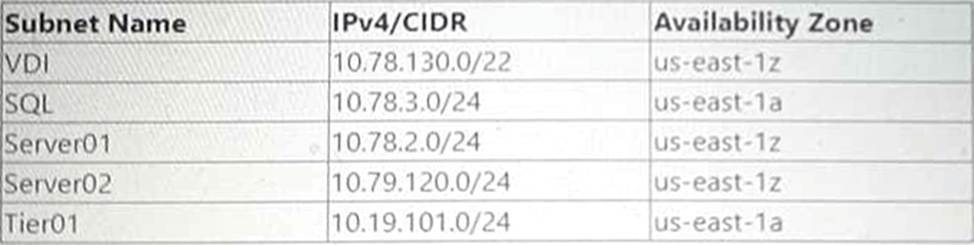
The following tags have been applied to a Custom Network Security Group:

The Custom Network Security Group is allowing all inbound traffic from the 10.0.0.0/22 network.
Which two subnets would be able to receive inbound traffic from AWS instances on a 10.0.0.0/22 network segment"? (Choose two.)
- A . Server01
- B . Tier01
- C . SQL
- D . VDl
AB
Explanation:
To determine which subnets would be able to receive inbound traffic from AWS instances on a 10.0.0.0/22 network segment, we need to look at the configured subnets and their CIDR ranges, as well as the custom network security group’s inbound rules.
Available CIDR ranges in VPC:
HOTSPOT
An administrator needs to recover a cluster protected using the Cluster Protect feature. The Prism Central instance was not on the failed cluster.
Which steps, in order, should the administrator perform to recover the cluster?
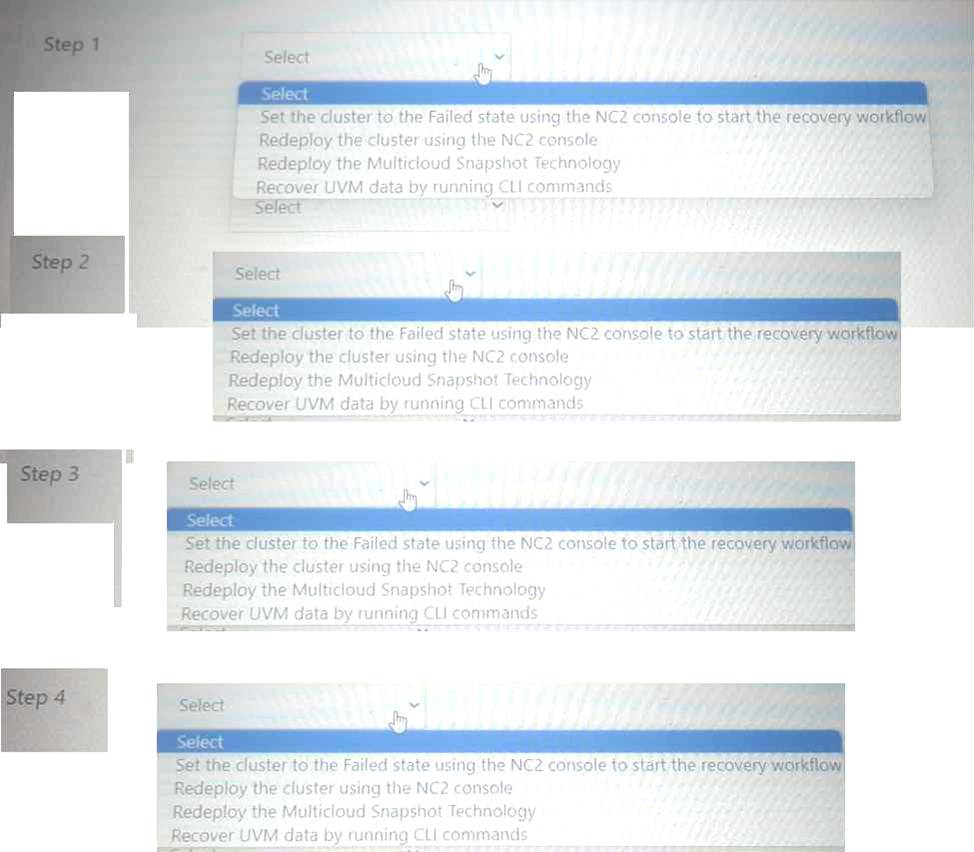
Step 1: Set the cluster to the Failed state using the NC2 console to start the recovery workflow.
Step 2: Redeploy the cluster using the NC2 console.
Step 3: Redeploy the Multicloud Snapshot Technology.
Step 4: Recover UVM data by running CLI commands.
Set the cluster to the Failed state using the NC2 console to start the recovery workflow: This step involves marking the cluster as failed to initiate the recovery process.
Redeploy the cluster using the NC2 console: Once the cluster is marked as failed, the next step is to redeploy it using the tools available in the NC2 console.
Redeploy the Multicloud Snapshot Technology: After the cluster is redeployed, the Multicloud Snapshot Technology needs to be redeployed to ensure data consistency and availability.
Recover UVM data by running CLI commands: The final step is to recover the User VM (UVM) data by executing the necessary CLI commands to restore the data from the snapshots or backups.
Reference: Nutanix Documentation on Cluster Protect and Recovery Processes Nutanix Support & Insights
Nutanix Cloud Clusters on AWS Administration
HOTSPOT
An administrator needs to recover a cluster protected using the Cluster Protect feature. The Prism Central instance was not on the failed cluster.
Which steps, in order, should the administrator perform to recover the cluster?
Step 1: Set the cluster to the Failed state using the NC2 console to start the recovery workflow.
Step 2: Redeploy the cluster using the NC2 console.
Step 3: Redeploy the Multicloud Snapshot Technology.
Step 4: Recover UVM data by running CLI commands.
Set the cluster to the Failed state using the NC2 console to start the recovery workflow: This step involves marking the cluster as failed to initiate the recovery process.
Redeploy the cluster using the NC2 console: Once the cluster is marked as failed, the next step is to redeploy it using the tools available in the NC2 console.
Redeploy the Multicloud Snapshot Technology: After the cluster is redeployed, the Multicloud Snapshot Technology needs to be redeployed to ensure data consistency and availability.
Recover UVM data by running CLI commands: The final step is to recover the User VM (UVM) data by executing the necessary CLI commands to restore the data from the snapshots or backups.
Reference: Nutanix Documentation on Cluster Protect and Recovery Processes Nutanix Support & Insights
Nutanix Cloud Clusters on AWS Administration