
Network Appliance NS0-304 Practice Exams
Last updated on Oct 22,2026- Exam Code: NS0-304
- Exam Name: NetApp Certified Hybrid Cloud Administrator
- Certification Provider: Network Appliance
- Latest update: Oct 22,2026
An administrator configures the trident ontap-san driver and specifies useCHAP=true.
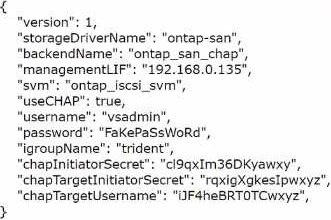
Which parameter is missing from the configuration?
- A . dataUF
- B . chapSecret
- C . clientPrivateKey
- D . chapUsername
D
Explanation:
When configuring the Trident ONTAP-SAN driver with CHAP (Challenge Handshake Authentication Protocol) enabled (useCHAP: true), it is essential to specify both the initiator and target CHAP secrets and their corresponding usernames. In the configuration provided, while the CHAP secrets for both initiator and target are specified (chapInitiatorSecret and chapTargetInitiatorSecret), only the CHAP target username (chapTargetUsername) is listed. The missing parameter necessary for the complete CHAP configuration is the CHAP initiator username (chapUsername). This username is used along with the chapInitiatorSecret to authenticate the initiator to the storage system.
To correct this, add the chapUsername field to the configuration file, ensuring that the initiator’s username matches the configured environment and that it is correctly paired with the chapInitiatorSecret. This inclusion ensures that both sides of the CHAP authentication process are properly identified, thereby providing the necessary security for SAN communication.
For further guidance on configuring CHAP with the Trident ONTAP-SAN driver, refer to the NetApp Trident documentation: NetApp Trident Documentation.
In an environment using Cloud Backup Service, a user reports that an urgently needed file cannot be found. The end user knows the file name but does not know when the file was last accessed or when it was deleted.
Which feature should be used?
- A . Restore Volume
- B . Browse & Restore
- C . Search & Restore
- D . Previous Versions
C
Explanation:
In a situation where an end user needs to find and restore a file whose last access or deletion time is unknown, the best feature to use within the Cloud Backup Service is Search & Restore.
Here ’ s why: Search Functionality: The Search & Restore feature allows users to quickly locate files within backup datasets using just the file name or other metadata. This is particularly useful when the exact details of the file, such as its last access date or deletion date, are unknown.
Efficient File Restoration: Once the file is located using the search functionality, it can be selectively restored to the desired location without the need to restore an entire volume, making the process efficient and tailored to the specific recovery need.
User-Friendly Interface: Cloud Backup Service typically provides a user-friendly interface for conducting searches and performing restores, making it accessible even to users who may not be deeply technical.
For detailed instructions on using the Search & Restore feature in NetApp Cloud Backup Service, refer to the service’s user guide or online help available at: NetApp Cloud Backup Service Documentation.
An administrator cannot create a new volume in Azure NetApp Files. The administrator receives an error that the DNS server is not available.
What should the administrator do?
- A . Confirm the network security groups allow connectivity
- B . Make sure that the Volume and DNS server are in the same subnet
- C . Create a VNet service endpoint to the DNS server
- D . Configure subnet delegation for the VNet
A
Explanation:
When an administrator receives an error that the DNS server is not available while trying to create a new volume in Azure NetApp Files, the first action should be to confirm that the network security groups allow connectivity.
Here’s the process:
Check Network Security Group Rules: Verify that the network security group (NSG) associated with the subnet where Azure NetApp Files is located has rules that allow traffic to and from the DNS server, specifically permitting DNS query traffic (typically over port 53 for both TCP and UDP). Adjust NSG Settings if Necessary: If the current NSG rules are restrictive and do not allow DNS traffic, modify them to include the necessary allowances for DNS resolution.
Test Connectivity: After updating the NSG settings, retry the volume creation to see if the DNS issue has been resolved.
For guidance on managing NSGs in Azure, consult the Azure documentation: Azure Network Security Groups.
An administrator needs to move several volumes that contain iSCSI LUNs from an ONTAP AFF cluster to CVO.
Which method should be used?
- A . SnapMirror
- B . XCP
- C . Foreign LUN Import (FLI)
- D . CloudSync
A
Explanation:
To move several volumes containing iSCSI LUNs from an ONTAP AFF cluster to Cloud Volumes ONTAP (CVO), the most appropriate method is using SnapMirror. Here’s the process:
Utilizing SnapMirror for LUN Migration: SnapMirror is NetApp’s replication technology that is ideally suited for efficiently transferring data between ONTAP systems, including from AFF to CVO. It is capable of handling complex data structures like iSCSI LUNs, ensuring data integrity and consistency during the transfer.
Configuration of SnapMirror: Set up a SnapMirror relationship between the source AFF cluster and
the destination CVO instance. This involves configuring the SnapMirror policy, scheduling the replication, and initializing the transfer of data.
Advantages for iSCSI LUNs: SnapMirror maintains the layout and attributes of the iSCSI LUNs during replication, which is crucial for ensuring that the storage is ready for immediate use upon completion of the replication to the CVO environment.
For step-by-step instructions on configuring and using SnapMirror for transferring iSCSI LUNs, consult the NetApp documentation on SnapMirror: NetApp SnapMirror Documentation.
Which two options must be configured when selecting a service level for Cloud Volumes Service (CVS) in GCP? (Choose two.)
- A . Performance
- B . High-Availability
- C . Capacity
- D . RAID Level
A, C
Explanation:
When selecting a service level for Cloud Volumes Service (CVS) in GCP, two primary options must be configured: Performance and Capacity.
Here’s how each affects the service:
Performance: This refers to the performance tier selected for the service, such as Standard, Premium, or Extreme, each providing different levels of throughput and IOPS. This choice directly impacts how quickly data can be accessed and processed, making it crucial for applications with specific performance needs.
Capacity: This is the total amount of storage space required. GCP Cloud Volumes Service offers various capacity options, and the choice can affect not only the cost but also the potential for future scalability and data management.
These configurations ensure that the volume’s capabilities align with the specific requirements of the applications it supports, providing flexibility and efficiency in resource utilization.
For more details on configuring service levels and understanding performance and capacity choices in GCP CVS, refer to Google Cloud’s documentation on Cloud Volumes Service: Google Cloud Volumes Service Documentation.