
Netskope NSK101 Practice Exams
Last updated on Oct 22,2026- Exam Code: NSK101
- Exam Name: Netskope Certified Cloud Security Administrator (NCCSA)
- Certification Provider: Netskope
- Latest update: Oct 22,2026
You need to locate events for specific activities such as "edit" or "login successful" in a cloud application.
In which SkopeIT Events & Alerts page would this information be found?
- A . Endpoint Events
- B . Page Events
- C . Application Events
- D . Websites
C
Explanation:
The Application Events page in the SkopeIT Events & Alerts section is where you can find logs and events related to specific activities within cloud applications, such as "edit" or "login successful". This section provides a detailed audit trail of user activities and application usage, which is essential for monitoring, security, and compliance purposes.
This answer is validated by the event categorization provided in the Netskope documentation, where application-specific events are logged under the Application Events section for easier tracking and analysis.
Reference: REST API v2 Overview – Netskope Knowledge Portal
Using the REST API v2 UCI Impact Endpoints – Netskope Knowledge Portal
Postman Collection for Netskope API
When would an administrator need to use a tombstone file?
- A . You use a tombstone file when a policy causes a file download to be blocked.
- B . You use a tombstone file when a policy causes a publicly shared file to be encrypted.
- C . You use a tombstone file when the policy causes a file to be moved to quarantine.
- D . You use a tombstone file when a policy causes a file to be moved to legal hold.
C
Explanation:
A tombstone file is a placeholder file that replaces the original file when it is moved to quarantine by a Netskope policy. The tombstone file contains information about the original file, such as its name, size, type, owner, and the reason why it was quarantined. The tombstone file also provides a link to the Netskope UI where the administrator or the file owner can view more details about the incident and take appropriate actions, such as restoring or deleting the file. The purpose of using a tombstone file is to preserve the metadata and location of the original file, as well as to notify the users about the quarantine action and how to access the file if needed.
Reference: Threat Protection – Netskope Knowledge PortalNetskope threat protection – Netskope
An administrator has created a DLP rule to search for text within documents that match a specific pattern. After creating a Real-time Protection Policy to make use of this DLP rule, the administrator suspects the rule is generating false positives.
Within the Netskope tenant, which feature allows administrators to review the data that was matched by the DLP rule?
- A . Risk Insights
- B . Forensic
- C . Quarantine
- D . Leaal Hold
B
Explanation:
When an administrator suspects that a DLP rule is generating false positives, the Forensic feature within the Netskope tenant allows for reviewing the data that was matched by the DLP rule. This feature provides detailed logs and insights into why a specific piece of data was flagged, enabling the administrator to analyze and adjust the rule as needed.
To access and use the Forensic feature:
Navigate to the Forensic section in the Netskope UI.
Review the detailed logs and matched data to understand the context and reason behind each match.
Adjust the DLP rules if necessary to reduce false positives and improve accuracy.
Reference: Netskope REST API Overview.
Netskope SDK Documentation.
Click the Exhibit button.
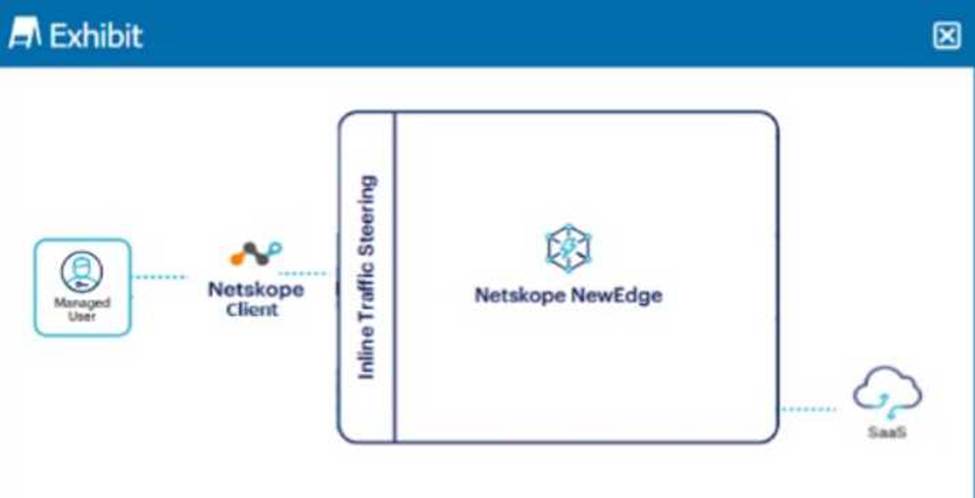
A user is connected to a SaaS application through Netskope’s Next Gen SWG with SSL inspection enabled.
In this scenario, what information is available in SkopeIT? (Choose three.)
- A . User activity, CCL
- B . Destination IP, OS patch version
- C . Account instance, category
- D . Username, source location
- E . File version, shared folder
ACD
Explanation:
In the scenario where a user is connected to a SaaS application through Netskope’s Next Gen Secure Web Gateway (SWG) with SSL inspection enabled, the following information is available in SkopeIT:
User activity, CCL: SkopeIT provides detailed logs of user activities, including actions taken within SaaS applications, and uses the Cloud Confidence Level (CCL) to rate the trustworthiness of cloud applications.
Account instance, category: It logs information about the specific instance of the account being accessed and categorizes the type of service or application in use, which helps in identifying the context of the user’s activities.
Username, source location: The username of the user accessing the SaaS application and their source location (such as IP address or geographic location) are logged for audit and compliance purposes.
Reference: Netskope documentation on SSL inspection and SkopeIT logging.
Detailed configuration guides on using Next Gen SWG and the types of data collected by SkopeIT.
What are two primary advantages of Netskope’s Secure Access Service Edge (SASE) architecture? (Choose two.
- A . no on-premises hardware required for policy enforcement
- B . Bayesian spam filtering
- C . Endpoint Detection and Response (EDR)
- D . single management console
A, D
Explanation:
Two primary advantages of Netskope’s Secure Access Service Edge (SASE) architecture are: no on-premises hardware required for policy enforcement and single management console. Netskope’s SASE architecture delivers network and security services as cloud-based services that can be accessed from any location and device. This eliminates the need for on-premises hardware appliances such as firewalls, proxies, VPNs, etc., that are costly to maintain and scale. Netskope’s SASE architecture also provides a single management console that allows administrators to configure and monitor all the network and security services from one place. This simplifies IT operations and reduces complexity and overhead.
Reference: Netskope SASEWhat is SASE?
Exhibit
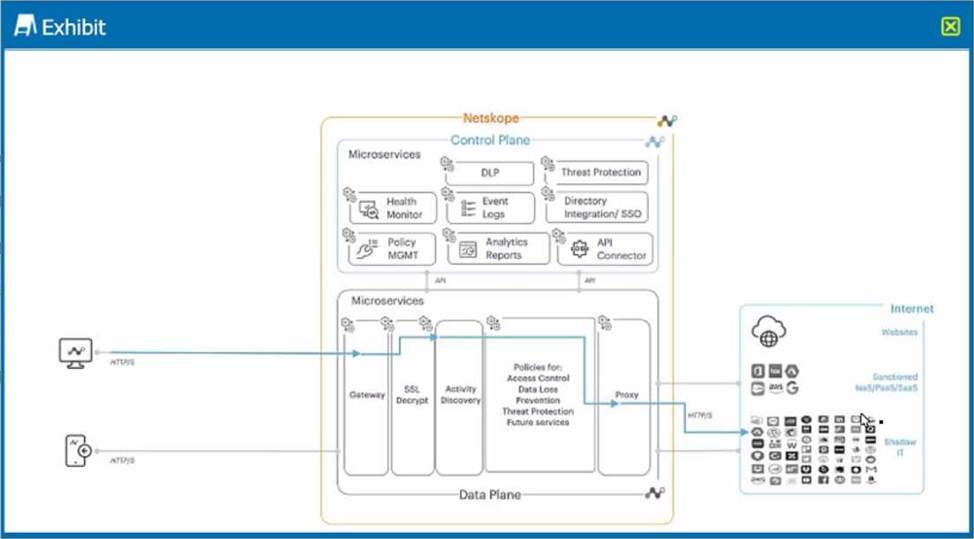
A user is connected to a cloud application through Netskope’s proxy.
In this scenario, what information is available at Skope IT? (Choose three.)
- A . username. device location
- B . destination IP. OS patch version
- C . account instance, URL category
- D . user activity, cloud app risk rating
- E . file version, shared folder
ACD
Explanation:
In this scenario, a user is connected to a cloud application through Netskope’s proxy, which is a deployment method that allows Netskope to intercept and inspect the traffic between the user and the cloud application in real time. In this case, Netskope can collect and display various information about the user and the cloud application at Skope IT, which is a feature in the Netskope platform that allows you to view and analyze all the activities performed by users on cloud applications. Some of the information that is available at Skope IT are: username, device location, account instance, URL
category, user activity, and cloud app risk rating. Username is the name or identifier of the user who is accessing the cloud application. Device location is the geographical location of the device that the user is using to access the cloud application. Account instance is the specific instance of the cloud application that the user is accessing, such as a personal or enterprise instance. URL category is the classification of the web page that the user is visiting within the cloud application, such as Business or Social Media. User activity is the action that the user is performing on the cloud application, such as Upload or Share. Cloud app risk rating is the score that Netskope assigns to the cloud application based on its security posture and compliance with best practices. Destination IP, OS patch version, file version, and shared folder are not information that is available at Skope IT in this scenario, as they are either unrelated or irrelevant to the proxy connection or the Skope IT feature.
Reference: [Netskope Inline CASB], [Netskope Skope IT].
Why would you want to define an App Instance?
- A . to create an API Data Protection Policy for a personal Box instance
- B . to differentiate between an enterprise Google Drive instance vs. a personal Google Drive instance
- C . to enable the instance_id attribute in the advanced search field when using query mode
- D . to differentiate between an enterprise Google Drive instance vs. an enterprise Box instance
B
Explanation:
An App Instance is a feature in the Netskope platform that allows you to define and identify different instances of the same cloud application based on the domain name or URL. For example, you can define an App Instance for your enterprise Google Drive instance (such as drive.google.com/a/yourcompany.com) and another App Instance for your personal Google Drive instance (such as drive.google.com). This way, you can differentiate between them and apply different policies and actions based on the App Instance. You would want to define an App Instance to achieve this level of granularity and control over your cloud application activities. Creating an API Data Protection Policy for a personal Box instance, enabling the instance_id attribute in the advanced search field, or differentiating between an enterprise Google Drive instance vs. an enterprise Box instance are not valid reasons to define an App Instance, as they are either unrelated or irrelevant to the App Instance feature.
Reference: Netskope Security Cloud Operation & Administration (NSCO&A) – Classroom Course, Module 5: Real-Time Policies, Lesson 4: App Instances.
Which three statements about Netskope Private Access Publishers are correct? (Choose three.)
- A . Publishers can run on Windows or Linux servers.
- B . Publishers can be deployed in both private data centers and public cloud providers to provide access to applications across disparate locations.
- C . Publisher deployment can be automated in public cloud environments using Netskope’s REST API.
- D . Publishers only make outbound connections to the Netskope Security Cloud which reduces the amount of public exposure.
- E . Publishers can be deployed as hardware or software appliances to provide access to applications across disparate locations.
ABD
Explanation:
The following statements about Netskope Private Access Publishers are correct:
Publishers can run on Windows or Linux servers:
Publishers are versatile and can be installed on both Windows and Linux operating systems.
Publishers can be deployed in both private data centers and public cloud providers to provide access to applications across disparate locations:
This flexibility allows organizations to use Publishers to connect applications hosted in various environments, ensuring seamless access across locations.
Publishers only make outbound connections to the Netskope Security Cloud which reduces the amount of public exposure:
By making only outbound connections, Publishers minimize the attack surface, enhancing security by reducing public exposure.
Reference: Netskope Private Access Deployment Guide
Netskope REST API v2 Overview
Your company has implemented Netskope’s Cloud Firewall and requires that all FTP connections are blocked regardless of the ports being used.
Which two statements correctly identify how to block FTP access? (Choose two.)
- A . Create a Real-time Protection policy with FTP as the destination application and Block as the action.
- B . Create a Real-time Protection policy with a custom Firewall App Definition for TCP port 21 as the destination application and Block as the action.
- C . Ensure there are no Real-time Protection polices that allow FTP and change the default non-Web action to Block.
- D . Create a custom Firewall App Definition for TCP port 21 and add it to the default tenant Steering Configuration as an exception.
A, B
Explanation:
To block all FTP connections regardless of the ports being used, the following steps should be taken using Netskope’s Cloud Firewall:
Real-time Protection Policy:
Create a Real-time Protection policy where FTP is defined as the destination application.
Set the action to "Block" to ensure that any FTP traffic is blocked regardless of the port being used.
Custom Firewall App Definition:
Create a custom Firewall App Definition specifically for TCP port 21.
Define the action as "Block" to ensure any traffic directed to this port is blocked, preventing FTP access.
These configurations ensure that FTP traffic is effectively blocked, securing the network from potential threats and unauthorized data transfers via FTP.
A customer changes CCI scoring from the default objective score to another score.
In this scenario, what would be a valid reason for making this change?
- A . The customer has discovered a new SaaS application that is not yet rated in the CCI database.
- B . The customer’s organization places a higher business risk weight on vendors that claim ownership of their data.
- C . The customer wants to punish an application vendor for providing poor customer service.
- D . The customer’s organization uses a SaaS application that is currently listed as "under research".
B
Explanation:
The CCI scoring is a way to measure the security posture of cloud applications based on a set of criteria and weights. The default objective score is calculated by Netskope using industry best practices and standards. However, customers can change the CCI scoring to suit their own business needs and risk appetite. For example, a customer may want to place a higher business risk weight on vendors that claim ownership of their data, as this may affect their data sovereignty and privacy rights. Changing the CCI scoring for this reason would be valid, as it reflects the customer’s own security requirements and preferences. Changing the CCI scoring for other reasons, such as discovering a new SaaS application, punishing an application vendor, or using an application under research, would not be valid, as they do not align with the purpose and methodology of the CCI scoring.
Reference: Netskope Security Cloud Operation & Administration (NSCO&A) – Classroom Course, Module 7: Cloud Confidence Index (CCI), Lesson 1: CCI Overview and Lesson 2: CCI Scoring.